You Might Also Like
Learn Coding Visually
Learn to code with interactive, live-preview playgrounds — HTML, CSS, JavaScript, React & more.
 HTML Playground42 lessons · Click-based · Live preview
 CSS PlaygroundLearn CSS with a live editor
 JavaScript Playground60 lessons · DOM · Async · Canvas
 React PlaygroundLearn React with a live code editor
 GSAP PlaygroundLearn GSAP animation interactively
 SVG Playground44 lessons · shapes · paths · animation
 SCSS Playground45 lessons · Sass modules · tokens
 Tailwind PlaygroundLearn Tailwind CSS with a live editor
 Bootstrap 5 Playground50 lessons · live preview
Stagger Grid Ripple — Free GSAP Grid Stagger Snippet
Stagger Grid Ripple · Animations · Plain HTML, CSS & JS · Live preview
What's included
Features
About this UI Snippet
Stagger Grid Ripple — GSAP’s 2D Stagger Turns Delays Into Waves
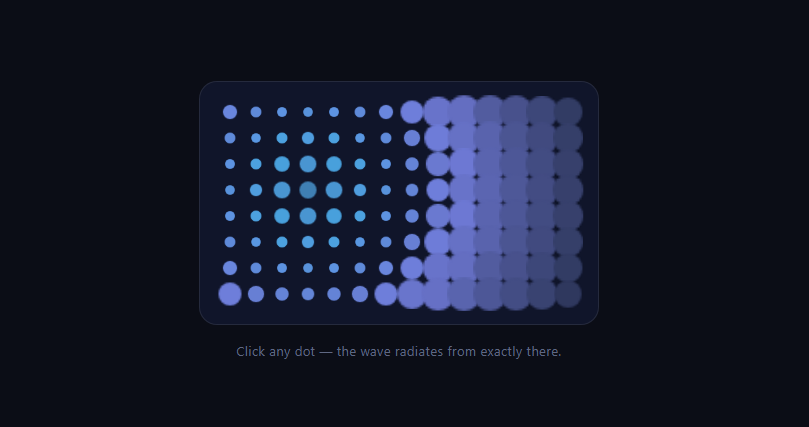
A stagger is usually a one-dimensional idea — item 3 starts after item 2. GSAP's advanced stagger object makes it *spatial*: tell it your targets form an 8×14 grid, name any dot as the origin, and delays are computed from true 2D distance, so one tween ripples outward like a stone dropped in water. This snippet wires that to clicks — the wave radiates from exactly the dot you touched — using only core GSAP, no plugins.
grid: [rows, cols] gives the stagger geometry
By default, staggered delays follow DOM order — a raster sweep, left-to-right, top-to-bottom. Passing stagger: { grid: [8, 14] } tells GSAP the flat target list is actually a grid, and from then computes each element's delay from its *Euclidean distance* to the origin. Corner dots of a ring start together; diagonals arrive later than orthogonals by exactly √2 — the circular wavefront you see is that distance math made visible.
from accepts an index, and that's the interaction
from takes keywords ('center', 'edges', 'random', 'start') *or a target index*. The click handler reads the dot's index and passes it straight in — that's the entire mechanism for "the ripple starts where you clicked." No coordinate math, no distance loops: one number changes the wave's epicenter. The load-time burst uses 'center'; try 'edges' for an inward-collapsing wave.
keyframes make each dot's journey rich
Each dot doesn't just scale once — it plays a three-act sequence: pop large and indigo, compress small and cyan, then settle home with an elastic.out wobble. The keyframes array defines that per-target timeline inside a single tween, and the stagger offsets each dot's *entire sequence*. Multi-phase-per-target × distance-offset is what separates a living ripple from a scale pulse.
overwrite: true lets waves interrupt waves
Click twice fast and the second ripple needs to take over dots mid-animation. overwrite: true kills any prior tweens on each target the moment the new tween touches it — so overlapping waves hand off cleanly instead of compounding transforms. This is the built-in, per-target version of the killTweensOf idiom, and it's what makes the demo feel like a toy you can drum on.
each vs amount, the pacing choice
each: 0.035 fixes the delay *per unit of grid distance* — bigger grids take proportionally longer to traverse. The alternative, amount, fixes the *total* spread and divides it, keeping overall duration constant regardless of grid size. For click-toys, each feels more physical (waves have a speed); for choreographed intros, amount keeps scenes on schedule.
112 dots is nothing — because of what's animated
Scale and background-color on absolutely tiny elements, driven by one tween object: the per-frame cost is GSAP updating transforms, which comfortably handles thousands of targets. The dots are generated by a loop, so ROWS/COLS scale the field freely.
Customizing it
Animate y for a fabric-like bulge, switch from: 'random' for sparkle, or drive ripples from keypresses. Related: distance-staggered entrances in scroll reveal grid, assembling tiles in scroll tile assemble, ambient fields in flickering grid, and dot backdrops in dot pattern.
Build with AI
Build, Understand, Optimize, and Extend It With AI
You don't have to work out GSAP's 2D stagger geometry on your own. Paste this snippet's HTML, CSS, and JS into an AI coding assistant like Claude and ask it to explain exactly how stagger.grid combined with a numeric from index computes Euclidean distance to produce a circular wavefront instead of a raster sweep, or why overwrite: true is what lets rapid clicks hand dots off between overlapping ripples without them compounding. The same assistant can help optimize it, for example checking whether the each: 0.035 pacing constant should scale with grid size so very large fields don't take an uncomfortably long time to fully ripple. It's also useful for extending the feature: ask it to animate a y-axis bulge instead of scale for a fabric-like ripple, trigger ripples from keyboard arrow presses instead of only clicks, or drive a ripple automatically from incoming data updates on specific grid cells. Treat the code less like a finished artifact and more like a starting point for a conversation.
Prompt to recreate it
Copy this into your AI assistant of choice to build the effect from scratch, or as a jumping-off point for your own variant:
Build an interactive click-to-ripple dot grid using GSAP's core stagger system (no plugins) in plain HTML, CSS, and JavaScript.

Requirements:
- Generate a grid of small circular dot elements from a fixed ROWS by COLS constant using a loop (not hand-written markup), each carrying a data attribute holding its flat array index, laid out with CSS grid so it visually forms rows and columns.
- Write a single ripple function that takes an origin (either a target index or a keyword like center) and animates all the dots with one GSAP tween using the keyframes option to give each dot a multi-phase per-target sequence: first an enlarged, distinctly colored pop, then a compressed, differently colored contraction, then a settle back to the resting scale and color using an elastic ease for a slight overshoot wobble.
- Configure the stagger as an object (not a single number) using the grid option set to the actual rows and columns, so GSAP treats the flat dot list as a 2D field and computes each dot's delay from true 2D distance to the origin rather than DOM order.
- The stagger's from option must accept the clicked dot's own index directly (read from its data attribute in the click handler), so the ripple's origin is wherever the user clicked, not a fixed point.
- Set overwrite to true on the tween so that clicking a new origin while a previous ripple is still animating causes each dot to be handed off cleanly to the new wave the instant the new tween reaches it, rather than the two animations compounding.
- Play one ripple automatically on page load using a keyword origin like center, before any user interaction, to demonstrate the effect immediately.
Want to tighten it up first? Run this prompt through the AI Prompt Studio to score it across 8 quality dimensions, catch anti-patterns, and tune the wording for Claude, ChatGPT, or Gemini before you paste it in.
Step by step
How to Use
- 1Add the GSAP CDNCore gsap only — advanced staggers need no plugin.
- 2Paste HTML, CSS, and JS112 dots generate and play a center burst.
- 3Click any dotThe wave radiates from exactly that dot.
- 4Click rapidlyoverwrite lets new waves interrupt old ones.
- 5Watch one dotPop, compress, elastic settle — three keyframes.
- 6Resize the fieldChange ROWS and COLS; geometry adapts.
Real-world uses
Common Use Cases
Got questions?
Frequently Asked Questions
You declare it: stagger: { grid: [8, 14] } tells the engine the flat target list wraps into 8 rows of 14. From then on, from-based delays use true 2D Euclidean distance to the origin rather than DOM order — which is why the wavefront is circular, with diagonal neighbors starting √2 later than orthogonal ones.
stagger.from accepts a target index alongside keywords like 'center' and 'edges'. The click handler reads the dot's data-i and passes that number in; GSAP computes every other dot's delay from its grid distance to that index. Moving the epicenter costs one integer — no coordinates or distance loops in userland code.
Each dot's full journey: pop to 2.1× in indigo, compress to 0.6× in cyan, then an elastic settle home — a three-act mini-timeline defined once inside the tween. The stagger then offsets each target's entire sequence by its distance delay. Rich per-target motion times spatial offsets is the recipe; a single scale pulse reads flat by comparison.
overwrite: true — as the new ripple's stagger reaches each dot, it kills any earlier tween still running on that dot, so waves hand targets off cleanly instead of compounding scales and colors. It's the per-target automatic version of killTweensOf, and it's what makes the field safe to drum on.
each: 0.035 fixes the delay per unit of grid distance, so the wave has a constant physical speed and larger grids take longer to cross — right for interactive toys. amount fixes the total spread and divides it among targets, keeping the overall duration constant regardless of grid size — right for choreographed intros that must fit a scene.
Render the dots from a ROWS×COLS array (map / v-for / *ngFor) with data-i indexes, attach one delegated click handler on the grid ref, and fire the initial 'center' burst in a mount effect — useEffect, onMounted, or ngAfterViewInit — with killTweensOf cleanup on unmount. Keep animation out of state entirely; GSAP owns the dots. Grid, gap, and dot styles are one-line Tailwind utilities.