You Might Also Like
Learn Coding Visually
Learn to code with interactive, live-preview playgrounds — HTML, CSS, JavaScript, React & more.
 HTML Playground42 lessons · Click-based · Live preview
 CSS PlaygroundLearn CSS with a live editor
 JavaScript Playground60 lessons · DOM · Async · Canvas
 React PlaygroundLearn React with a live code editor
 GSAP PlaygroundLearn GSAP animation interactively
 SVG Playground44 lessons · shapes · paths · animation
 SCSS Playground45 lessons · Sass modules · tokens
 Tailwind PlaygroundLearn Tailwind CSS with a live editor
 Bootstrap 5 Playground50 lessons · live preview
Long-Press Preview (iOS Peek) — Free Hold-to-Preview Snippet
Long-Press Preview (iOS-Style Peek) · Modals · Plain HTML, CSS & JS · Live preview
What's included
Features
About this UI Snippet
Long-Press Preview — The Touch Equivalent of a Hover Tooltip
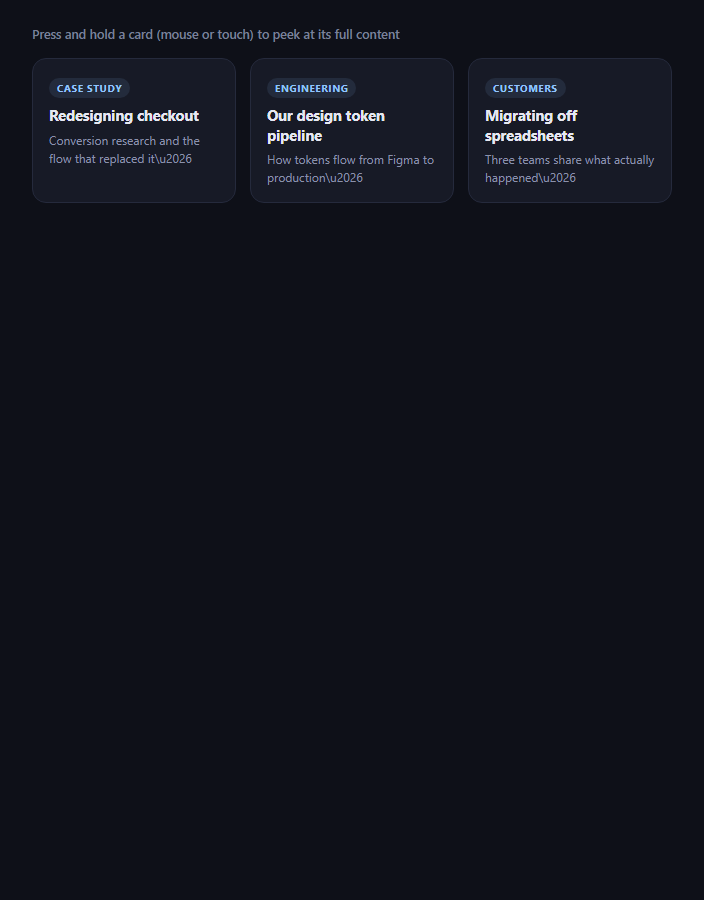
Touchscreens have no hover state, so a tooltip that only appears on :hover is invisible on mobile. This snippet is iOS's "Peek" pattern rebuilt in plain JavaScript: pressing and holding a card past a real time threshold, without dragging, pops up a preview of its expanded content near where you pressed — release and it disappears. It uses genuine pointerdown timing and movement tracking, not a CSS :active state or a fixed-delay animation.
A timer that can be cancelled
pointerdown starts a setTimeout for PRESS_MS (500ms) and immediately marks the card as .pressing for visual feedback. If the pointer lifts (pointerup) or leaves before that timer fires, clearPress() cancels it — so a normal tap, which lifts in well under 500ms, never triggers a peek at all. Only a press held continuously past the threshold ever calls showPeek().
Movement tolerance distinguishes a hold from a scroll
A long press has to reject drags and scroll gestures too, not just quick taps. onPressMove computes the distance from the press's starting point with Math.hypot, and any movement past MOVE_TOLERANCE (10px) cancels the pending timer and hides an already-shown peek — so starting to scroll the page, or dragging past the card, correctly falls through to normal scrolling instead of triggering (or getting stuck showing) a preview.
Positioned near the press point, with edge awareness
positionPeek clamps the peek horizontally so it never overflows the viewport's left or right edge, and checks whether there's enough room above the press point (top < 140) to flip the peek below it instead — the same edge-awareness a well-built context menu needs, applied to a preview bubble instead of a menu.
Release dismisses immediately
pointerup and pointercancel both call onPressEnd, which clears any pending timer and hides the peek if it's showing — there's no separate "tap elsewhere to dismiss" step, since a peek is meant to be a momentary preview tied entirely to the press, exactly like iOS's own Peek gesture.
Customizing it
Tune PRESS_MS and MOVE_TOLERANCE, add a "Pop" step where a second press-through commits to full navigation (iOS's Peek-and-Pop), or swap the plain text preview for rendered HTML. Pair it with long-press confirm with radial fill for a different real hold-timing mechanic, or image magnifier for a hover-based preview on desktop.
Build with AI
Build, Understand, Optimize, and Extend It With AI
You don't have to work out the timing-and-movement detection from scratch. Paste this snippet's HTML, CSS, and JS into an AI coding assistant like Claude and ask it to explain exactly why the setTimeout started on pointerdown must be cancelled on pointerup, and why a separate movement check using Math.hypot against the press's starting coordinates is necessary even though a timer alone could distinguish "held long enough" from "released quickly." The same assistant can help you optimize it, for instance asking whether the edge-flip logic in positionPeek should also account for the peek overflowing the bottom of the viewport, not just the left/right edges and the top. It's also useful for extending the interaction: ask it to add a second-stage "Pop" gesture where continuing to press past a longer threshold navigates to the full content (mirroring iOS's Peek-and-Pop), animate the peek's scale proportionally to progress toward the threshold rather than appearing all at once, or add a haptic vibration pulse the moment the peek appears on supporting devices. Treat the code less like a finished artifact and more like a starting point for a conversation.
Prompt to recreate it
Copy this into your AI assistant of choice to build the effect from scratch, or as a jumping-off point for your own variant:
Build a "long-press preview" (iOS-style Peek) interaction in plain HTML, CSS, and JavaScript using the Pointer Events API with real timing and movement detection — this is the touch equivalent of a hover tooltip, for devices with no hover state.

Requirements:
- A grid of pressable cards, each carrying its own preview content (e.g. via a data attribute), and a single shared preview popup element reused for whichever card is currently being pressed.
- On pointerdown on a card, record the press's starting coordinates and start a setTimeout for a configurable duration (e.g. 500ms) — do not show the preview immediately and do not use a CSS transition-delay in place of a real, cancellable JavaScript timer.
- On pointerup or pointercancel, clear the pending timeout if it hasn't fired yet (so a normal quick tap never shows the preview) and hide the preview immediately if it was already showing (so releasing a long press dismisses it right away, with no separate tap-elsewhere-to-close step required).
- On pointermove while a press is active, compute the straight-line distance from the press's original starting coordinates using the Pythagorean theorem (or Math.hypot). If that distance exceeds a small movement tolerance (e.g. 10px), treat the gesture as a scroll or drag rather than a hold: cancel the pending timer and hide any visible preview, so accidental page scrolling never triggers or gets stuck showing a peek.
- When the hold timer does complete without exceeding the movement tolerance, show the preview positioned near the original press coordinates, horizontally clamped so it never renders off the left or right edge of the viewport, and vertically flipped to appear below the press point instead of above it when there isn't enough room above.
- Call preventDefault on the contextmenu event for the pressable cards, since many mobile browsers show their own native long-press callout menu around the same ~500ms threshold, which would otherwise visually conflict with the custom preview.
Want to tighten it up first? Run this prompt through the AI Prompt Studio to score it across 8 quality dimensions, catch anti-patterns, and tune the wording for Claude, ChatGPT, or Gemini before you paste it in.
Step by step
How to Use
- 1Paste HTML, CSS, and JSA grid of cards renders with a press-and-hold hint.
- 2Press and hold a cardNothing happens for the first 500ms besides a subtle press state.
- 3Keep holding past 500msA preview peek appears near where you pressed.
- 4ReleaseThe peek disappears immediately.
- 5Drag or scroll insteadMovement past a small tolerance cancels the peek entirely.
- 6Tune the feelChange PRESS_MS and MOVE_TOLERANCE.
Real-world uses
Common Use Cases
Got questions?
Frequently Asked Questions
pointerdown starts a setTimeout for a fixed duration (500ms by default). A normal tap releases well before that timer fires, and pointerup immediately cancels the pending timer via clearTimeout, so the preview never appears. Only a press held continuously past the full duration lets the timer run to completion and call showPeek() — a quick tap and a long press are structurally different outcomes of the same timer, not two separate detection paths.
Every pointermove event while a press is active computes the straight-line distance from the press's starting coordinates using Math.hypot. If that distance exceeds MOVE_TOLERANCE (10px), the pending timer is cancelled and any already-shown peek is hidden immediately — so starting to scroll the page, or dragging away from the card, correctly cancels the gesture instead of accidentally showing (or leaving stuck) a preview.
positionPeek() centers the peek horizontally on the press coordinate, then clamps that position so the peek's fixed width never overflows the viewport's left or right edge. It also checks whether there's enough vertical room above the press point; if not, it flips the peek to appear below the press point instead, the same edge-awareness pattern used in a well-built context menu.
On many touch browsers, holding a finger in place for roughly half a second also triggers the operating system's own long-press callout menu (e.g. "Copy", "Share") via the contextmenu event, which would visually collide with this snippet's own custom peek. Calling e.preventDefault() on contextmenu suppresses that native menu so only the custom preview appears.
Keep the timer id and the press-start coordinates in refs (not state, since they update on every pointermove without needing a re-render), and keep only the shown boolean and preview content in state so React re-renders the peek's visibility and text. Attach the pointer handlers per card via refs or event delegation, and clear the timer in a cleanup function on unmount.