You Might Also Like
Learn Coding Visually
Learn to code with interactive, live-preview playgrounds — HTML, CSS, JavaScript, React & more.
 HTML Playground42 lessons · Click-based · Live preview
 CSS PlaygroundLearn CSS with a live editor
 JavaScript Playground60 lessons · DOM · Async · Canvas
 React PlaygroundLearn React with a live code editor
 GSAP PlaygroundLearn GSAP animation interactively
 SVG Playground44 lessons · shapes · paths · animation
 SCSS Playground45 lessons · Sass modules · tokens
 Tailwind PlaygroundLearn Tailwind CSS with a live editor
 Bootstrap 5 Playground50 lessons · live preview
Long-Press Confirm with Radial Fill — Free Circular Hold Button
Long-Press Confirm with Radial Fill · Buttons · Plain HTML, CSS & JS · Live preview
What's included
Features
About this UI Snippet
Long-Press Confirm with Radial Fill — A Circular Hold Gesture
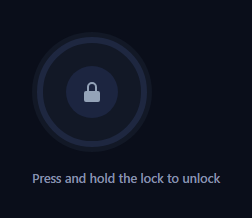
This is the same "deliberate gesture beats an interrupting dialog" idea behind hold to confirm, rebuilt around a circular progress ring instead of a linear bar. Holding the button traces an SVG ring closed around it; letting go early resets the ring instead of confirming. It's the shape you see around a countdown avatar, a wearable's unlock gesture, or a camera shutter hold, and it reads as more deliberate than a bar because the "target" — a fully closed circle — is visually obvious from the first frame.
A stroke-dashoffset ring, not a CSS animation
The ring is a single <circle> given stroke-dasharray equal to its own circumference (2 π r) and a stroke-dashoffset that starts equal to that same value, which hides the entire stroke. Every animation frame recomputes progress = elapsed / HOLD_MS from performance.now() and sets strokeDashoffset = CIRCUMFERENCE * (1 - progress), so the visible arc length is always an exact, real-time reflection of how long the pointer has been down — not a canned CSS @keyframes sweep that runs for a fixed duration no matter what the user does.
Radial vs. linear: why the mechanic changes the feel
A linear bar fills left-to-right and communicates "how much is left" the way a loading bar does. A radial ring instead frames the button itself, so the *target* — a closed loop — is spatially obvious around the exact thing you're pressing, and the gesture reads more like "close the circle" than "wait for a bar." Because the ring is drawn with stroke-linecap: round and rotated -90deg so it starts at 12 o'clock, the sweep looks like a clock hand completing a lap, which is a distinct visual grammar from a progress bar.
Real elapsed-time math, not decoration
Exactly like a linear hold button, releasing early doesn't just stop an animation — cancel() reads whatever strokeDashoffset the ring is currently at and eases it back to the closed (empty) state with a short transition, so a hold released at 40% visibly retracts from 40%, never snapping or lying about how far you got. The transition is re-enabled only for that retract, keeping the fill-up itself frame-accurate.
Pointer capture keeps the hold honest
setPointerCapture on pointerdown means the button keeps receiving pointerup even if a finger drifts slightly off the small circular hit area during the hold — important since a round button has a smaller forgiving hit region than a wide bar. touch-action: none stops the page from scrolling underneath the gesture.
Customizing it
Swap the icon inside the ring, change HOLD_MS, recolor the completed state, or make the ring a full 360° gauge with tick marks for a "charge meter" feel. Pair it with slide to confirm as an alternate confirm gesture, or use the same stroke-dashoffset technique to drive a radial menu trigger's own progress state.
Build with AI
Build, Understand, Optimize, and Extend It With AI
You don't have to derive the SVG circumference math by hand. Paste this snippet's HTML, CSS, and JS into an AI coding assistant like Claude and ask it to explain exactly why stroke-dasharray is set to the circle's own circumference (2 * Math.PI * r), how setting stroke-dashoffset to circumference times (1 - progress) reveals exactly that fraction of the ring, and why driving that offset from requestAnimationFrame against performance.now() produces a ring that is always an honest reflection of real hold duration rather than a canned animation. The same assistant can help you optimize it, for instance asking whether the ring's radius and the CIRCUMFERENCE constant could be computed from the SVG's own getTotalLength() so they never drift out of sync if the radius changes. It's also useful for extending the interaction: ask it to add tick marks around the ring for a segmented "charge meter" look, make the ring a full continuously-updating gauge instead of resetting after each hold, or add a subtle haptic pulse when the ring crosses each quarter. Treat the code less like a finished artifact and more like a starting point for a conversation.
Prompt to recreate it
Copy this into your AI assistant of choice to build the effect from scratch, or as a jumping-off point for your own variant:
Build a "long-press confirm with radial fill" button in plain HTML, CSS, and JavaScript using the Pointer Events API and an SVG circle progress ring — no CSS-only animation, no library.

Requirements:
- A round button containing an SVG with two concentric circles: a static background track circle and a foreground progress circle whose stroke-dasharray is set (in CSS or JS) to its own circumference, 2 * Math.PI * radius, with stroke-dashoffset initially equal to that same circumference so no stroke is visible.
- On pointerdown, capture the pointer with setPointerCapture using the event's pointerId, record the start time via performance.now(), and begin a requestAnimationFrame loop.
- Each animation frame must compute progress as elapsed time divided by a fixed hold-duration constant (clamped to a max of 1), and set the progress circle's stroke-dashoffset to circumference * (1 - progress) so the visible arc length is a direct, real-time function of actual elapsed hold time — not a fixed-duration CSS animation that plays regardless of how long the pointer was actually held. Reaching progress 1 must trigger the confirmed action exactly once and stop the loop.
- On pointerup, pointercancel, or the pointer leaving the button mid-hold, cancel the animation frame and animate stroke-dashoffset back to the full (empty) circumference using a short CSS transition on that property specifically, enabled only for this retract so the fill-up itself stays frame-accurate — visually retracting the ring from whatever point it had actually reached, not resetting instantly.
- Rotate the SVG -90 degrees so the ring visually begins filling from the 12 o'clock position like a clock hand, and use a rounded stroke-linecap so the arc's leading edge looks deliberate rather than a raw cut line.
- Set touch-action: none on the button so holding it does not scroll the page on touch devices, and on successful completion mark the button visually done (e.g. a color change) with the next press resetting the ring to empty before starting a new hold.
Want to tighten it up first? Run this prompt through the AI Prompt Studio to score it across 8 quality dimensions, catch anti-patterns, and tune the wording for Claude, ChatGPT, or Gemini before you paste it in.
Step by step
How to Use
- 1Paste HTML, CSS, and JSA circular lock button renders with an empty ring around it.
- 2Press and hold the buttonThe ring traces closed clockwise from 12 o'clock in real time.
- 3Release earlyThe ring eases back to empty from wherever it stopped.
- 4Hold to completionThe ring fully closes, turns green, and the action confirms once.
- 5Press again to resetA completed button resets before re-running the confirm.
- 6Tune the holdChange HOLD_MS or the ring's stroke width and color.
Real-world uses
Common Use Cases
Got questions?
Frequently Asked Questions
The circle's stroke-dasharray is set to its own circumference, 2 * Math.PI * r for r=52 (about 326.7), which makes the entire stroke one dash the length of the circle. stroke-dashoffset then starts at that same value, hiding the stroke completely. Setting the offset to CIRCUMFERENCE * (1 - progress) reveals exactly progress percent of the ring, so the visible arc length is a direct, real-time function of elapsed hold time.
A fixed-duration CSS animation would play for the same length of time regardless of how long the pointer was actually held, and it can't report an arbitrary in-progress value back to JavaScript if the user releases early. Driving strokeDashoffset from requestAnimationFrame against performance.now() means the ring's state always matches the real hold duration, and releasing early retracts from wherever it genuinely stopped.
The underlying elapsed-time and pointer-capture logic is the same pattern as a linear bar, but the visual target changes: a radial ring frames the button itself so the goal (closing the loop) is obvious around the exact element being pressed, and the clockwise sweep from 12 o'clock reads as a clock or gauge completing rather than a bar filling left to right.
setPointerCapture is called on pointerdown, so the button keeps receiving the eventual pointerup even if the finger slides slightly outside its circular hit area — which matters more here than on a wide bar, since a circle has a smaller forgiving target. pointerleave only cancels the hold if the capture was somehow lost.
Keep progress and done in component state (or refs, to avoid re-rendering every frame) and store the rAF id and start time in refs. Bind strokeDashoffset to the circle via an inline style or attribute binding, attach the pointer handlers to the button ref, and call your real action inside confirm(). Clean up the animation frame on unmount.