You Might Also Like
Learn Coding Visually
Learn to code with interactive, live-preview playgrounds — HTML, CSS, JavaScript, React & more.
 HTML Playground42 lessons · Click-based · Live preview
 CSS PlaygroundLearn CSS with a live editor
 JavaScript Playground60 lessons · DOM · Async · Canvas
 React PlaygroundLearn React with a live code editor
 GSAP PlaygroundLearn GSAP animation interactively
 SVG Playground44 lessons · shapes · paths · animation
 SCSS Playground45 lessons · Sass modules · tokens
 Tailwind PlaygroundLearn Tailwind CSS with a live editor
 Bootstrap 5 Playground50 lessons · live preview
Hold to Confirm Button — Free Press and Hold JS Snippet
Hold to Confirm Button · Buttons · Plain HTML, CSS & JS · Live preview
What's included
Features
About this UI Snippet
Hold to Confirm Button — Press-and-Hold Action
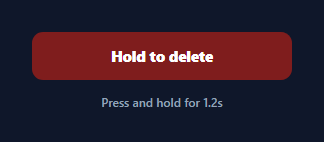
A hold-to-confirm button replaces a two-step "Are you sure?" dialog with a single deliberate gesture: the user presses and holds, a bar fills, and the action only fires when it completes. It's the safety pattern behind "hold to delete", "hold to power off", and destructive actions in apps that want intent without a modal interrupt. This snippet builds it in plain HTML, CSS, and vanilla JavaScript with no dependency.
Time-based progress, not a CSS transition
The fill is driven by requestAnimationFrame against performance.now(), not a fixed CSS animation. Each frame computes progress = elapsed / HOLD_MS and sets the fill width, so the bar's position always reflects exactly how long the button has been held — and releasing mid-way leaves it at the real point reached. Reaching progress >= 1 calls confirm() once and stops the loop, so the action can't double-fire.
Pointer Events with capture
A single set of Pointer Events covers mouse, touch, and pen. On pointerdown the button calls setPointerCapture, which means it keeps receiving pointerup even if the finger drifts off the button — critical on touch, where a small slide would otherwise drop the release event and leave the hold stuck. touch-action:none stops the page scrolling while you hold.
Cancel on early release
pointerup, pointercancel, and a guarded pointerleave all route to cancel(), which stops the animation frame and animates the fill back to zero with a brief CSS transition (re-enabled only for the retract so the fill-up itself stays frame-accurate). A status line gives feedback — "Released too soon" — so the gesture's requirement is obvious without trial and error.
Locked completion and reset
On success the button turns green, swaps its label to "Deleted", and sets done, which makes the next press reset first rather than re-running. Separating confirm(), cancel(), and reset() keeps each transition explicit and makes the control easy to reason about.
Wiring to a real action
Put your destructive call inside confirm() — delete the record, sign out, wipe the cache. Because completion is the single choke point, you get the safety of a held gesture with one line of integration, and you can tune HOLD_MS to match how dangerous the action is.
Build with AI
Build, Understand, Optimize, and Extend It With AI
You don't have to trace the pointer-event lifecycle by hand. Paste this snippet's HTML, CSS, and JS into an AI coding assistant like Claude and ask it to explain exactly why setPointerCapture is called on pointerdown, or how the frame function's progress calculation against performance.now() keeps the fill bar accurate even if the browser drops a few animation frames. The same assistant is useful for optimizing it — ask whether the retract transition re-enabled inside cancel could conflict with a rapid press-cancel-press sequence, and how to guard against that race condition. It's just as handy for extending the control: ask it to add a haptic vibration pulse on completion for supporting devices, make HOLD_MS configurable per instance so different actions require different hold lengths, or add a keyboard-accessible fallback using a held Enter or Space key with the same progress logic. Treat the code less like a finished artifact and more like a starting point for a conversation.
Prompt to recreate it
Copy this into your AI assistant of choice to build the effect from scratch, or as a jumping-off point for your own variant:
Build a "hold to confirm" button in plain HTML, CSS, and JavaScript using the Pointer Events API — no requestAnimationFrame-free CSS-only trick, no library.

Requirements:
- A button containing an absolutely-positioned fill element (initially zero width, positioned behind the label) and a label span on top of it.
- On pointerdown, capture the pointer with setPointerCapture using the event's pointerId, record the start time via performance.now(), and begin a requestAnimationFrame loop.
- Each animation frame must compute progress as the elapsed time since start divided by a fixed hold duration constant (clamped to a maximum of 1), set the fill element's width to that progress as a percentage, and only trigger the confirmed action once progress reaches exactly 1 — after which the animation loop must stop so the action cannot fire twice.
- On pointerup, pointercancel, or the pointer leaving the button while a hold is in progress, cancel the animation frame, animate the fill back to zero width using a short CSS transition (enabled only for this retract, not for the fill-up itself), and show a message indicating the hold was released too early.
- Set touch-action: none on the button so holding it does not trigger page scrolling on touch devices.
- On successful completion, visually mark the button as done (e.g. a color change and updated label) and make the next press reset the button to its initial state before starting a new hold, rather than immediately re-triggering the action.
- Expose the hold duration as a single named constant so it's trivial to tune for more or less dangerous actions.
Want to tighten it up first? Run this prompt through the AI Prompt Studio to score it across 8 quality dimensions, catch anti-patterns, and tune the wording for Claude, ChatGPT, or Gemini before you paste it in.
Step by step
How to Use
- 1Paste HTML, CSS, and JSA red "Hold to delete" button renders with a status line beneath it.
- 2Press and holdA fill bar sweeps across the button while you keep pressing.
- 3Release earlyLetting go before it fills retracts the bar and shows a retry hint.
- 4Hold to completionAt full the button turns green and the action confirms once.
- 5Press again to resetA completed button resets on the next press before re-running.
- 6Wire your actionPut the real delete or sign-out call inside confirm().
Real-world uses
Common Use Cases
Got questions?
Frequently Asked Questions
Because the progress must reflect the real hold duration so an early release leaves the bar exactly where it stopped. Each frame computes progress as elapsed / HOLD_MS from performance.now() and sets the width. A fixed CSS animation couldn't be paused at an arbitrary point or report how far it got when you let go.
It uses Pointer Events and calls setPointerCapture on pointerdown, so the button keeps receiving the pointerup even if your finger slides slightly off it — a common cause of stuck holds otherwise. touch-action:none also stops the page from scrolling while you press.
pointerup, pointercancel, and pointerleave all call cancel(), which stops the animation frame and animates the fill back to zero with a short transition, then shows a "Released too soon" message. The transition is enabled only for the retract so the fill-up itself stays frame-accurate.
No. When progress reaches 1, confirm() runs once and the animation loop stops. A done flag marks the button complete so the next press resets it rather than re-triggering, ensuring the destructive action executes a single time per hold.
Keep the progress and done state in the component and store the rAF id and start time in refs (not state) so updating them doesn't re-render. Attach the pointer handlers to a ref'd button, and call your action inside confirm(). Clean up the animation frame on unmount. In Tailwind, the fill is an absolutely-positioned span with an inline width bound to progress.