You Might Also Like
Learn Coding Visually
Learn to code with interactive, live-preview playgrounds — HTML, CSS, JavaScript, React & more.
 HTML Playground42 lessons · Click-based · Live preview
 CSS PlaygroundLearn CSS with a live editor
 JavaScript Playground60 lessons · DOM · Async · Canvas
 React PlaygroundLearn React with a live code editor
 GSAP PlaygroundLearn GSAP animation interactively
 SVG Playground44 lessons · shapes · paths · animation
 SCSS Playground45 lessons · Sass modules · tokens
 Tailwind PlaygroundLearn Tailwind CSS with a live editor
 Bootstrap 5 Playground50 lessons · live preview
Bookmark Toggle — Free Save Button HTML CSS JS Snippet
Bookmark Toggle · Buttons · Plain HTML, CSS & JS · Live preview
What's included
Features
About this UI Snippet
Bookmark Toggle — Animated Save Button with Count
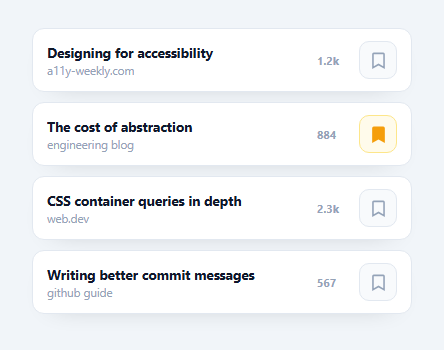
A bookmark toggle is the save-for-later button beside an article, product, or post — the flag or ribbon that fills when you tap it and tracks how many people saved the item. This snippet builds a polished, accessible one in plain HTML, CSS, and vanilla JavaScript: an outline-to-filled icon with a springy pop animation and an optimistic save count, all with no dependency.
Outline-to-filled with one SVG path
The icon is a single <path> whose fill is none by default and switches to the accent color when saved — toggled purely by an .on class on the button. There's no icon swap or second graphic: the same flag morphs from outline to solid via CSS, which keeps the markup tiny and the transition (fill .2s) clean.
A spring "pop" on save
When you bookmark an item the icon plays a bkPop keyframe — scaling up past 1 then settling — using a cubic-bezier(.34,1.56,.64,1) overshoot ease that gives it a tactile, rewarding snap. The animation is restarted reliably with the void btn.offsetWidth reflow trick so it replays on every save, and it only fires on the save direction (not un-save) to reinforce the positive action.
Optimistic count updates
Clicking flips item.saved and immediately adjusts item.saves by ±1, then re-renders — the count moves the instant you tap rather than waiting for a server round-trip. This optimistic pattern is what makes save buttons feel responsive; in production you'd POST the change and only roll back if the request fails. A fmt() helper abbreviates large counts (1240 → 1.2k) the way social UIs do.
Accessible toggle semantics
Each button is a real <button> with aria-label and an aria-pressed that reflects the saved state, so screen readers announce "Bookmark, pressed" and keyboard users can Tab and toggle with Enter or Space — no roles or key handling to wire up.
Per-item encapsulation
Each row builds its own paint() closure over its data, so state stays local to the item and there's no shared lookup or re-render of the whole list on every click. That structure scales to long feeds and maps directly onto a component model where each card owns its saved state.
Build with AI
Build, Understand, Optimize, and Extend It With AI
You don't have to trace the reflow trick or the per-item closures by hand to see how this holds together. Paste this snippet's HTML, CSS, and JS into an AI coding assistant like Claude and ask it to explain exactly why "void btn.offsetWidth" is needed before re-adding the pop class, and how each row's paint function closes over its own item object instead of sharing state across the list. The same assistant can help optimize it — asking whether building each row with createElement and innerHTML on every load is the cheapest approach for a long list, or whether the fmt() thousands-abbreviation function handles negative or fractional counts correctly. It's also a good way to extend the widget: ask it to persist saved state to localStorage, animate the count number rolling up and down instead of snapping, or add an undo toast after unsaving. Treat the code less like a finished artifact and more like a starting point for a conversation.
Prompt to recreate it
Copy this into your AI assistant of choice to build the effect from scratch, or as a jumping-off point for your own variant:
Build a list of "bookmark/save toggle" buttons in plain HTML, CSS, and JavaScript using a single SVG path per button and optimistic local state — no icon library, no framework.

Requirements:
- Render a list of items from a plain JavaScript array of objects (each with a title, subtitle, a save count, and a boolean saved flag), building the DOM for each row with document.createElement rather than a big innerHTML string for the whole list.
- Each row's bookmark control must be a single SVG path whose fill is none by default; toggling a CSS class on the parent button (not swapping to a second icon) must switch the fill to a solid accent color, so the outline-to-filled effect comes from exactly one path element.
- Clicking the button must flip that item's saved boolean and adjust its save count by exactly plus or minus one in the same handler, before any network call, so the displayed count updates optimistically and instantly.
- When (and only when) an item transitions to saved, play a scale-based "pop" keyframe animation on the icon that overshoots past full size before settling, and make sure the animation reliably replays on every single save click even if the previous animation already finished — including forcing a reflow between removing and re-adding the animation class so the browser doesn't skip a repeat.
- Abbreviate large save counts (e.g. 1240 becomes "1.2k") with a small formatting helper function.
- Each button must be a real button element with an aria-label and an aria-pressed attribute that reflects the current saved state, so it is fully keyboard operable and correctly announced by assistive tech.
Want to tighten it up first? Run this prompt through the AI Prompt Studio to score it across 8 quality dimensions, catch anti-patterns, and tune the wording for Claude, ChatGPT, or Gemini before you paste it in.
Step by step
How to Use
- 1Paste HTML, CSS, and JSA list of items renders, each with a save count and a bookmark button.
- 2Click the bookmarkThe flag fills with color and pops with a springy animation.
- 3Watch the countThe save count increments immediately as an optimistic update.
- 4Click again to un-saveThe flag returns to an outline and the count decrements.
- 5Tab and press EnterThe button is keyboard operable with an aria-pressed state.
- 6Wire to your APIPOST the change inside the click handler and roll back on error.
Real-world uses
Common Use Cases
Got questions?
Frequently Asked Questions
The bookmark is a single SVG path with fill: none. Adding an .on class to the button sets fill to the accent color with a short CSS transition, so the same outline shape becomes solid. There's no second icon or image — one path handles both states.
Clicking immediately flips the saved flag and adjusts the count by plus or minus one before any network call, so the number reacts the instant you tap. In production you'd send the change to your server in the same handler and only revert if the request fails, which keeps the UI feeling instant.
The pop is a positive reinforcement for the save action, so paint() triggers it only when the new state is saved, not when un-saving. It's restarted with the void offsetWidth reflow trick so it replays reliably on every save rather than only the first time.
Yes. Each control is a native button with an aria-label and an aria-pressed attribute that mirrors the saved state, so assistive tech announces it as a pressed or unpressed toggle. Being a real button, it's focusable and operable with Enter or Space without any extra key handling.
Hold the saved flag and count in state per item and bind the .on class and aria-pressed to it. Do the optimistic ±1 in the click handler alongside your API call. For the pop, toggle an animation class with a key change or by removing and re-adding it. In Tailwind, switch the path fill with a conditional class on the saved state.