Source Code
<div class="bab-card">
  <h3>Subscribers</h3>
  <div class="bab-table-wrap">
    <table class="bab-table">
      <thead>
        <tr>
          <th class="bab-cb"><input type="checkbox" id="babAll" aria-label="Select all"></th>
          <th>Name</th><th>Email</th><th>Status</th>
        </tr>
      </thead>
      <tbody id="babBody"></tbody>
    </table>
  </div>

  <!-- Floating bar appears when one or more rows are selected -->
  <div class="bab-bar" id="babBar">
    <span class="bab-count"><b id="babCount">0</b> selected</span>
    <div class="bab-actions">
      <button type="button" data-act="email"><svg viewBox="0 0 24 24" fill="none" stroke="currentColor" stroke-width="2"><rect x="2" y="4" width="20" height="16" rx="2"/><path d="M22 7l-10 5L2 7"/></svg> Email</button>
      <button type="button" data-act="export"><svg viewBox="0 0 24 24" fill="none" stroke="currentColor" stroke-width="2"><path d="M21 15v4a2 2 0 0 1-2 2H5a2 2 0 0 1-2-2v-4"/><polyline points="7 10 12 15 17 10"/><line x1="12" y1="15" x2="12" y2="3"/></svg> Export</button>
      <button type="button" data-act="delete" class="bab-danger"><svg viewBox="0 0 24 24" fill="none" stroke="currentColor" stroke-width="2"><polyline points="3 6 5 6 21 6"/><path d="M19 6l-1 14a2 2 0 0 1-2 2H8a2 2 0 0 1-2-2L5 6"/></svg> Delete</button>
    </div>
    <button type="button" class="bab-clear" id="babClear">Clear</button>
  </div>
</div>*{box-sizing:border-box;margin:0;padding:0}
body{font-family:system-ui,-apple-system,sans-serif;background:#f8fafc;min-height:100vh;display:flex;align-items:flex-start;justify-content:center;padding:40px 24px}
.bab-card{position:relative;background:#fff;border-radius:16px;padding:18px;width:100%;max-width:600px;box-shadow:0 18px 44px rgba(15,23,42,.08)}
.bab-card h3{font-size:16px;font-weight:800;color:#0f172a;margin-bottom:14px}
.bab-table-wrap{overflow-x:auto}
.bab-table{width:100%;border-collapse:collapse;font-size:13px;min-width:420px}
.bab-table th,.bab-table td{padding:11px 12px;text-align:left;white-space:nowrap}
.bab-table thead th{background:#f8fafc;color:#475569;font-weight:700;font-size:11.5px;text-transform:uppercase;letter-spacing:.03em;border-bottom:1.5px solid #e2e8f0}
.bab-table tbody td{border-bottom:1px solid #f1f5f9;color:#334155}
.bab-cb{width:38px}
.bab-table input[type=checkbox]{width:16px;height:16px;accent-color:#6366f1;cursor:pointer}
.bab-table tbody tr.sel{background:#f5f3ff}
.bab-table tbody tr:hover{background:#fafbfc}
.bab-table tbody tr.sel:hover{background:#eef2ff}
.bab-name{font-weight:700;color:#0f172a}
.bab-badge{display:inline-block;padding:2px 9px;border-radius:999px;font-size:10.5px;font-weight:700}
.bab-badge.active{background:#dcfce7;color:#15803d}
.bab-badge.pending{background:#fef3c7;color:#a16207}
.bab-bar{position:absolute;left:50%;bottom:18px;transform:translate(-50%,140%);opacity:0;pointer-events:none;
display:flex;align-items:center;gap:14px;background:#0f172a;border-radius:12px;padding:9px 9px 9px 16px;
box-shadow:0 16px 40px rgba(15,23,42,.35);transition:transform .3s cubic-bezier(.34,1.3,.64,1),opacity .25s;z-index:5}
.bab-bar.show{transform:translate(-50%,0);opacity:1;pointer-events:all}
.bab-count{font-size:13px;color:#e2e8f0;font-weight:600;white-space:nowrap}
.bab-count b{color:#fff;font-weight:800}
.bab-actions{display:flex;gap:4px}
.bab-actions button{display:inline-flex;align-items:center;gap:6px;background:none;border:none;color:#cbd5e1;font-size:12.5px;font-weight:700;cursor:pointer;padding:7px 11px;border-radius:8px;font-family:inherit;transition:background .15s,color .15s}
.bab-actions button svg{width:15px;height:15px}
.bab-actions button:hover{background:#1e293b;color:#fff}
.bab-actions .bab-danger:hover{background:#7f1d1d;color:#fecaca}
.bab-clear{background:#1e293b;border:none;color:#94a3b8;font-size:12px;font-weight:700;cursor:pointer;padding:7px 12px;border-radius:8px;font-family:inherit}
.bab-clear:hover{color:#fff}var ROWS = [
{ id: 1, name: 'Priya Nair', email: 'priya@acme.io', status: 'active' },
{ id: 2, name: 'Marcus Webb', email: 'marcus@acme.io', status: 'active' },
{ id: 3, name: 'Yuki Tanaka', email: 'yuki@acme.io', status: 'pending' },
{ id: 4, name: 'Elena Cruz', email: 'elena@acme.io', status: 'active' },
{ id: 5, name: 'Tom Rivera', email: 'tom@acme.io', status: 'pending' },
];
var selected = new Set();
var body = document.getElementById('babBody');
var bar = document.getElementById('babBar');
var allCb = document.getElementById('babAll');
body.innerHTML = ROWS.map(function (r) {
return '<tr data-id="' + r.id + '">' +
'<td class="bab-cb"><input type="checkbox" class="bab-row" aria-label="Select ' + r.name + '"></td>' +
'<td class="bab-name">' + r.name + '</td><td>' + r.email + '</td>' +
'<td><span class="bab-badge ' + r.status + '">' + (r.status === 'active' ? 'Active' : 'Pending') + '</span></td>' +
'</tr>';
}).join('');
function sync() {
document.getElementById('babCount').textContent = selected.size;
bar.classList.toggle('show', selected.size > 0);
// Header checkbox reflects all / none / indeterminate.
allCb.checked = selected.size === ROWS.length && ROWS.length > 0;
allCb.indeterminate = selected.size > 0 && selected.size < ROWS.length;
body.querySelectorAll('tr').forEach(function (tr) {
var on = selected.has(+tr.dataset.id);
tr.classList.toggle('sel', on);
tr.querySelector('.bab-row').checked = on;
});
}
body.addEventListener('change', function (e) {
if (!e.target.classList.contains('bab-row')) return;
var id = +e.target.closest('tr').dataset.id;
if (e.target.checked) selected.add(id); else selected.delete(id);
sync();
});
allCb.addEventListener('change', function () {
if (this.checked) ROWS.forEach(function (r) { selected.add(r.id); });
else selected.clear();
sync();
});
document.querySelector('.bab-actions').addEventListener('click', function (e) {
var btn = e.target.closest('button');
if (!btn) return;
var ids = Array.from(selected);
// Run the bulk action on the selected ids array (email / export / delete) here.
if (btn.dataset.act === 'delete') {
ROWS = ROWS.filter(function (r) { return !selected.has(r.id); });
body.querySelectorAll('tr').forEach(function (tr) { if (selected.has(+tr.dataset.id)) tr.remove(); });
selected.clear();
sync();
} else {
var label = btn.dataset.act === 'email' ? 'Emailed' : 'Exported';
btn.textContent = '✓ ' + label;
setTimeout(function () { sync(); selected.clear(); sync(); }, 900);
}
});
document.getElementById('babClear').addEventListener('click', function () { selected.clear(); sync(); });
sync();Learn Coding Visually
Learn to code with interactive, live-preview playgrounds — HTML, CSS, JavaScript, React & more.
 HTML Playground42 lessons · Click-based · Live preview
 CSS PlaygroundLearn CSS with a live editor
 JavaScript Playground60 lessons · DOM · Async · Canvas
 React PlaygroundLearn React with a live code editor
 GSAP PlaygroundLearn GSAP animation interactively
 SVG Playground44 lessons · shapes · paths · animation
 SCSS Playground45 lessons · Sass modules · tokens
 Tailwind PlaygroundLearn Tailwind CSS with a live editor
 Bootstrap 5 Playground50 lessons · live preview
Bulk Actions Bar — Table Row Selection HTML CSS JS
Bulk Actions Bar · Tables · Plain HTML, CSS & JS · Live preview
What's included
Features
About this UI Snippet
Bulk Actions Bar — Floating Action Bar for Selected Table Rows
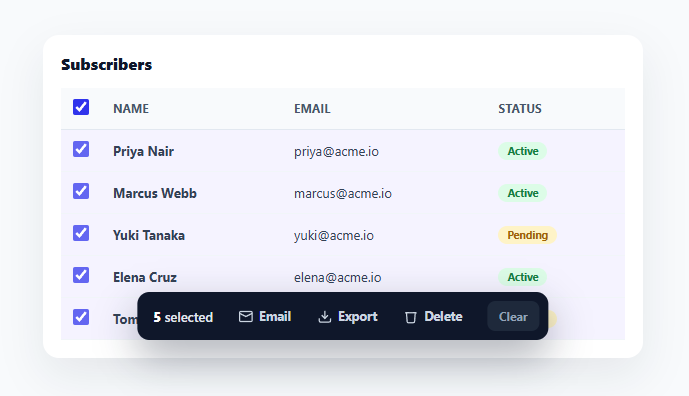
Any table where users manage many records — subscribers, orders, files, tasks — needs bulk actions: select several rows, then email, export, or delete them all at once. The pattern that does this best is a floating action bar that stays hidden until something is selected, then slides up with the count and the available actions. This snippet builds that complete interaction in plain HTML, CSS, and vanilla JavaScript: row checkboxes, a header select-all with an indeterminate state, and a context bar that appears on demand.
A bar that appears only when relevant
The bulk-actions bar is hidden by default and slides up from the bottom of the table the instant one or more rows are selected, showing "N selected" and the action buttons. When the selection is cleared, it slides away. This "contextual toolbar" approach keeps the interface clean — the actions don't clutter the screen when there's nothing to act on, and they appear exactly when they become useful. The bar animates with transform and opacity only (a spring-eased rise), so it feels responsive and stays smooth across every framework export.
Selection tracked in a Set
Selected rows live in a JavaScript Set of row ids, which is the natural data structure for "which things are chosen": adding, removing, and membership checks are all trivial, and selected.size is the live count. Every interaction — a row checkbox, select-all, or an action — mutates the Set and calls one sync() function that re-derives all the UI: the count, the bar's visibility, each row's highlight and checkbox, and the header checkbox state. There's no scattered DOM bookkeeping; the Set is the source of truth and the UI is its projection.
Select-all with a true indeterminate state
The header checkbox does more than check/uncheck everything — it correctly reflects partial selection with the indeterminate state (the dash, not a check), which is the standard, accessible way to show "some but not all rows are selected." sync() sets checked when every row is selected, indeterminate when some are, and neither when none are. This three-state header is a detail most hand-built tables skip, but it's what makes select-all feel correct: a half-selected table shouldn't show a fully-checked header.
Actions that operate on the selection
The bar's buttons — Email, Export, and a red-tinted Delete — each operate on the current set of selected ids. Delete removes the rows and clears the selection (which hides the bar); Email and Export show a brief confirmation in the demo, but in a real app these are where you'd call your API with the selected ids. Separating the destructive Delete visually (red on hover) follows the convention that keeps a bulk delete from being fired by accident, and a "Clear" button lets users deselect everything in one click without unchecking each row.
Row affordances and accessibility
Selected rows get a tinted background so the selection is visible in the table itself, not just in the bar's count, and each checkbox carries an aria-label naming its row. The header checkbox is labeled "Select all." For a production build you'd add Shift-click range selection (covered in the FAQs) and announce selection changes via a live region, but the core — Set-backed selection, a contextual bar, and a correct tri-state header — is the foundation every bulk-action table needs.
Build with AI
Build, Understand, Optimize, and Extend It With AI
You don't have to trace every sync() call by hand to see why the selection state never drifts from the UI. Paste this snippet's HTML, CSS, and JS into an AI coding assistant like Claude and ask it to explain exactly why the selected ids are stored in a Set rather than an array, and how sync computes the header checkbox's indeterminate property (which is JavaScript-only, not an HTML attribute) from the relationship between selected.size and ROWS.length. The same assistant can help optimize it — asking whether re-querying every table row on every single sync call is wasteful for a table with thousands of rows compared to only touching changed rows, or whether the delete action's full-table re-render could instead remove just the affected DOM nodes. It's also useful for extending the pattern: ask it to add Shift-click range selection, keyboard navigation between checkboxes, or an undo toast after a bulk delete. Treat the code less like a finished artifact and more like a starting point for a conversation.
Prompt to recreate it
Copy this into your AI assistant of choice to build the effect from scratch, or as a jumping-off point for your own variant:
Build a data table with row selection and a floating "bulk actions bar" in plain HTML, CSS, and JavaScript, backed by a Set for selection state — no framework, no library.

Requirements:
- A table with a checkbox in the header (select-all) and a checkbox in every row, where selected row ids are stored in a single JavaScript Set that is the sole source of truth for selection.
- A single sync function that, given only the current Set, updates everything derived from it in one pass: the visible "N selected" count, whether each row carries a selected/highlighted class, whether each row's own checkbox is checked, and the header checkbox's checked and indeterminate properties (checked only when every row is selected, indeterminate specifically when some but not all rows are selected, unchecked when none are) — no other code path may directly mutate any of these outside that one function.
- A bar that is completely hidden (not clickable, not visible) when the Set is empty, and slides up into view the moment the Set has at least one entry, sliding away again the instant it's cleared, animated using only transform and opacity so it composites smoothly.
- Toggling the header checkbox must add every row's id to the Set (selecting all) or clear the Set entirely (selecting none), and clicking a single row checkbox must add or remove just that row's id, both cases calling the same sync function afterward.
- The bar must contain at least three action buttons (e.g. email, export, delete) that read Array.from(selected) to know which ids to act on; the delete action specifically must remove the corresponding rows from both the underlying data array and the DOM, then clear the Set and re-sync, while the other actions show a brief confirmation state before clearing the selection.
- Provide a separate "Clear" control that empties the Set and re-syncs without performing any action, and ensure every row checkbox and the select-all checkbox carry proper aria-labels naming what they select.
Want to tighten it up first? Run this prompt through the AI Prompt Studio to score it across 8 quality dimensions, catch anti-patterns, and tune the wording for Claude, ChatGPT, or Gemini before you paste it in.
Step by step
How to Use
- 1Paste HTML, CSS, and JSA subscribers table renders with a checkbox per row and a select-all in the header.
- 2Select rowsCheck one or more rows — a floating bar slides up showing the count and Email / Export / Delete actions.
- 3Use select-allClick the header checkbox to select every row; with a partial selection it shows the indeterminate dash.
- 4Run a bulk actionClick Email, Export, or Delete — the action applies to all selected rows (Delete removes them and hides the bar).
- 5Clear the selectionClick "Clear" to deselect everything at once; the bar slides away.
- 6Wire up real actionsIn the actions handler, call your API with Array.from(selected) for email, export, or delete.
Real-world uses
Common Use Cases
Got questions?
Frequently Asked Questions
A Set of row ids is the natural model for "which rows are chosen": add/delete/has are O(1), there are no duplicates, and size gives the live count. Every interaction mutates the Set and calls one sync() that re-derives the entire UI from it — the count, bar visibility, row highlights, and header state — so the displayed selection can never drift from the actual selection. Storing it as an array or scattered DOM flags invites those inconsistencies.
A checkbox's indeterminate is a JavaScript-only property (not an attribute) that shows a dash instead of a check. In sync(), set checked = (selected.size === total), and indeterminate = (selected.size > 0 && selected.size < total). This gives the correct three states — all, some, none — so a partial selection shows the dash rather than a misleading full check, which is the accessible, expected behavior.
Track the index of the last-clicked row. On a row checkbox change, if Shift was held (check the event), select every row between the last index and the current one (in either direction) by adding their ids to the Set, then sync(). This lets users select a contiguous range quickly, matching the file-manager convention, and only requires remembering the previous click index.
In the actions click handler, take Array.from(selected) (the chosen ids) and call your API — a bulk email endpoint, an export that streams a file, or a batch delete. Show a loading state during the request and reconcile the table with the result (remove deleted rows, show a success toast). For destructive actions, add a confirmation step before firing.
In React, hold the selected Set (or array) in useState and derive the count, bar visibility, and header state in render; in Vue, use a reactive Set with computed values; in Angular, use a component Set with getters. The selection logic and tri-state header math port unchanged — only the per-change re-render moves into the framework's reactivity, and you set the checkbox indeterminate via a ref/directive since it's a property.