More Forms Snippets
Slide to Confirm — Drag Slider HTML CSS JS Snippet
Slide to Confirm · Forms · Plain HTML, CSS & JS · Live preview
What's included
Features
translateX and the fill uses scaleX, so the motion is compositor-smooth and survives Tailwind/React export (which animate transforms, not raw width).down records the pointer-to-handle offset, so grabbing the handle anywhere does not snap it to the cursor — it tracks naturally.maxPos() reads the track and handle sizes on each use, so the end threshold stays correct even if the layout resizes.window keep the drag alive when the pointer leaves the track mid-slide.complete(); anything short animates back, enforcing a deliberate full slide.done flag blocks further dragging so the action cannot double-fire, and the track turns green with a check label..animate class adds transition: transform only for snap-back and confirm, keeping the active drag perfectly 1:1.e.touches or e.clientX, so it works identically on phones and desktops.About this UI Snippet
Slide to Confirm — Drag-to-Commit Handle, Snap-Back & Confirmed Lock State
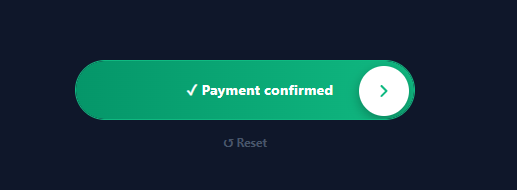
"Slide to confirm" is the deliberate-action control: instead of a one-tap button that is easy to hit by accident, the user must drag a handle all the way across a track to commit. It is the right pattern for irreversible or high-stakes actions — sending a payment, deleting an account, dispatching an order, unlocking a device. This snippet implements it in plain HTML, CSS, and vanilla JavaScript with full touch and mouse support: a draggable handle, a fill that tracks the drag, snap-back if released early, and a locked confirmed state.
Transform-based dragging (smooth everywhere)
The handle moves with transform: translateX and the green fill grows with transform: scaleX from a left origin — both are compositor-friendly transforms, so the drag is smooth and, importantly, the animation survives a Tailwind/React export unchanged (utility frameworks animate transforms but not raw width). During an active drag the position is set directly with no transition for 1:1 finger tracking; only the snap-back and confirm use a .animate class that adds transition: transform.
Accurate pointer math
On press, down records the offset between the pointer and the handle's current position, so the handle does not jump to the cursor. move then sets the position as pointerX − offset, clamped between 0 and maxPos() (the track width minus the handle and padding, measured live so it stays correct if the layout changes). The move and up listeners live on window, so dragging continues even if the pointer leaves the track.
Threshold, snap-back, and lock
On release, up checks whether the handle reached the end (within a few pixels of maxPos()). If it did, complete() locks the control: it snaps the handle fully right, fills the track green, changes the label to "✓ Payment confirmed", and reveals a reset link. If it did not, the handle and fill animate back to the start — the action is *not* committed, which is the whole point of requiring a full, intentional slide. A done flag blocks further dragging once confirmed so the action cannot fire twice.
Replayable
A reset button (hidden until confirmation) calls resetSlide, animating everything back to the initial state so you can demo it repeatedly or re-arm the control after, say, a failed transaction.
Because the commit happens only in complete(), wiring it to a real action is a one-line change. Pair this with a confirm dialog for typed confirmations, an order summary before payment, or a download button for progress-based actions.
Step by step
How to Use
- 1Paste HTML, CSS, and JSA dark pill track appears with a white circular handle on the left and the label "Slide to confirm payment".
- 2Drag the handlePress the handle and drag right — it follows your finger 1:1 and a green fill grows behind it.
- 3Release earlyLet go before the end — the handle and fill spring back to the start and nothing is confirmed.
- 4Slide all the wayDrag to the far right and release — the track locks green, the label becomes "✓ Payment confirmed", and a reset link appears.
- 5Reset and replayClick "↺ Reset" — everything animates back so you can try again or re-arm the control.
- 6Wire your actionPut your real API call or navigation inside
complete()— it only runs on a full, intentional slide.
Real-world uses
Common Use Cases
Got questions?
Frequently Asked Questions
Put your code inside complete() — it is called only when the handle is released at the end of the track. For async actions (a payment API), keep the locked state during the request and, on failure, call resetSlide() with an error message so the user can slide again; on success, leave it locked or navigate away.
Transforms (translateX, scaleX) run on the compositor for smoothness, and — crucially for this site's framework exports — Tailwind's transition utility animates transform but not raw width. Using scaleX for the fill means the snap-back animation works identically in the HTML, React, Vue, and Tailwind versions.
up() confirms when pos >= maxPos() - 4 (within 4px of the end). Lower the tolerance for a stricter "must reach the very end" feel, or raise it to forgive a slightly short slide. You can also require holding at the end briefly before committing by adding a short timer in up().
Dragging alone is not accessible, so provide a keyboard path: make the handle a focusable <button> (it is) and support Enter/Space or Arrow-Right-to-fill as an alternative that calls complete(). Add role="slider" with aria-valuenow updated as it moves, and ensure the confirmed state is announced via the label text, not colour alone.
In React, store the position in a ref (not state, to avoid re-render per frame), attach pointer listeners in a useEffect with cleanup, and set the transform via the handle ref; flip a confirmed state in complete. In Vue, use template refs and onMounted/onUnmounted. In Angular, bind in ngAfterViewInit with @ViewChild. The transform math and snap-back CSS port unchanged.
Slide to Confirm — Export as HTML, React, Vue, Angular & Tailwind
<!DOCTYPE html>
<html lang="en">
<head>
<meta charset="UTF-8" />
<meta name="viewport" content="width=device-width, initial-scale=1.0" />
<title>Slide to Confirm</title>
<style>
*{box-sizing:border-box;margin:0;padding:0}
body{font-family:system-ui,-apple-system,sans-serif;background:#0f172a;min-height:100vh;display:flex;flex-direction:column;align-items:center;justify-content:center;gap:16px;padding:24px}
.sc-wrap{display:flex;flex-direction:column;align-items:center;gap:14px;width:100%;max-width:340px}
.sc-track{position:relative;width:100%;height:60px;background:#1e293b;border:1px solid #334155;border-radius:30px;overflow:hidden;display:flex;align-items:center;user-select:none;touch-action:none}
.sc-track.done{border-color:#10b981}
.sc-fill{position:absolute;left:0;top:0;bottom:0;width:100%;background:linear-gradient(90deg,#059669,#10b981);transform:scaleX(0);transform-origin:left;border-radius:30px}
.sc-fill.animate{transition:transform .3s cubic-bezier(.4,0,.2,1)}
.sc-label{position:absolute;left:0;right:0;text-align:center;font-size:14px;font-weight:700;color:#94a3b8;pointer-events:none;z-index:1;padding-left:30px;letter-spacing:.01em}
.sc-track.done .sc-label{color:#fff}
.sc-handle{position:absolute;left:5px;top:5px;width:50px;height:50px;border-radius:50%;background:#fff;border:none;color:#6366f1;display:flex;align-items:center;justify-content:center;cursor:grab;z-index:2;box-shadow:0 4px 12px rgba(0,0,0,.3);font-size:18px;font-weight:800}
.sc-handle:active{cursor:grabbing}
.sc-handle.animate{transition:transform .3s cubic-bezier(.4,0,.2,1)}
.sc-track.done .sc-handle{color:#10b981}
.sc-reset{background:none;border:none;color:#475569;font-size:12px;font-weight:700;cursor:pointer;font-family:inherit;opacity:0;pointer-events:none;transition:opacity .2s}
.sc-reset.show{opacity:1;pointer-events:auto}
.sc-reset:hover{color:#94a3b8}
</style>
</head>
<body>
<div class="sc-wrap">
<div class="sc-track" id="scTrack">
<div class="sc-fill" id="scFill"></div>
<span class="sc-label" id="scLabel">Slide to confirm payment</span>
<button class="sc-handle" id="scHandle" aria-label="Slide to confirm">
<svg viewBox="0 0 24 24" width="20" height="20" fill="none" stroke="currentColor" stroke-width="2.5" stroke-linecap="round" stroke-linejoin="round"><path d="m9 18 6-6-6-6"/></svg>
</button>
</div>
<button class="sc-reset" id="scReset">↺ Reset</button>
</div>
<script>
var track = document.getElementById('scTrack');
var handle = document.getElementById('scHandle');
var fill = document.getElementById('scFill');
var label = document.getElementById('scLabel');
var resetBtn = document.getElementById('scReset');
var dragging = false, offset = 0, pos = 0, done = false;
function maxPos() { return track.clientWidth - handle.offsetWidth - 10; }
function setPos(p) {
pos = Math.max(0, Math.min(maxPos(), p));
handle.style.transform = 'translateX(' + pos + 'px)';
fill.style.transform = 'scaleX(' + ((pos + handle.offsetWidth + 5) / track.clientWidth) + ')';
}
function down(e) {
if (done) return;
dragging = true;
handle.classList.remove('animate');
fill.classList.remove('animate');
var x = e.touches ? e.touches[0].clientX : e.clientX;
offset = x - pos;
if (e.cancelable) e.preventDefault();
}
function move(e) {
if (!dragging) return;
var x = e.touches ? e.touches[0].clientX : e.clientX;
setPos(x - offset);
}
function up() {
if (!dragging) return;
dragging = false;
handle.classList.add('animate');
fill.classList.add('animate');
if (pos >= maxPos() - 4) complete();
else setPos(0);
}
function complete() {
done = true;
setPos(maxPos());
fill.style.transform = 'scaleX(1)';
track.classList.add('done');
label.textContent = '✓ Payment confirmed';
resetBtn.classList.add('show');
}
function resetSlide() {
done = false;
track.classList.remove('done');
label.textContent = 'Slide to confirm payment';
resetBtn.classList.remove('show');
handle.classList.add('animate');
fill.classList.add('animate');
setPos(0);
}
handle.addEventListener('mousedown', down);
handle.addEventListener('touchstart', down, { passive: false });
window.addEventListener('mousemove', move);
window.addEventListener('touchmove', move, { passive: false });
window.addEventListener('mouseup', up);
window.addEventListener('touchend', up);
resetBtn.addEventListener('click', resetSlide);
</script>
</body>
</html><!DOCTYPE html>
<html lang="en">
<head>
<meta charset="UTF-8" />
<meta name="viewport" content="width=device-width, initial-scale=1.0" />
<title>Slide to Confirm</title>
<!-- Tailwind CSS v3+ — arbitrary value classes (e.g. bg-[#0f172a]) are valid -->
<script src="https://cdn.tailwindcss.com"></script>
<style>
* {
box-sizing:border-box;margin:0;padding:0
}
body {
font-family:system-ui,-apple-system,sans-serif;background:#0f172a;min-height:100vh;display:flex;flex-direction:column;align-items:center;justify-content:center;gap:16px;padding:24px
}
.sc-track.done {
border-color:#10b981
}
.sc-fill.animate {
transition:transform .3s cubic-bezier(.4,0,.2,1)
}
.sc-track.done .sc-label {
color:#fff
}
.sc-handle.animate {
transition:transform .3s cubic-bezier(.4,0,.2,1)
}
.sc-track.done .sc-handle {
color:#10b981
}
.sc-reset.show {
opacity:1;pointer-events:auto
}
</style>
</head>
<body>
<div class="flex flex-col items-center gap-3.5 w-full max-w-[340px]">
<div class="sc-track relative w-full h-[60px] bg-[#1e293b] border border-[#334155] rounded-[30px] overflow-hidden flex items-center select-none [touch-action:none]" id="scTrack">
<div class="sc-fill absolute left-0 top-0 bottom-0 w-full [background:linear-gradient(90deg,#059669,#10b981)] [transform:scaleX(0)] [transform-origin:left] rounded-[30px]" id="scFill"></div>
<span class="sc-label absolute left-0 right-0 text-center text-sm font-bold text-[#94a3b8] pointer-events-none z-[1] pl-[30px] tracking-[.01em]" id="scLabel">Slide to confirm payment</span>
<button class="sc-handle absolute left-[5px] top-[5px] w-[50px] h-[50px] rounded-full bg-[#fff] border-0 text-[#6366f1] flex items-center justify-center cursor-grab z-[2] shadow-[0_4px_12px_rgba(0,0,0,.3)] text-lg font-extrabold active:cursor-grabbing" id="scHandle" aria-label="Slide to confirm">
<svg viewBox="0 0 24 24" width="20" height="20" fill="none" stroke="currentColor" stroke-width="2.5" stroke-linecap="round" stroke-linejoin="round"><path d="m9 18 6-6-6-6"/></svg>
</button>
</div>
<button class="sc-reset bg-transparent border-0 text-[#475569] text-xs font-bold cursor-pointer font-[inherit] opacity-0 pointer-events-none [transition:opacity_.2s] hover:text-[#94a3b8]" id="scReset">↺ Reset</button>
</div>
<script>
var track = document.getElementById('scTrack');
var handle = document.getElementById('scHandle');
var fill = document.getElementById('scFill');
var label = document.getElementById('scLabel');
var resetBtn = document.getElementById('scReset');
var dragging = false, offset = 0, pos = 0, done = false;
function maxPos() { return track.clientWidth - handle.offsetWidth - 10; }
function setPos(p) {
pos = Math.max(0, Math.min(maxPos(), p));
handle.style.transform = 'translateX(' + pos + 'px)';
fill.style.transform = 'scaleX(' + ((pos + handle.offsetWidth + 5) / track.clientWidth) + ')';
}
function down(e) {
if (done) return;
dragging = true;
handle.classList.remove('animate');
fill.classList.remove('animate');
var x = e.touches ? e.touches[0].clientX : e.clientX;
offset = x - pos;
if (e.cancelable) e.preventDefault();
}
function move(e) {
if (!dragging) return;
var x = e.touches ? e.touches[0].clientX : e.clientX;
setPos(x - offset);
}
function up() {
if (!dragging) return;
dragging = false;
handle.classList.add('animate');
fill.classList.add('animate');
if (pos >= maxPos() - 4) complete();
else setPos(0);
}
function complete() {
done = true;
setPos(maxPos());
fill.style.transform = 'scaleX(1)';
track.classList.add('done');
label.textContent = '✓ Payment confirmed';
resetBtn.classList.add('show');
}
function resetSlide() {
done = false;
track.classList.remove('done');
label.textContent = 'Slide to confirm payment';
resetBtn.classList.remove('show');
handle.classList.add('animate');
fill.classList.add('animate');
setPos(0);
}
handle.addEventListener('mousedown', down);
handle.addEventListener('touchstart', down, { passive: false });
window.addEventListener('mousemove', move);
window.addEventListener('touchmove', move, { passive: false });
window.addEventListener('mouseup', up);
window.addEventListener('touchend', up);
resetBtn.addEventListener('click', resetSlide);
</script>
</body>
</html>import React, { useEffect } from 'react';
// CSS — optionally move to SlideToConfirm.module.css
const css = `
*{box-sizing:border-box;margin:0;padding:0}
body{font-family:system-ui,-apple-system,sans-serif;background:#0f172a;min-height:100vh;display:flex;flex-direction:column;align-items:center;justify-content:center;gap:16px;padding:24px}
.sc-wrap{display:flex;flex-direction:column;align-items:center;gap:14px;width:100%;max-width:340px}
.sc-track{position:relative;width:100%;height:60px;background:#1e293b;border:1px solid #334155;border-radius:30px;overflow:hidden;display:flex;align-items:center;user-select:none;touch-action:none}
.sc-track.done{border-color:#10b981}
.sc-fill{position:absolute;left:0;top:0;bottom:0;width:100%;background:linear-gradient(90deg,#059669,#10b981);transform:scaleX(0);transform-origin:left;border-radius:30px}
.sc-fill.animate{transition:transform .3s cubic-bezier(.4,0,.2,1)}
.sc-label{position:absolute;left:0;right:0;text-align:center;font-size:14px;font-weight:700;color:#94a3b8;pointer-events:none;z-index:1;padding-left:30px;letter-spacing:.01em}
.sc-track.done .sc-label{color:#fff}
.sc-handle{position:absolute;left:5px;top:5px;width:50px;height:50px;border-radius:50%;background:#fff;border:none;color:#6366f1;display:flex;align-items:center;justify-content:center;cursor:grab;z-index:2;box-shadow:0 4px 12px rgba(0,0,0,.3);font-size:18px;font-weight:800}
.sc-handle:active{cursor:grabbing}
.sc-handle.animate{transition:transform .3s cubic-bezier(.4,0,.2,1)}
.sc-track.done .sc-handle{color:#10b981}
.sc-reset{background:none;border:none;color:#475569;font-size:12px;font-weight:700;cursor:pointer;font-family:inherit;opacity:0;pointer-events:none;transition:opacity .2s}
.sc-reset.show{opacity:1;pointer-events:auto}
.sc-reset:hover{color:#94a3b8}
`;
export default function SlideToConfirm() {
// Auto-generated escape hatch: the original snippet's vanilla JS runs once
// after mount and queries the rendered DOM. For idiomatic React, lift this
// into state + handlers.
useEffect(() => {
const _listeners = [];
const _originalAddEventListener = EventTarget.prototype.addEventListener;
EventTarget.prototype.addEventListener = function(type, listener, options) {
_listeners.push({ target: this, type, listener, options });
return _originalAddEventListener.call(this, type, listener, options);
};
var track = document.getElementById('scTrack');
var handle = document.getElementById('scHandle');
var fill = document.getElementById('scFill');
var label = document.getElementById('scLabel');
var resetBtn = document.getElementById('scReset');
var dragging = false, offset = 0, pos = 0, done = false;
function maxPos() { return track.clientWidth - handle.offsetWidth - 10; }
function setPos(p) {
pos = Math.max(0, Math.min(maxPos(), p));
handle.style.transform = 'translateX(' + pos + 'px)';
fill.style.transform = 'scaleX(' + ((pos + handle.offsetWidth + 5) / track.clientWidth) + ')';
}
function down(e) {
if (done) return;
dragging = true;
handle.classList.remove('animate');
fill.classList.remove('animate');
var x = e.touches ? e.touches[0].clientX : e.clientX;
offset = x - pos;
if (e.cancelable) e.preventDefault();
}
function move(e) {
if (!dragging) return;
var x = e.touches ? e.touches[0].clientX : e.clientX;
setPos(x - offset);
}
function up() {
if (!dragging) return;
dragging = false;
handle.classList.add('animate');
fill.classList.add('animate');
if (pos >= maxPos() - 4) complete();
else setPos(0);
}
function complete() {
done = true;
setPos(maxPos());
fill.style.transform = 'scaleX(1)';
track.classList.add('done');
label.textContent = '✓ Payment confirmed';
resetBtn.classList.add('show');
}
function resetSlide() {
done = false;
track.classList.remove('done');
label.textContent = 'Slide to confirm payment';
resetBtn.classList.remove('show');
handle.classList.add('animate');
fill.classList.add('animate');
setPos(0);
}
handle.addEventListener('mousedown', down);
handle.addEventListener('touchstart', down, { passive: false });
window.addEventListener('mousemove', move);
window.addEventListener('touchmove', move, { passive: false });
window.addEventListener('mouseup', up);
window.addEventListener('touchend', up);
resetBtn.addEventListener('click', resetSlide);
// Cleanup: restore addEventListener and remove all listeners
return () => {
EventTarget.prototype.addEventListener = _originalAddEventListener;
for (const { target, type, listener, options } of _listeners) {
target.removeEventListener(type, listener, options);
}
};
}, []);
return (
<>
<style>{css}</style>
<div className="sc-wrap">
<div className="sc-track" id="scTrack">
<div className="sc-fill" id="scFill"></div>
<span className="sc-label" id="scLabel">Slide to confirm payment</span>
<button className="sc-handle" id="scHandle" aria-label="Slide to confirm">
<svg viewBox="0 0 24 24" width="20" height="20" fill="none" stroke="currentColor" strokeWidth="2.5" strokeLinecap="round" stroke-linejoin="round"><path d="m9 18 6-6-6-6"/></svg>
</button>
</div>
<button className="sc-reset" id="scReset">↺ Reset</button>
</div>
</>
);
}import React, { useEffect } from 'react';
// Requires Tailwind CSS v3+ — https://tailwindcss.com/docs/installation
// Arbitrary value classes (e.g. bg-[#0f172a]) are valid Tailwind v3+
export default function SlideToConfirm() {
// Auto-generated escape hatch: the original snippet's vanilla JS runs once
// after mount and queries the rendered DOM. For idiomatic React, lift this
// into state + handlers.
useEffect(() => {
const _listeners = [];
const _originalAddEventListener = EventTarget.prototype.addEventListener;
EventTarget.prototype.addEventListener = function(type, listener, options) {
_listeners.push({ target: this, type, listener, options });
return _originalAddEventListener.call(this, type, listener, options);
};
var track = document.getElementById('scTrack');
var handle = document.getElementById('scHandle');
var fill = document.getElementById('scFill');
var label = document.getElementById('scLabel');
var resetBtn = document.getElementById('scReset');
var dragging = false, offset = 0, pos = 0, done = false;
function maxPos() { return track.clientWidth - handle.offsetWidth - 10; }
function setPos(p) {
pos = Math.max(0, Math.min(maxPos(), p));
handle.style.transform = 'translateX(' + pos + 'px)';
fill.style.transform = 'scaleX(' + ((pos + handle.offsetWidth + 5) / track.clientWidth) + ')';
}
function down(e) {
if (done) return;
dragging = true;
handle.classList.remove('animate');
fill.classList.remove('animate');
var x = e.touches ? e.touches[0].clientX : e.clientX;
offset = x - pos;
if (e.cancelable) e.preventDefault();
}
function move(e) {
if (!dragging) return;
var x = e.touches ? e.touches[0].clientX : e.clientX;
setPos(x - offset);
}
function up() {
if (!dragging) return;
dragging = false;
handle.classList.add('animate');
fill.classList.add('animate');
if (pos >= maxPos() - 4) complete();
else setPos(0);
}
function complete() {
done = true;
setPos(maxPos());
fill.style.transform = 'scaleX(1)';
track.classList.add('done');
label.textContent = '✓ Payment confirmed';
resetBtn.classList.add('show');
}
function resetSlide() {
done = false;
track.classList.remove('done');
label.textContent = 'Slide to confirm payment';
resetBtn.classList.remove('show');
handle.classList.add('animate');
fill.classList.add('animate');
setPos(0);
}
handle.addEventListener('mousedown', down);
handle.addEventListener('touchstart', down, { passive: false });
window.addEventListener('mousemove', move);
window.addEventListener('touchmove', move, { passive: false });
window.addEventListener('mouseup', up);
window.addEventListener('touchend', up);
resetBtn.addEventListener('click', resetSlide);
// Cleanup: restore addEventListener and remove all listeners
return () => {
EventTarget.prototype.addEventListener = _originalAddEventListener;
for (const { target, type, listener, options } of _listeners) {
target.removeEventListener(type, listener, options);
}
};
}, []);
return (
<>
<style>{`
* {
box-sizing:border-box;margin:0;padding:0
}
body {
font-family:system-ui,-apple-system,sans-serif;background:#0f172a;min-height:100vh;display:flex;flex-direction:column;align-items:center;justify-content:center;gap:16px;padding:24px
}
.sc-track.done {
border-color:#10b981
}
.sc-fill.animate {
transition:transform .3s cubic-bezier(.4,0,.2,1)
}
.sc-track.done .sc-label {
color:#fff
}
.sc-handle.animate {
transition:transform .3s cubic-bezier(.4,0,.2,1)
}
.sc-track.done .sc-handle {
color:#10b981
}
.sc-reset.show {
opacity:1;pointer-events:auto
}
`}</style>
<div className="flex flex-col items-center gap-3.5 w-full max-w-[340px]">
<div className="sc-track relative w-full h-[60px] bg-[#1e293b] border border-[#334155] rounded-[30px] overflow-hidden flex items-center select-none [touch-action:none]" id="scTrack">
<div className="sc-fill absolute left-0 top-0 bottom-0 w-full [background:linear-gradient(90deg,#059669,#10b981)] [transform:scaleX(0)] [transform-origin:left] rounded-[30px]" id="scFill"></div>
<span className="sc-label absolute left-0 right-0 text-center text-sm font-bold text-[#94a3b8] pointer-events-none z-[1] pl-[30px] tracking-[.01em]" id="scLabel">Slide to confirm payment</span>
<button className="sc-handle absolute left-[5px] top-[5px] w-[50px] h-[50px] rounded-full bg-[#fff] border-0 text-[#6366f1] flex items-center justify-center cursor-grab z-[2] shadow-[0_4px_12px_rgba(0,0,0,.3)] text-lg font-extrabold active:cursor-grabbing" id="scHandle" aria-label="Slide to confirm">
<svg viewBox="0 0 24 24" width="20" height="20" fill="none" stroke="currentColor" strokeWidth="2.5" strokeLinecap="round" stroke-linejoin="round"><path d="m9 18 6-6-6-6"/></svg>
</button>
</div>
<button className="sc-reset bg-transparent border-0 text-[#475569] text-xs font-bold cursor-pointer font-[inherit] opacity-0 pointer-events-none [transition:opacity_.2s] hover:text-[#94a3b8]" id="scReset">↺ Reset</button>
</div>
</>
);
}<template>
<div class="sc-wrap">
<div class="sc-track" id="scTrack">
<div class="sc-fill" id="scFill"></div>
<span class="sc-label" id="scLabel">Slide to confirm payment</span>
<button class="sc-handle" id="scHandle" aria-label="Slide to confirm">
<svg viewBox="0 0 24 24" width="20" height="20" fill="none" stroke="currentColor" stroke-width="2.5" stroke-linecap="round" stroke-linejoin="round"><path d="m9 18 6-6-6-6"/></svg>
</button>
</div>
<button class="sc-reset" id="scReset">↺ Reset</button>
</div>
</template>
<script setup>
import { onMounted } from 'vue';
let track;
let handle;
let fill;
let label;
let resetBtn;
var dragging = false, offset = 0, pos = 0, done = false;
function maxPos() { return track.clientWidth - handle.offsetWidth - 10; }
function setPos(p) {
pos = Math.max(0, Math.min(maxPos(), p));
handle.style.transform = 'translateX(' + pos + 'px)';
fill.style.transform = 'scaleX(' + ((pos + handle.offsetWidth + 5) / track.clientWidth) + ')';
}
function down(e) {
if (done) return;
dragging = true;
handle.classList.remove('animate');
fill.classList.remove('animate');
var x = e.touches ? e.touches[0].clientX : e.clientX;
offset = x - pos;
if (e.cancelable) e.preventDefault();
}
function move(e) {
if (!dragging) return;
var x = e.touches ? e.touches[0].clientX : e.clientX;
setPos(x - offset);
}
function up() {
if (!dragging) return;
dragging = false;
handle.classList.add('animate');
fill.classList.add('animate');
if (pos >= maxPos() - 4) complete();
else setPos(0);
}
function complete() {
done = true;
setPos(maxPos());
fill.style.transform = 'scaleX(1)';
track.classList.add('done');
label.textContent = '✓ Payment confirmed';
resetBtn.classList.add('show');
}
function resetSlide() {
done = false;
track.classList.remove('done');
label.textContent = 'Slide to confirm payment';
resetBtn.classList.remove('show');
handle.classList.add('animate');
fill.classList.add('animate');
setPos(0);
}
onMounted(() => {
track = document.getElementById('scTrack');
handle = document.getElementById('scHandle');
fill = document.getElementById('scFill');
label = document.getElementById('scLabel');
resetBtn = document.getElementById('scReset');
handle.addEventListener('mousedown', down);
handle.addEventListener('touchstart', down, { passive: false });
window.addEventListener('mousemove', move);
window.addEventListener('touchmove', move, { passive: false });
window.addEventListener('mouseup', up);
window.addEventListener('touchend', up);
resetBtn.addEventListener('click', resetSlide);
});
</script>
<style scoped>
*{box-sizing:border-box;margin:0;padding:0}
body{font-family:system-ui,-apple-system,sans-serif;background:#0f172a;min-height:100vh;display:flex;flex-direction:column;align-items:center;justify-content:center;gap:16px;padding:24px}
.sc-wrap{display:flex;flex-direction:column;align-items:center;gap:14px;width:100%;max-width:340px}
.sc-track{position:relative;width:100%;height:60px;background:#1e293b;border:1px solid #334155;border-radius:30px;overflow:hidden;display:flex;align-items:center;user-select:none;touch-action:none}
.sc-track.done{border-color:#10b981}
.sc-fill{position:absolute;left:0;top:0;bottom:0;width:100%;background:linear-gradient(90deg,#059669,#10b981);transform:scaleX(0);transform-origin:left;border-radius:30px}
.sc-fill.animate{transition:transform .3s cubic-bezier(.4,0,.2,1)}
.sc-label{position:absolute;left:0;right:0;text-align:center;font-size:14px;font-weight:700;color:#94a3b8;pointer-events:none;z-index:1;padding-left:30px;letter-spacing:.01em}
.sc-track.done .sc-label{color:#fff}
.sc-handle{position:absolute;left:5px;top:5px;width:50px;height:50px;border-radius:50%;background:#fff;border:none;color:#6366f1;display:flex;align-items:center;justify-content:center;cursor:grab;z-index:2;box-shadow:0 4px 12px rgba(0,0,0,.3);font-size:18px;font-weight:800}
.sc-handle:active{cursor:grabbing}
.sc-handle.animate{transition:transform .3s cubic-bezier(.4,0,.2,1)}
.sc-track.done .sc-handle{color:#10b981}
.sc-reset{background:none;border:none;color:#475569;font-size:12px;font-weight:700;cursor:pointer;font-family:inherit;opacity:0;pointer-events:none;transition:opacity .2s}
.sc-reset.show{opacity:1;pointer-events:auto}
.sc-reset:hover{color:#94a3b8}
</style>// @ts-nocheck
// Note: vanilla JS DOM manipulation is preserved as-is inside ngAfterViewInit().
// For idiomatic Angular, replace document.getElementById() with @ViewChild() refs
// and move state into component properties with two-way binding.
import { Component, AfterViewInit, ViewEncapsulation } from '@angular/core';
import { CommonModule } from '@angular/common';
@Component({
selector: 'app-slide-to-confirm',
standalone: true,
imports: [CommonModule],
encapsulation: ViewEncapsulation.None,
template: `
<div class="sc-wrap">
<div class="sc-track" id="scTrack">
<div class="sc-fill" id="scFill"></div>
<span class="sc-label" id="scLabel">Slide to confirm payment</span>
<button class="sc-handle" id="scHandle" aria-label="Slide to confirm">
<svg viewBox="0 0 24 24" width="20" height="20" fill="none" stroke="currentColor" stroke-width="2.5" stroke-linecap="round" stroke-linejoin="round"><path d="m9 18 6-6-6-6"/></svg>
</button>
</div>
<button class="sc-reset" id="scReset">↺ Reset</button>
</div>
`,
styles: [`
*{box-sizing:border-box;margin:0;padding:0}
body{font-family:system-ui,-apple-system,sans-serif;background:#0f172a;min-height:100vh;display:flex;flex-direction:column;align-items:center;justify-content:center;gap:16px;padding:24px}
.sc-wrap{display:flex;flex-direction:column;align-items:center;gap:14px;width:100%;max-width:340px}
.sc-track{position:relative;width:100%;height:60px;background:#1e293b;border:1px solid #334155;border-radius:30px;overflow:hidden;display:flex;align-items:center;user-select:none;touch-action:none}
.sc-track.done{border-color:#10b981}
.sc-fill{position:absolute;left:0;top:0;bottom:0;width:100%;background:linear-gradient(90deg,#059669,#10b981);transform:scaleX(0);transform-origin:left;border-radius:30px}
.sc-fill.animate{transition:transform .3s cubic-bezier(.4,0,.2,1)}
.sc-label{position:absolute;left:0;right:0;text-align:center;font-size:14px;font-weight:700;color:#94a3b8;pointer-events:none;z-index:1;padding-left:30px;letter-spacing:.01em}
.sc-track.done .sc-label{color:#fff}
.sc-handle{position:absolute;left:5px;top:5px;width:50px;height:50px;border-radius:50%;background:#fff;border:none;color:#6366f1;display:flex;align-items:center;justify-content:center;cursor:grab;z-index:2;box-shadow:0 4px 12px rgba(0,0,0,.3);font-size:18px;font-weight:800}
.sc-handle:active{cursor:grabbing}
.sc-handle.animate{transition:transform .3s cubic-bezier(.4,0,.2,1)}
.sc-track.done .sc-handle{color:#10b981}
.sc-reset{background:none;border:none;color:#475569;font-size:12px;font-weight:700;cursor:pointer;font-family:inherit;opacity:0;pointer-events:none;transition:opacity .2s}
.sc-reset.show{opacity:1;pointer-events:auto}
.sc-reset:hover{color:#94a3b8}
`]
})
export class SlideToConfirmComponent implements AfterViewInit {
ngAfterViewInit(): void {
var track = document.getElementById('scTrack');
var handle = document.getElementById('scHandle');
var fill = document.getElementById('scFill');
var label = document.getElementById('scLabel');
var resetBtn = document.getElementById('scReset');
var dragging = false, offset = 0, pos = 0, done = false;
function maxPos() { return track.clientWidth - handle.offsetWidth - 10; }
function setPos(p) {
pos = Math.max(0, Math.min(maxPos(), p));
handle.style.transform = 'translateX(' + pos + 'px)';
fill.style.transform = 'scaleX(' + ((pos + handle.offsetWidth + 5) / track.clientWidth) + ')';
}
function down(e) {
if (done) return;
dragging = true;
handle.classList.remove('animate');
fill.classList.remove('animate');
var x = e.touches ? e.touches[0].clientX : e.clientX;
offset = x - pos;
if (e.cancelable) e.preventDefault();
}
function move(e) {
if (!dragging) return;
var x = e.touches ? e.touches[0].clientX : e.clientX;
setPos(x - offset);
}
function up() {
if (!dragging) return;
dragging = false;
handle.classList.add('animate');
fill.classList.add('animate');
if (pos >= maxPos() - 4) complete();
else setPos(0);
}
function complete() {
done = true;
setPos(maxPos());
fill.style.transform = 'scaleX(1)';
track.classList.add('done');
label.textContent = '✓ Payment confirmed';
resetBtn.classList.add('show');
}
function resetSlide() {
done = false;
track.classList.remove('done');
label.textContent = 'Slide to confirm payment';
resetBtn.classList.remove('show');
handle.classList.add('animate');
fill.classList.add('animate');
setPos(0);
}
handle.addEventListener('mousedown', down);
handle.addEventListener('touchstart', down, { passive: false });
window.addEventListener('mousemove', move);
window.addEventListener('touchmove', move, { passive: false });
window.addEventListener('mouseup', up);
window.addEventListener('touchend', up);
resetBtn.addEventListener('click', resetSlide);
// Bind inline-handler functions to the component so the template can call them
Object.assign(this, { maxPos, setPos, down, move, up, complete, resetSlide });
}
}