You Might Also Like
Learn Coding Visually
Learn to code with interactive, live-preview playgrounds — HTML, CSS, JavaScript, React & more.
 HTML Playground42 lessons · Click-based · Live preview
 CSS PlaygroundLearn CSS with a live editor
 JavaScript Playground60 lessons · DOM · Async · Canvas
 React PlaygroundLearn React with a live code editor
 GSAP PlaygroundLearn GSAP animation interactively
 SVG Playground44 lessons · shapes · paths · animation
 SCSS Playground45 lessons · Sass modules · tokens
 Tailwind PlaygroundLearn Tailwind CSS with a live editor
 Bootstrap 5 Playground50 lessons · live preview
Fullscreen API Toggle Button — Free requestFullscreen Demo
Fullscreen API Toggle Button · Buttons · Plain HTML, CSS & JS · Live preview
What's included
Features
About this UI Snippet
Fullscreen API Toggle Button — State Driven by the Real Event, Not the Click
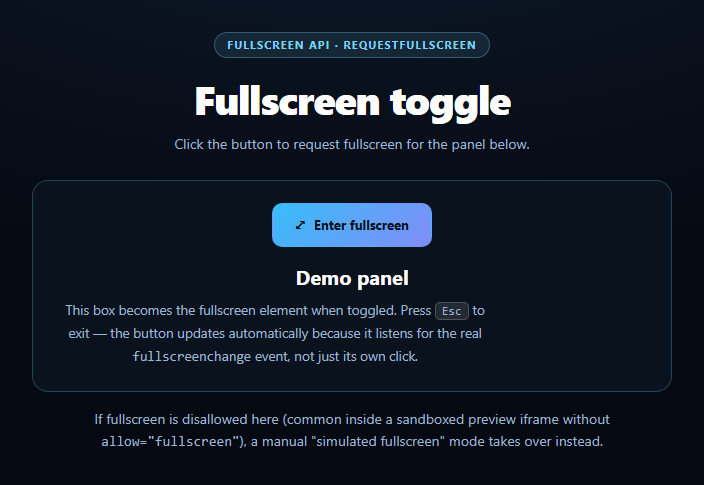
This snippet wraps the browser's real Fullscreen API — element.requestFullscreen() and document.exitFullscreen() — in a single toggle button, and gets the one detail most homemade fullscreen buttons miss: the button's icon and label are driven entirely by the fullscreenchange event, never by the click handler's own assumption of what just happened.
Why the click handler can't be the source of truth
A user can leave fullscreen in ways that never touch your button at all — pressing Esc, using browser chrome, or switching apps on some platforms. If a toggle button only flips its own local "am I fullscreen" flag inside the click handler, it goes stale the instant the user exits with Esc. This snippet instead listens for the real fullscreenchange event (plus its webkitfullscreenchange/msfullscreenchange cousins) and checks document.fullscreenElement directly every time it fires, so the icon and label are always correct regardless of how fullscreen was entered or exited.
Vendor-prefix handling, kept minimal
Evergreen Chrome, Firefox, and Edge support the unprefixed requestFullscreen/exitFullscreen/fullscreenElement/fullscreenEnabled surface, but Safari has historically shipped webkit-prefixed variants in some versions. Small resolver functions (fsRequest, fsExit, fsElement, fsEnabled) pick whichever method actually exists on the element or document, so the rest of the code never has to branch on browser.
The blocked case: sandboxed iframes
Fullscreen is a permission-gated feature. Inside a sandboxed preview <iframe> without allow="fullscreen" in its attributes, document.fullscreenEnabled reports false outright, or a call to requestFullscreen() rejects with NotAllowedError/SecurityError. Both paths are caught and routed into a simulated fullscreen mode: the panel gets a CSS class that visually enlarges and highlights it in place, the button still toggles correctly, and a note explains plainly why the real API isn't in use. The demo never sits inert.
One toggle button, two real states
Clicking the button when nothing is fullscreen tries the real API first; only on failure does it fall back to the simulated class. Clicking again while simulated simply removes that class — no dead ends, no silent no-ops. Pair this with a screen wake lock toggle for a media-player control cluster, or a network information badge for a broader "browser capability" dashboard.
Build with AI
Build, Understand, Optimize, and Extend It With AI
Paste this snippet's HTML, CSS, and JS into an AI coding assistant like Claude and ask it to explain why the button's displayed state comes from the fullscreenchange event listener rather than from the click handler that requested fullscreen in the first place — and what breaks if you skip that and just toggle a local boolean instead. It's also useful for reasoning about the fallback: ask why document.fullscreenEnabled is checked before ever calling requestFullscreen(), and why the request is additionally wrapped in a catch even after that check passes. For extensions, ask it to add fullscreen support for a video element with custom controls, or to persist the user's last fullscreen preference across page loads. Treat the code less like a finished artifact and more like a starting point for a conversation.
Prompt to recreate it
Copy this into your AI assistant of choice to build the effect from scratch, or as a jumping-off point for your own variant:
Build a "fullscreen toggle button" in plain HTML, CSS, and JavaScript using the real browser Fullscreen API — no libraries.

Requirements:
- A panel element and a button that calls panelElement.requestFullscreen() to enter fullscreen and document.exitFullscreen() to exit, resolving vendor-prefixed variants (webkitRequestFullscreen, webkitExitFullscreen, webkitFullscreenElement, document.webkitFullscreenEnabled) as a fallback for older Safari.
- CRITICAL: the button's icon/label state must be driven by listening for the real fullscreenchange (and webkitfullscreenchange) event and checking document.fullscreenElement === panelElement inside that handler — not by a boolean the click handler sets itself — because the user can exit fullscreen via Esc or browser chrome without ever clicking the button again.
- Before requesting fullscreen, check document.fullscreenEnabled and treat a false value as "fullscreen is disallowed in this context" (e.g. a sandboxed iframe missing allow="fullscreen"). Also wrap the requestFullscreen() call itself in a .catch/try-catch for NotAllowedError/SecurityError rejections.
- CRITICAL fallback: when fullscreen is disallowed or the request is rejected, fall back to a "simulated fullscreen" mode that toggles a CSS class enlarging/highlighting the panel in place, with clear status text explaining that the real Fullscreen API is unavailable here and a simulated mode is active instead. The toggle button must keep working identically in this mode.
- The status text should always plainly state which mode is currently active (idle, real fullscreen, or simulated) so the demo is never ambiguous or looks broken.
Want to tighten it up first? Run this prompt through the AI Prompt Studio to score it across 8 quality dimensions, catch anti-patterns, and tune the wording for Claude, ChatGPT, or Gemini before you paste it in.
Step by step
How to Use
- 1Paste HTML, CSS, and JSA panel with a fullscreen toggle button renders.
- 2Click "Enter fullscreen"The panel requests real browser fullscreen.
- 3Press EscThe button label updates via the real fullscreenchange event.
- 4Try it in a restricted contextBlocked fullscreen falls back to a simulated in-page mode.
- 5Click to exitWorks identically whether real or simulated.
- 6Style the fullscreen stateTarget :fullscreen for layout changes when active.
Real-world uses
Common Use Cases
Got questions?
Frequently Asked Questions
Because the icon and label are driven by the real fullscreenchange event listener, which checks document.fullscreenElement every time it fires — not by a local flag the click handler sets. Esc, browser chrome, and OS-level exits all fire this event just like a programmatic exitFullscreen() call, so the UI stays accurate no matter how fullscreen ends.
The snippet checks document.fullscreenEnabled before requesting, and also wraps the request call in a catch for NotAllowedError or SecurityError. Either path routes into a simulated fullscreen mode that visually enlarges the panel with CSS instead, with a status note explaining that the real API is unavailable — the button keeps working either way.
Some Safari versions historically required webkitRequestFullscreen/webkitExitFullscreen and webkitFullscreenElement. This snippet resolves whichever variant exists at runtime via small helper functions, so it works across the unprefixed and webkit-prefixed API without separate code paths elsewhere.
Yes — requestFullscreen() is called on whatever element reference you pass to fsRequest(). Point it at any container (a video element, a chart div, a whole app shell) and update the fullscreenchange check to compare against that same element.
Keep a ref to the target element, call the same requestFullscreen/exitFullscreen resolvers on it from an event handler, and register the fullscreenchange listener in a mount effect, removing it on unmount. Store the active/simulated state in component state and drive the icon/label from that, exactly as the vanilla version does from the DOM.