You Might Also Like
Learn Coding Visually
Learn to code with interactive, live-preview playgrounds — HTML, CSS, JavaScript, React & more.
 HTML Playground42 lessons · Click-based · Live preview
 CSS PlaygroundLearn CSS with a live editor
 JavaScript Playground60 lessons · DOM · Async · Canvas
 React PlaygroundLearn React with a live code editor
 GSAP PlaygroundLearn GSAP animation interactively
 SVG Playground44 lessons · shapes · paths · animation
 SCSS Playground45 lessons · Sass modules · tokens
 Tailwind PlaygroundLearn Tailwind CSS with a live editor
 Bootstrap 5 Playground50 lessons · live preview
Screen Wake Lock Toggle — Free navigator.wakeLock Demo
Screen Wake Lock Toggle · Buttons · Plain HTML, CSS & JS · Live preview
What's included
Features
About this UI Snippet
Screen Wake Lock Toggle — Real Wake Lock With the Visibility Quirk Handled
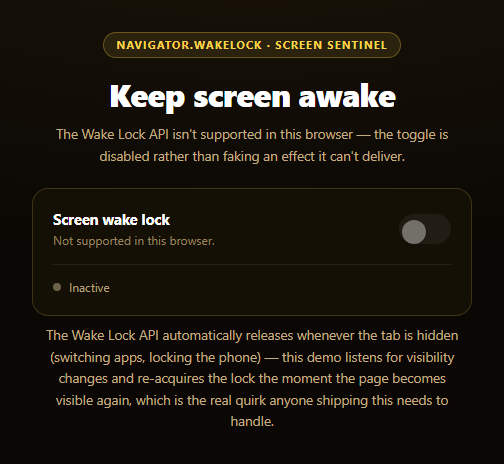
This toggle calls the genuine Screen Wake Lock API — navigator.wakeLock.request('screen') — to actually prevent a device's display from sleeping while the toggle is on, the kind of control a recipe app or workout timer needs so the screen doesn't dim mid-instruction. Unlike a purely decorative switch, this one either does the real thing or plainly says it can't, because a wake lock toggle that silently does nothing is worse than no toggle at all.
Requesting and holding the lock
acquireLock() calls navigator.wakeLock.request('screen'), which resolves with a WakeLockSentinel — a live handle representing the held lock — wrapped in a try/catch since the browser can refuse the request (commonly a NotAllowedError, and some browsers refuse outright on very low battery). Success flips the UI to its "on" state and updates the status text to confirm the lock is genuinely active, not just that a switch was clicked.
The auto-release quirk, handled honestly
The one behavior every real implementation of this feature has to account for: a wake lock automatically releases the instant its document becomes hidden — switching apps, locking the phone, or backgrounding the tab all silently drop it. This snippet listens for the sentinel's own release event to detect that, and separately listens for visibilitychange on the document to re-acquire the lock the moment the page becomes visible again, but only if the user still wants it on (tracked in userWantsLock). Skipping this step is the single most common bug in real wake-lock implementations — the toggle looks "on" but the screen sleeps anyway the next time the user glances away.
No supported, no fake toggle
If 'wakeLock' in navigator is false, the toggle is disabled outright with an explanatory status line, rather than left interactive and doing nothing when clicked — matching the honesty standard set by this library's canvas audio frequency bars snippet, which never leaves a capability-gated control pretending to work. A visually-active-looking toggle that silently fails to keep the screen awake would defeat the entire purpose of the control.
A visible status dot
Beyond the toggle itself, a small status dot and label track the sentinel's actual state, so at a glance — even without reading the longer status sentence — it's clear whether the lock is genuinely held right now. Pair this with an uptime status page or status pill for the same "live indicator" pattern applied elsewhere in a dashboard.
Customizing it
Auto-request the lock on page load for a kiosk-style display, add a countdown showing how long the lock has been held, or combine it with a dark mode toggle for a late-night reading mode.
Build with AI
Build, Understand, Optimize, and Extend It With AI
Paste this snippet's HTML, CSS, and JS into an AI coding assistant like Claude and ask it to explain why the Wake Lock API automatically releases the lock whenever the document becomes hidden, and why that makes the visibilitychange re-acquisition logic essential rather than optional — walk through what would happen if that listener were removed. It's a good prompt for reasoning about the WakeLockSentinel object specifically: ask why the code listens for the sentinel's own release event in addition to tracking a separate userWantsLock boolean, and what real-world scenario (other than switching tabs) could cause an unexpected release. For extensions, ask it to add a running timer showing how long the lock has been continuously held, a battery-level check that proactively warns the user the browser may refuse the request, or a way to distinguish "released because you turned it off" from "released unexpectedly" in the UI. Treat the code less like a finished artifact and more like a starting point for a conversation.
Prompt to recreate it
Copy this into your AI assistant of choice to build the effect from scratch, or as a jumping-off point for your own variant:
Build a "Screen Wake Lock Toggle" in plain HTML, CSS, and JavaScript — no libraries.

Requirements:
- A toggle switch with proper role="switch" and aria-checked semantics, plus a small status dot/label and a longer status sentence, all reflecting the real current wake lock state.
- On toggle-on, check 'wakeLock' in navigator before calling navigator.wakeLock.request('screen') inside a try/catch. On success, store the returned WakeLockSentinel and update the UI to an active state with a status message confirming the lock is genuinely held.
- CRITICAL: handle the Wake Lock API's real auto-release behavior. The lock automatically releases whenever the page's visibility state becomes hidden (switching tabs or apps, locking the device) — listen for the document's visibilitychange event and, if the user still wants the lock on and it isn't currently held, re-request it automatically when the page becomes visible again. Also listen for the sentinel's own "release" event to detect and reflect releases that weren't user-initiated.
- On toggle-off, call sentinel.release() if a sentinel is currently held, and update the UI back to an inactive state.
- On unsupported browsers (the API doesn't exist at all — a common case, since support is Chromium-focused) or a rejected request (e.g. a NotAllowedError from a low-battery refusal or a blocked permissions policy in a sandboxed iframe, a likely scenario for wherever this demo renders), do NOT leave the toggle interactive and silently non-functional — either disable it outright with a clear "not supported" message, or show a specific failure reason in the status text and reset the toggle to its off state.
Want to tighten it up first? Run this prompt through the AI Prompt Studio to score it across 8 quality dimensions, catch anti-patterns, and tune the wording for Claude, ChatGPT, or Gemini before you paste it in.
Step by step
How to Use
- 1Paste HTML, CSS, and JSAn off-state toggle with a status dot renders.
- 2Click the toggle to turn it onnavigator.wakeLock.request('screen') is called live.
- 3Switch tabs or lock your phoneThe lock auto-releases — a real browser behavior.
- 4Return to the tabThe visibilitychange listener re-acquires the lock automatically.
- 5Click the toggle offThe sentinel is released and the screen can sleep again.
- 6Try it in an unsupported browserThe toggle disables itself with a clear explanation.
Real-world uses
Common Use Cases
Got questions?
Frequently Asked Questions
That shouldn't happen with this snippet — but it's the exact bug that occurs if a wake lock implementation doesn't handle the API's biggest quirk: the lock automatically releases the instant the document is hidden (switching tabs, locking the phone, backgrounding the app). This snippet listens for visibilitychange and re-acquires the lock automatically when the page becomes visible again, as long as the toggle is still meant to be on.
The Wake Lock API (navigator.wakeLock) isn't supported in every browser. This snippet checks 'wakeLock' in navigator before doing anything, and if it's missing, disables the toggle outright with an explanatory message rather than leaving it clickable and silently doing nothing — a toggle that looks functional but has no effect is worse than one that's honestly unavailable.
No — requesting a wake lock requires a real user action to trigger it in this snippet (clicking the toggle), and the browser itself will show some visible indication that a page is holding a wake lock in many implementations. The lock is also always scoped to that specific document and releases automatically the moment the tab is closed, navigated away from, or hidden.
Browsers can refuse a wake lock request for reasons like critically low battery, an explicit user or system power-saving policy, or (in an embedded context) a permissions policy blocking the wake-lock feature for that frame. This snippet catches that rejection and shows the actual error name in the status text, then leaves the toggle in a clearly labeled off state rather than pretending the lock is held.
Store the WakeLockSentinel and a "user wants lock" boolean in refs (not state, since the sentinel is a live object rather than serializable data), and mirror the same acquireLock/releaseLock functions as event handlers. Add the visibilitychange listener in a mount effect and remove it in cleanup, and make sure to release any held lock on unmount so a component teardown doesn't leave a phantom lock active.