You Might Also Like
Learn Coding Visually
Learn to code with interactive, live-preview playgrounds — HTML, CSS, JavaScript, React & more.
 HTML Playground42 lessons · Click-based · Live preview
 CSS PlaygroundLearn CSS with a live editor
 JavaScript Playground60 lessons · DOM · Async · Canvas
 React PlaygroundLearn React with a live code editor
 GSAP PlaygroundLearn GSAP animation interactively
 SVG Playground44 lessons · shapes · paths · animation
 SCSS Playground45 lessons · Sass modules · tokens
 Tailwind PlaygroundLearn Tailwind CSS with a live editor
 Bootstrap 5 Playground50 lessons · live preview
File System Access Save Dialog — Free showSaveFilePicker + Download Fallback
File System Access Save Dialog · Buttons · Plain HTML, CSS & JS · Live preview
What's included
Features
About this UI Snippet
File System Access Save Dialog — Native Picker With a Universal Download Fallback
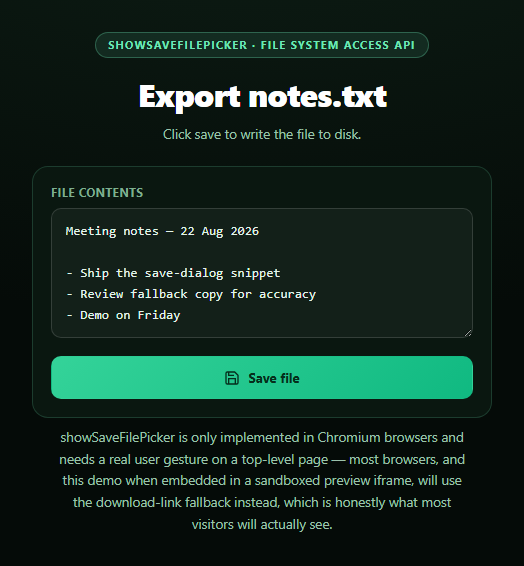
This snippet calls window.showSaveFilePicker(), part of the File System Access API, to open a genuine native "Save As" dialog and write a generated text file directly to the chosen location on disk. It's a striking capability — real filesystem writes from a web page — but it's also one of the narrowest in browser support: Chromium-based browsers only, and even there it needs a direct, top-level user gesture, so it's routinely unavailable inside a sandboxed preview iframe. The snippet is built around the assumption that most visitors will hit the fallback, not the native path.
The real save path
When 'showSaveFilePicker' in window is true, saveFile() calls it with a suggested filename and an accepted MIME type, gets back a file handle, opens a writable stream with handle.createWritable(), writes the textarea's contents, and closes the stream. The result is a real file written wherever the user chose in a native OS dialog — no download folder, no blob URL.
The fallback everyone else gets
Everywhere else — Firefox, Safari, and any context where the API throws (a SecurityError from a missing user-activation, or the whole feature being disallowed inside a sandboxed iframe) — downloadFallback() builds a Blob, wraps it in URL.createObjectURL, and clicks a temporary <a download> link. This is the technique behind this library's download button snippet, and it's honestly the one that matters most here: it's what the overwhelming majority of real-world visitors to this exact demo will experience.
Naming the mode, not hiding it
Every path updates the status line with a specific sentence — "saved via the native dialog" versus "downloaded via the browser's normal download flow" — rather than a generic "Done." A visitor on Firefox should never wonder if the demo secretly failed; the status text says plainly which mechanism actually ran, matching the honesty pattern set by canvas audio frequency bars elsewhere in this library.
Handling cancellation separately
Closing the native picker without choosing a location throws an AbortError, which is treated as a normal cancellation — the status simply says "Save cancelled," and the code does not fall through to a download the user never asked for. Only genuine failures (missing support, blocked permission, security errors) trigger the fallback.
Customizing it
Change the accepted file type and extension, generate the contents dynamically (CSV export, JSON config, a report), or add a second button that always forces the download-link path for a consistent one-click export regardless of browser.
Build with AI
Build, Understand, Optimize, and Extend It With AI
Paste this snippet's HTML, CSS, and JS into an AI coding assistant like Claude and ask it to explain the two save paths side by side: how showSaveFilePicker's returned file handle and createWritable() stream differ from the Blob + URL.createObjectURL + <a download> technique, and why the code checks 'showSaveFilePicker' in window before ever attempting the call rather than just wrapping everything in one try/catch. It's a good prompt for reasoning about narrow-support browser APIs generally — ask which browsers implement the File System Access API today, why it requires a direct user gesture, and why sandboxed iframes commonly disallow it even in Chrome. For extensions, ask it to add support for opening and re-saving an existing file with showOpenFilePicker, exporting multiple file types (CSV, JSON) with different MIME/extension pairs, or a progress indicator for larger generated files. Treat the code less like a finished artifact and more like a starting point for a conversation.
Prompt to recreate it
Copy this into your AI assistant of choice to build the effect from scratch, or as a jumping-off point for your own variant:
Build a "File System Access Save Dialog" button in plain HTML, CSS, and JavaScript — no libraries.

Requirements:
- A textarea with some default sample text content and a "Save file" button.
- The Save button should check 'showSaveFilePicker' in window before calling it (do not assume it exists), and when available, call window.showSaveFilePicker with a suggestedName and an accept type of text/plain, then get a writable stream via handle.createWritable(), write the textarea's current value, and close the stream — all wrapped in a try/catch.
- Handle the AbortError case specially: if the user cancels the native save dialog, show a "Save cancelled" status and do not fall back to a download.
- CRITICAL: implement a full fallback for every other case — the API missing entirely (Firefox, Safari, and most non-Chromium browsers, which is the expected common case) or the call throwing for any reason other than cancellation (e.g. a SecurityError because the call happened outside a genuine user gesture, or because the feature is disallowed inside a sandboxed iframe, a likely scenario for wherever this demo renders). The fallback should build a Blob from the textarea's contents, create an object URL with URL.createObjectURL, click a temporary anchor element with a download attribute set to the filename, then revoke the object URL after a short delay.
- A status text element that clearly states, after each attempt, whether the file was saved via the native picker or downloaded via the fallback technique, so a viewer understands which mechanism actually ran rather than assuming the button is broken if no native dialog appears.
Want to tighten it up first? Run this prompt through the AI Prompt Studio to score it across 8 quality dimensions, catch anti-patterns, and tune the wording for Claude, ChatGPT, or Gemini before you paste it in.
Step by step
How to Use
- 1Paste HTML, CSS, and JSA textarea with sample contents and a Save file button render.
- 2Click "Save file" in Chrome/EdgeA native OS save dialog opens; choose a location and it writes.
- 3Click it in Firefox or SafariIt falls back automatically to a normal file download.
- 4Cancel the native pickerThe status reads "Save cancelled" — no fallback download fires.
- 5Edit the textareaWhatever you type is what gets saved or downloaded.
- 6Read the status lineIt always names which mechanism actually saved the file.
Real-world uses
Common Use Cases
Got questions?
Frequently Asked Questions
showSaveFilePicker() is part of the File System Access API, which only Chromium-based browsers (Chrome, Edge, Opera) implement — Firefox and Safari don't support it at all. This snippet checks for that support before attempting the call, and falls back to the classic Blob + <a download> technique everywhere else, which is what triggers your browser's normal download flow instead of a native dialog.
showSaveFilePicker() requires a direct, top-level user gesture — a click handler chain that hasn't been delayed by an async gap — and it's disallowed inside many sandboxed iframe contexts (including, likely, wherever this demo preview is rendered) regardless of browser. When the call throws for any reason other than a user cancelling the dialog, the code catches it and falls back to the download-link technique automatically.
Closing the picker without choosing a location or filename throws an AbortError. This snippet treats that specifically as a cancellation, not a failure — it updates the status text to "Save cancelled" and does not fall through to the download fallback, since the native picker itself worked, the user just backed out.
Yes — the <a download> blob technique is the same mechanism behind virtually every "export" or "download" button on the web, and it's supported in every modern browser without any permission prompt at all. The only difference from the native picker is that the file lands in the browser's configured downloads folder rather than a location you choose interactively.
Keep the file contents in component state bound to the textarea, and call the same saveFile() logic — the showSaveFilePicker check, try/catch, and downloadFallback — from a click handler. There's nothing framework-specific about either the File System Access API or the Blob/URL.createObjectURL fallback; both are plain browser APIs that work identically regardless of framework.