You Might Also Like
Learn Coding Visually
Learn to code with interactive, live-preview playgrounds — HTML, CSS, JavaScript, React & more.
 HTML Playground42 lessons · Click-based · Live preview
 CSS PlaygroundLearn CSS with a live editor
 JavaScript Playground60 lessons · DOM · Async · Canvas
 React PlaygroundLearn React with a live code editor
 GSAP PlaygroundLearn GSAP animation interactively
 SVG Playground44 lessons · shapes · paths · animation
 SCSS Playground45 lessons · Sass modules · tokens
 Tailwind PlaygroundLearn Tailwind CSS with a live editor
 Bootstrap 5 Playground50 lessons · live preview
Web Share Button — Free navigator.share with Copy-Link Fallback
Web Share Button · Buttons · Plain HTML, CSS & JS · Live preview
What's included
Features
About this UI Snippet
Web Share Button — Native Share Sheet With a Copy-Link Fallback
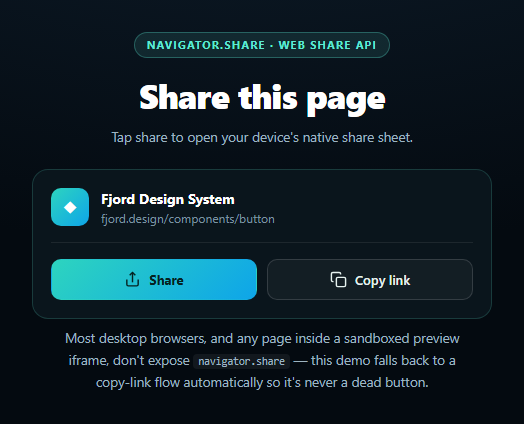
The Web Share Button calls the real navigator.share() API to hand a title, text, and URL off to the operating system's native share sheet — the same picker a user sees sharing from a mobile app. The catch is that support is narrow: most desktop browsers never implemented it, it typically requires a secure context and a direct user gesture, and it's routinely unavailable inside a sandboxed preview iframe like the one rendering this demo. Rather than pretend that away, this snippet treats the missing case as the expected one and builds a full three-layer fallback so the button is always useful.
Layer 1 — the real share sheet
attemptShare() first checks navigator.share exists (and, where present, that navigator.canShare(shareData) approves the payload) before calling it inside a try/catch. On success the OS share sheet opens with the page's title, text, and URL. A user backing out of that sheet throws an AbortError, which is treated as a normal cancellation, not an error state.
Layer 2 — Clipboard API copy
When navigator.share doesn't exist, or the real call fails for any other reason, control falls to copyLink(), which tries navigator.clipboard.writeText(). This is the path most desktop viewers — and anyone inside this sandboxed preview — will actually see run, so it gets first-class treatment: a checkmark-style "Copied!" state on the button, not just a console log.
Layer 3 — execCommand and manual select
If the Clipboard API itself is missing or throws (older browsers, or a clipboard-write permission denied by an iframe's permissions policy), manualCopyFallback() creates an off-screen input, selects its text, and calls the legacy document.execCommand('copy'). Only if that also fails does the status text ask the viewer to select and copy the URL by hand — the true last resort, reached only when every programmatic path has been exhausted.
Why this order matters
Each layer is honest about what actually ran: the status line names which path fired, rather than silently succeeding or silently failing. That mirrors the pattern in this library's canvas audio frequency bars snippet, which fails a denied getUserMedia call into a fully-functional simulated mode instead of a blank canvas — the same "real API first, dependable fallback always" philosophy. Pair this button with a copy button for a plain clipboard action, or a share modal and social share bar for platform-specific sharing.
Customizing it
Swap in your real title/text/url, style the copied state to match your brand, or gate the share button's visibility entirely behind 'share' in navigator if you'd rather only show the copy-link UI on unsupported browsers.
Build with AI
Build, Understand, Optimize, and Extend It With AI
Paste this snippet's HTML, CSS, and JS into an AI coding assistant like Claude and ask it to walk through the three-layer fallback chain — why the code checks navigator.share and, where available, navigator.canShare(shareData) before calling it, why an AbortError from a cancelled share sheet is handled differently from every other rejection, and why the Clipboard API fallback itself needs a further execCommand('copy') fallback rather than just failing. It's a good prompt for reasoning about real-world browser API support: ask which current browsers actually implement navigator.share, and why a sandboxed iframe (like the one likely rendering this very demo) so often blocks it. For extensions, ask it to add platform-specific share links (X/Twitter, email, SMS) as an additional fallback tier before the raw copy-link, or to persist a "recently shared" toast that doesn't block interaction. Treat the code less like a finished artifact and more like a starting point for a conversation.
Prompt to recreate it
Copy this into your AI assistant of choice to build the effect from scratch, or as a jumping-off point for your own variant:
Build a "Web Share Button" in plain HTML, CSS, and JavaScript — no libraries.

Requirements:
- A "Share" button that, when clicked, checks for navigator.share support (and navigator.canShare if present) before calling navigator.share({ title, text, url }) inside a try/catch, so it uses the browser's real native share sheet wherever supported.
- Handle the AbortError case specially: if the user cancels the native share sheet, show a "Share cancelled" status rather than treating it as a failure.
- CRITICAL: implement a full fallback chain, since navigator.share is unsupported on most desktop browsers and is commonly disabled inside sandboxed preview iframes (a likely scenario for wherever this demo renders). When navigator.share is missing or any other error occurs, fall back to a "Copy link" flow: try navigator.clipboard.writeText(url) first; if the Clipboard API itself is unavailable or throws, fall back further to creating a temporary off-screen input, selecting its text, and calling the legacy document.execCommand('copy'); if even that fails, show the raw URL in the status text and ask the user to copy it manually.
- A separate always-visible "Copy link" button that runs the same copy fallback chain directly, with a "Copied!" confirmation state (e.g. a checkmark and temporary label change) that reverts after a couple of seconds.
- A status text element that at every step clearly states which path actually ran (native share succeeded, share cancelled, copied via Clipboard API, copied via execCommand, or manual copy required) so a viewer understands why they're seeing a particular behavior rather than assuming the button is broken.
Want to tighten it up first? Run this prompt through the AI Prompt Studio to score it across 8 quality dimensions, catch anti-patterns, and tune the wording for Claude, ChatGPT, or Gemini before you paste it in.
Step by step
How to Use
- 1Paste HTML, CSS, and JSA page-preview card with Share and Copy link buttons renders.
- 2Click "Share" on a supporting deviceThe OS share sheet opens with the page's title and URL.
- 3Click "Share" elsewhereIt falls back automatically to copying the link instead.
- 4Click "Copy link" directlyClipboard API copies the URL; the button confirms with a checkmark.
- 5Read the status lineIt always names which path actually ran.
- 6Swap in your real URLEdit the shareData object's title, text, and url.
Real-world uses
Common Use Cases
Got questions?
Frequently Asked Questions
navigator.share() is unsupported on most desktop browsers (it shipped for mobile Safari and Chrome on Android/ChromeOS first) and it's commonly stripped from sandboxed preview iframes like the one rendering this demo, since the "web-share" permissions policy has to be explicitly allowed by the embedding page. When it's missing, the button automatically falls back to copying the link to your clipboard instead — check the status line, which names exactly which path ran.
navigator.share() rejects with an AbortError when the user dismisses the native share sheet without completing a share. This snippet treats that specific error as a normal cancellation — it updates the status text to "Share cancelled" and does not fall through to the copy-link fallback, since the share sheet itself worked correctly.
A share button that does nothing when unsupported looks broken. Copying the link is the closest equivalent action available everywhere: the visitor still ends up able to paste the URL wherever they'd have shared it. The fallback even has its own two layers — the modern Clipboard API first, then the legacy execCommand('copy') technique — so it keeps working even in older or more locked-down browsers.
Yes, in the sense that something always happens. Most sandboxed iframes block both the Web Share and Clipboard-write permissions by default, so you'll typically see the button fall all the way to the manual fallback, which selects the URL text and asks you to copy it by hand. That's expected behavior for this snippet, not a bug — it demonstrates the exact failure mode a real embedded deployment needs to handle.
Keep the shareData object as component state or props so the title/text/url reflect the current page. Wrap attemptShare and copyLink as event handlers bound to your framework's click bindings, and drive the "Copied!" label from a boolean state variable with a setTimeout reset instead of directly touching textContent. The capability checks (navigator.share, navigator.clipboard) work identically in any framework since they're plain browser APIs.