You Might Also Like
Learn Coding Visually
Learn to code with interactive, live-preview playgrounds — HTML, CSS, JavaScript, React & more.
 HTML Playground42 lessons · Click-based · Live preview
 CSS PlaygroundLearn CSS with a live editor
 JavaScript Playground60 lessons · DOM · Async · Canvas
 React PlaygroundLearn React with a live code editor
 GSAP PlaygroundLearn GSAP animation interactively
 SVG Playground44 lessons · shapes · paths · animation
 SCSS Playground45 lessons · Sass modules · tokens
 Tailwind PlaygroundLearn Tailwind CSS with a live editor
 Bootstrap 5 Playground50 lessons · live preview
Text-to-Speech Button — Free Web Speech API Read-Aloud Snippet
Text-to-Speech Button · Buttons · Plain HTML, CSS & JS · Live preview
What's included
Features
About this UI Snippet
Text-to-Speech Button — Native Read-Aloud With the Web Speech API
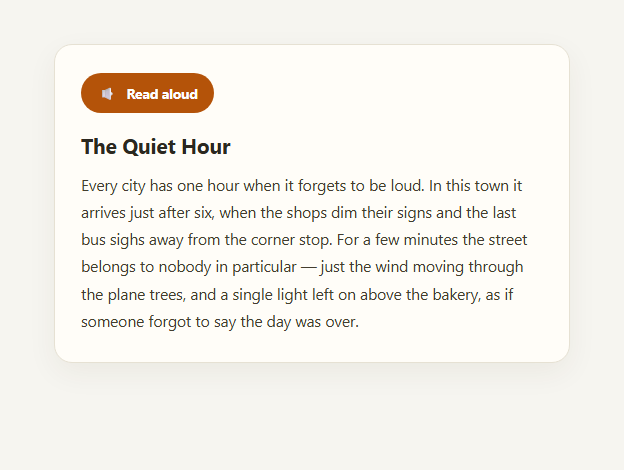
Every major browser ships a working text-to-speech engine for free, through the Web Speech API's speechSynthesis interface — no server round-trip, no paid API key, no audio file to generate. This snippet wires up a "Read aloud" button that speaks a paragraph using window.speechSynthesis and SpeechSynthesisUtterance, with real play/pause/stop states and a pulsing icon and live word highlight synced to the browser's own speech-boundary events, not a fake timer.
The actual API surface
speechSynthesis.speak(utterance) queues an utterance for the browser's speech engine; speechSynthesis.pause() and .resume() suspend and continue it mid-sentence (support for true pause/resume varies slightly by browser and voice, but is solid in current Chrome, Edge, and Safari); speechSynthesis.cancel() stops everything immediately. The utterance object itself fires onstart, onend, onerror, and — most usefully for a rich UI — onboundary, which the browser calls as it crosses each word or sentence boundary while speaking, carrying a charIndex and charLength into the original text.
Real-time word highlighting from onboundary
Rather than faking a highlight with a fixed-interval timer (which drifts out of sync with actual speech rate almost immediately), this snippet listens to utterance.onboundary and uses the event's charIndex/charLength to slice the exact word currently being spoken out of the original paragraph, wrapping it in a <span class="tts-word"> with a highlight background. Because the event fires from the browser's own speech engine, the highlight tracks the actual audio, not an approximation — the same technique used by karaoke-style read-along apps.
Honest handling of missing support
Not every browser or embedded webview implements speechSynthesis (some in-app browsers and older environments don't), so the script feature-detects 'speechSynthesis' in window && 'SpeechSynthesisUtterance' in window before wiring anything up, disables the button, and shows a clear inline message rather than silently failing or throwing when clicked. That kind of honest degradation matters more here than in most snippets, because a broken read-aloud button with no explanation is worse for accessibility than no button at all.
Where it fits alongside other accessibility affordances
Pair a read-aloud button with a dyslexia-friendly reading mode toggle and a text size adjuster for a genuinely useful reading-accessibility toolbar — some users benefit from hearing content while others benefit from font and spacing changes, and offering both costs little once you have this pattern in place. It also complements the live region announcer pattern, since the role="status" element here announces state changes ("Speaking…", "Paused", "Finished") to screen reader users the same way.
Build with AI
Build, Understand, Optimize, and Extend It With AI
Paste this snippet's HTML, CSS, and JS into an AI coding assistant like Claude and ask it to explain how the onboundary event's charIndex and charLength let the highlight track real speech timing instead of a guessed interval — that distinction is the core trick worth understanding before you extend this pattern. It's also a good prompt for building a voice picker: ask the assistant to add a select populated from speechSynthesis.getVoices(), handling the fact that the list can be empty until the voiceschanged event fires. You could ask it to add a reading-speed slider bound to utterance.rate, or to make the highlight scroll the reading pane to keep the current word in view for very long passages. Treat the snippet as a working base for a fuller read-aloud feature rather than a finished, uneditable widget.
Prompt to recreate it
Copy this into your AI assistant of choice to build the effect from scratch, or as a jumping-off point for your own variant:
Build a "Read aloud" text-to-speech button in plain HTML, CSS, and JavaScript using the native Web Speech API (window.speechSynthesis and SpeechSynthesisUtterance) — no external library or API key.

Requirements:
- A button that starts speaking a paragraph of text when first clicked, and toggles between pause and resume on subsequent clicks while speech is active, using speechSynthesis.pause()/.resume() rather than cancel-and-restart.
- A separate stop control that immediately cancels speech via speechSynthesis.cancel() and resets all UI state.
- A visual "speaking" indicator (such as a pulsing icon) that is only active while speech.speaking is true, driven by the utterance's onstart and onend events rather than a fixed timer.
- Real-time word highlighting: listen to the utterance's onboundary event and use its charIndex/charLength to highlight the exact word currently being spoken within the source paragraph, so the highlight is synced to actual speech progress, not a fake interval.
- A role="status" live region that announces state changes like "Speaking...", "Paused", and "Finished" for screen reader users.
- Feature-detect 'speechSynthesis' in window and 'SpeechSynthesisUtterance' in window before wiring anything up; if unsupported, disable the button and show a clear plain-language message explaining that this browser doesn't support read-aloud, rather than failing silently or throwing when clicked.
- Cancel any in-flight speech on page unload to avoid audio continuing after navigation.
Want to tighten it up first? Run this prompt through the AI Prompt Studio to score it across 8 quality dimensions, catch anti-patterns, and tune the wording for Claude, ChatGPT, or Gemini before you paste it in.
Step by step
How to Use
- 1Click "Read aloud"The browser's speech engine starts reading the paragraph; the icon pulses.
- 2Watch the word highlightEach word highlights as it's spoken, driven by the utterance's boundary events.
- 3Click the button againIt pauses mid-sentence; the label switches to "Resume".
- 4Click "Stop"Speech cancels immediately and the highlight clears.
- 5Try it with speech unsupportedFeature detection disables the button and shows a plain-language notice instead of failing silently.
- 6Swap in your own textReplace #readerText's content — the JS re-reads it via textContent on each speak().
Real-world uses
Common Use Cases
Got questions?
Frequently Asked Questions
No — it uses the browser's built-in Web Speech API (window.speechSynthesis), which is a native browser feature with no network request, no API key, and no per-character cost. The voice quality depends on what the operating system and browser provide, which varies but is generally solid on current Chrome, Edge, Safari, and Firefox.
It listens to the utterance's onboundary event, which the browser's own speech engine fires as it crosses each word boundary while actually speaking, carrying the exact character index and length of that word. The highlight uses those values to slice the real word out of the source text, so it tracks the actual audio rather than an approximated fixed-interval timer that would drift.
The script checks for 'speechSynthesis' in window and 'SpeechSynthesisUtterance' in window before wiring up any listeners. If either is missing, the button is disabled and a plain-language notice explains that read-aloud isn't available in this browser, rather than the button silently doing nothing or throwing an error when clicked.
Yes — true mid-utterance pause and resume is well supported in current Chrome, Edge, and Safari, but some browser/voice combinations may resume from a slightly different point or, in rare older cases, restart the utterance instead of truly resuming. It's worth testing pause/resume specifically in your target browsers if that exact behavior matters for your use case.
Yes — set utterance.rate (0.1 to 10, default 1), utterance.pitch (0 to 2, default 1), and utterance.voice to one of the SpeechSynthesisVoice objects returned by speechSynthesis.getVoices() (note getVoices() can return an empty array until the voiceschanged event fires the first time in some browsers).