Source Code
<div class="ss-card">
  <div class="ss-pre">Share this article</div>
  <h3 class="ss-title">Designing Delightful Micro-Interactions</h3>

  <div class="ss-row">
    <button class="ss-btn x" data-label="Post on X" onclick="share('x')" aria-label="Post on X">
      <svg viewBox="0 0 24 24" width="18" height="18" fill="#fff"><path d="M18.9 2H22l-7 8 8.2 12h-6.4l-5-7.3L6 22H2.9l7.5-8.6L2 2h6.6l4.6 6.7L18.9 2zm-1.1 18h1.7L7.3 3.8H5.5L17.8 20z"/></svg>
    </button>
    <button class="ss-btn fb" data-label="Share on Facebook" onclick="share('fb')" aria-label="Share on Facebook">
      <svg viewBox="0 0 24 24" width="20" height="20" fill="#fff"><path d="M14 8.5h2V6h-2c-1.9 0-3.2 1.3-3.2 3.3V11H9v2.5h1.8V21h2.6v-7.5h2.1l.5-2.5h-2.6V9.5c0-.6.3-1 1-1z"/></svg>
    </button>
    <button class="ss-btn li" data-label="Share on LinkedIn" onclick="share('li')" aria-label="Share on LinkedIn">
      <svg viewBox="0 0 24 24" width="18" height="18" fill="#fff"><path d="M6.5 8.3A1.65 1.65 0 1 0 6.5 5a1.65 1.65 0 0 0 0 3.3zM5.2 9.7H8V19H5.2zM10 9.7h2.6v1.3c.4-.7 1.4-1.5 3-1.5 2.5 0 3.2 1.6 3.2 3.9V19h-2.8v-5c0-1.1-.4-1.9-1.5-1.9-1 0-1.6.7-1.6 1.9V19H10z"/></svg>
    </button>
    <button class="ss-btn wa" data-label="Send on WhatsApp" onclick="share('wa')" aria-label="Send on WhatsApp">
      <svg viewBox="0 0 24 24" width="19" height="19" fill="none" stroke="#fff" stroke-width="2" stroke-linecap="round" stroke-linejoin="round"><path d="M12 3a9 9 0 0 0-7.7 13.7L3 21l4.5-1.2A9 9 0 1 0 12 3z"/><path d="M8.5 9.5c0 3.3 2.7 6 6 6"/></svg>
    </button>
  </div>

  <div class="ss-copy">
    <input class="ss-url" id="ssUrl" readonly value="https://fwdtools.com/ui-snippets/" onclick="this.select()">
    <button class="ss-copybtn" id="ssCopyBtn" onclick="copyLink()">Copy link</button>
  </div>
</div>*{box-sizing:border-box;margin:0;padding:0}
body{font-family:system-ui,-apple-system,sans-serif;background:#f1f5f9;min-height:100vh;display:flex;align-items:center;justify-content:center;padding:24px}
.ss-card{background:#fff;border:1px solid #e2e8f0;border-radius:16px;padding:24px;width:100%;max-width:360px;box-shadow:0 14px 44px rgba(15,23,42,.07)}
.ss-pre{font-size:11px;font-weight:700;color:#94a3b8;text-transform:uppercase;letter-spacing:.06em}
.ss-title{font-size:18px;font-weight:800;color:#1e293b;margin:6px 0 18px;line-height:1.3}
.ss-row{display:flex;gap:12px;margin-bottom:18px}
.ss-btn{position:relative;width:48px;height:48px;border-radius:14px;border:none;cursor:pointer;display:flex;align-items:center;justify-content:center;transition:transform .15s,box-shadow .15s;flex:1}
.ss-btn:hover{transform:translateY(-4px)}
.ss-btn:active{transform:translateY(-1px) scale(.96)}
.ss-btn.x{background:#0f172a;box-shadow:0 6px 16px rgba(15,23,42,.3)}
.ss-btn.fb{background:#1877f2;box-shadow:0 6px 16px rgba(24,119,242,.35)}
.ss-btn.li{background:#0a66c2;box-shadow:0 6px 16px rgba(10,102,194,.35)}
.ss-btn.wa{background:#25d366;box-shadow:0 6px 16px rgba(37,211,102,.35)}
.ss-btn::after{content:attr(data-label);position:absolute;bottom:calc(100% + 8px);left:50%;transform:translateX(-50%);background:#1e293b;color:#fff;font-size:11px;font-weight:600;padding:4px 8px;border-radius:6px;white-space:nowrap;opacity:0;pointer-events:none;transition:opacity .15s}
.ss-btn:hover::after{opacity:1}
.ss-copy{display:flex;gap:8px;background:#f8fafc;border:1px solid #e2e8f0;border-radius:11px;padding:5px 5px 5px 12px;align-items:center}
.ss-url{flex:1;min-width:0;border:none;background:none;outline:none;font-size:12px;color:#64748b;font-family:inherit;text-overflow:ellipsis}
.ss-copybtn{background:#6366f1;color:#fff;border:none;border-radius:8px;padding:9px 14px;font-size:12px;font-weight:700;cursor:pointer;font-family:inherit;white-space:nowrap;transition:background .15s}
.ss-copybtn:hover{background:#4f46e5}
.ss-copybtn.done{background:#10b981}function shareUrl(net) {
var url = encodeURIComponent(document.getElementById('ssUrl').value);
var text = encodeURIComponent('Designing Delightful Micro-Interactions');
if (net === 'x') return 'https://twitter.com/intent/tweet?url=' + url + '&text=' + text;
if (net === 'fb') return 'https://www.facebook.com/sharer/sharer.php?u=' + url;
if (net === 'li') return 'https://www.linkedin.com/sharing/share-offsite/?url=' + url;
if (net === 'wa') return 'https://wa.me/?text=' + text + '%20' + url;
return '#';
}
function share(net) {
window.open(shareUrl(net), '_blank', 'noopener,width=600,height=520');
}
function copyLink() {
var input = document.getElementById('ssUrl');
var btn = document.getElementById('ssCopyBtn');
var done = function () {
btn.textContent = 'Copied ✓';
btn.classList.add('done');
setTimeout(function () { btn.textContent = 'Copy link'; btn.classList.remove('done'); }, 1600);
};
if (navigator.clipboard && navigator.clipboard.writeText) {
navigator.clipboard.writeText(input.value).then(done).catch(fallback);
} else {
fallback();
}
function fallback() {
input.select();
try { document.execCommand('copy'); } catch (e) {}
done();
}
}Learn Coding Visually
Learn to code with interactive, live-preview playgrounds — HTML, CSS, JavaScript, React & more.
 HTML Playground42 lessons · Click-based · Live preview
 CSS PlaygroundLearn CSS with a live editor
 JavaScript Playground60 lessons · DOM · Async · Canvas
 React PlaygroundLearn React with a live code editor
 GSAP PlaygroundLearn GSAP animation interactively
 SVG Playground44 lessons · shapes · paths · animation
 SCSS Playground45 lessons · Sass modules · tokens
 Tailwind PlaygroundLearn Tailwind CSS with a live editor
 Bootstrap 5 Playground50 lessons · live preview
Social Share Bar — Share Buttons HTML CSS JS Snippet
Social Share Bar · Navigation · Plain HTML, CSS & JS · Live preview
What's included
Features
shareUrl builds X/Facebook/LinkedIn/WhatsApp share-intent links with escaped URL and title — no platform SDKs or trackers.share opens a sized popup with noopener, preventing the opened page from accessing your window.attr(data-label) tooltip, naming each action without extra markup.copyLink uses navigator.clipboard.writeText for one-click copying of the share URL.document.execCommand('copy').shareUrl — the rest of the bar is unchanged.About this UI Snippet
Social Share Bar — Brand Buttons, Share-Intent URLs & Copy-Link With Feedback
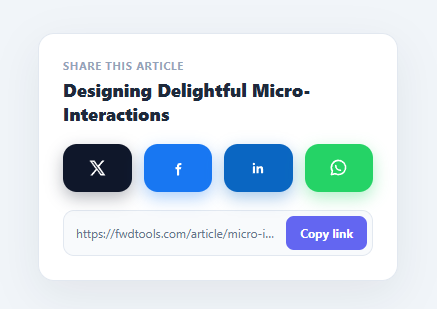
Making content easy to share is one of the cheapest growth levers there is, and a polished share bar removes the friction. This snippet implements one in plain HTML, CSS, and vanilla JavaScript: brand-coloured buttons for X, Facebook, LinkedIn, and WhatsApp that open the real share-intent dialogs, hover tooltips, and a copy-link field with copied feedback and a clipboard fallback.
Real share-intent URLs (no SDKs)
You do not need each platform's heavy JavaScript SDK to share a link — every major network exposes a share-intent URL. shareUrl builds them: X uses twitter.com/intent/tweet, Facebook sharer.php, LinkedIn sharing/share-offsite, and WhatsApp wa.me/?text=, each with the page URL and title encodeURIComponent-escaped. share opens the chosen one in a sized popup with noopener for security. No tracking scripts, no third-party bundles, no privacy cost — just a link.
Brand-correct, tactile buttons
Each button carries its platform's brand colour and a matching coloured shadow, with the icon as inline SVG (so there are no external image requests). On hover they lift (translateY) and reveal a CSS-only tooltip via content: attr(data-label) — "Post on X", "Send on WhatsApp" — so the action is explicit. The lift and tooltip are transform/opacity transitions, which stay smooth and export cleanly.
Copy-link with robust fallback
The copy field shows the URL and a Copy button. copyLink uses the modern navigator.clipboard.writeText API and, if it is unavailable or rejected (older browsers, insecure contexts, or sandboxed iframes), falls back to selecting the input and running document.execCommand('copy'). Either way the button confirms with "Copied ✓" and a green state for 1.6 seconds, then resets — the feedback that tells users the link is actually on their clipboard. Clicking the URL field also selects its text for manual copy.
Why no third-party scripts matter
Most "share" widgets pull in each network's JavaScript SDK, which adds hundreds of kilobytes, blocks rendering, sets cookies, and lets the platform track every visitor who merely loads the page — not just those who share. Share-intent URLs need none of that: they are plain links the browser opens, so the page stays fast and private and there is nothing to consent to. This snippet deliberately uses that approach, which is both better for Core Web Vitals and friendlier to privacy regulations.
Drop-in and configurable
Point the ssUrl value and the title in shareUrl at your real page (or set them dynamically from location.href and document.title) and the whole bar works. Add or remove networks by adding a button and a branch in shareUrl — the brand colour comes from a single CSS class, so a new platform is a button, a colour, and one line of URL logic. Pair this with an article card or blog layout, a copy button for code/links, or a QR code generator for offline sharing.
Build with AI
Build, Understand, Optimize, and Extend It With AI
You don't have to work out the URL-escaping and fallback logic by hand. Paste this snippet's HTML, CSS, and JS into an AI coding assistant like Claude and ask it to explain exactly why each network's share-intent URL is built with encodeURIComponent rather than plain string concatenation, or why copyLink tries navigator.clipboard.writeText first and only falls back to document.execCommand('copy') on failure rather than the other way around. The same assistant can help optimize it, for instance checking whether the popup window dimensions passed to window.open are sensible across every listed network's actual share dialog size. It is just as useful for extending the bar: ask it to add the native Web Share API as a mobile-first option that supersedes the button row when navigator.share exists, add Reddit or Telegram as additional networks, or make ssUrl and the shared title dynamically reflect the current page via location.href and document.title instead of hardcoded values. Treat the code less like a finished artifact and more like a starting point for a conversation.
Prompt to recreate it
Copy this into your AI assistant of choice to build the effect from scratch, or as a jumping-off point for your own variant:
Build a "social share bar" with brand-colored network buttons and a copy-link field in plain HTML, CSS, and JavaScript — no SDKs, no third-party scripts.

Requirements:
- At least four share buttons (e.g. X, Facebook, LinkedIn, WhatsApp), each with its platform's real brand color as its background and an inline SVG logo — no external image requests for the icons.
- A function that builds each network's real share-intent URL by hand (the plain URL format each platform documents for sharing, like a tweet-intent or sharer.php URL), with the page URL and share text both passed through encodeURIComponent so special characters in the URL or title never break the query string.
- Clicking a share button must open its intent URL in a new popup window sized to a reasonable fixed width and height, and the window.open call must include the noopener flag so the opened page cannot access or manipulate the original window.
- Each share button must show a CSS-only tooltip on hover naming the exact action (e.g. "Post on X"), implemented via a ::after pseudo-element reading a data-label attribute, with no extra tooltip markup.
- A read-only text input showing the page URL, clicking which selects all its text, plus a "Copy link" button. The copy handler must first attempt navigator.clipboard.writeText, and only if that API is unavailable or its promise rejects, fall back to selecting the input's text and calling document.execCommand("copy").
- After a successful copy (through either path), the button must visually confirm with different text and a different background color for roughly 1.5 to 2 seconds before automatically reverting to its original label and color.
Want to tighten it up first? Run this prompt through the AI Prompt Studio to score it across 8 quality dimensions, catch anti-patterns, and tune the wording for Claude, ChatGPT, or Gemini before you paste it in.
Step by step
How to Use
- 1Paste HTML, CSS, and JSA share card appears with four brand buttons (X, Facebook, LinkedIn, WhatsApp) and a copy-link field below.
- 2Hover a buttonEach button lifts and shows a tooltip like "Share on LinkedIn", so the action is clear before clicking.
- 3Click to shareClicking opens the platform's real share dialog in a popup, pre-filled with the page URL and title.
- 4Copy the linkClick "Copy link" — the URL is copied to the clipboard and the button confirms "Copied ✓" in green for ~1.6s.
- 5Select the URLClick the URL field to select its text for manual copying on browsers that block programmatic copy.
- 6Point it at your pageSet the
ssUrlvalue and the title inshareUrl(or readlocation.href/document.title) to share the real page.
Real-world uses
Common Use Cases
Got questions?
Frequently Asked Questions
Set the URL field value to location.href and the title in shareUrl to document.title (or an Open Graph title) on load. For dynamic SPAs, read them at click time inside share so the link reflects the current route. Ensure your page has proper og:title/og:image meta tags so the shared preview looks good — the share intent only passes the URL; the platform fetches the rest.
No. Share-intent URLs (sharer.php, intent/tweet, share-offsite, wa.me) work without any SDK, script tag, or app id, and they avoid the privacy and performance cost of loading third-party JavaScript. SDKs are only needed for richer integrations like login or in-page feeds, not for a simple "share this link" button.
navigator.clipboard requires a secure context (HTTPS) and can be unavailable or blocked in some iframes and older browsers. The document.execCommand('copy') fallback (select the input, then copy) keeps the button working in those environments. The snippet tries the modern API first and only falls back if it is missing or rejects.
On mobile, the Web Share API gives the OS share sheet: add a button that calls navigator.share({ title, url }) when navigator.share exists, and fall back to this bar otherwise. The native sheet lets users pick any installed app (Messages, Telegram, email) and is the preferred experience on phones.
In React, map a config array of networks to buttons, build the intent URL in an onClick, and manage the "Copied" state with useState plus a setTimeout. In Vue, use a method per action and a ref for the copied flag. In Angular, methods on the component with a boolean for feedback. The share-intent URLs and copy logic port unchanged.