You Might Also Like
Learn Coding Visually
Learn to code with interactive, live-preview playgrounds — HTML, CSS, JavaScript, React & more.
 HTML Playground42 lessons · Click-based · Live preview
 CSS PlaygroundLearn CSS with a live editor
 JavaScript Playground60 lessons · DOM · Async · Canvas
 React PlaygroundLearn React with a live code editor
 GSAP PlaygroundLearn GSAP animation interactively
 SVG Playground44 lessons · shapes · paths · animation
 SCSS Playground45 lessons · Sass modules · tokens
 Tailwind PlaygroundLearn Tailwind CSS with a live editor
 Bootstrap 5 Playground50 lessons · live preview
App Badge API Demo — Free navigator.setAppBadge with On-Page Mock
App Badge API Demo · Buttons · Plain HTML, CSS & JS · Live preview
What's included
Features
About this UI Snippet
App Badge API Demo — Real setAppBadge Plus a Mock You Can Actually See
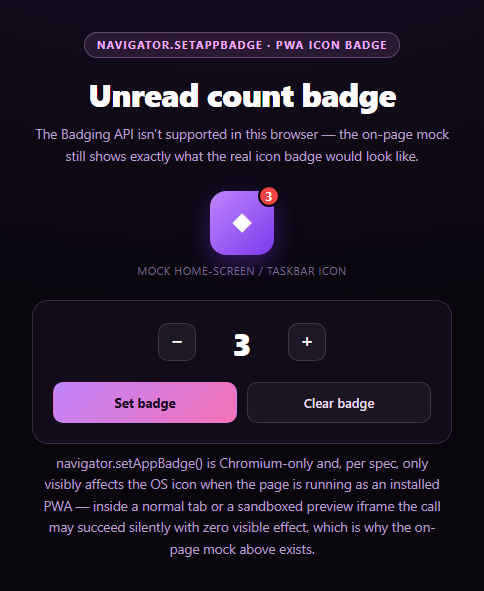
The Badging API's navigator.setAppBadge(count) puts a small number on a Progressive Web App's home-screen or taskbar icon — the same kind of unread-count indicator native mail and messaging apps have shown for years. This snippet calls the real API, but it's built around an unusual honesty problem: even when the call succeeds perfectly, it's often completely invisible to whoever is looking at the demo, because badging only affects a page's OS-level icon, and this demo is neither installed nor, in most cases, being viewed as a PWA at all.
The real call, made honestly
setBadge() calls navigator.setAppBadge(count) for a positive count or navigator.clearAppBadge() at zero, behind a 'setAppBadge' in navigator capability check and a try/catch. Critically, a successful resolution here does not mean you'll see anything — the spec allows the call to succeed with zero visible effect if the page isn't running as an installed, standalone PWA. That's not a bug to work around; it's the API behaving exactly as designed, and the status text says so explicitly rather than declaring false success.
A mock that makes the invisible visible
Because the real effect is so often unobservable in a demo context, an on-page mock icon with its own badge overlay mirrors the count at all times, updated by syncMock() independent of whether the real API call succeeds, fails, or doesn't exist. This is the actual point of the snippet: it lets you understand and preview what setAppBadge(3) would put on a real taskbar icon, without needing to install anything.
Support is narrow, so the mock isn't optional
The Badging API is implemented only in Chromium-based browsers, and even there it requires the page to be an installed, standalone-display-mode PWA to have any visible effect — a plain browser tab, and especially a sandboxed preview iframe like the one likely rendering this demo, will never show a badge no matter how correctly the code calls the API. Building the mock as a first-class, always-functional part of the UI (rather than an apologetic fallback) is what keeps this demo meaningful. It follows the same principle as this library's canvas audio frequency bars snippet: assume the real capability might be invisible or unavailable, and make sure there's still something genuinely useful on screen.
Counting up and down
The +/− stepper is entirely independent of the API call — you can freely adjust the count and only commit it to setAppBadge/the mock when you click "Set badge," which keeps the demo's two concerns (choosing a number, and badging with it) cleanly separated. Pair this with a status pill for a non-PWA unread indicator, or a notification permission prompt for the companion notifications feature.
Customizing it
Wire the count to a real unread-messages or pending-tasks total, call setAppBadge without an argument for a flag-only badge (no number, just a dot), or debounce calls if the count changes frequently.
Build with AI
Build, Understand, Optimize, and Extend It With AI
Paste this snippet's HTML, CSS, and JS into an AI coding assistant like Claude and ask it to explain the specific honesty problem this demo solves: why a successful navigator.setAppBadge() call can have zero visible effect, and why that's spec-compliant behavior tied to whether the page is running as an installed standalone PWA rather than a bug. It's a useful prompt for reasoning about "invisible success" states in browser APIs generally — ask what other APIs behave this way (succeed technically, but only matter in a context the demo can't reproduce) and how you'd design a UI around each one. For extensions, ask it to add a toggle simulating "installed" vs "not installed" mode that changes which messaging is shown, wire the count to a real data source like unread messages in a chat demo, or add support for the flag-only badge (calling setAppBadge with no argument). Treat the code less like a finished artifact and more like a starting point for a conversation.
Prompt to recreate it
Copy this into your AI assistant of choice to build the effect from scratch, or as a jumping-off point for your own variant:
Build an "App Badge API Demo" in plain HTML, CSS, and JavaScript — no libraries.

Requirements:
- A mock app icon element (a rounded square with a glyph) with a small overlaid badge showing a count, positioned like a real home-screen/taskbar app badge, hidden entirely when the count is zero.
- A +/− stepper with a numeric display that lets the user adjust a count value independently before committing it.
- A "Set badge" button that, when clicked: (1) always updates the on-page mock icon's badge to match the current count regardless of anything else, and (2) checks 'setAppBadge' in navigator, and if present, calls navigator.setAppBadge(count) (or navigator.clearAppBadge() if count is zero) inside a try/catch.
- CRITICAL: the status message after calling the real API must be honest about a key spec behavior — setAppBadge() can resolve successfully with absolutely no visible effect if the page is not currently running as an installed, standalone-display-mode Progressive Web App (which is the case for essentially every viewer of this demo, especially if it's rendered inside a sandboxed preview iframe). The status text should explain that a successful call was made but likely isn't visible anywhere except the on-page mock, rather than implying the real OS icon badge was definitely shown.
- A "Clear badge" button that resets the count to zero, clears the mock icon's badge, and calls navigator.clearAppBadge() if supported.
- Handle the case where the Badging API doesn't exist at all (most non-Chromium browsers) by clearly stating that in the status line while still keeping the on-page mock icon fully functional as the primary way to see the effect of any count change.
Want to tighten it up first? Run this prompt through the AI Prompt Studio to score it across 8 quality dimensions, catch anti-patterns, and tune the wording for Claude, ChatGPT, or Gemini before you paste it in.
Step by step
How to Use
- 1Paste HTML, CSS, and JSA mock app icon and a count stepper render.
- 2Adjust the count with +/−The stepper number updates independent of the badge.
- 3Click "Set badge"Calls the real setAppBadge() and updates the mock icon.
- 4Check the status lineIt explains whether the real badge would actually be visible.
- 5Click "Clear badge"Resets the count and clears both the real and mock badge.
- 6Install as a PWA to see it for realOnly then does the OS icon actually show the badge.
Real-world uses
Common Use Cases
Got questions?
Frequently Asked Questions
navigator.setAppBadge() only has a visible effect when the page is running as an installed, standalone Progressive Web App — a badge set from a regular browser tab, or from inside a sandboxed preview iframe like the one likely rendering this demo, can succeed at the JavaScript level with zero visible result, because there's no home-screen or taskbar icon for the operating system to badge. That's exactly why the on-page mock icon exists: it shows you what the real badge would look like.
No — the Badging API is implemented only in Chromium-based browsers (Chrome, Edge, Opera) and has no support in Firefox or Safari as of this writing. This snippet checks 'setAppBadge' in navigator before calling it and clearly states in the status line when the API is unavailable, while the on-page mock keeps working identically either way.
You'd need to install this page as a PWA (which requires a real web app manifest and, typically, a service worker — beyond what a single-file demo provides) and open it in its own installed window rather than a browser tab. Only then does the operating system have an actual icon to place the badge number on, whether that's a taskbar icon on desktop or a home-screen icon on Android.
setAppBadge(count) sets a specific number badge (or a flag-style dot if called with no argument at all) on the installed app's icon. clearAppBadge() removes it entirely, equivalent to calling setAppBadge(0) in most implementations. This snippet calls clearAppBadge() automatically whenever the stepper count reaches zero and "Set badge" is clicked, keeping the two functions' behavior consistent with the spec.
Bind the count to component state driven by your +/− buttons, and call the same setBadge/clearBadge logic — the capability check, try/catch, and mock-icon sync — from your framework's click handlers. Since the real effect is entirely OS-level and outside the DOM, there's nothing framework-specific to worry about beyond keeping the mock icon's rendered count in sync with your state.