You Might Also Like
Learn Coding Visually
Learn to code with interactive, live-preview playgrounds — HTML, CSS, JavaScript, React & more.
 HTML Playground42 lessons · Click-based · Live preview
 CSS PlaygroundLearn CSS with a live editor
 JavaScript Playground60 lessons · DOM · Async · Canvas
 React PlaygroundLearn React with a live code editor
 GSAP PlaygroundLearn GSAP animation interactively
 SVG Playground44 lessons · shapes · paths · animation
 SCSS Playground45 lessons · Sass modules · tokens
 Tailwind PlaygroundLearn Tailwind CSS with a live editor
 Bootstrap 5 Playground50 lessons · live preview
Local Font Access Picker — Free queryLocalFonts with Curated Fallback
Local Font Access Picker · Buttons · Plain HTML, CSS & JS · Live preview
What's included
Features
About this UI Snippet
Local Font Access Picker — Real System Fonts, or a Curated List in the Same UI
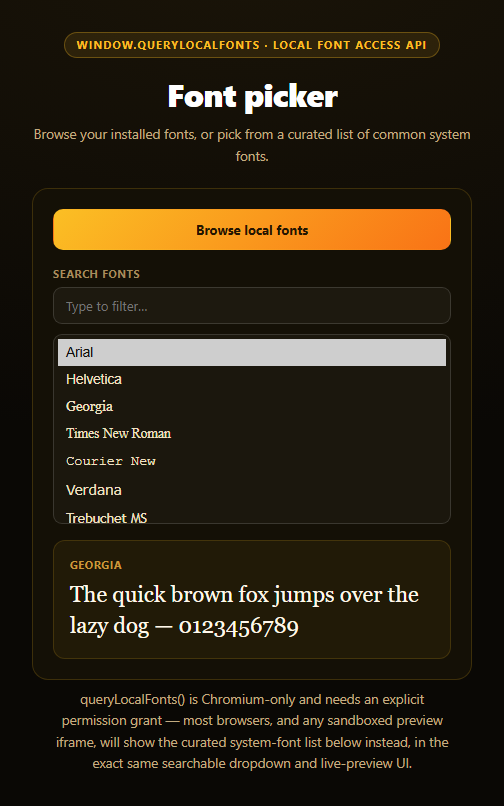
The Local Font Access API's window.queryLocalFonts() lets a page enumerate every font actually installed on a user's device — design tools and creative software are the obvious use case. It's also one of the most tightly gated capabilities available to the web: Chromium-only, behind an explicit permission prompt, and disabled by default inside most embedded and sandboxed contexts. This snippet's design goal is that the picker UI — search box, list, live preview — looks and behaves identically whether it's listing your real fonts or a curated fallback.
The real enumeration path
browseLocalFonts() checks 'queryLocalFonts' in window before calling it, wrapped in a try/catch since the call can reject with a NotAllowedError if the permission prompt is denied. On success, it deduplicates the returned FontData array by family name, sorts it alphabetically, and repopulates the same <select> and preview elements the curated list uses — there's no separate "real font" rendering path.
A curated list that's a real feature, not an apology
CURATED_FONTS is a hand-picked set of the common cross-platform system font stacks — Arial, Georgia, Times New Roman, Courier New, Verdana, and others — each paired with a proper CSS fallback stack ('Times New Roman', Times, serif) so they render sensibly even on a device that happens to lack the exact named font. This list populates the picker by default and stays fully searchable, filterable, and previewable, because for the overwhelming majority of visitors — anyone not on a permission-granted Chromium session — this curated list *is* the font picker, not a degraded stand-in for one.
One rendering path, two data sources
populateSelect() and applyPreview() don't know or care whether allFonts currently holds real queryLocalFonts() results or the curated defaults — both paths funnel through the identical functions, the same discipline used in this library's canvas audio frequency bars snippet, where simulated and real audio data drive one shared drawing routine. That's what keeps the two modes visually indistinguishable.
Live preview, either way
Selecting any font — real or curated — immediately updates a sample sentence's font-family, giving instant visual feedback. Searching filters the currently active list (real or curated) by substring match against the font name. Pair this with a dark mode toggle for a settings panel, or a native popover API demo for the picker's dropdown behavior pattern.
Customizing it
Expand the curated list with more web-safe stacks, group fonts by category (serif/sans/mono), or add a "download from Google Fonts" fallback tier for names the curated list doesn't cover.
Build with AI
Build, Understand, Optimize, and Extend It With AI
Paste this snippet's HTML, CSS, and JS into an AI coding assistant like Claude and ask it to explain why the curated fallback font list is built to be a fully-featured, equally-weighted picker experience rather than a degraded placeholder — and why both the real queryLocalFonts() results and the curated defaults are funneled through the exact same populateSelect/applyPreview functions instead of separate rendering code paths. It's a good prompt for reasoning about privacy-sensitive browser APIs generally — ask why enumerating installed fonts is treated as a meaningful fingerprinting risk requiring an explicit permission prompt, unlike most other CSS or DOM capabilities. For extensions, ask it to add font categorization (serif/sans-serif/monospace/display) as filterable tabs, persist the last-selected font in localStorage, or add a font-weight and font-style selector alongside the family picker. Treat the code less like a finished artifact and more like a starting point for a conversation.
Prompt to recreate it
Copy this into your AI assistant of choice to build the effect from scratch, or as a jumping-off point for your own variant:
Build a "Local Font Access Picker" in plain HTML, CSS, and JavaScript — no libraries.

Requirements:
- A "Browse local fonts" button, a search input, a scrollable list/select of font names, and a live preview area showing sample text rendered in the currently selected font.
- Define a curated array of at least ten common cross-platform system font names (Arial, Georgia, Times New Roman, Courier New, Verdana, Segoe UI, Trebuchet MS, Tahoma, Palatino, Impact, etc.), each paired with a proper CSS font-family fallback stack, and populate the list and preview from this array by default so the picker is fully functional immediately on load with zero permissions needed.
- The Browse button should check 'queryLocalFonts' in window before calling it, then call window.queryLocalFonts() inside a try/catch. On success, deduplicate the returned font data by family name, sort alphabetically, and replace the active font list with the real results, re-rendering through the exact same list-population and preview functions the curated list uses (do not create a separate rendering path for real vs. curated fonts).
- CRITICAL: since queryLocalFonts() is Chromium-only, permission-gated, and commonly blocked entirely inside a sandboxed preview iframe (a likely scenario for wherever this demo renders), handle every failure case — API missing, permission denied, or any thrown error — by leaving the curated list active and showing a specific status message explaining why real fonts weren't loaded, without ever leaving the picker non-functional or empty.
- The search input should filter whichever font list is currently active (real or curated) by a case-insensitive substring match on the font name, and selecting any font in the list should immediately update the preview text's font-family to match.
Want to tighten it up first? Run this prompt through the AI Prompt Studio to score it across 8 quality dimensions, catch anti-patterns, and tune the wording for Claude, ChatGPT, or Gemini before you paste it in.
Step by step
How to Use
- 1Paste HTML, CSS, and JSA searchable dropdown of curated system fonts renders with a live preview.
- 2Click "Browse local fonts"On Chromium with permission granted, real installed fonts load instead.
- 3Search the listFilters whichever font source is currently active.
- 4Select a fontThe sample sentence's font-family updates immediately.
- 5Deny or lack the permissionThe status explains it and the curated list stays fully usable.
- 6Swap in your own sample textEdit the preview paragraph to test your own copy.
Real-world uses
Common Use Cases
Got questions?
Frequently Asked Questions
window.queryLocalFonts() is implemented only in Chromium-based browsers and requires an explicit permission grant through a browser prompt — if it's unsupported, denied, or blocked (which is the common case inside a sandboxed preview iframe like the one likely rendering this demo, since the local-fonts permission is rarely granted to embedded frames), the picker simply keeps showing its curated list of common system fonts, which is a fully functional picker in its own right.
Browsers treat this as a meaningful privacy-sensitive permission, since your exact set of installed fonts can be used as a device fingerprinting signal. That's why queryLocalFonts() requires an explicit one-time permission prompt the user must actively approve, unlike most other font-related browser APIs, and why it's disabled by default in many embedded and sandboxed contexts.
The curated list includes common cross-platform system fonts like Arial, Georgia, Times New Roman, Courier New, Verdana, Segoe UI, and others that have shipped with Windows, macOS, or both for years, each paired with a proper CSS fallback stack. They were chosen because they're highly likely to render as intended regardless of the visitor's actual operating system, even without any font-detection capability at all.
No — the search input filters whichever list is currently active (allFonts) by a case-insensitive substring match against each font's name, using the exact same filtering and re-rendering logic regardless of whether that list holds real queryLocalFonts() results or the curated defaults. There's no separate code path for either source.
Keep the current font list and selected font in component state, and call the same queryLocalFonts()-checking logic from your "Browse" button's click handler, updating state on success instead of touching the DOM directly. Drive both the dropdown options and the live preview's font-family style from that same state so the two data sources (real and curated) continue to render through one shared path.