You Might Also Like
Learn Coding Visually
Learn to code with interactive, live-preview playgrounds — HTML, CSS, JavaScript, React & more.
 HTML Playground42 lessons · Click-based · Live preview
 CSS PlaygroundLearn CSS with a live editor
 JavaScript Playground60 lessons · DOM · Async · Canvas
 React PlaygroundLearn React with a live code editor
 GSAP PlaygroundLearn GSAP animation interactively
 SVG Playground44 lessons · shapes · paths · animation
 SCSS Playground45 lessons · Sass modules · tokens
 Tailwind PlaygroundLearn Tailwind CSS with a live editor
 Bootstrap 5 Playground50 lessons · live preview
Payment Request API Button — Free Native Checkout Sheet Demo
Payment Request API Button · Buttons · Plain HTML, CSS & JS · Live preview
What's included
Features
About this UI Snippet
Payment Request API Button — Real Payment Sheet, Honest Fallback
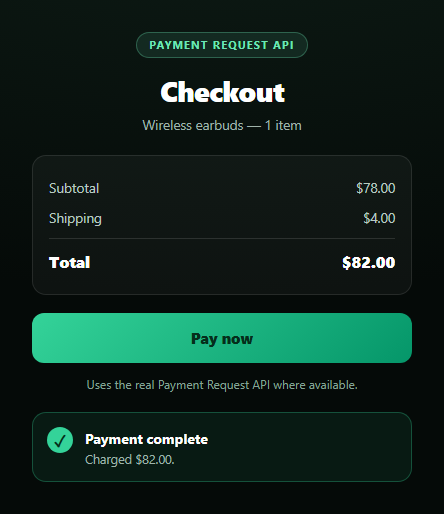
This snippet wires up the actual PaymentRequest constructor — the browser API behind the native "Pay" sheet you see on checkout pages that support Apple Pay, Google Pay, or saved cards — rather than faking that UI with a modal. Because that real sheet only appears under a narrow set of conditions, the button also ships a complete, well-designed mock checkout so the demo never looks stuck or broken, and the copy tells you plainly which path just ran.
What actually happens on click
handlePay() first checks 'PaymentRequest' in window. If present, it builds a methods array (here basic-card with supported networks) and a details object describing the total and line items, constructs new PaymentRequest(methods, details), optionally calls request.canMakePayment(), then calls request.show() — which is the line that, in a real HTTPS site with a supporting browser and a saved payment method, pops the OS-level payment sheet. On success, response.complete('success') closes the sheet and confirms the charge.
Why this almost always falls back
The Payment Request API is real, but it has hard requirements this snippet can't control: a secure context (HTTPS, never plain http:// or a srcdoc sandbox treated as opaque), a browser that still implements it (support has been narrowing as Chrome and others push toward the newer Payment Handler model), and — critically — at least one payment method actually registered on the device. None of those are guaranteed inside a sandboxed preview iframe, so request.show() typically rejects immediately, and the catch block routes into mockCheckout().
A fallback that looks intentional, not apologetic
mockCheckout() disables the button, shows a "Processing…" state, and after a short delay reveals a styled success card with a checkmark — the same visual weight a real completed payment would have. The status line underneath always states which path ran ("Simulating a card charge (no real API available here)…" vs. a live sheet), so nothing is silently faked without being disclosed.
Extending it for production
A production integration needs a real merchant account and server-side charge verification — response only tells the client that the browser collected payment details; the actual charge must be confirmed server-side with your payment processor. Pair the pattern with OTP verification for a full checkout flow, or passkey login for the authentication side of an account-based checkout.
Build with AI
Build, Understand, Optimize, and Extend It With AI
Paste this snippet's HTML, CSS, and JS into an AI coding assistant like Claude and ask it to explain exactly why request.show() requires a secure context and a registered payment method, and why that combination makes it almost certain to fail inside a sandboxed preview iframe even though the code is fully correct. It's also useful for reasoning about the fallback design — ask why the mock checkout matches the real success state's visual weight instead of showing an apologetic error message, and why the status line always discloses which path ran rather than silently faking a payment. For extensions, ask it to add support for multiple payment method identifiers, wire canMakePayment() into a pre-render check that hides the button entirely on unsupported browsers, or connect the real path to a specific payment processor's Payment Request integration docs. Treat the code less like a finished artifact and more like a starting point for a conversation.
Prompt to recreate it
Copy this into your AI assistant of choice to build the effect from scratch, or as a jumping-off point for your own variant:
Build a "Payment Request API button" in plain HTML, CSS, and JavaScript — no libraries.

Requirements:
- A checkout summary card (item, subtotal, shipping, total) and a "Pay now" button.
- On click, feature-detect with 'PaymentRequest' in window. If present, construct a real new PaymentRequest(methods, details) with a basic-card method and a details object matching the displayed total, optionally await request.canMakePayment(), then await request.show() and complete the response with response.complete('success') on success.
- CRITICAL: wrap the entire real payment attempt in try/catch, since request.show() will almost always fail in a demo/sandboxed context — it requires a secure HTTPS context, a supporting browser, and at least one registered payment method on the device. On ANY failure (unsupported API, insecure context, no payment method, user cancellation, or a blocked Permissions-Policy in a sandboxed iframe), fall back to a fully designed mock checkout: disable the button, show a brief "Processing…" state, then reveal a styled success confirmation card with a checkmark, exactly matching the visual weight the real payment success would have.
- A status text element that always states plainly which path just ran — the real native payment sheet or the simulated mock flow — so a viewer never wonders whether a real charge occurred.
- Never leave the button permanently disabled or the demo stuck loading regardless of which path executes.
Want to tighten it up first? Run this prompt through the AI Prompt Studio to score it across 8 quality dimensions, catch anti-patterns, and tune the wording for Claude, ChatGPT, or Gemini before you paste it in.
Step by step
How to Use
- 1Paste HTML, CSS, and JSA checkout summary and "Pay now" button render.
- 2Click "Pay now"The code checks for PaymentRequest support.
- 3On a supporting HTTPS site with a saved cardThe native payment sheet opens.
- 4In this sandboxed preview (or most browsers)It falls back to a mock checkout automatically.
- 5Read the status lineIt states plainly which path just ran.
- 6Watch the success cardA styled confirmation appears either way.
Real-world uses
Common Use Cases
Got questions?
Frequently Asked Questions
The real Payment Request API needs a secure (HTTPS) context, a browser that still implements the classic PaymentRequest sheet, and at least one payment method already registered on the device (a saved card, Apple Pay, Google Pay, etc). A sandboxed preview iframe typically fails at least one of these — often all three — so request.show() rejects and the code falls back to a fully designed mock checkout rather than leaving the button stuck.
No — the status text always states plainly which path just ran, e.g. "Simulating a card charge (no real API available here)" versus opening a live browser sheet. No money moves in either the real or mock path in this demo; production use requires server-side charge confirmation with an actual payment processor regardless of which client path fired.
Yes, and it has been shifting. Chromium browsers have historically had the widest support, Safari supports it primarily for Apple Pay, and some browsers are moving toward the newer Payment Handler model instead of the classic sheet. Always feature-detect with 'PaymentRequest' in window and test on your actual target browsers rather than assuming universal support.
It asks the browser whether it currently has at least one usable payment method matching what you requested, without showing any UI. This snippet awaits it before calling show() so it can throw a clear, catchable error ("no-payment-method") instead of opening a sheet that would have nothing to offer.
Register a merchant account with a payment processor that supports the Payment Request API (or Payment Handler), replace the basic-card method with your processor's supported method identifier and data, serve the page over HTTPS, and verify every charge server-side using the token or response your processor returns from response.complete() — never trust the client-side "success" alone.