You Might Also Like
Learn Coding Visually
Learn to code with interactive, live-preview playgrounds — HTML, CSS, JavaScript, React & more.
 HTML Playground42 lessons · Click-based · Live preview
 CSS PlaygroundLearn CSS with a live editor
 JavaScript Playground60 lessons · DOM · Async · Canvas
 React PlaygroundLearn React with a live code editor
 GSAP PlaygroundLearn GSAP animation interactively
 SVG Playground44 lessons · shapes · paths · animation
 SCSS Playground45 lessons · Sass modules · tokens
 Tailwind PlaygroundLearn Tailwind CSS with a live editor
 Bootstrap 5 Playground50 lessons · live preview
Vibration API Pattern Demo — Free navigator.vibrate() UI
Vibration API Pattern Demo · Buttons · Plain HTML, CSS & JS · Live preview
What's included
Features
About this UI Snippet
Vibration API Pattern Demo — Real Haptic Patterns With a Visible Twin
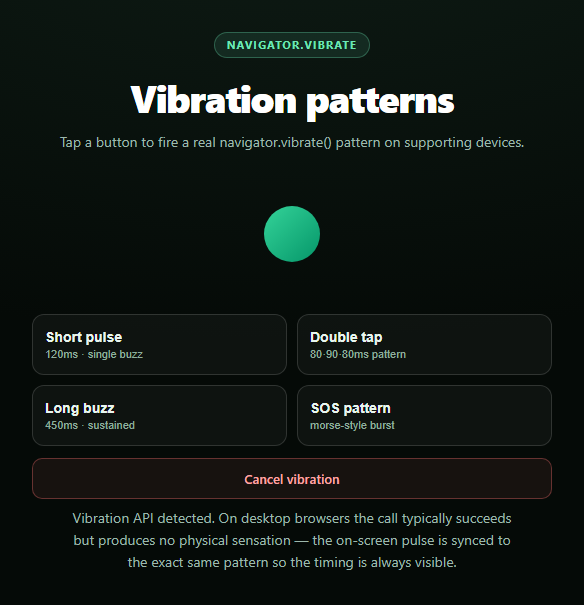
This snippet fires genuine navigator.vibrate() calls with distinct timing patterns, then mirrors each one as an on-screen pulse animation so the demo communicates what happened even when you can't feel it — which, on a desktop browser previewing this snippet, is every time.
Patterns as arrays, not just numbers
navigator.vibrate() accepts either a single millisecond number for one buzz, or an array like [80, 90, 80] meaning vibrate 80ms, pause 90ms, vibrate 80ms. This snippet uses both forms: a plain number for the short pulse and long buzz, and arrays for the double-tap and SOS patterns, parsed from a data-pattern attribute on each button.
The on-screen pulse is timed off the same array
animatePulse() walks the same pattern array the vibration call receives, scheduling a CSS animation restart at every "vibrate" segment (the even-indexed entries) using setTimeout offsets that sum the preceding durations. Because both the haptic call and the visual pulse read from one source of truth, the pulse never drifts out of sync with what the hardware is (or would be) doing.
Honest about what happens on desktop
Vibration hardware is a phone/tablet feature. On desktop Chrome, Firefox, and friends, navigator.vibrate frequently exists as a function and returns true, but produces zero physical sensation since there's no vibration motor to drive — the call isn't fake, it's just inert on that hardware. The status line and note explicitly call this out rather than implying the button "worked" in a way the user can feel.
Feature detection plus a false return
Beyond checking typeof navigator.vibrate === 'function', the demo also branches on the call's own return value: navigator.vibrate() returns false without throwing when the document isn't in an "active"/focused state, when a Permissions-Policy blocks it in a sandboxed iframe, or when the OS has vibration switched off. Both paths — unsupported entirely, and supported-but-declined — get distinct, honest status copy instead of a generic error.
Cancel support
Calling navigator.vibrate(0) (or an empty array) cancels any in-progress pattern immediately; the Cancel button wires this up alongside resetting the on-screen pulse, useful for patterns like the SOS burst that otherwise run for a couple of seconds.
Pair this with a notification permission prompt for a fuller "device capability" showcase, or a badging API demo for another rarely-covered browser capability.
Build with AI
Build, Understand, Optimize, and Extend It With AI
Paste this snippet's HTML, CSS, and JS into an AI coding assistant like Claude and ask it to explain how the pattern array format (alternating vibrate and pause durations) drives both the real navigator.vibrate() call and the synced on-screen pulse from the same source array. It's also useful for reasoning about the API's fail-silent design — ask why navigator.vibrate() returns false rather than throwing when a call is declined, and how that differs from the platform-level unsupported case (iOS Safari, most desktop browsers) that this snippet also detects. For extensions, ask it to add a custom pattern builder where users type comma-separated durations, add a "repeat" toggle that loops a pattern until cancelled, or wire the SOS pattern to a keyboard shortcut. Treat the code less like a finished artifact and more like a starting point for a conversation.
Prompt to recreate it
Copy this into your AI assistant of choice to build the effect from scratch, or as a jumping-off point for your own variant:
Build a "vibration pattern demo" in plain HTML, CSS, and JavaScript using the real Vibration API (navigator.vibrate) — no libraries.

Requirements:
- Several buttons, each with a distinct navigator.vibrate() pattern: a short single pulse (a plain number), a double-tap pattern (an array like [80, 90, 80]), a long sustained buzz, and a longer multi-segment SOS-style pattern (an array with several alternating vibrate/pause durations).
- Feature-detect navigator.vibrate with typeof navigator.vibrate === 'function' before ever calling it, and show clear status text distinguishing "not supported in this browser" (common on iOS Safari and many desktop browsers) from "supported."
- CRITICAL: navigator.vibrate() can return false without throwing an error when the call is declined (document not focused/active, a sandboxed iframe's Permissions-Policy blocking the feature, or vibration disabled at the OS level). Check the return value and show distinct status copy for "declined" versus "fired successfully" versus "unsupported" — do not treat vibrate() as fire-and-forget with no feedback.
- CRITICAL: implement a synced on-screen pulse animation that reads the exact same pattern array as the vibration call and times a CSS pulse/scale animation to match each vibrate segment (using setTimeout offsets that sum the pattern's preceding durations). This must run regardless of whether the real vibration succeeds, since on desktop browsers (where this demo is very likely to be viewed) there is no vibration hardware to feel even when the API call itself succeeds — the visual pulse is what makes the demo meaningful there.
- A Cancel button that calls navigator.vibrate(0) to stop any in-progress pattern and resets the on-screen pulse.
- Status copy should be explicit and honest about which of three states is active: real hardware vibration likely occurred (mobile with support), the API exists but declined the call, or the API isn't available at all — never imply success when only the visual simulation ran.
Want to tighten it up first? Run this prompt through the AI Prompt Studio to score it across 8 quality dimensions, catch anti-patterns, and tune the wording for Claude, ChatGPT, or Gemini before you paste it in.
Step by step
How to Use
- 1Paste HTML, CSS, and JSFour pattern buttons and a pulse indicator render.
- 2Click a pattern buttonnavigator.vibrate() fires with that pattern's timing.
- 3Watch the pulseAn on-screen pulse animates in sync, visible even on desktop.
- 4Try it on a phoneSupporting Android browsers produce a real physical buzz.
- 5Cancel mid-patternClick Cancel to stop a long or SOS pattern early.
- 6Read the status lineIt reports supported, declined, or unsupported explicitly.
Real-world uses
Common Use Cases
Got questions?
Frequently Asked Questions
No. As of this writing, iOS Safari (and all browsers on iOS, since they share WebKit) does not implement navigator.vibrate at all — Apple has never shipped it. This snippet detects that absence via typeof navigator.vibrate === 'function' and falls back to the on-screen pulse animation only, with status copy explaining the platform gap rather than pretending it worked.
Vibration requires physical hardware — a vibration motor — which desktop and laptop computers don't have. On many desktop browsers navigator.vibrate is still present as a function and can return true, but there's nothing to actuate. The synced on-screen pulse exists specifically so the demo communicates timing and pattern shape even where hardware feedback is impossible.
The Vibration API is designed to fail silently rather than throw. It returns false (instead of throwing) when the calling document isn't in an active/focused state, when a Permissions-Policy denies the vibrate feature to the current frame (common in sandboxed preview iframes), or when the OS has vibration disabled system-wide. This snippet checks the return value and shows distinct status copy for that case versus total unsupported.
A single number vibrates once for that many milliseconds. An array alternates vibrate/pause/vibrate/pause starting with vibrate — so [80, 90, 80] means vibrate 80ms, pause 90ms, vibrate 80ms. This snippet's SOS button uses a longer array to demonstrate a multi-segment morse-style pattern, and the on-screen pulse reads the same array to time its own animation.
Wrap the pattern-firing logic in a handler that checks typeof navigator.vibrate === 'function' before calling it, and keep the pulse animation as CSS classes toggled by state rather than direct DOM manipulation. Cancel any in-progress vibration (navigator.vibrate(0)) in a cleanup/unmount effect if your component might unmount mid-pattern.