Learn Coding Visually
Learn to code with interactive, live-preview playgrounds — HTML, CSS, JavaScript, React & more.
 HTML Playground42 lessons · Click-based · Live preview
 CSS PlaygroundLearn CSS with a live editor
 JavaScript Playground60 lessons · DOM · Async · Canvas
 React PlaygroundLearn React with a live code editor
 GSAP PlaygroundLearn GSAP animation interactively
 SVG Playground44 lessons · shapes · paths · animation
 SCSS Playground45 lessons · Sass modules · tokens
 Tailwind PlaygroundLearn Tailwind CSS with a live editor
 Bootstrap 5 Playground50 lessons · live preview
Notification Permission Prompt — Custom Soft-Ask UI
Notification Permission Prompt · Modals · Plain HTML, CSS & JS · Live preview
What's included
Features
About this UI Snippet
Notification Permission Prompt — Custom Soft-Ask Before the Native Browser Dialog
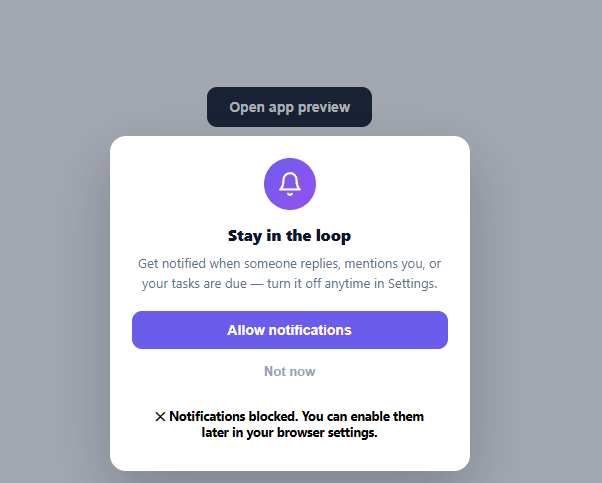
Calling Notification.requestPermission() cold — the moment a page loads, with no context — is one of the most reliably rejected UX patterns on the web: browsers show a single native dialog with no second chance, so a denied click can never be re-asked without the user manually changing browser settings. The fix growth and product teams use is a "soft-ask": a custom, on-brand modal that explains *why* notifications are useful and only triggers the real, one-shot browser permission prompt once the user has already said yes once. This snippet builds that soft-ask pattern end to end.
Why the soft-ask exists
Once a user clicks "Block" on the native browser dialog, that origin can never show the prompt again programmatically — the only way back is the user manually re-enabling it in browser settings, which almost never happens. A soft-ask modal lets you absorb that first, context-free "no" yourself: dismissing *this* modal costs nothing and can be shown again later, while only an explicit "Allow" click spends the one real, irreversible browser prompt.
Three distinct outcomes
Clicking Allow calls the real Notification.requestPermission() API (falling back to a simulated "granted" state in environments where the Notification API isn't available, like this sandboxed preview) and reports back one of three states: granted, denied, or dismissed (for the "Not now" button, which never touches the browser API at all). Each state gets its own message and color — green for granted, red for denied, neutral gray for dismissed — so the user always knows exactly what just happened.
Entrance and dismissal
The card sits fixed near the bottom of the viewport, the position most native browser permission prompts use, so the soft-ask visually rehearses where the real dialog will appear next. It animates in with opacity and transform only (translateY plus a slight scale), and a backdrop click dismisses it the same as clicking "Not now" — both routed through the same closePrompt() so there's only one dismissal code path to maintain.
The shaking bell icon
The bell icon plays a short multi-keyframe rotation loop on repeat — a few quick alternating tilts followed by a pause — mimicking the universal "new notification" bell-shake animation, reinforcing the modal's purpose purely visually before the user reads a word of copy.
Checking permission state before re-asking
A production build should never show this modal blindly — Notification.permission (read without calling requestPermission) reports 'default', 'granted', or 'denied' for the current origin. Only show the soft-ask when it's 'default'; if it's already 'denied', the browser will silently ignore any future requestPermission() call, so the right move is a different message pointing the user toward their browser's site settings instead of repeating a prompt that can no longer do anything.
Build with AI
Build, Understand, Optimize, and Extend It With AI
Rather than guessing at the permission-flow subtleties, paste this snippet's HTML, CSS, and JS into an AI coding assistant like Claude and ask it to explain exactly why calling Notification.requestPermission() cold on page load is considered one of the worst web UX patterns, and how this soft-ask's three distinct outcome states (granted, denied, dismissed) map to what actually happens to the browser's own permission state versus what's just local UI. The same assistant can help optimize it, for instance asking whether the openPrompt() function should first check Notification.permission and skip showing the modal entirely if it's already 'denied' (since re-asking would be pointless), or whether the auto-close timeout after showing the outcome should vary by outcome type. It's also useful for extending the pattern: ask it to persist a "user dismissed N times" counter so the soft-ask backs off after repeated dismissals, adapt the same soft-ask shell for camera or microphone permission requests, or add a lightweight A/B testable copy variant system. Treat the code less like a finished artifact and more like a starting point for a conversation.
Prompt to recreate it
Copy this into your AI assistant of choice to build the effect from scratch, or as a jumping-off point for your own variant:
Build a "notification permission soft-ask" modal in plain HTML, CSS, and JavaScript that wraps the real browser Notification API — no framework, no toast library.

Requirements:
- A custom modal (not the native browser permission dialog) anchored near the bottom of the viewport, the same general location most browsers show their own permission prompt, with a backdrop, an icon, a headline, explanatory copy, an "Allow notifications" button, and a "Not now" dismiss button.
- The modal must animate in and out using only opacity and transform (translate plus a slight scale), and clicking the backdrop must dismiss it through the exact same code path as clicking "Not now" — there should be only one close function, not two separate ones that duplicate logic.
- Clicking "Allow" must call the real browser Notification.requestPermission() API (with a safe fallback behavior if the Notification API doesn't exist in the current environment) and, based on its resolved value, show one of three distinct result messages with distinct styling: granted (success-colored), denied (error-colored), with the dismiss button producing a third, neutral "maybe later" result that never touches the browser API at all.
- After showing any outcome message, the modal must auto-close itself after a short delay with no further user action required.
- Add a code comment explaining that a production version must first read Notification.permission (without calling requestPermission) before ever showing this modal, and must skip showing it (or show different copy) if permission is already 'denied', since the browser will silently ignore a repeated requestPermission() call in that state.
- The bell icon must play a short, repeating multi-step rotation animation (a quick shake) to visually reinforce the notification theme independent of the copy.
Want to tighten it up first? Run this prompt through the AI Prompt Studio to score it across 8 quality dimensions, catch anti-patterns, and tune the wording for Claude, ChatGPT, or Gemini before you paste it in.
Step by step
How to Use
- 1Paste HTML, CSS, and JSA page with a single "Open app preview" button renders; click it to trigger the soft-ask, simulating when you'd show it in a real app.
- 2Read the soft-ask cardA bottom-anchored modal with a shaking bell icon explains why notifications are useful, with Allow and Not Now buttons.
- 3Click AllowThe real browser Notification.requestPermission() call fires (or a simulated granted state in sandboxed previews), and the result message shows the outcome.
- 4Click Not nowThe modal shows a neutral dismissal message and closes — no browser API is called, so it can be shown again later.
- 5Click the backdropClicking outside the card dismisses it the same way as Not Now.
- 6Trigger it at the right momentReplace the trigger button with a call to openPrompt() at a meaningful point in your app — e.g. after a user completes a key action, not on page load.
Real-world uses
Common Use Cases
Got questions?
Frequently Asked Questions
Because the browser shows its native permission dialog only once per origin per outcome — a context-free "no" on page load can permanently block your app from ever re-asking programmatically. A custom soft-ask absorbs that early "no" safely, since dismissing it costs nothing and can be shown again, while only an informed "Allow" click spends the real one-shot browser prompt.
Check Notification.permission (without calling requestPermission) on page load — it's 'granted', 'denied', or 'default'. Only show this soft-ask when it's 'default'; if it's already 'denied', show a different message pointing the user to browser settings instead, since requestPermission() won't show a dialog again.
After requestPermission() resolves to 'granted', call new Notification('Title', { body: 'message', icon: '/icon.png' }) for local notifications, or register a service worker and use the Push API for notifications sent from your server while the app is closed.
After a user takes an action whose value is obviously tied to notifications — sending a message, creating a reminder, adding an item to a watchlist — rather than immediately on page load, when the request has no context and is far more likely to be dismissed.
In React, control the open/closed state with useState and call Notification.requestPermission() inside the Allow handler exactly as shown; in Vue, use ref()/reactive(); in Angular, use a component method. The browser Notification API itself is framework-agnostic, so only the show/hide state management changes.