You Might Also Like
Learn Coding Visually
Learn to code with interactive, live-preview playgrounds — HTML, CSS, JavaScript, React & more.
 HTML Playground42 lessons · Click-based · Live preview
 CSS PlaygroundLearn CSS with a live editor
 JavaScript Playground60 lessons · DOM · Async · Canvas
 React PlaygroundLearn React with a live code editor
 GSAP PlaygroundLearn GSAP animation interactively
 SVG Playground44 lessons · shapes · paths · animation
 SCSS Playground45 lessons · Sass modules · tokens
 Tailwind PlaygroundLearn Tailwind CSS with a live editor
 Bootstrap 5 Playground50 lessons · live preview
Media Session API Controls — Free navigator.mediaSession Mini Player
Media Session API Controls · Buttons · Plain HTML, CSS & JS · Live preview
What's included
Features
About this UI Snippet
Media Session API Controls — A Real Player With Real OS Integration
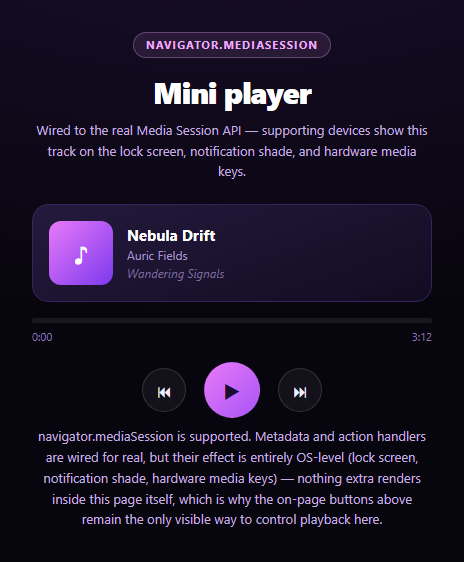
This snippet is a working mini player first, and a Media Session API demo second — because navigator.mediaSession's entire effect is invisible inside a page: it only shows up on a lock screen, in a notification shade, or when a hardware media key is pressed. The on-page buttons have to carry the whole visible demo on their own.
MediaMetadata drives OS surfaces
Every time the track changes or play state flips, updateMetadata() assigns a fresh new MediaMetadata({ title, artist, album }) to navigator.mediaSession.metadata and sets navigator.mediaSession.playbackState. On a real device with this player embedded in a real page (not a sandboxed iframe preview), that's what populates the lock-screen now-playing card and notification-shade media widget — artwork, title, and artist, kept in sync automatically as the track advances.
setActionHandler wires hardware to page state
navigator.mediaSession.setActionHandler('play', play) (and 'pause', 'previoustrack', 'nexttrack', 'seekto') registers this exact page's own functions as the targets for OS-level media controls — a Bluetooth headset's play button, a car head unit's skip button, or a keyboard's media keys all route through these same handlers, calling the identical play()/pause()/nextTrack() functions the on-page buttons call.
Why the effect can't be shown here
There's no way for a snippet running inside a preview iframe to render a real OS lock screen or notification shade — that's chrome owned entirely by the operating system, several privilege layers above what any web page can draw. So this snippet is explicit that setActionHandler and MediaMetadata are wired for real, with zero expectation that anything extra appears in the preview itself.
The on-page player never depends on Media Session
Every piece of visible functionality — play/pause, previous/next, the progress bar, elapsed time — runs through plain setInterval-driven page state and DOM updates, gated behind a hasMediaSession check only for the OS-integration calls. Strip navigator.mediaSession out entirely and the player still works exactly the same on-page; that's a deliberate design choice, not an accident.
Pair this with a screen wake lock toggle so a played track keeps the screen alive, or a canvas audio frequency bars visualizer for a fuller player UI.
Build with AI
Build, Understand, Optimize, and Extend It With AI
Paste this snippet's HTML, CSS, and JS into an AI coding assistant like Claude and ask it to explain why the Media Session API's effect (lock-screen now-playing card, hardware media key routing) is fundamentally invisible from inside the page itself, and why that means the on-page player logic must be built to work completely independently of navigator.mediaSession's availability. It's also useful for reasoning about the shared-handler design — ask why registering the same play/pause/nextTrack functions via setActionHandler as the on-page buttons already call keeps OS-triggered and button-triggered playback perfectly consistent, versus writing separate logic for each trigger source. For extensions, ask it to add real MediaMetadata artwork (an array of icon sizes), wire up a real HTMLAudioElement instead of the setInterval-based progress simulation, or add a 'stop' action handler. Treat the code less like a finished artifact and more like a starting point for a conversation.
Prompt to recreate it
Copy this into your AI assistant of choice to build the effect from scratch, or as a jumping-off point for your own variant:
Build a "media session controls" mini music player in plain HTML, CSS, and JavaScript using the real Media Session API (navigator.mediaSession.setActionHandler and MediaMetadata) — no libraries, no real audio file required.

Requirements:
- A mini player UI: album art placeholder, track title/artist/album text, a progress bar with elapsed/duration time, and play/pause/previous/next buttons, cycling through a small hardcoded playlist array (title, artist, album, duration in seconds).
- CRITICAL: the on-page player must be fully functional using ONLY ordinary page JavaScript (setInterval to advance elapsed time, DOM updates for the progress bar and button icons) with ZERO dependency on the Media Session API being supported — feature-detect with 'mediaSession' in navigator and gate only the OS-integration calls behind that check, never the core playback logic.
- On every track change and play/pause toggle, if mediaSession is supported, update navigator.mediaSession.metadata with a new MediaMetadata({ title, artist, album }) and set navigator.mediaSession.playbackState to 'playing' or 'paused', wrapped in try/catch since some contexts restrict MediaMetadata construction.
- Register real setActionHandler callbacks for at least 'play', 'pause', 'previoustrack', 'nexttrack', and 'seekto' (updating elapsed time from details.seekTime), each calling the SAME function the corresponding on-page button calls, wrapped in try/catch per call since individual action names can be unsupported and setActionHandler throws in that case.
- CRITICAL: in the UI copy and code comments, clearly explain that the Media Session API's actual effect — a lock-screen now-playing widget, a notification-shade media control, hardware media key routing — is entirely OS-level and cannot be rendered or simulated inside the page/iframe itself, so a developer or user should not expect to SEE anything different in the preview even when the API is fully wired and working; the only way to observe it is a real device's lock screen or hardware media keys against a real (non-sandboxed) page.
- Show a status note that states whether mediaSession is supported in the current browser/context, without implying that unsupported means the player itself is broken — the player must look and behave identically either way from an on-page perspective.
Want to tighten it up first? Run this prompt through the AI Prompt Studio to score it across 8 quality dimensions, catch anti-patterns, and tune the wording for Claude, ChatGPT, or Gemini before you paste it in.
Step by step
How to Use
- 1Paste HTML, CSS, and JSA working mini player with three tracks renders.
- 2Click playThe progress bar advances and elapsed time counts up.
- 3Use next/previousTrack metadata updates on-page and via MediaMetadata.
- 4Check a real deviceOn mobile with a real page, the lock screen shows this track.
- 5Try hardware media keysA keyboard or headset play/pause routes to the same handlers.
- 6Read the noteClarifies the API's effect is OS-level, not visible on-page.
Real-world uses
Common Use Cases
Got questions?
Frequently Asked Questions
Because the Media Session API's entire visible effect lives outside the page — on the device's lock screen, in the notification shade's media widget, or triggered via hardware media keys. There is no way for any web page, including this snippet inside a preview iframe, to render or simulate that OS-owned chrome. The API is wired for real; its payoff simply isn't observable from inside the page itself.
Yes, identically. The entire play/pause/skip/progress system runs on ordinary page JavaScript (setInterval and DOM updates) gated by a hasMediaSession check only around the OS-integration calls (MediaMetadata assignment and setActionHandler registration). Removing navigator.mediaSession support changes nothing about how the on-page buttons behave.
It registers this page's own JavaScript functions (play, pause, prevTrack, nextTrack, and a seek handler) as the targets the operating system calls when the user interacts with OS-level media controls — a lock-screen button, a Bluetooth headset's play button, a car head unit, or a keyboard's media keys. Pressing one of those calls the exact same function the matching on-page button calls.
Assigning navigator.mediaSession.metadata = new MediaMetadata({ title, artist, album, artwork }) tells the OS what to display for the currently "playing" content on surfaces the page can't draw into directly, like a lock screen's now-playing card or a notification shade's media widget. This snippet updates it every time the track or play state changes so those OS surfaces stay in sync automatically.
Keep the metadata/action-handler wiring in an effect that runs once on mount (re-running setActionHandler on every render can churn OS-level registrations unnecessarily), and store playback state (track index, elapsed time, playing) in your framework's own state so on-page renders and MediaMetadata updates both derive from one source of truth. Clear the interval and consider setting mediaSession.playbackState to 'none' on unmount.