You Might Also Like
Learn Coding Visually
Learn to code with interactive, live-preview playgrounds — HTML, CSS, JavaScript, React & more.
 HTML Playground42 lessons · Click-based · Live preview
 CSS PlaygroundLearn CSS with a live editor
 JavaScript Playground60 lessons · DOM · Async · Canvas
 React PlaygroundLearn React with a live code editor
 GSAP PlaygroundLearn GSAP animation interactively
 SVG Playground44 lessons · shapes · paths · animation
 SCSS Playground45 lessons · Sass modules · tokens
 Tailwind PlaygroundLearn Tailwind CSS with a live editor
 Bootstrap 5 Playground50 lessons · live preview
Push Notification Subscription Toggle — Free Notification API Demo
Push Notification Subscription Toggle · Buttons · Plain HTML, CSS & JS · Live preview
What's included
Features
About this UI Snippet
Push Notification Subscription Toggle — Real Permission, Honestly Scoped
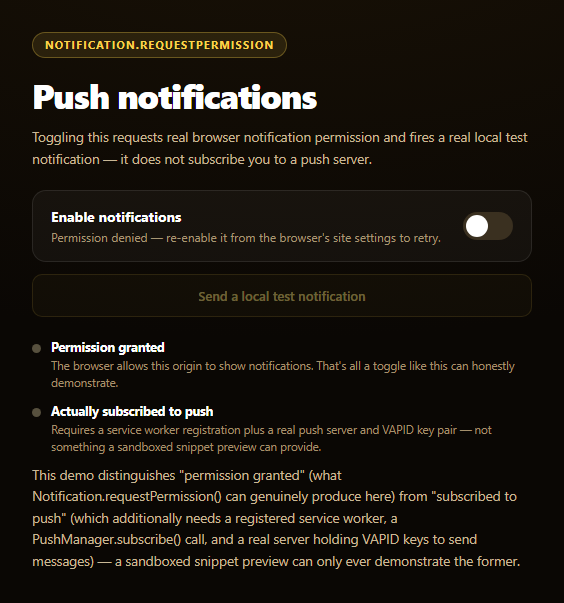
This snippet requests genuine browser notification permission and fires a real local notification — but it's deliberately upfront that neither of those is the same thing as a working push subscription, which needs infrastructure a client-side snippet can't provide.
Two different things people conflate
"Notifications are on" in a browser's UI can mean either of two very different states: the origin has *permission* to show notifications (a synchronous, client-only grant), or the browser has an active *push subscription* delivering messages from a server even when no tab is open. This snippet's toggle only ever produces the first — Notification.requestPermission() — and says so explicitly next to a second, grayed-out item explaining what subscribing would additionally require.
Permission can't be revoked from the page
Once Notification.permission is 'granted', no page-side API can turn it back off — that's a deliberate browser security boundary, since a site shouldn't be able to silently disable a user-controlled setting. The toggle's click handler checks for this and explains that only the user, via browser site settings, can revoke it, rather than pretending the switch has that power.
A local notification is not push
The "Send a local test notification" button calls new Notification(...) directly from the page — genuinely real, but fundamentally different from push: it can only fire while this page is open, whereas a real push message arrives through a service worker's push event, dispatched by the browser even with every tab of the site closed, triggered by your server sending an authenticated request to a push service using the subscription's endpoint and a VAPID key pair.
Why full push can't run in this sandbox
A complete implementation needs a registered service worker (navigator.serviceWorker.register), a pushManager.subscribe({ applicationServerKey }) call producing an endpoint URL, and a server that stores that endpoint and holds VAPID keys to actually send messages. None of that fits in a self-contained preview snippet, so the JS comments show exactly where that real call would go rather than pretending to run it.
Pair this with notification permission prompt for a simpler single-purpose version, or badging API demo for a related unread-count capability.
Build with AI
Build, Understand, Optimize, and Extend It With AI
Paste this snippet's HTML, CSS, and JS into an AI coding assistant like Claude and ask it to explain why Notification.requestPermission() granting permission is not the same as having an active push subscription, and what additional pieces — service worker registration, pushManager.subscribe(), VAPID keys, a server — a complete push implementation needs beyond what this snippet can demonstrate. It's also useful for reasoning about the permission model's asymmetry — ask why browsers let a page request permission but never let it revoke that permission programmatically, and why a previously-denied permission can't be re-prompted. For extensions, ask it to sketch the service worker's push event handler that would show a real push-delivered notification, or the pushManager.subscribe({ applicationServerKey }) call and what a minimal Node/Express endpoint to store the resulting subscription would look like. Treat the code less like a finished artifact and more like a starting point for a conversation.
Prompt to recreate it
Copy this into your AI assistant of choice to build the effect from scratch, or as a jumping-off point for your own variant:
Build a "push notification subscription toggle" in plain HTML, CSS, and JavaScript using the real Notification API (Notification.requestPermission and new Notification()) — no service worker, no server, no libraries.

Requirements:
- A toggle switch reflecting Notification.permission ('default', 'granted', or 'denied') and a "Send a local test notification" button enabled only when permission is granted.
- Feature-detect with typeof window.Notification !== 'undefined' before using it, and disable the toggle with clear copy if unsupported (some contexts, including sandboxed iframes and non-HTTPS origins, block it entirely).
- Clicking the toggle when permission is 'default' must call await Notification.requestPermission() and update the UI based on the real result ('granted' or 'denied').
- CRITICAL: clicking the toggle when permission is already 'granted' must NOT attempt any kind of fake "turn off" — instead show copy explaining that browsers give pages no API to revoke a granted notification permission, and that only the user can do so via the browser's own site settings. Similarly, if permission is 'denied', explain that browsers do not allow re-prompting after an explicit denial.
- The test button must call a real `new Notification(title, { body })` constructor to show a genuine local notification, and the surrounding copy/comments must clearly explain this is NOT the same as a real push notification: a local Notification only fires while the page itself is open, whereas real push delivery works through a service worker's 'push' event dispatched by the browser even when no tab is open, triggered by a server sending an authenticated message to a push service using the subscription's endpoint and VAPID keys.
- CRITICAL: include a clearly visible UI section (not just a code comment) that explicitly distinguishes "permission granted" from "actually subscribed to push," stating that a real subscription additionally requires a registered service worker, a pushManager.subscribe() call, and a real backend server — and that this self-contained snippet can only demonstrate the permission and local-notification pieces, not full push delivery.
- Include a code comment showing (but not executing) what a real pushManager.subscribe({ applicationServerKey: VAPID_PUBLIC_KEY }) call would look like, so a developer reading the source sees the next real step.
Want to tighten it up first? Run this prompt through the AI Prompt Studio to score it across 8 quality dimensions, catch anti-patterns, and tune the wording for Claude, ChatGPT, or Gemini before you paste it in.
Step by step
How to Use
- 1Paste HTML, CSS, and JSA permission toggle and test-notification button render.
- 2Click the toggleA real Notification.requestPermission() prompt appears.
- 3Allow itThe switch turns on and the test button becomes enabled.
- 4Click "Send a local test notification"A genuine new Notification() fires from the page.
- 5Try toggling againThe copy explains permission can't be revoked from the page.
- 6Read the distinction panelClarifies granted permission versus an actual push subscription.
Real-world uses
Common Use Cases
Got questions?
Frequently Asked Questions
No — it only requests and grants browser notification permission via Notification.requestPermission(). An actual push subscription additionally requires a registered service worker, a call to pushManager.subscribe() with a VAPID application server key, and a real server that stores the resulting subscription endpoint and sends authenticated push messages to it. This snippet is upfront that it demonstrates only the permission half.
Browsers deliberately give web pages no API to revoke a granted Notification permission — only the user can do that, through the browser's own site settings or permissions UI. This is a security boundary preventing a site from silently disabling a setting the user explicitly controls. The toggle's handler detects the already-granted state and explains this rather than attempting (and failing) to revoke it.
new Notification(...) is called directly from a page's own JavaScript and can only fire while that page (or a service worker it controls) is running. A real push notification arrives through a service worker's push event, dispatched by the browser even when every tab of the site is closed, triggered by a message your server sent to a push service using the subscription's endpoint and VAPID keys — infrastructure this local test button doesn't use.
A working push subscription needs a service worker that can actually register and control the page's scope, plus a real backend server holding VAPID keys and able to send authenticated push messages to a browser's push service. A self-contained preview snippet has neither a persistent origin for service worker registration nor a server, so this demo shows exactly where those real calls (pushManager.subscribe, server-side send) would go as comments rather than executing them.
Keep the permission-check and requestPermission() logic as-is in a handler, and drive the switch's visual state from Notification.permission read on mount (there's no change event for permission, so re-check it after any requestPermission() call resolves). For real push, add service worker registration and pushManager.subscribe() in a separate effect, gated behind your own backend endpoint for storing the subscription.