You Might Also Like
Learn Coding Visually
Learn to code with interactive, live-preview playgrounds — HTML, CSS, JavaScript, React & more.
 HTML Playground42 lessons · Click-based · Live preview
 CSS PlaygroundLearn CSS with a live editor
 JavaScript Playground60 lessons · DOM · Async · Canvas
 React PlaygroundLearn React with a live code editor
 GSAP PlaygroundLearn GSAP animation interactively
 SVG Playground44 lessons · shapes · paths · animation
 SCSS Playground45 lessons · Sass modules · tokens
 Tailwind PlaygroundLearn Tailwind CSS with a live editor
 Bootstrap 5 Playground50 lessons · live preview
EyeDropper Color Picker — Free window.EyeDropper Screen Sampler
EyeDropper Color Picker · Buttons · Plain HTML, CSS & JS · Live preview
What's included
Features
About this UI Snippet
EyeDropper Color Picker — Sampling Real Screen Pixels, With a Manual Fallback
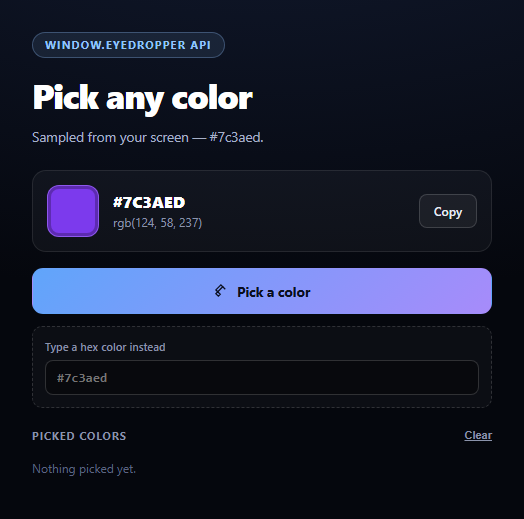
Most "color picker" widgets on the web are really just <input type="color"> wrappers — a swatch grid or a saturation square you drag inside. This one is different: it uses the actual window.EyeDropper API to let the user sample a pixel from *anywhere on their screen*, not just inside the page, then builds a running palette from what's picked.
The real API: new EyeDropper().open()
window.EyeDropper is a constructor. Calling new EyeDropper().open() inside a click handler switches the cursor into a magnifier and resolves a promise with { sRGBHex: '#rrggbb' } once the user clicks anywhere — another browser tab, the OS taskbar, a design file open in a different app. It must be invoked from a direct user gesture (the click on "Pick a color") or the browser rejects it; that's why the pick call lives directly inside the button's click listener rather than behind any async setup.
Cancellation is not an error
Pressing Escape or clicking away rejects the promise with an AbortError DOMException. The code checks for that name specifically and restores the idle message instead of showing a scary "failed" state — cancelling a pick is a normal, expected outcome, not a failure.
Honest unsupported fallback
window.EyeDropper currently exists only in Chromium-based browsers (Chrome, Edge, Opera) — Firefox and Safari don't implement it. Rather than hide the feature or show a dead button, typeof window.EyeDropper === 'function' is feature-detected up front: if it's missing, the "Pick a color" button is hidden and a manual hex <input> takes its place, styled identically to the rest of the UI. Because applyColor() is the single function both paths call, the swatch, hex/RGB readout, palette, and copy button behave exactly the same whether the color came from a real screen sample or a typed value.
A palette that survives repeated picks
Every applied color — from either path — is pushed to the front of a picked array (deduped, capped at 12) and re-rendered as clickable chips, so a design session can build up a working set of colors without losing earlier picks. Pair this with a gradient picker for building multi-stop gradients from sampled colors, or a color swatch grid for a fixed brand palette.
Build with AI
Build, Understand, Optimize, and Extend It With AI
Paste this snippet's HTML, CSS, and JS into an AI coding assistant like Claude and ask it to explain why new EyeDropper().open() must be called synchronously from within a user-gesture event handler, and what would break if it were called after an await or inside a setTimeout instead. It's also useful for reasoning about the fallback: ask why the manual hex input and the real eyedropper both funnel into the same applyColor() function rather than having separate rendering logic for each path, and how that keeps the swatch, palette, and copy button behavior identical regardless of source. For extensions, ask it to add a "compare two colors" mode using two independent eyedropper picks, persist the palette to localStorage between sessions, or add an HSL readout alongside the existing hex/RGB values. Treat the code less like a finished artifact and more like a starting point for a conversation.
Prompt to recreate it
Copy this into your AI assistant of choice to build the effect from scratch, or as a jumping-off point for your own variant:
Build an "EyeDropper color picker" tool in plain HTML, CSS, and JavaScript using the real browser window.EyeDropper API — no libraries.

Requirements:
- A "Pick a color" button that, on click, calls new EyeDropper().open() directly and synchronously inside the click handler (required because the API only works from a direct user gesture), and on success applies the returned sRGBHex value to a swatch element, a hex text readout, and an RGB text readout computed from the hex.
- Wrap the open() call in a try/catch. If the promise rejects with a DOMException named AbortError (the user pressed Escape or clicked away to cancel), show a neutral "cancelled" status message rather than an error. For any other rejection, show a status message naming the error and suggesting the manual fallback.
- CRITICAL: feature-detect support with typeof window.EyeDropper === 'function' before wiring up the button. If unsupported (which is the common case — this API currently only exists in Chromium-based browsers, not Firefox or Safari), hide the pick button entirely and show a manual hex color text input in its place, styled to match the rest of the UI. Route both the real eyedropper result and the manual input's value through the exact same "apply color" function so the swatch, RGB readout, and everything downstream behaves identically regardless of which path produced the color.
- Maintain a running palette: every applied color (whether picked or manually typed) gets added to a deduplicated list of clickable swatch chips capped at a reasonable size (e.g. 12), each of which re-applies that color when clicked, plus a "Clear" control to empty the palette.
- Add a "Copy" button next to the current hex value that copies it to the clipboard via navigator.clipboard.writeText with a brief "Copied!" confirmation state.
Want to tighten it up first? Run this prompt through the AI Prompt Studio to score it across 8 quality dimensions, catch anti-patterns, and tune the wording for Claude, ChatGPT, or Gemini before you paste it in.
Step by step
How to Use
- 1Paste HTML, CSS, and JSThe swatch, hex/RGB readout, and palette render immediately.
- 2Click "Pick a color"In a supporting browser, your cursor becomes a magnifier.
- 3Click any pixel on screenAnother tab, the OS, another app — the real color is sampled.
- 4Press Escape to cancelThe pick aborts cleanly with no error shown.
- 5Unsupported browser?A manual hex input appears in place of the button automatically.
- 6Build a paletteEvery applied color adds a clickable chip you can revisit or clear.
Real-world uses
Common Use Cases
Got questions?
Frequently Asked Questions
It currently ships in Chromium-based browsers — Chrome, Edge, and Opera — from Chrome 95 onward. Firefox and Safari do not implement it as of this writing. The snippet feature-detects with typeof window.EyeDropper === 'function' and swaps in a manual hex input when it's missing, so the demo works everywhere either way.
The EyeDropper API requires a direct user gesture (a click, tap, or key press) to open, as a security measure against pages silently sampling the screen. That's why new EyeDropper().open() is called synchronously inside the button's own click listener rather than after any await or setTimeout, which would break the gesture chain and cause the browser to reject the call.
Pressing Escape or clicking outside the eyedropper's active area rejects the open() promise with a DOMException named AbortError. The code checks err.name === 'AbortError' specifically and shows a neutral "cancelled" message rather than an error, since cancelling is a normal, expected user action, not a failure.
Yes — that's the defining feature of the EyeDropper API versus a regular color input. Once open() is called, the browser lets the user click anywhere visible on their screen, including other applications, the OS desktop, or another monitor, and returns the sRGB hex of whatever pixel was clicked.
Feature-detect window.EyeDropper once (e.g. in a memoized value or computed property), conditionally render either the pick button or the manual hex input based on it, and call new EyeDropper().open() inside the button's onClick handler exactly as here — keep it synchronous with the click so the user-gesture requirement is preserved. Store the resulting hex in component state and derive the RGB/swatch/palette from that single value.