You Might Also Like
Learn Coding Visually
Learn to code with interactive, live-preview playgrounds — HTML, CSS, JavaScript, React & more.
 HTML Playground42 lessons · Click-based · Live preview
 CSS PlaygroundLearn CSS with a live editor
 JavaScript Playground60 lessons · DOM · Async · Canvas
 React PlaygroundLearn React with a live code editor
 GSAP PlaygroundLearn GSAP animation interactively
 SVG Playground44 lessons · shapes · paths · animation
 SCSS Playground45 lessons · Sass modules · tokens
 Tailwind PlaygroundLearn Tailwind CSS with a live editor
 Bootstrap 5 Playground50 lessons · live preview
Shake to Undo — Free DeviceMotion API Shake Gesture Snippet
Shake to Undo · Buttons · Plain HTML, CSS & JS · Live preview
What's included
Features
About this UI Snippet
Shake to Undo — Real Motion Sensing With an Honest Fallback
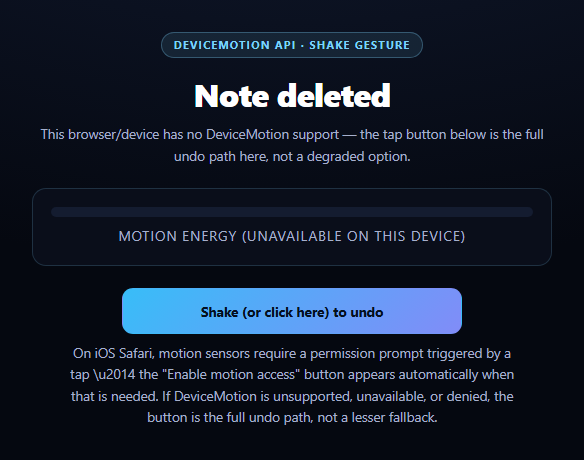
Shake-to-undo is the classic mobile gesture — popularized by iOS's system-wide "shake to undo" — where physically shaking the device reverses the last action. This snippet wires up the real devicemotion event and a genuine acceleration-delta shake detector, following the same honesty pattern as canvas audio frequency bars: feature-detect the real API, use it when available, and fail into a fallback that is fully functional rather than a degraded placeholder.
Real acceleration-delta shake detection
Every devicemotion event carries accelerationIncludingGravity, an {x, y, z} reading in m/s². A single reading can't detect a shake — shaking means the *change* between consecutive readings is large. The handler computes delta = |x - lastX| + |y - lastY| + |z - lastZ| between the current and previous reading, and only counts it as a shake when delta exceeds SHAKE_THRESHOLD — genuine motion-derived detection, not a timer or a fake trigger. A 1-second cooldown (lastShakeTime) stops one violent shake from firing the undo repeatedly.
Why three different code paths exist
DeviceMotion has three distinct real-world states this snippet handles explicitly: (1) the API doesn't exist at all — most desktop browsers — detected with typeof DeviceMotionEvent === 'undefined'; (2) it exists but iOS 13+ gates it behind DeviceMotionEvent.requestPermission(), which can only be called from a real user gesture like a tap, never on page load; (3) it exists and needs no explicit permission (most Android browsers), so listening can start immediately. Each path is feature-detected rather than assumed, and each fails toward the same visible, working fallback.
The fallback is not a lesser path
The tap button calls the exact same doUndo(source) function the real shake gesture calls — it isn't a "sorry, no shake for you" message, it's the complete undo interaction, just triggered by a tap instead of an accelerometer reading. This matters because DeviceMotion is denied constantly in practice: desktop has no sensor, many browsers block it by default for privacy, and users often decline the iOS permission prompt. A demo (or a real feature) that goes dead in those cases looks broken; one where the fallback *is* the feature does not.
A live motion meter for feedback
Rather than a shake being invisible until it fires, meterFill's width is driven by the same delta value every event, scaled against the threshold — so on a supporting device you can see motion energy building toward the shake threshold in real time, turning an otherwise invisible sensor reading into visible feedback.
Customizing it
Tune SHAKE_THRESHOLD and the cooldown window for stricter or looser detection, swap doUndo for your real undo logic, or pair this with a notification permission prompt pattern for other gated-permission APIs.
Build with AI
Build, Understand, Optimize, and Extend It With AI
You don't have to work out DeviceMotion's platform quirks by hand. Paste this snippet's HTML, CSS, and JS into an AI coding assistant like Claude and ask it to explain exactly why shake detection needs to compare the delta between consecutive accelerationIncludingGravity readings rather than checking a single reading's magnitude, and why DeviceMotionEvent.requestPermission on iOS can only be called from inside a real tap handler rather than automatically on page load. The same assistant can help you optimize it — for instance asking whether SHAKE_THRESHOLD and the shake cooldown window should adapt based on a short calibration period reading the device's resting motion noise floor, rather than using one fixed constant for every device. It's also useful for extending the pattern: ask it to add a directional shake requirement (e.g. only trigger on left-right shakes, not up-down), persist whether the user previously granted motion permission so the prompt isn't re-shown every session, or apply the same feature-detect-then-honest-fallback structure to DeviceOrientation for a tilt-based interaction. Treat the code less like a finished artifact and more like a starting point for a conversation.
Prompt to recreate it
Copy this into your AI assistant of choice to build the effect from scratch, or as a jumping-off point for your own variant:
Build a "shake to undo" interaction in plain HTML, CSS, and JavaScript using the real DeviceMotion API, with a fully-functional fallback for unsupported or permission-denied cases — follow a feature-detect-then-honest-fallback pattern, not a fake or decorative shake animation.

Requirements:
- A single undo function that performs the actual undo action, callable from more than one trigger source, with a short cooldown so it cannot fire twice within under a second of itself.
- A visible tap/click button that calls this exact same undo function directly — it must not be a separate, lesser, or differently-worded fallback path; it is the same action as the real gesture, just triggered by a tap.
- Real shake detection: listen for the devicemotion event, read event.accelerationIncludingGravity on each event, and compute the sum of absolute differences between the current reading's x/y/z and the previous reading's x/y/z. Only treat it as a shake, calling the undo function, when that computed delta exceeds a configurable threshold — a single acceleration reading alone must never be enough, since a shake is specifically a large change between consecutive samples.
- Explicit feature detection with three distinct handled cases: (1) DeviceMotionEvent does not exist at all (most desktop browsers) — detect via typeof DeviceMotionEvent === 'undefined' and go straight to the fallback messaging; (2) DeviceMotionEvent exists and exposes a requestPermission static method (iOS 13+ Safari) — in this case do NOT call requestPermission automatically; instead show a visible button that calls it only when tapped (since the browser requires the call to originate from a real user gesture), and start listening for devicemotion only if the promise resolves to 'granted', falling back honestly if denied or if the request itself throws; (3) DeviceMotionEvent exists with no permission gate (most non-iOS browsers) — begin listening immediately.
- A status text element that always explains, in plain language, which of the above states is currently active (no support / awaiting permission tap / permission denied / live and listening), so the user understands why they are or are not seeing real shake detection.
- A live visual meter (e.g. a fill bar) driven by the actual computed motion delta on every devicemotion event, so accelerometer activity is visible even before it crosses the shake threshold.
Want to tighten it up first? Run this prompt through the AI Prompt Studio to score it across 8 quality dimensions, catch anti-patterns, and tune the wording for Claude, ChatGPT, or Gemini before you paste it in.
Step by step
How to Use
- 1Paste HTML, CSS, and JSA status line explains what to do based on your device.
- 2On a supporting phoneGrant motion access if prompted, then physically shake it.
- 3Watch the motion meterIt fills with real accelerometer delta as you move the device.
- 4On desktop or unsupported devicesThe status explains why, and the tap button is the full path.
- 5Tap the undo button anytimeIt runs the identical doUndo() the real shake gesture calls.
- 6Tune the sensitivityChange SHAKE_THRESHOLD and the cooldown window.
Real-world uses
Common Use Cases
Got questions?
Frequently Asked Questions
Every devicemotion event provides an x/y/z acceleration reading. The handler computes the absolute difference between the current and previous reading on each axis and sums them into a single delta value. Only when that delta exceeds SHAKE_THRESHOLD does it count as a shake — a single still or slowly-moving reading never triggers it, since a shake is specifically a large change between consecutive samples, not a large single reading.
iOS 13 and later gate DeviceMotionEvent behind an explicit permission check exposed as DeviceMotionEvent.requestPermission(), which the browser only allows to be called from inside a real user gesture like a tap — never automatically on page load. The snippet checks whether that method exists and, if so, shows a visible "Enable motion access" button rather than trying (and failing) to request it silently. Most Android browsers expose devicemotion without any such gate.
The code checks typeof DeviceMotionEvent === 'undefined' first for browsers with no motion API at all, and handles a denied or failed permission request as a separate case. Both routes call the same fallbackNoMotion() function, which updates the status text to explain why and leaves the tap button as the complete, fully working undo path — not a disabled or lesser option.
Both the shake gesture and the button call the identical doUndo(source) function with only the source label differing. There is no separate, reduced code path for "no motion available" — the same undo logic runs either way, so a user on desktop or with motion denied gets exactly the same outcome as a user who successfully shakes their phone.
Do the feature detection and event wiring inside a mount effect, storing the last acceleration reading and last-shake timestamp in refs (not state, since they update on every motion event). Call your real undo action from inside doUndo, and remove the devicemotion listener in the effect's cleanup function so it doesn't keep firing after unmount.