Learn Coding Visually
Learn to code with interactive, live-preview playgrounds — HTML, CSS, JavaScript, React & more.
 HTML Playground42 lessons · Click-based · Live preview
 CSS PlaygroundLearn CSS with a live editor
 JavaScript Playground60 lessons · DOM · Async · Canvas
 React PlaygroundLearn React with a live code editor
 GSAP PlaygroundLearn GSAP animation interactively
 SVG Playground44 lessons · shapes · paths · animation
 SCSS Playground45 lessons · Sass modules · tokens
 Tailwind PlaygroundLearn Tailwind CSS with a live editor
 Bootstrap 5 Playground50 lessons · live preview
Pong vs Computer — Free HTML CSS JS Snippet
Pong vs Computer · Games · Plain HTML, CSS & JS · Live preview
What's included
Features
About this UI Snippet
Pong vs Computer — Angle-Reflection Ball Physics & Rate-Limited AI Paddle Tracking
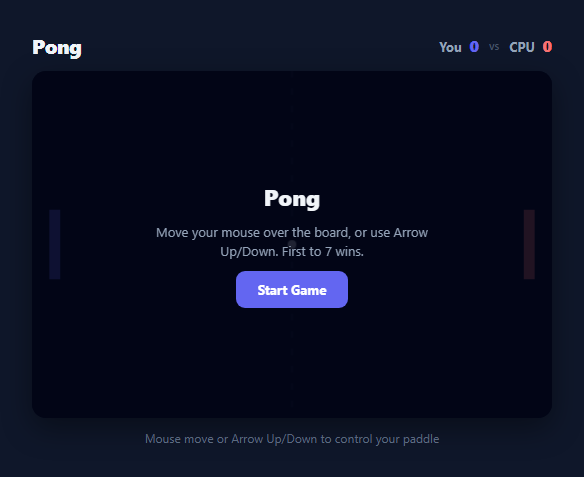
Pong is the original video game archetype, and its two mechanics — realistic ball bounce physics and a computer opponent that feels fair rather than either trivial or unbeatable — are exactly what separate a convincing Pong clone from a flat, boring one. This snippet implements both properly: the ball's bounce angle genuinely depends on where it strikes each paddle, and the computer paddle tracks the ball with a deliberately imperfect, rate-limited speed so a human player can actually win.
Why a perfectly-tracking AI paddle is not fun
A naive Pong AI simply sets cpuY = ball.y every frame, producing a paddle that never misses — mathematically unbeatable and immediately obvious as artificial. This snippet's update() function instead computes diff = ball.y - cpuCenter (how far the CPU paddle's centre is from the ball) and applies only a fraction of that distance each frame: cpuStep = clamp(diff * 0.09, -CPU_MAX_SPEED, CPU_MAX_SPEED). The 0.09 proportional factor means the paddle always chases the ball but never snaps to it instantly, and CPU_MAX_SPEED = 4.2 caps how many pixels it can move in a single frame even when the ball is far away. The result is an opponent that plays a genuinely strong game on straightforward shots but can be beaten with sharp angle changes and fast cross-court hits that outrun its top speed — exactly the behaviour of a satisfying, beatable AI.
Angle-reflection bounce physics, not a flat mirror bounce
Real Pong's signature feel comes from the paddle acting like a curved surface rather than a flat wall: hitting the ball near the paddle's edge sends it off at a steep angle, while hitting it dead centre sends it nearly straight back. bounceOffPaddle(paddleY) computes relativeHit = (ball.y - paddleY) / PADDLE_H, a value from 0 (top of paddle) to 1 (bottom of paddle), then maps it to an angle: angle = (clampedRel - 0.5) * (Math.PI / 3), giving a range of plus or minus 60 degrees from horizontal. The ball's new velocity is then recomputed from that angle and a speed that increases slightly on every hit — speed = Math.min(9, Math.hypot(ball.vx, ball.vy) * 1.06) — capped at 9 so rallies gradually intensify without becoming physically uncontrollable. This is real angle-reflection physics driven by contact position, not a simple vx *= -1 mirror bounce.
Dual control scheme and canvas coordinate mapping
The player's paddle responds to both mouse movement and Arrow Up/Down keys. Mouse control reads e.clientY, subtracts the canvas's bounding-rect offset, and multiplies by H / rect.height to correctly map the mouse's screen-pixel position to the canvas's internal coordinate space — this scale correction matters because the canvas element is styled at width: 100% in CSS while its internal drawing buffer stays fixed at 480x320, so without the scale factor the paddle would track incorrectly on any screen where the canvas is rendered larger or smaller than its native resolution. Arrow key control simply nudges playerY by a fixed 6px per frame while the key is held, tracked through a keys object updated on keydown/keyup.
Wall bounces, scoring, and match state
The ball reflects off the top and bottom walls with a simple vy *= -1, since walls (unlike paddles) are flat and don't need angle variation. Paddle collision is detected with an axis-aligned range check on both x position and y overlap with the paddle's height before applying the angle-reflection bounce. When the ball passes fully off either the left or right edge, the corresponding score increments, resetPositions() re-centres both paddles and calls serveBall() to launch a new ball toward a random side, and the whole match resolves once either score reaches WIN_SCORE = 7, at which point endMatch() stops the requestAnimationFrame loop and shows a win/loss overlay with a "Play Again" button.
Build with AI
Build, Understand, Optimize, and Extend It With AI
Paste this snippet's HTML, CSS, and JS into an AI coding assistant like Claude and ask it to explain exactly how the proportional cpuStep calculation and CPU_MAX_SPEED cap combine to produce an AI that is competitive but beatable — understanding that tuning is the key to extending the difficulty in either direction. It's also a strong candidate for AI-assisted additions: ask the assistant to add a difficulty selector that adjusts CPU_MAX_SPEED and the tracking factor together, to add a local two-player mode by replacing the CPU logic with a second keyboard control scheme, or to add a subtle particle or screen-shake effect on paddle hits for extra game feel. You could also ask it to review the AABB paddle collision ranges to confirm the ball can never tunnel through a paddle at high speed (a classic bug in naive collision code), and to suggest a fix such as continuous collision detection if it finds a gap. Treat the code as a physics sandbox to question and improve, not a finished black box.
Prompt to recreate it
Copy this into your AI assistant of choice to build the effect from scratch, or as a jumping-off point for your own variant:
Build a Pong game against a computer opponent using the HTML5 Canvas API in plain HTML, CSS, and JavaScript — no frameworks, no build tooling.

Requirements:
- Two paddles on a canvas: the human player's paddle controlled by mouse movement over the canvas (correctly scaled from screen pixels to canvas coordinates) and by Arrow Up/Down keys, restricted to vertical movement only and clamped within the canvas bounds; the computer's paddle on the opposite side.
- A computer-controlled paddle that tracks the ball's vertical position using a deliberately imperfect, rate-limited movement speed (for example a proportional step toward the ball's position capped at a maximum pixels-per-frame value) rather than snapping instantly to the ball — a perfectly tracking paddle must be avoidable since it would be unbeatable and not fun.
- A ball that moves continuously via a requestAnimationFrame loop, bounces off the top and bottom walls with simple vertical reflection, and bounces off either paddle with real angle-reflection physics where the rebound angle depends on exactly where along the paddle's height the ball made contact (centre hits return nearly straight, edge hits return at a steep angle).
- Ball speed that increases slightly with each paddle hit (capped at a reasonable maximum) so rallies build tension over time rather than staying at a flat constant speed.
- A visible score for both the player and the computer that increments when the ball fully passes the opposing side, immediately followed by re-centring both paddles and serving a new ball toward a random side with a slight randomized angle.
- A "first to 7 points wins" round-end state that stops the game loop, clearly displays who won and the final score, and offers a restart control that resets both scores and paddle positions and starts a fresh match.
Want to tighten it up first? Run this prompt through the AI Prompt Studio to score it across 8 quality dimensions, catch anti-patterns, and tune the wording for Claude, ChatGPT, or Gemini before you paste it in.
Source Code
<div class="pg-wrap">
  <div class="pg-header">
    <h2>Pong</h2>
    <div class="pg-scores">
      <span class="pg-score-you">You <strong id="pg-score-player">0</strong></span>
      <span class="pg-vs">vs</span>
      <span class="pg-score-cpu">CPU <strong id="pg-score-cpu">0</strong></span>
    </div>
  </div>

  <div class="pg-canvas-wrap">
    <canvas id="pg-canvas" width="480" height="320"></canvas>
    <div class="pg-overlay" id="pg-overlay">
      <p class="pg-overlay-title" id="pg-overlay-title">Pong</p>
      <p class="pg-overlay-sub" id="pg-overlay-sub">Move your mouse over the board, or use Arrow Up/Down. First to 7 wins.</p>
      <button class="pg-start-btn" id="pg-start-btn">Start Game</button>
    </div>
  </div>

  <p class="pg-hint">Mouse move or Arrow Up/Down to control your paddle</p>
</div>
* { box-sizing: border-box; margin: 0; padding: 0; }
body { font-family: system-ui, sans-serif; background: #0f172a; min-height: 100vh; display: flex; align-items: center; justify-content: center; padding: 24px; }
.pg-wrap { display: flex; flex-direction: column; align-items: center; gap: 12px; width: 100%; max-width: 520px; }
.pg-header { width: 100%; display: flex; align-items: center; justify-content: space-between; }
.pg-header h2 { color: #f1f5f9; font-size: 20px; font-weight: 800; letter-spacing: -0.02em; }
.pg-scores { display: flex; align-items: center; gap: 10px; font-size: 13px; font-weight: 700; color: #94a3b8; }
.pg-scores strong { font-size: 16px; margin-left: 4px; }
.pg-score-you strong { color: #6366f1; }
.pg-score-cpu strong { color: #f87171; }
.pg-vs { color: #475569; font-weight: 600; font-size: 11px; }
.pg-canvas-wrap { position: relative; width: 100%; aspect-ratio: 3 / 2; border-radius: 14px; overflow: hidden; box-shadow: 0 10px 30px rgba(0,0,0,0.4); }
#pg-canvas { width: 100%; height: 100%; display: block; background: #020617; cursor: none; }
.pg-overlay {
position: absolute; inset: 0;
background: rgba(2, 6, 23, 0.88);
display: flex; flex-direction: column; align-items: center; justify-content: center; gap: 10px;
text-align: center; padding: 20px;
}
.pg-overlay.hidden { display: none; }
.pg-overlay-title { color: #f1f5f9; font-size: 22px; font-weight: 800; }
.pg-overlay-sub { color: #94a3b8; font-size: 13px; max-width: 300px; line-height: 1.5; }
.pg-start-btn {
padding: 10px 22px; font-size: 13px; font-weight: 700; border-radius: 9px;
border: none; background: #6366f1; color: #fff; cursor: pointer;
font-family: inherit; transition: background 0.15s, transform 0.1s;
}
.pg-start-btn:hover { background: #4f46e5; }
.pg-start-btn:active { transform: scale(0.96); }
.pg-hint { color: #64748b; font-size: 12px; }const canvas = document.getElementById('pg-canvas');
const ctx = canvas.getContext('2d');
const W = canvas.width, H = canvas.height;
const PADDLE_W = 10, PADDLE_H = 64;
const BALL_SIZE = 8;
const PLAYER_X = 16;
const CPU_X = W - 16 - PADDLE_W;
const WIN_SCORE = 7;
const CPU_MAX_SPEED = 4.2;
const playerScoreEl = document.getElementById('pg-score-player');
const cpuScoreEl = document.getElementById('pg-score-cpu');
const overlayEl = document.getElementById('pg-overlay');
const overlayTitleEl = document.getElementById('pg-overlay-title');
const overlaySubEl = document.getElementById('pg-overlay-sub');
const startBtn = document.getElementById('pg-start-btn');
let playerY, cpuY, ball, playerScore, cpuScore, running, rafHandle;
function resetPositions() {
playerY = H / 2 - PADDLE_H / 2;
cpuY = H / 2 - PADDLE_H / 2;
serveBall();
}
function serveBall() {
const dir = Math.random() < 0.5 ? -1 : 1;
const angle = (Math.random() * 0.5 - 0.25);
ball = {
x: W / 2, y: H / 2,
vx: dir * 4.2,
vy: angle * 4.2,
};
}
function resetMatch() {
playerScore = 0;
cpuScore = 0;
playerScoreEl.textContent = '0';
cpuScoreEl.textContent = '0';
resetPositions();
running = false;
draw();
}
canvas.addEventListener('mousemove', e => {
const rect = canvas.getBoundingClientRect();
const scaleY = H / rect.height;
const mouseY = (e.clientY - rect.top) * scaleY;
playerY = clamp(mouseY - PADDLE_H / 2, 0, H - PADDLE_H);
});
const keys = {};
document.addEventListener('keydown', e => {
if (e.key === 'ArrowUp' || e.key === 'ArrowDown') e.preventDefault();
keys[e.key] = true;
});
document.addEventListener('keyup', e => { keys[e.key] = false; });
function clamp(v, min, max) { return Math.max(min, Math.min(max, v)); }
function startGame() {
if (running) return;
running = true;
overlayEl.classList.add('hidden');
cancelAnimationFrame(rafHandle);
loop();
}
function loop() {
if (!running) return;
update();
draw();
rafHandle = requestAnimationFrame(loop);
}
function update() {
if (keys['ArrowUp']) playerY = clamp(playerY - 6, 0, H - PADDLE_H);
if (keys['ArrowDown']) playerY = clamp(playerY + 6, 0, H - PADDLE_H);
const cpuCenter = cpuY + PADDLE_H / 2;
const targetCenter = ball.y;
const diff = targetCenter - cpuCenter;
const cpuStep = clamp(diff * 0.09, -CPU_MAX_SPEED, CPU_MAX_SPEED);
cpuY = clamp(cpuY + cpuStep, 0, H - PADDLE_H);
ball.x += ball.vx;
ball.y += ball.vy;
if (ball.y - BALL_SIZE / 2 <= 0) {
ball.y = BALL_SIZE / 2;
ball.vy *= -1;
} else if (ball.y + BALL_SIZE / 2 >= H) {
ball.y = H - BALL_SIZE / 2;
ball.vy *= -1;
}
if (ball.vx < 0 && ball.x - BALL_SIZE / 2 <= PLAYER_X + PADDLE_W && ball.x - BALL_SIZE / 2 >= PLAYER_X - 10) {
if (ball.y >= playerY && ball.y <= playerY + PADDLE_H) {
bounceOffPaddle(playerY);
ball.x = PLAYER_X + PADDLE_W + BALL_SIZE / 2;
}
}
if (ball.vx > 0 && ball.x + BALL_SIZE / 2 >= CPU_X && ball.x + BALL_SIZE / 2 <= CPU_X + 10) {
if (ball.y >= cpuY && ball.y <= cpuY + PADDLE_H) {
bounceOffPaddle(cpuY);
ball.x = CPU_X - BALL_SIZE / 2;
}
}
if (ball.x < 0) {
cpuScore++;
cpuScoreEl.textContent = cpuScore;
handlePointScored();
} else if (ball.x > W) {
playerScore++;
playerScoreEl.textContent = playerScore;
handlePointScored();
}
}
function bounceOffPaddle(paddleY) {
const relativeHit = (ball.y - paddleY) / PADDLE_H;
const clampedRel = clamp(relativeHit, 0, 1);
const angle = (clampedRel - 0.5) * (Math.PI / 3);
const speed = Math.min(9, Math.hypot(ball.vx, ball.vy) * 1.06);
const dir = ball.vx < 0 ? 1 : -1;
ball.vx = dir * speed * Math.cos(angle);
ball.vy = speed * Math.sin(angle);
}
function handlePointScored() {
if (playerScore >= WIN_SCORE || cpuScore >= WIN_SCORE) {
endMatch();
} else {
resetPositions();
}
}
function endMatch() {
running = false;
cancelAnimationFrame(rafHandle);
const won = playerScore > cpuScore;
overlayTitleEl.textContent = won ? 'You Win!' : 'Computer Wins';
overlaySubEl.textContent = 'Final score ' + playerScore + ' - ' + cpuScore + '. Click Start to play again.';
startBtn.textContent = 'Play Again';
overlayEl.classList.remove('hidden');
}
function draw() {
ctx.fillStyle = '#020617';
ctx.fillRect(0, 0, W, H);
ctx.strokeStyle = '#1e293b';
ctx.setLineDash([6, 10]);
ctx.beginPath();
ctx.moveTo(W / 2, 0);
ctx.lineTo(W / 2, H);
ctx.stroke();
ctx.setLineDash([]);
ctx.fillStyle = '#6366f1';
ctx.fillRect(PLAYER_X, playerY, PADDLE_W, PADDLE_H);
ctx.fillStyle = '#f87171';
ctx.fillRect(CPU_X, cpuY, PADDLE_W, PADDLE_H);
ctx.fillStyle = '#f1f5f9';
ctx.beginPath();
ctx.arc(ball.x, ball.y, BALL_SIZE / 2, 0, Math.PI * 2);
ctx.fill();
}
startBtn.addEventListener('click', () => {
resetMatch();
startGame();
});
resetMatch();Step by step
How to Use
- 1Start the matchClick "Start Game" to hide the overlay and begin the requestAnimationFrame loop. The ball serves from centre toward a random side with a slight random vertical angle so every rally starts differently.
- 2Control your paddleMove your mouse over the canvas to directly position your paddle at the corresponding height, or hold Arrow Up/Down to nudge it 6px per frame — both input methods work simultaneously and are clamped to stay within the canvas bounds.
- 3Watch the CPU track imperfectlyThe computer paddle chases the ball's Y position using a proportional step capped at CPU_MAX_SPEED (4.2px/frame), so fast or sharply-angled shots can outrun its tracking speed — this is intentional and is what makes the AI beatable rather than a perfect wall.
- 4Aim your returns using paddle positionbounceOffPaddle() computes the ball's new angle from exactly where it struck your paddle: hitting near the top or bottom edge sends the ball off at a steep angle (up to 60 degrees), while a centre hit returns it nearly straight across.
- 5Play to 7 pointsEach time the ball passes fully off either side, the scoring player's counter increments and the ball re-serves from centre. The first side to reach WIN_SCORE (7) ends the match with a win/loss overlay showing the final score.
- 6ReplayClick "Play Again" after a match ends to call resetMatch(), which zeroes both scores, re-centres both paddles, serves a fresh ball, and restarts the game loop from a clean state.
Real-world uses
Common Use Cases
Got questions?
Frequently Asked Questions
The CPU paddle moves toward the ball's Y position using a proportional step (roughly 9% of the remaining distance per frame) capped at a maximum speed of 4.2 pixels per frame. On a fast or sharply-angled shot, the ball can cross the court faster than the paddle can close that distance, causing a miss. This is intentional — a paddle that snaps instantly to the ball's position every frame would be mathematically unbeatable and not enjoyable to play against.
bounceOffPaddle() calculates relativeHit as the fraction of the paddle's height where contact occurred (0 at the top, 1 at the bottom), then maps that to an angle between -60 and +60 degrees using (relativeHit - 0.5) * (Math.PI / 3). A centre hit produces a near-horizontal return; a hit near either edge sends the ball off at a steep angle, exactly like the physical spin-and-angle behaviour of the original arcade game.
Yes — every time the ball hits either paddle, its speed is multiplied by 1.06 via Math.hypot(ball.vx, ball.vy) * 1.06, capped at a maximum of 9 to keep the game controllable. This means long rallies become progressively faster and more tense, while short rallies stay at a moderate, learnable pace.
The canvas element is styled with width: 100% in CSS so it resizes responsively, but its internal drawing buffer stays fixed at 480x320 pixels. Without correcting for this, a mouse position read directly from e.clientY would be wrong on any screen where the canvas renders at a different size than its native resolution. Multiplying by H / rect.height converts the mouse's on-screen pixel position into the canvas's internal coordinate space accurately at any display size.
Adjust CPU_MAX_SPEED (its top pixel-per-frame movement speed) and the 0.09 proportional tracking factor inside update(). Raising either value makes the CPU track the ball more aggressively and win more often; lowering them makes it slower to react and easier to beat. Setting CPU_MAX_SPEED very high while keeping the tracking factor at 1 effectively recreates the unbeatable "perfect paddle" this snippet deliberately avoids.