Learn Coding Visually
Learn to code with interactive, live-preview playgrounds — HTML, CSS, JavaScript, React & more.
 HTML Playground42 lessons · Click-based · Live preview
 CSS PlaygroundLearn CSS with a live editor
 JavaScript Playground60 lessons · DOM · Async · Canvas
 React PlaygroundLearn React with a live code editor
 GSAP PlaygroundLearn GSAP animation interactively
 SVG Playground44 lessons · shapes · paths · animation
 SCSS Playground45 lessons · Sass modules · tokens
 Tailwind PlaygroundLearn Tailwind CSS with a live editor
 Bootstrap 5 Playground50 lessons · live preview
Classic Snake Game — Free HTML CSS JS Snippet
Classic Snake Game · Games · Plain HTML, CSS & JS · Live preview
What's included
Features
About this UI Snippet
Classic Snake Game — Canvas Grid Game Loop, Direction Queue & Persisted Best Score
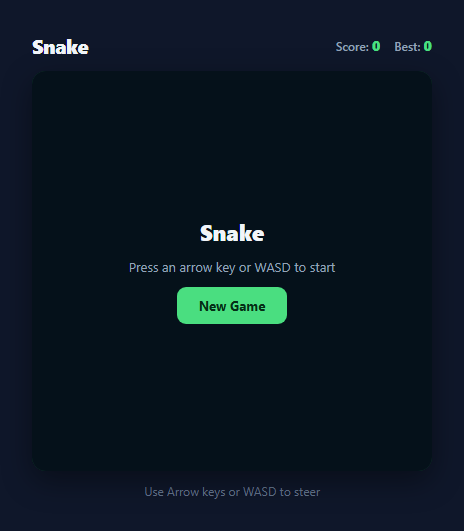
Snake is the archetypal grid-based arcade game: a growing line of segments moves continuously across a fixed grid, eating food to grow longer while avoiding collisions with the walls or its own body. This snippet is a complete, dependency-free implementation using the HTML5 Canvas API, a fixed-tick game loop, and a direction queue that correctly prevents the classic "instant death by reversing into yourself" bug found in many amateur Snake clones.
Grid state as an array of coordinates, not pixels
The snake is not tracked in pixel space — it is an array of { x, y } grid-cell coordinates, snake = [{x:9,y:9}, {x:8,y:9}, {x:7,y:9}], where index 0 is always the head. A single cellSize constant (canvas.width / GRID_SIZE, an 18x18 grid on a 360px canvas) converts grid coordinates to pixels only at draw time inside draw(). This separation between logical grid state and pixel rendering is what makes collision detection trivial: checking whether the new head coordinate matches any existing segment, snake.some(seg => seg.x === newHead.x && seg.y === newHead.y), is a simple integer comparison rather than a bounding-box or pixel-overlap calculation.
The fixed-tick game loop
Movement runs on setInterval(tick, TICK_MS) with TICK_MS = 130, meaning the entire game state — direction, head position, growth, collision — advances exactly once every 130 milliseconds regardless of how fast the player presses keys. This is deliberate: Snake's difficulty and feel come from the fixed cadence of movement, unlike a requestAnimationFrame-driven action game where movement speed should track the display refresh rate. Each tick() call applies the queued direction, computes a new head cell, checks for wall and self collisions, and either grows the snake (on eating food) or moves it (by pushing a new head and popping the tail) before triggering a full redraw.
The direction queue: solving the reversal bug
A common Snake implementation bug is that pressing the opposite of the current direction (for example pressing Down while moving Up) causes the snake to immediately try to move into the cell occupied by its own second segment, ending the game unfairly on a single mistaken keypress. This snippet solves it with two separate variables: direction (the direction actually applied on the last tick) and queuedDirection (the direction requested by the most recent keypress). setDirection(x, y) checks isOpposite(proposed, direction) — comparing against the direction the snake is *currently* moving, not the queued one — and silently discards the keypress if it is a direct reversal. Only non-reversing keypresses update queuedDirection, and queuedDirection is copied into direction at the very start of each tick(), so rapid key-mashing between ticks cannot queue up multiple direction changes that would let a reversal slip through.
Food placement, growth, and scoring
placeFood() repeatedly generates a random grid cell and rejects it with a do...while loop if it lands on any current snake segment, guaranteeing food never spawns inside the snake's own body. When the new head coordinate matches the food coordinate, the score increments and a new food cell is placed without popping the tail — since the tail is only removed on non-eating moves via snake.pop(), leaving it in place is exactly what makes the snake one segment longer.
Persisted best score and canvas rendering
The best score persists across page reloads using localStorage.getItem('snake-best-score') and localStorage.setItem, checked and updated inside gameOver() whenever the current run's score exceeds the stored best. Rendering itself is straightforward canvas drawing: the food is a filled circle via ctx.arc(), and each snake segment is a filled, slightly-inset rectangle via ctx.fillRect(), with the head segment drawn in a brighter green (#4ade80) than the body (#22c55e) so the direction of travel is always visually obvious at a glance.
Build with AI
Build, Understand, Optimize, and Extend It With AI
Paste this snippet's HTML, CSS, and JS into an AI coding assistant like Claude and ask it to walk through why direction and queuedDirection are kept as two separate variables instead of one — that distinction is exactly what prevents the classic Snake bug where a fast reversal keypress kills you instantly, and it's worth understanding fully before you touch the input logic. It's also a good target for AI-assisted extension: ask the assistant to add increasing speed over time by gradually lowering TICK_MS as the score grows, to add obstacle walls in the middle of the grid that also trigger game over on collision, or to add touch/swipe controls so the game is playable on mobile without a physical keyboard. You could also ask it to explain the trade-offs between the current setInterval fixed-tick approach and a requestAnimationFrame-with-accumulator approach for smoother rendering between logical ticks. Use it to interrogate the code's decisions, not just to copy the output.
Prompt to recreate it
Copy this into your AI assistant of choice to build the effect from scratch, or as a jumping-off point for your own variant:
Build a classic Snake game using the HTML5 Canvas API in plain HTML, CSS, and JavaScript — no frameworks, no build tooling.

Requirements:
- A snake represented as an array of grid-cell coordinates (not raw pixels) moving continuously across a fixed-size grid in the last valid direction the player pressed, controllable via both Arrow keys and WASD.
- A fixed-tick game loop (setInterval or a requestAnimationFrame loop with a time accumulator) that advances the snake's position at a constant, configurable interval independent of how fast the player presses keys, since Snake's difficulty comes from a steady cadence, not frame-rate-linked movement.
- A direction queue or equivalent mechanism that silently ignores any keypress attempting to reverse the snake directly into itself (the exact opposite of its current travel direction), so a mistimed keypress cannot cause an unfair instant self-collision.
- Random food placement on an empty grid cell (never inside the snake's current body) that, when eaten, grows the snake by one segment, increases a visible score counter, and immediately spawns new food elsewhere.
- Game-over detection when the snake's head collides with the outer wall boundary or with any of its own body segments, showing a clear game-over state with the final score and a way to restart.
- A best/high score that persists across page reloads using localStorage, displayed alongside the current live score and updated whenever a new run beats the stored best.
- A "New Game" control that fully resets the snake's position, length, direction, and score without needing a page reload, plus a clear initial state prompting the player to press a direction key to begin.
Want to tighten it up first? Run this prompt through the AI Prompt Studio to score it across 8 quality dimensions, catch anti-patterns, and tune the wording for Claude, ChatGPT, or Gemini before you paste it in.
Source Code
<div class="sn-wrap">
  <div class="sn-header">
    <h2>Snake</h2>
    <div class="sn-scores">
      <span>Score: <strong id="sn-score">0</strong></span>
      <span>Best: <strong id="sn-best">0</strong></span>
    </div>
  </div>

  <div class="sn-canvas-wrap">
    <canvas id="sn-canvas" width="360" height="360"></canvas>
    <div class="sn-overlay" id="sn-overlay">
      <p class="sn-overlay-title" id="sn-overlay-title">Snake</p>
      <p class="sn-overlay-sub" id="sn-overlay-sub">Press an arrow key or WASD to start</p>
      <button class="sn-new-btn" id="sn-new-btn">New Game</button>
    </div>
  </div>

  <p class="sn-hint">Use Arrow keys or WASD to steer</p>
</div>
* { box-sizing: border-box; margin: 0; padding: 0; }
body { font-family: system-ui, sans-serif; background: #0f172a; min-height: 100vh; display: flex; align-items: center; justify-content: center; padding: 24px; }
.sn-wrap { display: flex; flex-direction: column; align-items: center; gap: 12px; width: 100%; max-width: 400px; }
.sn-header { width: 100%; display: flex; align-items: center; justify-content: space-between; }
.sn-header h2 { color: #f1f5f9; font-size: 20px; font-weight: 800; letter-spacing: -0.02em; }
.sn-scores { display: flex; gap: 14px; font-size: 12px; color: #94a3b8; font-weight: 600; }
.sn-scores strong { color: #4ade80; font-size: 14px; }
.sn-canvas-wrap { position: relative; width: 100%; aspect-ratio: 1 / 1; border-radius: 14px; overflow: hidden; box-shadow: 0 10px 30px rgba(0,0,0,0.4); }
#sn-canvas { width: 100%; height: 100%; display: block; background: #14532d; }
.sn-overlay {
position: absolute; inset: 0;
background: rgba(2, 6, 23, 0.85);
display: flex; flex-direction: column; align-items: center; justify-content: center; gap: 10px;
text-align: center; padding: 20px;
}
.sn-overlay.hidden { display: none; }
.sn-overlay-title { color: #f1f5f9; font-size: 22px; font-weight: 800; }
.sn-overlay-sub { color: #94a3b8; font-size: 13px; max-width: 260px; line-height: 1.5; }
.sn-new-btn {
padding: 10px 22px; font-size: 13px; font-weight: 700; border-radius: 9px;
border: none; background: #4ade80; color: #052e16; cursor: pointer;
font-family: inherit; transition: background 0.15s, transform 0.1s;
}
.sn-new-btn:hover { background: #86efac; }
.sn-new-btn:active { transform: scale(0.96); }
.sn-hint { color: #64748b; font-size: 12px; }const GRID_SIZE = 18;
const TICK_MS = 130;
const canvas = document.getElementById('sn-canvas');
const ctx = canvas.getContext('2d');
const scoreEl = document.getElementById('sn-score');
const bestEl = document.getElementById('sn-best');
const overlayEl = document.getElementById('sn-overlay');
const overlayTitleEl = document.getElementById('sn-overlay-title');
const overlaySubEl = document.getElementById('sn-overlay-sub');
const newBtn = document.getElementById('sn-new-btn');
const BEST_KEY = 'snake-best-score';
let cellSize = canvas.width / GRID_SIZE;
let snake, direction, queuedDirection, food, score, running, loopHandle;
function loadBest() {
return parseInt(localStorage.getItem(BEST_KEY) || '0', 10);
}
function saveBest(value) {
localStorage.setItem(BEST_KEY, String(value));
}
function resetState() {
snake = [
{ x: 9, y: 9 }, { x: 8, y: 9 }, { x: 7, y: 9 },
];
direction = { x: 1, y: 0 };
queuedDirection = { x: 1, y: 0 };
score = 0;
running = false;
scoreEl.textContent = '0';
bestEl.textContent = loadBest();
placeFood();
draw();
}
function placeFood() {
let candidate;
do {
candidate = { x: Math.floor(Math.random() * GRID_SIZE), y: Math.floor(Math.random() * GRID_SIZE) };
} while (snake.some(seg => seg.x === candidate.x && seg.y === candidate.y));
food = candidate;
}
function isOpposite(a, b) {
return a.x === -b.x && a.y === -b.y;
}
function setDirection(x, y) {
const proposed = { x, y };
if (isOpposite(proposed, direction)) return;
queuedDirection = proposed;
}
document.addEventListener('keydown', e => {
switch (e.key) {
case 'ArrowUp': case 'w': case 'W': setDirection(0, -1); startIfNeeded(); break;
case 'ArrowDown': case 's': case 'S': setDirection(0, 1); startIfNeeded(); break;
case 'ArrowLeft': case 'a': case 'A': setDirection(-1, 0); startIfNeeded(); break;
case 'ArrowRight': case 'd': case 'D': setDirection(1, 0); startIfNeeded(); break;
default: return;
}
e.preventDefault();
});
function startIfNeeded() {
if (!running) startGame();
}
function startGame() {
if (running) return;
running = true;
overlayEl.classList.add('hidden');
clearInterval(loopHandle);
loopHandle = setInterval(tick, TICK_MS);
}
function tick() {
direction = queuedDirection;
const head = snake[0];
const newHead = { x: head.x + direction.x, y: head.y + direction.y };
if (newHead.x < 0 || newHead.x >= GRID_SIZE || newHead.y < 0 || newHead.y >= GRID_SIZE) {
return gameOver();
}
if (snake.some(seg => seg.x === newHead.x && seg.y === newHead.y)) {
return gameOver();
}
snake.unshift(newHead);
if (newHead.x === food.x && newHead.y === food.y) {
score++;
scoreEl.textContent = score;
placeFood();
} else {
snake.pop();
}
draw();
}
function gameOver() {
running = false;
clearInterval(loopHandle);
const best = loadBest();
if (score > best) {
saveBest(score);
bestEl.textContent = score;
}
overlayTitleEl.textContent = 'Game Over';
overlaySubEl.textContent = 'Score: ' + score + ' — click New Game to try again';
overlayEl.classList.remove('hidden');
}
function draw() {
ctx.fillStyle = '#14532d';
ctx.fillRect(0, 0, canvas.width, canvas.height);
ctx.fillStyle = '#f87171';
const foodPad = cellSize * 0.15;
ctx.beginPath();
ctx.arc(
food.x * cellSize + cellSize / 2,
food.y * cellSize + cellSize / 2,
cellSize / 2 - foodPad,
0, Math.PI * 2
);
ctx.fill();
snake.forEach((seg, i) => {
ctx.fillStyle = i === 0 ? '#4ade80' : '#22c55e';
const pad = 1.5;
ctx.fillRect(seg.x * cellSize + pad, seg.y * cellSize + pad, cellSize - pad * 2, cellSize - pad * 2);
});
}
newBtn.addEventListener('click', () => {
clearInterval(loopHandle);
resetState();
overlayTitleEl.textContent = 'Snake';
overlaySubEl.textContent = 'Press an arrow key or WASD to start';
overlayEl.classList.remove('hidden');
});
resetState();Step by step
How to Use
- 1Start movingPress any Arrow key or WASD key — the first valid keypress calls startIfNeeded(), which starts the setInterval game loop and hides the start overlay. The snake begins moving immediately in the pressed direction.
- 2Steer without reversing into yourselfsetDirection() silently ignores any keypress that is the direct opposite of the snake's current travel direction, so pressing Down while moving Up has no effect instead of causing instant self-collision — you must turn a 90-degree corner first.
- 3Eat food to grow and scoreEach red food pellet eaten via placeFood() increments the score display by one, spawns a new food cell guaranteed not to overlap the snake body, and adds one segment to the snake's length by skipping the usual tail-pop on that tick.
- 4Avoid walls and your own bodytick() checks the new head position against the 0 to GRID_SIZE-1 boundary and against every existing segment via snake.some(); either condition calls gameOver(), stops the interval, and shows the game-over overlay with your final score.
- 5Beat your best scoreYour highest score across all sessions is read from and written to localStorage under the key snake-best-score, displayed in the header next to your current score, and updated automatically whenever a run's score exceeds the stored best.
- 6Start a new gameClick "New Game" at any time to call resetState(), which clears the interval, resets the snake to its starting three-segment position and length, resets the score to zero, and shows the start overlay again.
Real-world uses
Common Use Cases
Got questions?
Frequently Asked Questions
setDirection() compares any newly requested direction against the direction variable, which holds the direction the snake actually moved on the most recent tick — not the queued one. If the requested direction is the exact opposite (isOpposite() checks x and y are both negated), the keypress is silently discarded and queuedDirection is left unchanged, so a same-tick reversal keypress simply has no effect.
Snake's gameplay is inherently discrete — the snake occupies one grid cell at a time and moves in fixed steps, not smooth continuous motion. setInterval(tick, 130) gives a constant, predictable cadence that matches this discrete model. requestAnimationFrame is better suited to games like the included Pong or Breakout snippets where the ball needs smooth per-frame position updates and physics.
The best score is stored as a string in localStorage under the key snake-best-score via saveBest(), and read back with loadBest() (parsed to an integer) whenever the game initialises or a run ends. Because localStorage persists per-origin across browser sessions, the best score survives page refreshes, tab closures, and even browser restarts on the same device.
Yes — GRID_SIZE controls how many cells make up each row and column (default 18x18 on a 360px canvas, so each cell is 20px), and TICK_MS controls the interval between moves in milliseconds (default 130ms). Lowering TICK_MS makes the snake move faster and the game harder; increasing GRID_SIZE gives more room to manoeuvre but takes longer to fill the board.
Only the most recent valid (non-reversing) keypress is kept, because setDirection() simply overwrites queuedDirection each time it is called and does not accumulate a history. Since queuedDirection is copied into direction once at the start of each tick(), rapid key-mashing between ticks cannot queue multiple moves — the snake will only ever apply the latest direction that was valid at tick time.