Source Code
<div class="spl-page">
<main class="spl-content"><p>↑ Page content above the footer</p></main>
<footer class="spl">
<div class="spl-inner">
<div class="spl-plans" id="splPlans">
<button class="spl-plan" data-plan="free">
<span class="spl-plan-name">Free</span>
<span class="spl-plan-price">$0</span>
<span class="spl-plan-cta">Current plan</span>
</button>
<button class="spl-plan" data-plan="pro">
<span class="spl-plan-badge">Most popular</span>
<span class="spl-plan-name">Pro</span>
<span class="spl-plan-price">$19<small>/mo</small></span>
<span class="spl-plan-cta">Upgrade</span>
</button>
<button class="spl-plan" data-plan="team">
<span class="spl-plan-name">Team</span>
<span class="spl-plan-price">$49<small>/mo</small></span>
<span class="spl-plan-cta">Upgrade</span>
</button>
<button class="spl-plan" data-plan="enterprise">
<span class="spl-plan-name">Enterprise</span>
<span class="spl-plan-price">Custom</span>
<span class="spl-plan-cta">Contact sales</span>
</button>
</div>
<div class="spl-bottom">
<div class="spl-col">
<p class="spl-brand">Northline</p>
<p class="spl-copy">© 2026 Northline Inc.</p>
</div>
<ul class="spl-links">
<li><a href="#">Full pricing</a></li>
<li><a href="#">Compare plans</a></li>
<li><a href="#">Docs</a></li>
<li><a href="#">Privacy</a></li>
</ul>
</div>
<div class="spl-toast" id="splToast" hidden></div>
</div>
</footer>
</div>*{box-sizing:border-box;margin:0;padding:0}
body{font-family:system-ui,-apple-system,sans-serif;background:#fafaf9}
.spl-page{min-height:100vh;display:flex;flex-direction:column}
.spl-content{flex:1;display:flex;align-items:center;justify-content:center;color:#a8a29e;font-size:13px;padding:50px 20px}
.spl{background:#fff;border-top:1px solid #e2e8f0;position:relative}
.spl-inner{max-width:1040px;margin:0 auto;padding:34px 24px 26px}
.spl-plans{display:grid;grid-template-columns:repeat(4,1fr);gap:12px;margin-bottom:26px}
.spl-plan{position:relative;background:#f8fafc;border:1.5px solid #e2e8f0;border-radius:14px;padding:16px 14px;display:flex;flex-direction:column;gap:6px;cursor:pointer;font-family:inherit;text-align:left;transition:border-color .15s,transform .15s,box-shadow .15s}
.spl-plan:hover{border-color:#6366f1;transform:translateY(-2px);box-shadow:0 8px 20px -8px rgba(99,102,241,.35)}
.spl-plan-badge{position:absolute;top:-9px;right:12px;background:#6366f1;color:#fff;font-size:9.5px;font-weight:800;padding:3px 8px;border-radius:20px;letter-spacing:.3px}
.spl-plan-name{font-size:12.5px;font-weight:700;color:#64748b;text-transform:uppercase;letter-spacing:.4px}
.spl-plan-price{font-size:19px;font-weight:800;color:#0f172a}
.spl-plan-price small{font-size:11px;font-weight:600;color:#94a3b8}
.spl-plan-cta{margin-top:4px;font-size:11.5px;font-weight:700;color:#4f46e5}
.spl-plan[data-plan="free"] .spl-plan-cta{color:#94a3b8}
.spl-bottom{display:flex;align-items:center;justify-content:space-between;flex-wrap:wrap;gap:14px;padding-top:20px;border-top:1px solid #f1f5f9}
.spl-brand{color:#0f172a;font-weight:800;font-size:14px;margin-bottom:4px}
.spl-copy{font-size:11.5px;color:#94a3b8}
.spl-links{list-style:none;display:flex;gap:18px;flex-wrap:wrap}
.spl-links a{color:#64748b;text-decoration:none;font-size:12.5px;transition:color .15s}
.spl-links a:hover{color:#0f172a}
.spl-toast{position:fixed;left:50%;bottom:24px;transform:translate(-50%,10px);background:#0f172a;color:#fff;font-size:12.5px;font-weight:600;padding:11px 18px;border-radius:12px;box-shadow:0 12px 30px -10px rgba(0,0,0,.4);z-index:30;opacity:0;transition:opacity .2s,transform .2s}
.spl-toast.show{opacity:1;transform:translate(-50%,0)}
@media (max-width:720px){ .spl-plans{grid-template-columns:repeat(2,1fr)} }
@media (max-width:480px){ .spl-plans{grid-template-columns:1fr} .spl-bottom{flex-direction:column;align-items:flex-start} }var plans = document.getElementById('splPlans');
var toast = document.getElementById('splToast');
var toastTimer = null;
var currentPlan = 'free';
var labels = {
free: 'You are already on the Free plan',
pro: 'Redirecting to checkout for the Pro plan\u2026',
team: 'Redirecting to checkout for the Team plan\u2026',
enterprise: 'Opening a message to sales for Enterprise\u2026'
};
function showToast(message) {
toast.textContent = message;
toast.hidden = false;
requestAnimationFrame(function () { toast.classList.add('show'); });
clearTimeout(toastTimer);
toastTimer = setTimeout(function () {
toast.classList.remove('show');
setTimeout(function () { toast.hidden = true; }, 200);
}, 2200);
}
function markCurrentPlan() {
plans.querySelectorAll('.spl-plan').forEach(function (btn) {
var cta = btn.querySelector('.spl-plan-cta');
var isCurrent = btn.dataset.plan === currentPlan;
if (isCurrent) {
cta.textContent = 'Current plan';
} else if (btn.dataset.plan === 'enterprise') {
cta.textContent = 'Contact sales';
} else {
cta.textContent = 'Upgrade';
}
});
}
plans.addEventListener('click', function (e) {
var btn = e.target.closest('.spl-plan');
if (!btn) return;
var plan = btn.dataset.plan;
showToast(labels[plan] || 'Opening plan details\u2026');
if (plan !== 'enterprise') {
currentPlan = plan;
markCurrentPlan();
}
});
markCurrentPlan();Learn Coding Visually
Learn to code with interactive, live-preview playgrounds — HTML, CSS, JavaScript, React & more.
 HTML Playground42 lessons · Click-based · Live preview
 CSS PlaygroundLearn CSS with a live editor
 JavaScript Playground60 lessons · DOM · Async · Canvas
 React PlaygroundLearn React with a live code editor
 GSAP PlaygroundLearn GSAP animation interactively
 SVG Playground44 lessons · shapes · paths · animation
 SCSS Playground45 lessons · Sass modules · tokens
 Tailwind PlaygroundLearn Tailwind CSS with a live editor
 Bootstrap 5 Playground50 lessons · live preview
SaaS Plan & Pricing Quick Links Footer — Free Snippet
SaaS Plan & Pricing Quick Links Footer · Footers · Plain HTML, CSS & JS · Live preview
What's included
Features
About this UI Snippet
SaaS Plan & Pricing Footer — Clickable Plan Cards with an Upgrade Toast
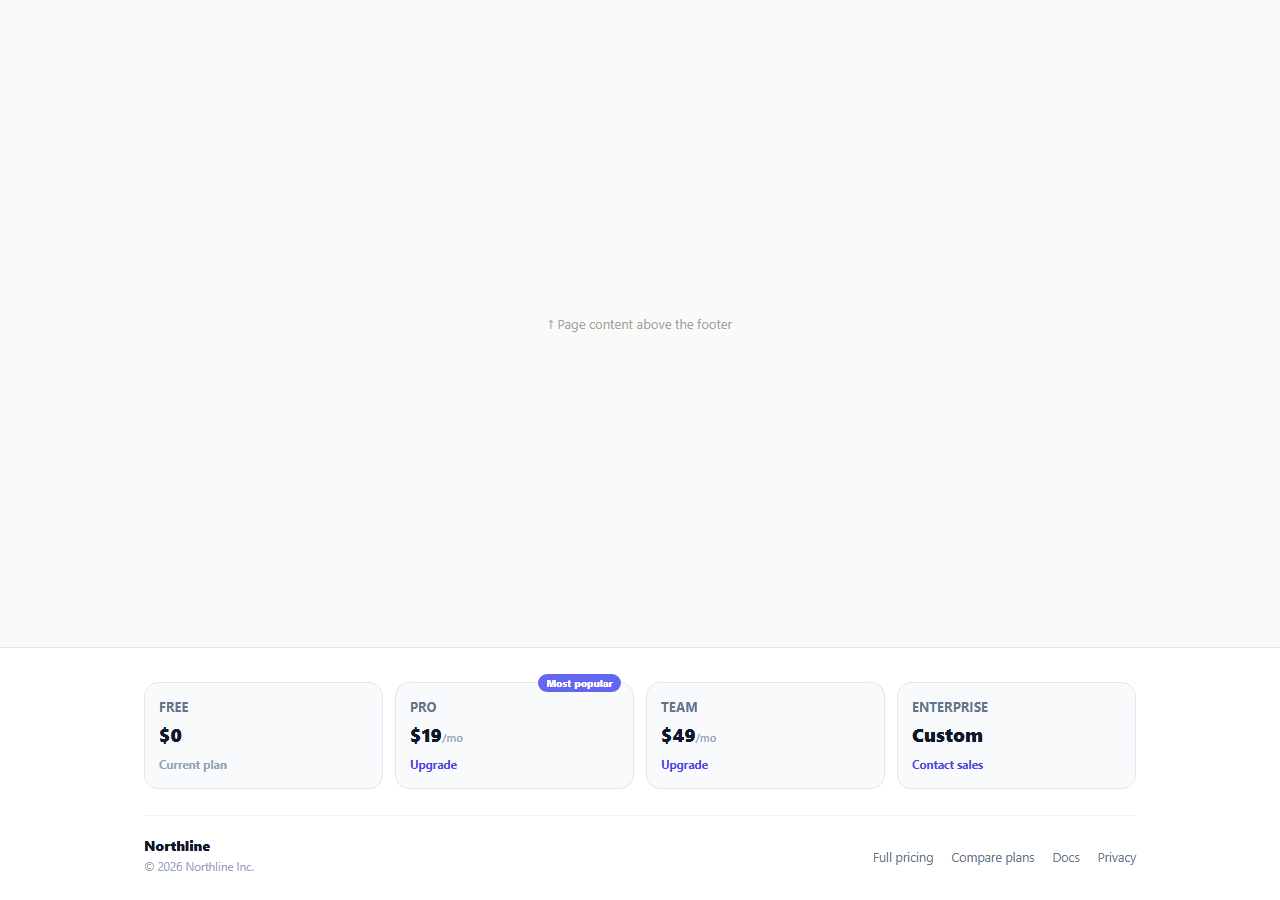
A pricing link buried in a text-only footer list forces a visitor to leave the page just to see what upgrading costs. This snippet instead puts the actual plan cards — name, price, and a plan-specific call to action — directly into the footer as a compact four-column grid, so the most common next action after "I like this product" is one click away no matter where on the site the visitor happens to be.
Plan cards driven by markup, not a JS array
Each .spl-plan button carries a data-plan attribute ("free", "pro", "team", "enterprise") and its own price, name, and CTA text directly in the HTML. This keeps the pricing content easy to edit for anyone comfortable with HTML, without needing to also update a parallel JavaScript data structure — a deliberate tradeoff for a footer where the plan list changes rarely and the click behavior is what needs to stay in sync.
A "Most popular" badge that breaks the grid rhythm on purpose
The Pro card carries an absolutely positioned .spl-plan-badge pill that overhangs the top edge of its card. This is the same visual technique full pricing pages use to draw the eye to the plan you most want visitors to pick, working even at footer scale where there is no room for a taller "recommended" banner.
Click feedback without leaving the page
Clicking any plan button calls showToast() with a plan-specific message pulled from the labels object — "Redirecting to checkout for the Pro plan…" for a paid tier, "Opening a message to sales…" for Enterprise, or a neutral message if already on that plan. The toast slides up from the bottom center, confirming the click registered before the actual navigation (a real checkout redirect or mailto link) takes over.
The current plan updates itself
markCurrentPlan() walks every plan card and sets its CTA text based on whether currentPlan matches that card's data-plan — "Current plan" for the active tier, "Upgrade" for any other paid tier, "Contact sales" for Enterprise regardless of the current plan. Clicking a non-enterprise plan updates currentPlan and re-runs this function, so the footer's own state stays internally consistent as the demo "upgrade" completes.
Why this belongs in the footer specifically
A visitor who scrolls all the way to the footer has typically read through most of the page already — feature descriptions, testimonials, FAQ — and is closer to a purchase decision than someone who just landed. Putting the actual plan comparison there, rather than only a plain "Pricing" text link, meets that visitor at the exact moment they are most ready to compare tiers.
Wiring it to a real checkout
Replace the data-plan click handler's toast-then-nothing behavior with a real navigation: for Free, no action needed; for Pro and Team, redirect to your billing provider's checkout session (e.g. a Stripe Checkout URL keyed by plan) rather than just showing a toast; for Enterprise, open a real mailto: link or a sales contact form modal instead of the placeholder toast message.
Build with AI
Build, Understand, Optimize, and Extend It With AI
Rather than tracing the current-plan state updates by hand, paste this snippet's HTML, CSS, and JS into an AI coding assistant like Claude and ask it to explain exactly how markCurrentPlan() keeps every card's CTA text consistent from a single currentPlan variable, and why Enterprise is intentionally excluded from that state machine. The same assistant can help you optimize it, for instance asking whether the plan data should be extracted into a shared array so the footer and a full pricing page render from one source of truth instead of two separate markup blocks. It is also useful for extending the footer: ask it to wire real checkout redirects per plan using your billing provider's hosted checkout, add an annual/monthly billing toggle that updates the displayed prices, or replace the mailto-style Enterprise action with a real contact-sales modal form. Treat the code less like a finished artifact and more like a starting point for a conversation.
Prompt to recreate it
Copy this into your AI assistant of choice to build the effect from scratch, or as a jumping-off point for your own variant:
Build a footer "plan and pricing quick links" section in plain HTML, CSS, and JavaScript, no library.

Requirements:
- A responsive grid of clickable plan cards (at minimum Free, Pro, Team, and Enterprise), each showing a plan name, a price, and a call-to-action label, with the Pro card showing an overhanging "Most popular" badge that breaks the card's top edge.
- A single JavaScript variable tracking the current plan. A shared render function must loop every plan card and set its CTA text purely from a comparison against that one variable: "Current plan" for the active tier, "Upgrade" for other paid tiers, and always "Contact sales" for the Enterprise tier regardless of which other plan is active.
- Clicking any plan card must show a toast notification that slides up from the bottom center of the page with a plan-specific message (e.g. a checkout-redirect message for paid tiers, a sales-contact message for Enterprise), auto-dismissing after a couple of seconds.
- Clicking a non-Enterprise plan card must update the current-plan variable and re-render every card's CTA text so exactly one card shows "Current plan" at any time.
- The grid must collapse from four columns to two, then to a single column, as the viewport narrows.
Want to tighten it up first? Run this prompt through the AI Prompt Studio to score it across 8 quality dimensions, catch anti-patterns, and tune the wording for Claude, ChatGPT, or Gemini before you paste it in.
Step by step
How to Use
- 1Paste HTML, CSS, and JSA four-column plan grid renders in the footer with the Pro plan showing a "Most popular" badge.
- 2Click any plan cardA confirmation toast slides up from the bottom describing the action for that specific plan.
- 3Click a non-Enterprise planIts CTA becomes "Current plan" and the previous current plan's CTA reverts to "Upgrade".
- 4Edit a plan's price or nameUpdate the text directly inside the matching .spl-plan button in the HTML panel.
- 5Add a new plan tierCopy a .spl-plan button, give it a new data-plan value, and add a matching entry to the labels object in JS.
- 6Wire it to real checkoutReplace the toast-only click handler with real navigation to your billing provider's checkout or a sales contact form.
Real-world uses
Common Use Cases
Got questions?
Frequently Asked Questions
No — this is a UI demo. Clicking shows a confirmation toast and updates the local "current plan" state used only to re-render the CTA labels. Wire the click handler to a real billing provider checkout session for actual purchases.
A single currentPlan variable is the source of truth. markCurrentPlan() re-runs on every click and sets each card's CTA text purely from a comparison against that one variable, so exactly one card ever shows "Current plan" at a time.
Enterprise pricing is typically negotiated rather than self-serve, so the demo intentionally excludes it from the currentPlan state machine — clicking it always shows a sales-contact message regardless of which other plan is active.
Copy an existing .spl-plan button, give it a unique data-plan value and its own name/price/CTA text, then add a matching key to the labels object in the JS panel so its toast message is defined.
Yes — delete the .spl-plan-badge span from the Pro button to remove it, or add the same span (with new text if desired) to a different plan button to highlight that one instead.
Yes. Model the plans as an array of objects (id, name, price, cta) rendered with a map/v-for, track currentPlanId in state, and derive each card's CTA text from a comparison against that state the same way markCurrentPlan() does.