Source Code
<div class="cst-page">
<main class="cst-content"><p>↑ Page content above the footer</p></main>
<footer class="cst">
<div class="cst-inner">
<div class="cst-top">
<div class="cst-col">
<p class="cst-brand">Northline</p>
<p class="cst-copy">© 2026 Northline Inc.</p>
</div>
<ul class="cst-links">
<li><a href="#">Docs</a></li>
<li><a href="#">Pricing</a></li>
<li><a href="#">Privacy</a></li>
<li><a href="#">Contact</a></li>
</ul>
</div>
<div class="cst-row">
<a class="cst-changelog" href="#" id="cstChangelogLink">
<span class="cst-changelog-badge" id="cstVersionBadge">v2.14.0</span>
<span class="cst-changelog-text">
<b id="cstChangelogTitle">Loading latest release…</b>
<small id="cstChangelogMeta"> </small>
</span>
<span class="cst-changelog-arrow">→</span>
</a>
<a class="cst-status" href="#" id="cstStatusLink">
<span class="cst-status-dot" id="cstStatusDot"></span>
<span id="cstStatusText">Checking status…</span>
</a>
</div>
</div>
</footer>
</div>*{box-sizing:border-box;margin:0;padding:0}
body{font-family:system-ui,-apple-system,sans-serif;background:#fafaf9}
.cst-page{min-height:100vh;display:flex;flex-direction:column}
.cst-content{flex:1;display:flex;align-items:center;justify-content:center;color:#a8a29e;font-size:13px;padding:50px 20px}
.cst{background:#0f172a;color:#cbd5e1}
.cst-inner{max-width:900px;margin:0 auto;padding:30px 24px 26px}
.cst-top{display:flex;align-items:center;justify-content:space-between;flex-wrap:wrap;gap:14px;padding-bottom:22px;border-bottom:1px solid #1e293b}
.cst-brand{color:#fff;font-weight:800;font-size:14px;margin-bottom:4px}
.cst-copy{font-size:11.5px;color:#64748b}
.cst-links{list-style:none;display:flex;gap:18px;flex-wrap:wrap}
.cst-links a{color:#94a3b8;text-decoration:none;font-size:12.5px;transition:color .15s}
.cst-links a:hover{color:#fff}
.cst-row{display:flex;gap:12px;flex-wrap:wrap;margin-top:18px}
.cst-changelog{flex:1;min-width:240px;display:flex;align-items:center;gap:12px;background:#1e293b;border:1px solid #334155;border-radius:14px;padding:12px 14px;text-decoration:none;transition:background .15s,transform .15s}
.cst-changelog:hover{background:#273449;transform:translateY(-1px)}
.cst-changelog-badge{flex-shrink:0;background:#4f46e5;color:#fff;font-size:11px;font-weight:800;padding:4px 9px;border-radius:8px}
.cst-changelog-text{flex:1;min-width:0}
.cst-changelog-text b{display:block;font-size:12.5px;color:#fff;white-space:nowrap;overflow:hidden;text-overflow:ellipsis}
.cst-changelog-text small{font-size:11px;color:#94a3b8}
.cst-changelog-arrow{color:#64748b;font-size:14px;flex-shrink:0;transition:transform .15s}
.cst-changelog:hover .cst-changelog-arrow{transform:translateX(3px)}
.cst-status{display:flex;align-items:center;gap:9px;background:#1e293b;border:1px solid #334155;border-radius:14px;padding:12px 16px;text-decoration:none;color:#e2e8f0;font-size:12.5px;font-weight:700;transition:background .15s}
.cst-status:hover{background:#273449}
.cst-status-dot{width:9px;height:9px;border-radius:50%;background:#64748b;flex-shrink:0;transition:background .2s}
.cst-status-dot.ok{background:#22c55e;box-shadow:0 0 0 0 rgba(34,197,94,.55);animation:cstPulse 2s infinite}
.cst-status-dot.degraded{background:#f59e0b}
.cst-status-dot.down{background:#ef4444}
@keyframes cstPulse{0%{box-shadow:0 0 0 0 rgba(34,197,94,.5)}70%{box-shadow:0 0 0 6px rgba(34,197,94,0)}100%{box-shadow:0 0 0 0 rgba(34,197,94,0)}}
@media (max-width:480px){ .cst-row{flex-direction:column} }var releases = [
{ version: 'v2.14.0', title: 'Faster bulk export and a redesigned activity feed', when: '2 days ago' },
{ version: 'v2.13.2', title: 'Fixed a sync issue affecting shared workspaces', when: '1 week ago' },
{ version: 'v2.13.0', title: 'Added keyboard shortcuts for the command palette', when: '3 weeks ago' }
];
var services = [
{ name: 'API', state: 'ok' },
{ name: 'Dashboard', state: 'ok' },
{ name: 'Webhooks', state: 'ok' }
];
var badge = document.getElementById('cstVersionBadge');
var titleEl = document.getElementById('cstChangelogTitle');
var metaEl = document.getElementById('cstChangelogMeta');
var dot = document.getElementById('cstStatusDot');
var statusText = document.getElementById('cstStatusText');
function loadChangelog() {
var latest = releases[0];
badge.textContent = latest.version;
titleEl.textContent = latest.title;
metaEl.textContent = 'Released ' + latest.when;
}
function computeOverallStatus() {
var worst = 'ok';
services.forEach(function (s) {
if (s.state === 'down') worst = 'down';
else if (s.state === 'degraded' && worst !== 'down') worst = 'degraded';
});
return worst;
}
function loadStatus() {
var overall = computeOverallStatus();
dot.className = 'cst-status-dot ' + overall;
if (overall === 'ok') statusText.textContent = 'All systems operational';
else if (overall === 'degraded') statusText.textContent = 'Degraded performance';
else statusText.textContent = 'Service disruption';
}
setTimeout(function () {
loadChangelog();
loadStatus();
}, 500);Learn Coding Visually
Learn to code with interactive, live-preview playgrounds — HTML, CSS, JavaScript, React & more.
 HTML Playground42 lessons · Click-based · Live preview
 CSS PlaygroundLearn CSS with a live editor
 JavaScript Playground60 lessons · DOM · Async · Canvas
 React PlaygroundLearn React with a live code editor
 GSAP PlaygroundLearn GSAP animation interactively
 SVG Playground44 lessons · shapes · paths · animation
 SCSS Playground45 lessons · Sass modules · tokens
 Tailwind PlaygroundLearn Tailwind CSS with a live editor
 Bootstrap 5 Playground50 lessons · live preview
Changelog & Status Footer — Free HTML CSS JS Snippet
Changelog & Status Footer · Footers · Plain HTML, CSS & JS · Live preview
What's included
Features
About this UI Snippet
Changelog & Status Footer — Latest Release Card with a Computed Status Dot
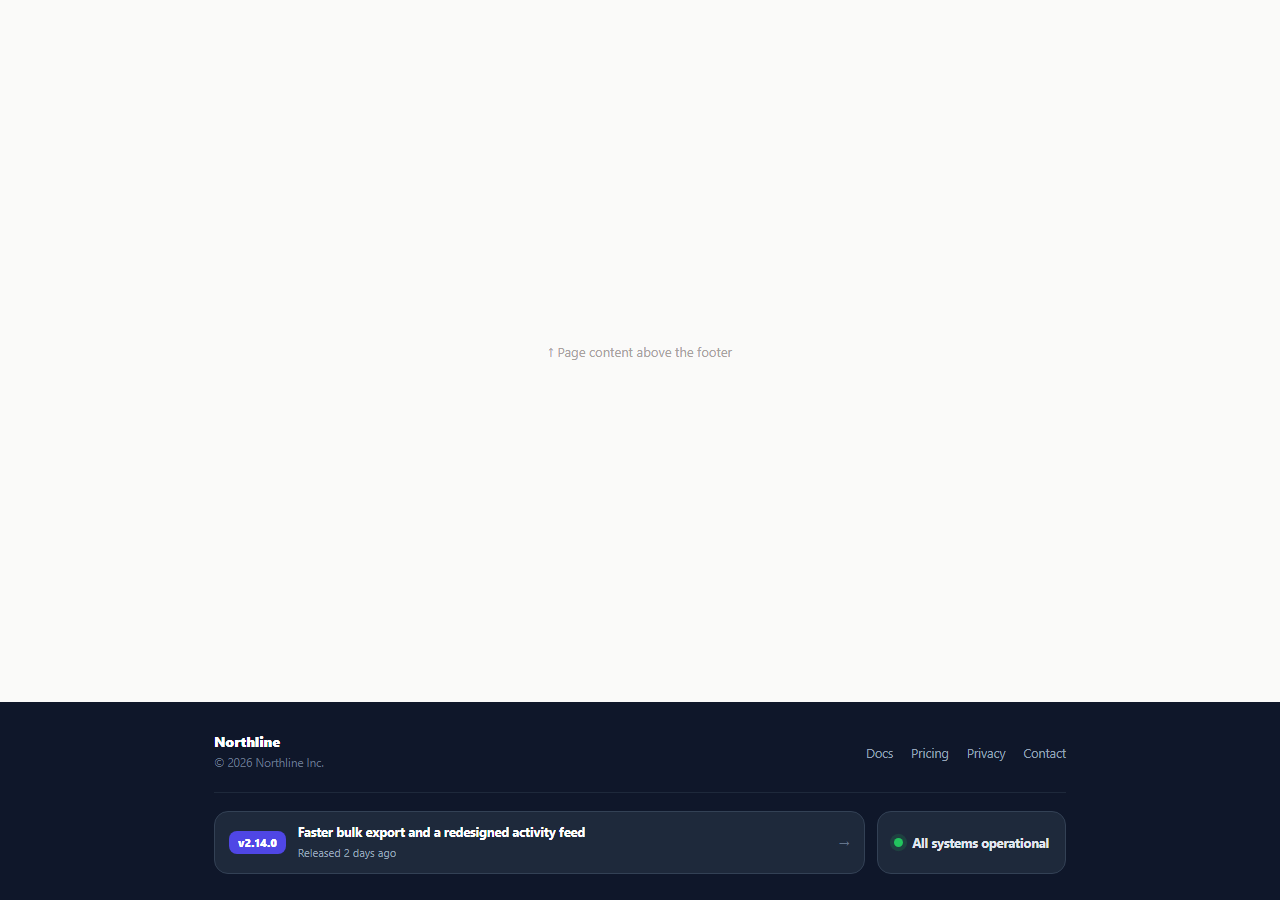
Most footers bury "what's new" and "is it working" behind separate pages a visitor rarely clicks. This snippet surfaces both directly in the footer as two compact cards: a changelog card showing the most recent release's version, title, and relative time, and a status card whose colored dot is computed from an actual list of services rather than hand-typed as "All systems operational" and forgotten the next time something breaks.
A changelog card driven by a releases array
The releases array holds objects with version, title, and when. loadChangelog() always reads releases[0] — the array's first entry is the source of truth for "latest," so publishing a new release is just unshifting a new object onto the front of the array rather than editing a separate hardcoded footer string. The version renders as a small colored .cst-changelog-badge pill, matching how release notes are tagged in real changelogs.
Status derived from services, not asserted
computeOverallStatus() walks the services array (each with a name and state of ok, degraded, or down) and returns the worst state found — down beats degraded beats ok. This mirrors how real status pages aggregate: the footer's one-line summary is never manually out of sync with the individual service states, because it is computed from them every time loadStatus() runs.
A pulsing dot only when things are actually fine
.cst-status-dot.ok gets a box-shadow keyframe pulse — the same "alive" visual language used across live-status UI — while .degraded and .down render as flat, non-pulsing amber and red. A pulse implies healthy, ongoing normal operation; a degraded or down state should read as a static, attention-worthy color instead.
Simulated load delay
Both cards start in a loading state ("Loading latest release…", "Checking status…") and populate after a setTimeout, standing in for a real fetch to a changelog API and a status-page API. This avoids the footer flashing empty content before real async data arrives, and gives you an obvious place to swap in fetch() calls.
Two independent link targets
Both cards are full <a> elements pointing at # in the demo — in production, the changelog card should link to the specific release's changelog entry (e.g. /changelog/v2.14.0) and the status card to your public status page (e.g. a hosted Statuspage or Instatus URL), so a curious or worried visitor lands on the right detail page from the footer with one click.
Wiring it to real data
Replace the static releases and services arrays with fetch() calls to your changelog API and status-page API (many status providers expose a JSON summary endpoint), keeping computeOverallStatus() and the render functions unchanged — they already treat the data as external truth, not something to duplicate elsewhere in the footer.
Build with AI
Build, Understand, Optimize, and Extend It With AI
Rather than tracing the worst-of status computation by hand, paste this snippet's HTML, CSS, and JS into an AI coding assistant like Claude and ask it to explain exactly how computeOverallStatus() picks the worst state across the services array and why that is more reliable than a single hardcoded status string. The same assistant can help you optimize it, for instance asking whether the changelog and status data should be cached with a short revalidation window instead of fetched fresh on every page load. It is also useful for extending the footer: ask it to wire in real fetch() calls to a changelog API and a status-page JSON endpoint, add a small incident history list under the status card, or animate the changelog card when a brand-new release appears since the visitor's last page view. Treat the code less like a finished artifact and more like a starting point for a conversation.
Prompt to recreate it
Copy this into your AI assistant of choice to build the effect from scratch, or as a jumping-off point for your own variant:
Build a footer "changelog and status" bar in plain HTML, CSS, and JavaScript, no library.

Requirements:
- A dark footer with brand/link columns above two side-by-side cards: a changelog card and a status card, stacking vertically on narrow screens.
- The changelog card must read its content from a JavaScript array of release objects (version, title, relative time), always displaying the first entry in the array as "latest" — adding a new release should only require adding a new object to the front of the array, not editing separate markup.
- The status card must compute its overall state from a separate JavaScript array of service objects, each with a state of "ok", "degraded", or "down" — the overall status must be the single worst state found across all services (down beats degraded beats ok), not a manually typed string.
- The status dot must pulse via a CSS box-shadow keyframe animation only when the overall computed state is "ok"; degraded and down states must render as flat, non-pulsing amber and red respectively.
- Both cards must start in a loading placeholder state ("Loading latest release…", "Checking status…") and populate after a short simulated delay via setTimeout, standing in for real API calls.
- Both cards must be full clickable link elements ready to point at a real changelog entry URL and a real status-page URL.
Want to tighten it up first? Run this prompt through the AI Prompt Studio to score it across 8 quality dimensions, catch anti-patterns, and tune the wording for Claude, ChatGPT, or Gemini before you paste it in.
Step by step
How to Use
- 1Paste HTML, CSS, and JSThe footer shows loading placeholders, then populates the changelog and status cards after a short simulated delay.
- 2Check the changelog cardIt shows the version badge, release title, and relative time of the most recent entry in the releases array.
- 3Check the status cardThe dot color and label are computed from the worst state found across the services array.
- 4Add a new releaseIn the JS panel, unshift a new { version, title, when } object onto the front of the releases array.
- 5Simulate an outageChange any service's state to "degraded" or "down" in the services array and reload to see the dot and label update.
- 6Wire it to real endpointsReplace the static arrays with fetch() calls to your changelog and status-page APIs.
Real-world uses
Common Use Cases
Got questions?
Frequently Asked Questions
The releases array in the JS panel, an array of { version, title, when } objects ordered newest first. loadChangelog() always renders releases[0], so publishing a new entry means adding a new object to the front of the array rather than editing separate footer markup.
computeOverallStatus() loops the services array and returns the single worst state found, using the precedence down > degraded > ok. The status dot color and label are derived from this one computed value, so they can never contradict the individual service states.
A pulsing animation visually implies ongoing healthy activity. Reusing it for a degraded or down state would send a confusing signal, so those states render as flat, non-animated amber or red instead.
Replace the static releases and services arrays with fetch() calls to your changelog API and status-page API (most status-page providers, including self-hosted ones, expose a JSON summary endpoint), keeping the render and computeOverallStatus() functions unchanged.
Yes — add as many { name, state } objects to the services array as needed. computeOverallStatus() already loops the full array regardless of length.
Yes. Keep releases and services as state or fetched data, derive the overall status with the same worst-of logic in a computed/useMemo value, and render the two cards from that derived state.