Source Code
<div name="lcl-page" class="lcl-page">
<main class="lcl-content"><p>↑ Page content above the footer</p></main>
<footer class="lcl">
<div class="lcl-inner">
<div class="lcl-col">
<p class="lcl-brand">Northline Studio</p>
<p class="lcl-copy">© 2026 Northline Studio Inc.</p>
</div>
<ul class="lcl-links">
<li><a href="#">Docs</a></li>
<li><a href="#">Pricing</a></li>
<li><a href="#">Status</a></li>
<li><a href="#">Privacy</a></li>
</ul>
<button class="lcl-launcher" id="lclLauncher">
<span class="lcl-avatars">
<span class="lcl-avatar" style="background:#f59e0b">M</span>
<span class="lcl-avatar" style="background:#6366f1">J</span>
</span>
<span class="lcl-launcher-text">
<b>Chat with us</b>
<small><span class="lcl-dot"></span> Online — avg reply 2 min</small>
</span>
</button>
</div>
</footer>
<div class="lcl-panel" id="lclPanel" hidden>
<div class="lcl-panel-head">
<div>
<b>Support</b>
<small><span class="lcl-dot"></span> Online now</small>
</div>
<button class="lcl-close" id="lclClose" aria-label="Close chat">×</button>
</div>
<div class="lcl-panel-body" id="lclBody">
<div class="lcl-msg lcl-msg-them">Hi! I'm Jordan from support. What can I help you with today?</div>
</div>
<div class="lcl-quick" id="lclQuick">
<button class="lcl-chip" data-q="pricing">Pricing question</button>
<button class="lcl-chip" data-q="bug">Report a bug</button>
<button class="lcl-chip" data-q="human">Talk to a human</button>
</div>
<form class="lcl-form" id="lclForm">
<input class="lcl-input" id="lclInput" type="text" placeholder="Type a message..." autocomplete="off">
<button class="lcl-send" type="submit" aria-label="Send">➤</button>
</form>
</div>
</div>*{box-sizing:border-box;margin:0;padding:0}
body{font-family:system-ui,-apple-system,sans-serif;background:#fafaf9}
.lcl-page{min-height:100vh;display:flex;flex-direction:column;position:relative}
.lcl-content{flex:1;display:flex;align-items:center;justify-content:center;color:#a8a29e;font-size:13px;padding:50px 20px}
.lcl{background:#0f172a;color:#cbd5e1}
.lcl-inner{max-width:1040px;margin:0 auto;padding:26px 24px;display:flex;align-items:center;gap:24px;flex-wrap:wrap}
.lcl-col{flex:1;min-width:160px}
.lcl-brand{color:#fff;font-weight:800;font-size:14px;margin-bottom:4px}
.lcl-copy{font-size:11.5px;color:#64748b}
.lcl-links{list-style:none;display:flex;gap:18px;flex-wrap:wrap}
.lcl-links a{color:#94a3b8;text-decoration:none;font-size:12.5px;transition:color .15s}
.lcl-links a:hover{color:#fff}
.lcl-launcher{display:flex;align-items:center;gap:10px;background:#1e293b;border:1px solid #334155;border-radius:14px;padding:8px 14px 8px 8px;cursor:pointer;transition:background .15s,transform .15s}
.lcl-launcher:hover{background:#273449;transform:translateY(-1px)}
.lcl-avatars{display:flex}
.lcl-avatar{width:28px;height:28px;border-radius:50%;color:#fff;font-size:11px;font-weight:800;display:flex;align-items:center;justify-content:center;border:2px solid #1e293b}
.lcl-avatar + .lcl-avatar{margin-left:-10px}
.lcl-launcher-text{text-align:left}
.lcl-launcher-text b{display:block;font-size:12.5px;color:#fff}
.lcl-launcher-text small{font-size:10.5px;color:#94a3b8;display:flex;align-items:center;gap:5px}
.lcl-dot{width:6px;height:6px;border-radius:50%;background:#22c55e;display:inline-block;box-shadow:0 0 0 0 rgba(34,197,94,.6);animation:lclPulse 2s infinite}
@keyframes lclPulse{0%{box-shadow:0 0 0 0 rgba(34,197,94,.55)}70%{box-shadow:0 0 0 6px rgba(34,197,94,0)}100%{box-shadow:0 0 0 0 rgba(34,197,94,0)}}
.lcl-panel{position:fixed;right:24px;bottom:24px;width:320px;max-height:440px;background:#fff;border-radius:18px;box-shadow:0 24px 60px -12px rgba(0,0,0,.35);display:flex;flex-direction:column;overflow:hidden;z-index:20;animation:lclRise .22s ease}
@keyframes lclRise{from{opacity:0;transform:translateY(14px) scale(.97)}to{opacity:1;transform:none}}
.lcl-panel-head{background:#0f172a;color:#fff;padding:14px 16px;display:flex;align-items:center;justify-content:space-between}
.lcl-panel-head b{font-size:13.5px;display:block}
.lcl-panel-head small{font-size:10.5px;color:#94a3b8;display:flex;align-items:center;gap:5px;margin-top:2px}
.lcl-close{background:none;border:none;color:#94a3b8;font-size:20px;cursor:pointer;line-height:1}
.lcl-close:hover{color:#fff}
.lcl-panel-body{flex:1;overflow-y:auto;padding:14px 16px;display:flex;flex-direction:column;gap:10px}
.lcl-msg{max-width:82%;font-size:12.5px;line-height:1.5;padding:9px 12px;border-radius:14px}
.lcl-msg-them{align-self:flex-start;background:#f1f5f9;color:#1e293b;border-bottom-left-radius:4px}
.lcl-msg-me{align-self:flex-end;background:#4f46e5;color:#fff;border-bottom-right-radius:4px}
.lcl-typing{align-self:flex-start;display:flex;gap:4px;padding:10px 12px;background:#f1f5f9;border-radius:14px;border-bottom-left-radius:4px}
.lcl-typing span{width:5px;height:5px;border-radius:50%;background:#94a3b8;animation:lclBounce 1s infinite}
.lcl-typing span:nth-child(2){animation-delay:.15s}
.lcl-typing span:nth-child(3){animation-delay:.3s}
@keyframes lclBounce{0%,60%,100%{transform:translateY(0)}30%{transform:translateY(-4px)}}
.lcl-quick{display:flex;gap:6px;padding:0 14px 10px;flex-wrap:wrap}
.lcl-chip{background:#eef2ff;color:#4338ca;border:none;border-radius:20px;padding:6px 11px;font-size:11px;font-weight:700;cursor:pointer;font-family:inherit}
.lcl-chip:hover{background:#e0e7ff}
.lcl-form{display:flex;gap:8px;padding:12px 14px;border-top:1px solid #f1f5f9}
.lcl-input{flex:1;border:1.5px solid #e2e8f0;border-radius:20px;padding:9px 14px;font-size:12.5px;font-family:inherit;outline:none}
.lcl-input:focus{border-color:#4f46e5}
.lcl-send{width:36px;height:36px;border-radius:50%;background:#4f46e5;color:#fff;border:none;cursor:pointer;font-size:13px}
@media (max-width:480px){
.lcl-panel{right:10px;left:10px;width:auto;bottom:10px}
}var launcher = document.getElementById('lclLauncher');
var panel = document.getElementById('lclPanel');
var closeBtn = document.getElementById('lclClose');
var body = document.getElementById('lclBody');
var form = document.getElementById('lclForm');
var input = document.getElementById('lclInput');
var quick = document.getElementById('lclQuick');
var replies = {
pricing: 'Our plans start at $12/mo per seat, with a 14-day free trial on every tier. Want a link to the pricing page?',
bug: 'Sorry about that! Could you describe what happened and which page you were on? A ticket will be opened right away.',
human: 'Connecting you to a teammate now — average wait time right now is under 2 minutes.'
};
function addMessage(text, who) {
var div = document.createElement('div');
div.className = 'lcl-msg lcl-msg-' + who;
div.textContent = text;
body.appendChild(div);
body.scrollTop = body.scrollHeight;
}
function showTyping() {
var t = document.createElement('div');
t.className = 'lcl-typing';
t.id = 'lclTyping';
t.innerHTML = '<span></span><span></span><span></span>';
body.appendChild(t);
body.scrollTop = body.scrollHeight;
}
function hideTyping() {
var t = document.getElementById('lclTyping');
if (t) t.remove();
}
function reply(text) {
showTyping();
setTimeout(function () {
hideTyping();
addMessage(text, 'them');
}, 900);
}
launcher.addEventListener('click', function () {
panel.hidden = !panel.hidden;
if (!panel.hidden) input.focus();
});
closeBtn.addEventListener('click', function () { panel.hidden = true; });
quick.addEventListener('click', function (e) {
var btn = e.target.closest('.lcl-chip');
if (!btn) return;
var key = btn.dataset.q;
addMessage(btn.textContent, 'me');
reply(replies[key] || 'Thanks for the note — someone will follow up shortly.');
});
form.addEventListener('submit', function (e) {
e.preventDefault();
var text = input.value.trim();
if (!text) return;
addMessage(text, 'me');
input.value = '';
reply('Got it — thanks! A support teammate will reply here shortly.');
});Learn Coding Visually
Learn to code with interactive, live-preview playgrounds — HTML, CSS, JavaScript, React & more.
 HTML Playground42 lessons · Click-based · Live preview
 CSS PlaygroundLearn CSS with a live editor
 JavaScript Playground60 lessons · DOM · Async · Canvas
 React PlaygroundLearn React with a live code editor
 GSAP PlaygroundLearn GSAP animation interactively
 SVG Playground44 lessons · shapes · paths · animation
 SCSS Playground45 lessons · Sass modules · tokens
 Tailwind PlaygroundLearn Tailwind CSS with a live editor
 Bootstrap 5 Playground50 lessons · live preview
Live Chat Launcher Footer Bar — Free HTML CSS JS Snippet
Live Chat Launcher Footer Bar · Footers · Plain HTML, CSS & JS · Live preview
What's included
Features
About this UI Snippet
Live Chat Launcher Footer — Support Bar with Working Chat Panel
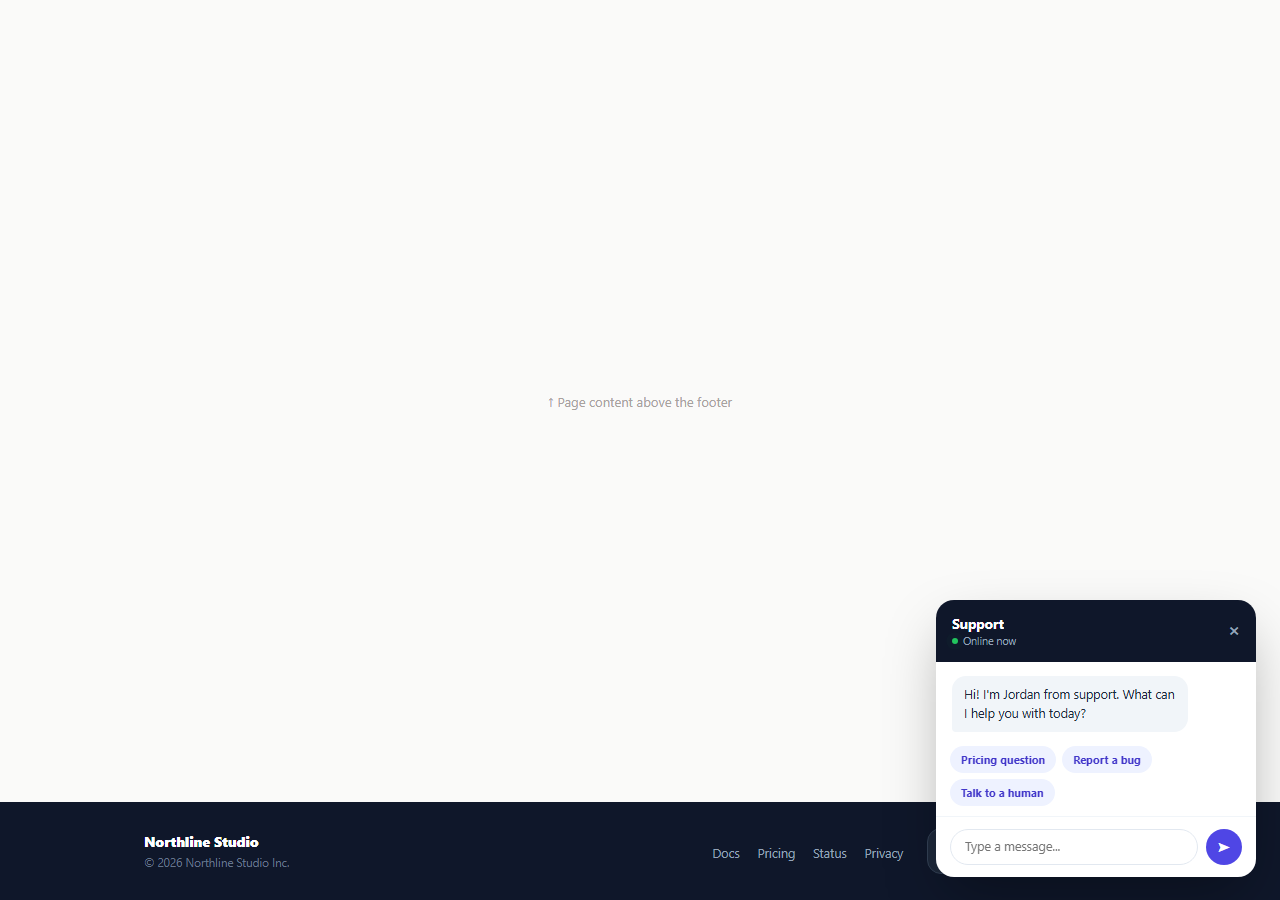
Many sites bury live chat behind a small floating bubble in the corner, easy to miss on a first visit. This snippet instead puts the launcher directly in the footer as a real support bar — stacked agent avatars, an online status dot with a pulse animation, and an average-reply-time label — so the offer to chat is visible the moment a visitor scrolls to the bottom of any page, alongside the usual footer links and copyright line.
A launcher that reads as "real people," not a generic icon
.lcl-avatars overlaps two colored initial-avatars with a negative margin, the same visual shorthand used by team-presence indicators across support tools — it signals there are specific humans behind the chat, not a bot-only widget. The pulsing green .lcl-dot next to "Online" uses a CSS box-shadow keyframe animation to draw the eye without JavaScript, and the average-reply-time text sets an honest expectation before the visitor even clicks.
A functioning chat panel, not a static mockup
Clicking the launcher toggles a fixed-position #lclPanel in the bottom-right corner via panel.hidden = !panel.hidden, animated in with a small lclRise keyframe. Inside, addMessage(text, who) appends a real message bubble styled by sender (lcl-msg-me vs lcl-msg-them) and scrolls the body to the newest message — this is a working two-way conversation thread, not a screenshot standing in for one.
Quick-reply chips that route to canned answers
Three suggestion chips ("Pricing question," "Report a bug," "Talk to a human") sit above the input row. Clicking one posts it as an outgoing message and looks up a matching canned response in the replies object keyed by data-q, so a visitor can get a useful first answer without typing anything — a real pattern used by production support-chat products to deflect the most common questions before a human ever needs to look.
A typing indicator with a realistic delay
Before any reply appears, showTyping() inserts a three-dot bouncing .lcl-typing element and reply() waits roughly 900ms before removing it and inserting the actual message. This mirrors the perceived-latency pattern real chat products use — an instant reply feels robotic and untrustworthy, while a short typing pause before the response reads as a person actually composing an answer.
Free-text fallback
Typing anything into the input and submitting the form appends it as an outgoing message and triggers a generic acknowledgement reply through the same reply() path used by the quick chips, so the panel handles both guided and open-ended conversations with one shared code path.
Wiring it to a real support backend
Replace the replies lookup and the generic fallback text with calls to your actual support platform's API (Intercom, Zendesk, a custom WebSocket channel), and swap the simulated setTimeout typing delay for a real "agent is typing" event pushed from the backend once connected.
Build with AI
Build, Understand, Optimize, and Extend It With AI
Rather than tracing the message and typing-indicator flow by hand, paste this snippet's HTML, CSS, and JS into an AI coding assistant like Claude and ask it to explain exactly how showTyping() and reply() coordinate to make a canned response feel like a person typing rather than an instant scripted reply. The same assistant can help you optimize it, for instance asking whether the fixed 900ms delay should vary randomly for a more natural feel. It is also useful for extending the footer: ask it to wire the replies object to a real support API or WebSocket connection, add file/screenshot attachment support to the message form, or persist the conversation in localStorage so it survives a page reload. Treat the code less like a finished artifact and more like a starting point for a conversation.
Prompt to recreate it
Copy this into your AI assistant of choice to build the effect from scratch, or as a jumping-off point for your own variant:
Build a footer "live chat launcher" bar in plain HTML, CSS, and JavaScript that opens a working floating chat panel, no chat SDK or library.

Requirements:
- A dark footer bar with brand and link columns plus a launcher button showing two overlapping colored avatar circles, an "Online" label with a pulsing status dot (CSS animation, no JS), and an average-reply-time line.
- Clicking the launcher toggles a fixed-position chat panel in a bottom corner of the screen (hidden attribute, not display none) with a small rise-in entrance animation, containing a header with a close button, a scrollable message thread starting with one greeting message, a row of quick-reply suggestion chips, and a text input with a send button.
- Clicking a quick-reply chip must add it as an outgoing message bubble, then show a three-dot bouncing typing indicator, then after a short delay replace the indicator with a canned reply looked up from a JavaScript object keyed by a data attribute on the chip.
- Submitting the text input must add the typed text as an outgoing message bubble the same way, then trigger the same typing-indicator-then-reply sequence with a generic acknowledgement message, reusing the same code path as the quick-reply chips rather than duplicating the logic.
- The message thread must auto-scroll to the newest message every time one is added, and closing the panel must not clear the conversation — reopening it must show the same messages exactly as they were left.
Want to tighten it up first? Run this prompt through the AI Prompt Studio to score it across 8 quality dimensions, catch anti-patterns, and tune the wording for Claude, ChatGPT, or Gemini before you paste it in.
Step by step
How to Use
- 1Paste HTML, CSS, and JSA dark footer bar renders with agent avatars, an online status pulse, and a Chat with us launcher.
- 2Click the launcherA chat panel rises in the bottom-right corner with a greeting message already visible.
- 3Click a quick-reply chipIt posts as your message, shows a typing indicator, then a canned reply appears after a short delay.
- 4Type your own messageSubmit the form to see it added to the thread with the same typing-then-reply sequence.
- 5Close and reopenThe close button hides the panel; clicking the launcher again reopens it without losing the conversation.
- 6Wire it to a real backendReplace the replies object and setTimeout delay with calls to your support platform’s live chat API.
Real-world uses
Common Use Cases
Got questions?
Frequently Asked Questions
No — the replies object contains canned demo text keyed by each quick-reply chip, and the free-text input triggers a generic acknowledgement. In production, replace both with calls to a real support backend such as Intercom, Zendesk, or a custom WebSocket channel.
showTyping() inserts a three-dot bouncing element into the message thread before the reply text is known to the user, and reply() waits about 900ms via setTimeout before removing it and inserting the actual message — simulating the natural pause of a person composing a response.
Add a new button with a data-q attribute inside #lclQuick, and add a matching key/value pair to the replies object in the JS panel with the canned answer text.
Yes — closing only sets panel.hidden to true, which hides it visually without clearing the message thread in #lclBody, so reopening shows the same conversation exactly where it left off.
Yes — change the right and bottom values on .lcl-panel to left and top (or any combination) to reposition it; the rise-in animation works from any corner.
Yes. Model the thread as an array of {text, who} objects in state, append to it on send, and drive a separate isTyping boolean to show or hide the typing indicator before appending the actual reply after your own delay or real API response.