Source Code
<footer class="site-footer">
  <div class="footer-top">
    <div class="footer-col">
      <p class="footer-brand">Nimbus</p>
      <p class="footer-tag">Infrastructure for modern teams.</p>
    </div>
    <div class="footer-col">
      <p class="footer-heading">Product</p>
      <a href="#">Features</a>
      <a href="#">Pricing</a>
      <a href="#">Changelog</a>
    </div>
    <div class="footer-col">
      <p class="footer-heading">Company</p>
      <a href="#">About</a>
      <a href="#">Careers</a>
      <a href="#">Blog</a>
    </div>
  </div>

  <div class="footer-bottom">
    <span class="footer-copy">© 2026 Nimbus, Inc.</span>
    <a class="status-link" id="statusLink" href="#" role="status">
      <span class="status-dot" id="statusDot"></span>
      <span id="statusText">Checking status…</span>
    </a>
  </div>
</footer>
* { box-sizing: border-box; margin: 0; padding: 0; }
body { font-family: system-ui, sans-serif; background: #f8fafc; display: flex; align-items: center; justify-content: center; min-height: 100vh; padding: 24px; }
.site-footer { width: 460px; max-width: 100%; background: #0f172a; border-radius: 18px; padding: 28px 24px 18px; display: flex; flex-direction: column; gap: 22px; }
.footer-top { display: flex; gap: 30px; flex-wrap: wrap; }
.footer-col { display: flex; flex-direction: column; gap: 8px; min-width: 110px; }
.footer-brand { font-size: 14px; font-weight: 800; color: #f1f5f9; }
.footer-tag { font-size: 11.5px; color: #64748b; line-height: 1.6; max-width: 160px; }
.footer-heading { font-size: 10.5px; font-weight: 700; color: #64748b; text-transform: uppercase; letter-spacing: 0.4px; margin-bottom: 2px; }
.footer-col a { font-size: 12px; color: #94a3b8; text-decoration: none; }
.footer-col a:hover { color: #e2e8f0; }
.footer-bottom { display: flex; align-items: center; justify-content: space-between; gap: 12px; flex-wrap: wrap; padding-top: 16px; border-top: 1px solid rgba(255,255,255,0.08); }
.footer-copy { font-size: 11px; color: #475569; }
.status-link { display: flex; align-items: center; gap: 7px; text-decoration: none; font-size: 11.5px; font-weight: 600; color: #94a3b8; padding: 4px 6px; border-radius: 7px; }
.status-link:hover { background: rgba(255,255,255,0.05); color: #e2e8f0; }
.status-link:focus-visible { outline: 2px solid #6366f1; outline-offset: 2px; }
.status-dot { width: 7px; height: 7px; border-radius: 50%; background: #64748b; flex-shrink: 0; }
.status-dot.operational { background: #10b981; box-shadow: 0 0 0 3px rgba(16,185,129,0.15); }
.status-dot.degraded { background: #f59e0b; box-shadow: 0 0 0 3px rgba(245,158,11,0.15); animation: pulse 1.6s ease infinite; }
.status-dot.outage { background: #ef4444; box-shadow: 0 0 0 3px rgba(239,68,68,0.15); animation: pulse 1.2s ease infinite; }
@keyframes pulse { 0%,100% { opacity: 1; } 50% { opacity: 0.45; } }const statusDot = document.getElementById('statusDot');
const statusText = document.getElementById('statusText');
const statusLink = document.getElementById('statusLink');
// A single lookup table maps a status KEY to everything the indicator needs
// to display — the dot's animation/color class and the exact label text.
// Every place a status could originate from (an initial fetch, a polling
// refresh, a webhook-driven update) only ever needs to know the status key;
// it never needs to separately decide what color or wording that implies.
const STATUS_CONFIG = {
operational: { className: 'operational', text: 'All systems operational' },
degraded: { className: 'degraded', text: 'Degraded performance' },
outage: { className: 'outage', text: 'Service outage' },
unknown: { className: '', text: 'Status unavailable' },
};
function applyStatus(key) {
const config = STATUS_CONFIG[key] || STATUS_CONFIG.unknown;
statusDot.className = 'status-dot ' + config.className;
statusText.textContent = config.text;
// Updating aria-label (not just the visible text) means the link's
// accessible name changes too, so a screen reader user tabbing to the
// footer hears the current status directly, not stale link text.
statusLink.setAttribute('aria-label', 'System status: ' + config.text + '. Opens status page.');
}
// Simulates a real status-page API poll. In production, replace this with
// an actual fetch to your status provider's public API (or your own
// status endpoint), keeping the same resolve-with-a-status-key contract.
function fetchStatus() {
return new Promise((resolve) => {
setTimeout(() => {
const outcomes = ['operational', 'operational', 'operational', 'degraded'];
resolve(outcomes[Math.floor(Math.random() * outcomes.length)]);
}, 700);
});
}
async function refreshStatus() {
try {
const status = await fetchStatus();
applyStatus(status);
} catch (err) {
// A failed status check is itself meaningful information — showing
// "unknown" rather than silently leaving a stale previous status
// displayed is the more honest choice when the check itself fails.
applyStatus('unknown');
}
}
refreshStatus();
// Poll periodically so the footer indicator stays current without requiring
// a full page reload — a real deployment would likely poll less frequently
// than this demo's shortened interval.
setInterval(refreshStatus, 15000);Learn Coding Visually
Learn to code with interactive, live-preview playgrounds — HTML, CSS, JavaScript, React & more.
 HTML Playground42 lessons · Click-based · Live preview
 CSS PlaygroundLearn CSS with a live editor
 JavaScript Playground60 lessons · DOM · Async · Canvas
 React PlaygroundLearn React with a live code editor
 GSAP PlaygroundLearn GSAP animation interactively
 SVG Playground44 lessons · shapes · paths · animation
 SCSS Playground45 lessons · Sass modules · tokens
 Tailwind PlaygroundLearn Tailwind CSS with a live editor
 Bootstrap 5 Playground50 lessons · live preview
Footer Live System-Status Indicator — Real Polling, Honest Unknown State
Footer Live System-Status Indicator · Footers · Plain HTML, CSS & JS · Live preview
What's included
Features
About this UI Snippet
Footer Status Indicator — Small Widget, Several Correctness Details
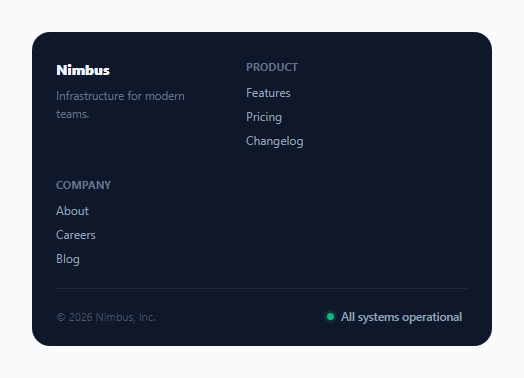
A small colored dot in a footer linking to "status.example.com" is a common pattern — but making it genuinely trustworthy (rather than a static green dot that never actually reflects reality) requires a few specific correctness details: real periodic polling, one shared mapping from status to every visual signal, an honestly distinct "unknown" state, and an accessible label that updates along with the visible text.
One lookup table, not scattered conditionals
STATUS_CONFIG maps every possible status key (operational, degraded, outage, and unknown) to both a CSS class (controlling the dot's color and pulse animation) and its display text, together as one unit. applyStatus() is the single function anything in the codebase would call to update the indicator — whether triggered by an initial page-load check, a periodic poll, or (in a more advanced version) a real-time webhook push. Because every possible caller funnels through this one function and one lookup table, the dot's color and its text label can never independently drift out of sync with each other.
An honest "unknown" state, distinct from "operational"
If the status check itself fails (a network error, a malformed response), the code explicitly calls applyStatus('unknown') rather than either leaving the previous status displayed unchanged or defaulting to a falsely reassuring "operational" appearance. A failed health check is itself meaningful information — silently showing stale or incorrect status data would be worse than plainly admitting the current status couldn't be determined.
`aria-label` updates alongside the visible text, not just once
applyStatus() doesn't only update statusText.textContent — it also rewrites the link's aria-label to include the current status wording. This matters specifically because the link's *accessible name* (what a screen reader announces) is derived from its aria-label when one is present, which takes priority over its visible text content. Without updating both together, a screen reader user could hear a stale, outdated status label indefinitely, even as the visually rendered text correctly updates on screen.
Periodic polling, not a one-time check
refreshStatus() runs once immediately on load and then again on a recurring interval via setInterval — a status indicator that only checks once when the page first loads would silently go stale the moment a user leaves the tab open, showing "all systems operational" for a page that's been open for hours regardless of what's actually happened to the service since. Polling periodically (at whatever interval makes sense for the real deployment) keeps the indicator meaningfully current for as long as the page stays open.
Build with AI
Build, Understand, Optimize, and Extend It With AI
Ask an AI assistant to explain why a failed status check should be shown as a distinct "unknown" state rather than either the last-known status or a default healthy appearance, and to discuss the accessibility distinction between an element's visible text content and its aria-label-derived accessible name. It's also worth asking for a version that also shows a small "last checked X seconds ago" timestamp, or one that uses the Page Visibility API to pause polling while the tab is in the background and resume (with an immediate re-check) when it becomes visible again.
Prompt to recreate it
Copy this into your AI assistant of choice to build the effect from scratch, or as a jumping-off point for your own variant:
Build a footer with a live system-status indicator in HTML, CSS, and vanilla JavaScript — no external library.

Requirements:
- A realistic multi-column site footer with a status indicator link at the bottom, showing a small colored dot and a text label describing current system health (e.g. operational, degraded performance, or outage), simulating a real status API poll with a delayed Promise.
- Define a single shared configuration object mapping each possible status value to both its dot styling (color/animation class) and its exact display text — every place in the code that updates the displayed status must go through one shared function using this same configuration, so the dot's color and its text can never disagree with each other.
- If the simulated status check itself fails (reject its promise), show a visually and textually distinct "status unavailable"/unknown state — do not leave a previous status displayed unchanged, and do not default to a falsely reassuring "operational" appearance.
- Update the status link's aria-label (not just its visible text content) every time the status changes, so its accessible name stays in sync for screen reader users — explain in a comment why aria-label needs to be updated separately from the visible text.
- Poll for status periodically after the initial page-load check (using setInterval), so the indicator can reflect a status change without requiring a full page reload.
- Give a pulsing animation specifically to the degraded/outage dot states, while keeping the operational state visually calm and static.
Want to tighten it up first? Run this prompt through the AI Prompt Studio to score it across 8 quality dimensions, catch anti-patterns, and tune the wording for Claude, ChatGPT, or Gemini before you paste it in.
Step by step
How to Use
- 1Observe the initial status checkThe dot starts in a neutral "checking" state and resolves to a real status (mostly "operational" in this simulated demo) shortly after load.
- 2Wait for the periodic re-checkEvery 15 seconds in this demo (tune for production), the indicator polls again and updates if the status has changed.
- 3Notice the pulsing animation on degraded/outage statesA subtle pulse on the dot draws more attention specifically when something is actually wrong, staying calm and static during normal operation.
- 4Tab to the status link with a keyboardIts aria-label announces the current status text directly, kept in sync with the visible label on every update.
- 5Replace fetchStatus() with a real API callPoint it at your actual status provider's API or your own health-check endpoint, keeping the same resolve-with-a-status-key contract.
Real-world uses
Common Use Cases
Got questions?
Frequently Asked Questions
applyStatus("unknown") is explicitly called, showing a distinct neutral state rather than leaving the previous status displayed (which could be stale and wrong) or defaulting to a falsely reassuring "operational" appearance. A failed check and an actual outage are treated as two different, honestly distinguished situations.
Driving both the dot's CSS class and its text label from the exact same lookup, inside one shared applyStatus() function, guarantees they can never disagree with each other — there's no code path where the color could update without the text, or vice versa.
When a link has an aria-label, that label — not its visible text content — determines what a screen reader announces as the link's accessible name. If only the visible text were updated, a screen reader user could hear a stale, outdated status indefinitely, even as everyone else sees the correct, updated text on screen.
No — refreshStatus() is called once immediately and then again on a recurring interval via setInterval, so the indicator stays reasonably current for as long as the page remains open, rather than silently going stale after the first check.
Reserving the pulsing animation for states that need attention keeps the normal, healthy state visually calm and unobtrusive — a constantly pulsing dot even during normal operation would either be needlessly distracting or would dilute the animation's usefulness as an attention signal when something is actually wrong.
Replace the body of fetchStatus() with a real fetch call to your status provider's public API (many, like Statuspage.io, offer a simple summary endpoint) or your own health-check endpoint, keeping the same Promise-resolving-to-a-status-key contract so the rest of the code works unchanged.