You Might Also Like
Learn Coding Visually
Learn to code with interactive, live-preview playgrounds — HTML, CSS, JavaScript, React & more.
 HTML Playground42 lessons · Click-based · Live preview
 CSS PlaygroundLearn CSS with a live editor
 JavaScript Playground60 lessons · DOM · Async · Canvas
 React PlaygroundLearn React with a live code editor
 GSAP PlaygroundLearn GSAP animation interactively
 SVG Playground44 lessons · shapes · paths · animation
 SCSS Playground45 lessons · Sass modules · tokens
 Tailwind PlaygroundLearn Tailwind CSS with a live editor
 Bootstrap 5 Playground50 lessons · live preview
CSS Cascade Layers @layer Explainer — Free Snippet
CSS Cascade Layers (@layer) Explainer · Layouts · Plain HTML, CSS & JS · Live preview
What's included
Features
About this UI Snippet
CSS Cascade Layers (@layer) Explainer — Controlling Cascade Priority Without Specificity Wars
Before cascade layers shipped, the only tools CSS gave you for resolving "which rule wins when two rules target the same element" were source order, specificity (ID beats class beats element), and the blunt hammer of !important. That system works fine in small stylesheets but breaks down badly at scale — once a design system, a component library, and page-specific overrides are all writing CSS for the same project, specificity wars are almost guaranteed, because bumping one selector's specificity to "win" often just moves the problem to the next conflict. The @layer at-rule, part of the CSS Cascade Layers specification and supported in all major browsers since 2022 (Chrome/Edge 99+, Firefox 97+, Safari 15.4+), solves this by adding an entirely new, explicit priority dimension to the cascade that sits *above* specificity.
How @layer actually works
You declare your layers' relative order once, up front, with a bare statement like @layer reset, base, components, utilities; — this line does not contain any rules, it just registers the names and their order. Layers declared later in this list have higher priority than layers declared earlier, no matter what specificity the individual selectors inside each layer have. This is the counterintuitive part worth sitting with: a single-element selector like .btn inside the utilities layer will beat an ID selector like #submit-button inside the reset layer, because layer order is checked *before* specificity is ever compared. Only after the browser has determined which layer wins does it fall back to specificity and source order to resolve conflicts *within* that same layer. Unlayered styles (any CSS not inside an @layer block) are treated as if they were in one implicit final layer that comes after all named layers — meaning ordinary global CSS still overrides everything in your layers unless you're careful, which is a common early surprise for teams adopting this feature.
Why this matters for modern UI development in 2025/2026
Design systems and component libraries (Tailwind's @layer base/components/utilities, and many custom-built systems) increasingly ship CSS in layers specifically so consuming applications can insert their own overrides at a predictable point in the priority order — for example, a documented @layer reset, tokens, base, components, overrides; contract lets a library guarantee "your app-level overrides layer will always beat our components layer," regardless of how specific either side's selectors are. This eliminates the need to escalate specificity or reach for !important just to override a third-party component's default button color. It also makes migrating or refactoring large stylesheets safer, because you can reason about "what layer is this rule in" as a stable fact, separate from "how many classes does this selector have."
How this demo simulates live reordering
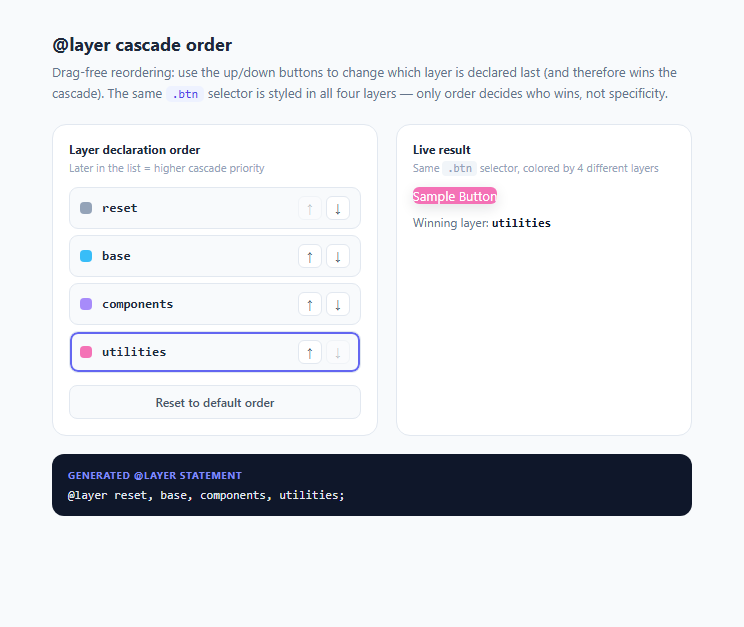
The actual CSS Cascade Layers spec fixes a layer's relative order at the *first* @layer statement the browser parses for that stylesheet — real production code does not reorder layers at runtime. To make the mechanism visible and interactive anyway, this demo re-writes a <style> tag's entire @layer statement and per-layer rule bodies every time you click a reorder button, using genuine @layer syntax each time. The rendered button's color always reflects whichever layer is declared *last* in the freshly injected statement, which is the real rule the browser cascade uses — this demo isn't faking the visual result, it's re-authoring valid CSS on the fly so you can explore the rule interactively.
Practical takeaway
If you remember one thing: layer order beats specificity, specificity only matters *within* a layer or among unlayered rules, and unlayered CSS always sits in an implicit layer after every named layer. Structuring your stylesheet with a small number of well-named layers (reset, tokens, base, components, utilities, overrides) up front gives you a predictable, documented escape hatch for every future override.
Build with AI
Build, Understand, Optimize, and Extend It With AI
Paste this snippet into an AI coding assistant like Claude and ask it to explain, step by step, why a low-specificity .btn selector inside a later-declared layer beats a high-specificity #id selector inside an earlier-declared layer — it can walk through the full CSS cascade algorithm (origin, importance, layer order, specificity, source order) using this exact demo as the running example. You could also ask it to explain the !important-reverses-layer-priority behavior in more depth, or to show you how a real project (not this JS-simulated reordering) would declare @layer reset, base, components, utilities; once at the top of a global stylesheet. It's also worth asking it to extend the demo with a fifth "overrides" layer and an unlayered CSS example to show how unlayered rules always beat named layers.
Prompt to recreate it
Copy this into your AI assistant of choice to build the effect from scratch, or as a jumping-off point for your own variant:
Build an interactive HTML/CSS/JS demo that teaches how CSS cascade layers (@layer) determine priority independent of selector specificity.

Requirements:
- Style one shared selector (e.g. .btn on a sample button) inside four separate, genuinely valid @layer blocks (for example reset, base, components, utilities), each giving the button a different background color, so all four rules have identical specificity and the only variable is layer declaration order.
- A reorderable list UI (up/down move buttons per row is acceptable — drag and drop is not required) representing the four layer names, where changing the order updates a visible "winning layer" label showing which layer is currently declared last.
- Because real CSS @layer order cannot be changed live via a JavaScript API once parsed, implement the reordering by having JS rebuild and re-inject a fresh <style> element containing a new, valid @layer statement (in the new order) plus each layer's rule body, every time the user reorders — so the visual result is driven by genuine CSS cascade-layer resolution, not a simulated class swap.
- Display the exact generated @layer statement text (e.g. "@layer base, utilities, reset, components;") in a visible code panel so the underlying mechanism is never hidden.
- Disable the "move up" control on the first item and "move down" on the last item so the order list can't be moved out of bounds.
- Include a way to reset the order back to the original default sequence.
- Use smooth CSS transitions on the button's background-color change so reordering feels responsive, and visually mark the currently-winning layer's row in the list (e.g. a highlighted ring) so its win is legible without reading the code panel.
Want to tighten it up first? Run this prompt through the AI Prompt Studio to score it across 8 quality dimensions, catch anti-patterns, and tune the wording for Claude, ChatGPT, or Gemini before you paste it in.
Step by step
How to Use
- 1Read the default orderThe default layer order is reset, base, components, utilities — declared by @layer reset, base, components, utilities; in the css panel. Because utilities is declared last, it currently wins, and the sample button is pink (#f472b6), matching the utilities swatch.
- 2Move a layer with the up/down arrowsClick the ↑ or ↓ button next to any layer name in the order-panel list. The list re-sorts instantly, the generated @layer statement text updates at the bottom, and the sample button's color changes to match whichever layer is now declared last.
- 3Move reset to the endClick ↓ on the "reset" row repeatedly until it reaches the bottom of the list. Even though .btn in the reset layer has the exact same selector specificity as every other layer's .btn rule, it now wins purely because of declaration order — this is the core lesson of the demo.
- 4Inspect the generated CSSThe dark "Generated @layer statement" panel shows the literal @layer statement text being injected into a live <style> tag in the page head via styleTag.textContent, so you can see the real CSS driving the result, not just a simulated color change.
- 5Reset to the default orderClick "Reset to default order" to restore reset, base, components, utilities and confirm the button returns to pink, re-establishing the utilities layer as the winner.
- 6Apply the pattern to your own stylesheetIn your real project CSS (not this JS-driven simulation), declare your layer order once at the top of your entry stylesheet, e.g. @layer reset, tokens, base, components, utilities, overrides; and then wrap each section of your existing CSS in the matching @layer name { ... } block — the order in that first statement is what governs priority everywhere in your app.
Real-world uses
Common Use Cases
Got questions?
Frequently Asked Questions
Yes, for normal-importance rules: layer order is checked before specificity in the cascade algorithm, so a low-specificity selector in a later layer beats a high-specificity selector in an earlier layer. !important flips this: important declarations in an EARLIER layer beat important declarations in a later layer — the priority order reverses for the important half of the cascade, which is an intentional design choice to keep !important as a true last-resort override.
Unlayered rules are treated as belonging to a single implicit layer that is always placed after every explicitly named layer, meaning ordinary global CSS in your stylesheet will override anything inside a named layer regardless of specificity, unless you also move that CSS into a layer. This surprises teams who assume wrapping third-party CSS in a layer automatically makes their own untouched styles win — it does, but only because their styles were already unlayered and therefore already last.
Yes — the first @layer statement (or first use of a layer name) that the browser parses, across all stylesheets in document order, establishes each named layer's position. Later files can add more rules to an already-registered layer name without changing its position, which is what lets a design system register layer names early and let the consuming app safely append rules to those same layers later.
Yes — @layer has been supported in Chrome/Edge since version 99, Firefox since 97, and Safari since 15.4, all released in 2022, giving it several years of broad support by 2026. There is no meaningful fallback concern for modern evergreen-browser audiences; older browsers simply ignore unrecognized @layer blocks' contents in unpredictable ways, so audit your support matrix if you must support legacy browsers.
Real @layer priority order is fixed by the browser at parse time from the first @layer statement it encounters — there is no live JS API to reorder an already-registered layer. To demonstrate genuine cascade-layer behavior rather than fake it with a plain class swap, the demo rebuilds and re-parses an entirely new, valid @layer statement and rule set on every reorder, so the color change you see is a real consequence of real CSS cascade-layer resolution, just triggered by re-parsing rather than a live reorder API.