

Learn Coding Visually
Learn to code with interactive, live-preview playgrounds — HTML, CSS, JavaScript, React & more.
 HTML Playground42 lessons · Click-based · Live preview
 CSS PlaygroundLearn CSS with a live editor
 JavaScript Playground60 lessons · DOM · Async · Canvas
 React PlaygroundLearn React with a live code editor
 GSAP PlaygroundLearn GSAP animation interactively
 SVG Playground44 lessons · shapes · paths · animation
 SCSS Playground45 lessons · Sass modules · tokens
 Tailwind PlaygroundLearn Tailwind CSS with a live editor
 Bootstrap 5 Playground50 lessons · live preview
Code Comparison Block — Before After Diff UI HTML CSS
Code Comparison Block · Layouts · Plain HTML, CSS & JS · Live preview
What's included
Features
.kw (purple), .fn (blue), .str (green), .bool (orange), .tag (pink) — VS Code Dark+ colours applied via span wrappers, no external library..bad-line and .good-line use display:block + negative margin to extend the background and border accent across the full panel width.replace(/^\d+\s*/gm, '') strips leading line numbers from innerText — pastes clean code without the number prefix..panel-before has a red border tint, .panel-after has a green border tint — at-a-glance bad/good visual identity for each panel..lang-badge shows the language or framework per panel (JavaScript / React) — important when comparing cross-language rewrites.background: #0d1117 (GitHub dark) for code blocks, #1e293b (slate-800) for headers — the standard developer tool dark colour scheme.About this UI Snippet
Code Comparison Block — CSS Syntax Highlight, Diff Line Markers & Copy-to-Clipboard
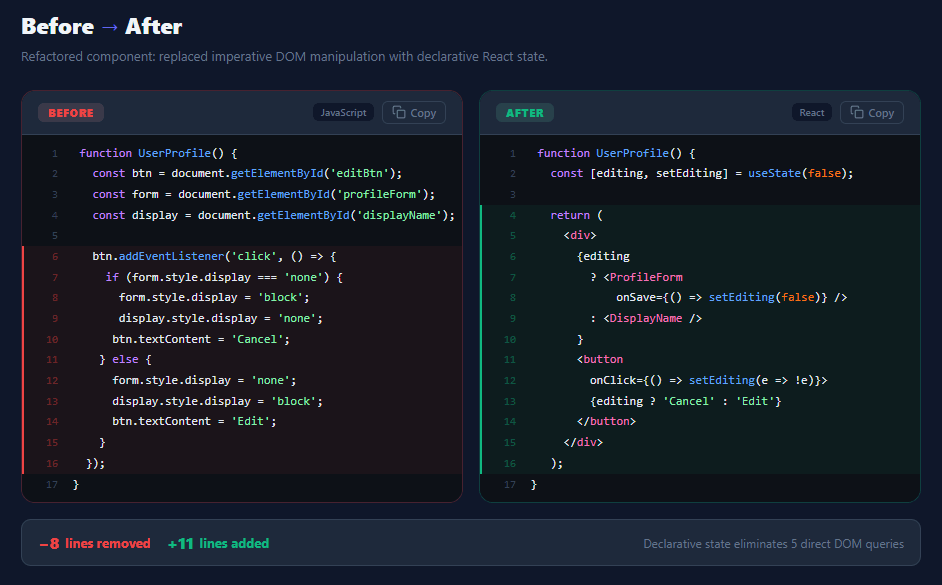
Code comparison blocks are essential in developer tooling, technical documentation, tutorial sites, and code review interfaces — anywhere you need to show what changed and why. This snippet builds a production-quality before/after comparison layout with two dark-theme code panels, CSS-based syntax highlighting, red/green diff line markers with left border accents, copy-to-clipboard buttons, language badges, and a diff summary bar showing lines added and removed.
Technical blog posts, refactoring guides, changelog pages, and code review tools all need a clear visual diff format. The challenge is communicating change at a glance: readers must immediately see what was removed (red), what was added (green), and understand the structural difference — without reading every line. The left border accent on diff lines mirrors the GitHub and GitLab diff viewer pattern that developers already recognise.
CSS syntax highlighting without a library
Syntax highlighting is achieved with HTML <span> elements wrapping token groups, each with a colour class: .kw (keywords, purple #c084fc), .fn (function names, blue #60a5fa), .str (strings, green #86efac), .bool (booleans, orange #f97316), .tag (JSX tags, pink #f472b6). This manual approach is intentional for a snippet — no external library dependency. For a production code editor, use a library like Prism.js or highlight.js. The colour palette is derived from the VS Code Dark+ theme, the most widely-used editor colour scheme.
Diff line markers
Lines marked with .bad-line or .good-line use a display: block override to make the span fill the full line width, combined with negative margin (margin: 0 -16px; padding: 0 16px) to extend the background colour into the panel padding — matching GitHub's diff viewer behaviour. The left border (border-left: 2px solid) provides a secondary "this line changed" indicator for colour-blind accessibility. Line numbers also shift colour: red-tinted for removed lines, green-tinted for added lines.
Copy-to-clipboard with line number stripping
The copy function uses pre.innerText to get the rendered text, then strips line numbers with replace(/^\d+\s*/gm, '') — a multiline regex that removes the leading number + whitespace from each line. The result is clean, pasteable code. The Clipboard API (navigator.clipboard.writeText) is modern and requires HTTPS in production. The button transitions to a green "Copied!" state for 2 seconds, then reverts — the same pattern used in code block and copy button snippets.
Build with AI
Build, Understand, Optimize, and Extend It With AI
Rather than assuming the copy button just grabs the visible text, paste this snippet's HTML, CSS, and JS into an AI coding assistant like Claude and ask it to explain exactly how copyCode() strips the leading line-number span from each .cl line using the regex replace, and why the diff line classes (bl and gl) use a negative-margin-plus-padding trick to extend their background color into the panel's own padding area. The same assistant can help you verify correctness — ask it to trace what would happen to the copied text if a code line legitimately started with a digit (like a line of actual code beginning with a number), and whether the current regex could strip real content by mistake. It's also a good partner for extending the block: ask it to add a unified single-panel diff mode with plus/minus prefixes instead of two side-by-side panels, wire real syntax highlighting via Shiki instead of hand-placed spans, or make the diff summary counts compute automatically by counting .bl and .gl lines instead of being hardcoded text. Treat the code less like a finished artifact and more like a starting point for a conversation.
Prompt to recreate it
Copy this into your AI assistant of choice to build the effect from scratch, or as a jumping-off point for your own variant:
Build a side-by-side "before/after code comparison" block in plain HTML, CSS, and JavaScript — no diffing library, no syntax-highlighting library.

Requirements:
- Two code panels in a responsive grid (side-by-side on desktop, stacked on narrow viewports), each with its own header showing a Before/After label, a language badge, and an independent copy button — styled with a distinct border tint per panel (e.g. reddish for before, greenish for after).
- Render each line of code as its own block-level element containing a non-selectable line-number span followed by the actual code content, with inline span elements applying syntax-highlight colors to keywords, function names, strings, booleans, and JSX-style tags.
- Mark specific lines as "removed" or "added" by giving their line element a distinct class that applies a tinted background color extending across the full width of the panel (including into the panel's padding, via a negative-margin technique) plus a colored left border accent, with the line-number's own color also tinting to match.
- Each panel's copy button must extract only the actual code text (not the line-number prefixes) by reading each line element's text and stripping the leading number and whitespace before joining lines back together, then copy that clean text via the Clipboard API with an execCommand-based fallback, and show a temporary checkmark-icon "Copied!" state that reverts after about two seconds.
- Below both panels, render a summary bar showing a count of lines removed, a count of lines added, and a short plain-English note describing the nature of the change.
Want to tighten it up first? Run this prompt through the AI Prompt Studio to score it across 8 quality dimensions, catch anti-patterns, and tune the wording for Claude, ChatGPT, or Gemini before you paste it in.
Source Code
<div class="page">
<div class="comp-header">
<h2 class="comp-title">Before <span class="arrow">→</span> After</h2>
<p class="comp-sub">Refactored component: replaced imperative DOM manipulation with declarative React state.</p>
</div>
<div class="comp-grid">
<!-- BEFORE panel -->
<div class="code-panel panel-before">
<div class="panel-header">
<div class="panel-label bad">Before</div>
<div class="header-right">
<span class="lang-badge">JavaScript</span>
<button class="copy-btn" onclick="copyCode(this, 'before')" aria-label="Copy code">
<svg width="14" height="14" viewBox="0 0 24 24" fill="none" stroke="currentColor" stroke-width="2" stroke-linecap="round"><rect x="9" y="9" width="13" height="13" rx="2"/><path d="M5 15H4a2 2 0 0 1-2-2V4a2 2 0 0 1 2-2h9a2 2 0 0 1 2 2v1"/></svg>
Copy
</button>
</div>
</div>
<div class="code-block" id="before"><div class="cl"><span class="ln">1</span> <span class="kw">function</span> <span class="fn">UserProfile</span>() {</div>
<div class="cl"><span class="ln">2</span> <span class="kw">const</span> btn = document.<span class="fn">getElementById</span>(<span class="str">'editBtn'</span>);</div>
<div class="cl"><span class="ln">3</span> <span class="kw">const</span> form = document.<span class="fn">getElementById</span>(<span class="str">'profileForm'</span>);</div>
<div class="cl"><span class="ln">4</span> <span class="kw">const</span> display = document.<span class="fn">getElementById</span>(<span class="str">'displayName'</span>);</div>
<div class="cl"><span class="ln">5</span> </div>
<div class="cl bl"><span class="ln">6</span> btn.<span class="fn">addEventListener</span>(<span class="str">'click'</span>, () => {</div>
<div class="cl bl"><span class="ln">7</span> <span class="kw">if</span> (form.style.display === <span class="str">'none'</span>) {</div>
<div class="cl bl"><span class="ln">8</span> form.style.display = <span class="str">'block'</span>;</div>
<div class="cl bl"><span class="ln">9</span> display.style.display = <span class="str">'none'</span>;</div>
<div class="cl bl"><span class="ln">10</span> btn.textContent = <span class="str">'Cancel'</span>;</div>
<div class="cl bl"><span class="ln">11</span> } <span class="kw">else</span> {</div>
<div class="cl bl"><span class="ln">12</span> form.style.display = <span class="str">'none'</span>;</div>
<div class="cl bl"><span class="ln">13</span> display.style.display = <span class="str">'block'</span>;</div>
<div class="cl bl"><span class="ln">14</span> btn.textContent = <span class="str">'Edit'</span>;</div>
<div class="cl bl"><span class="ln">15</span> }</div>
<div class="cl bl"><span class="ln">16</span> });</div>
<div class="cl"><span class="ln">17</span> }</div></div>
</div>
<!-- AFTER panel -->
<div class="code-panel panel-after">
<div class="panel-header">
<div class="panel-label good">After</div>
<div class="header-right">
<span class="lang-badge">React</span>
<button class="copy-btn" onclick="copyCode(this, 'after')" aria-label="Copy code">
<svg width="14" height="14" viewBox="0 0 24 24" fill="none" stroke="currentColor" stroke-width="2" stroke-linecap="round"><rect x="9" y="9" width="13" height="13" rx="2"/><path d="M5 15H4a2 2 0 0 1-2-2V4a2 2 0 0 1 2-2h9a2 2 0 0 1 2 2v1"/></svg>
Copy
</button>
</div>
</div>
<div class="code-block" id="after"><div class="cl"><span class="ln">1</span> <span class="kw">function</span> <span class="fn">UserProfile</span>() {</div>
<div class="cl"><span class="ln">2</span> <span class="kw">const</span> [editing, setEditing] = <span class="fn">useState</span>(<span class="bool">false</span>);</div>
<div class="cl"><span class="ln">3</span> </div>
<div class="cl gl"><span class="ln">4</span> <span class="kw">return</span> (</div>
<div class="cl gl"><span class="ln">5</span> <<span class="tag">div</span>></div>
<div class="cl gl"><span class="ln">6</span> {editing</div>
<div class="cl gl"><span class="ln">7</span> ? <<span class="tag">ProfileForm</span></div>
<div class="cl gl"><span class="ln">8</span> onSave={() => <span class="fn">setEditing</span>(<span class="bool">false</span>)} /></div>
<div class="cl gl"><span class="ln">9</span> : <<span class="tag">DisplayName</span> /></div>
<div class="cl gl"><span class="ln">10</span> }</div>
<div class="cl gl"><span class="ln">11</span> <<span class="tag">button</span></div>
<div class="cl gl"><span class="ln">12</span> onClick={() => <span class="fn">setEditing</span>(e => !e)}></div>
<div class="cl gl"><span class="ln">13</span> {editing ? <span class="str">'Cancel'</span> : <span class="str">'Edit'</span>}</div>
<div class="cl gl"><span class="ln">14</span> </<span class="tag">button</span>></div>
<div class="cl gl"><span class="ln">15</span> </<span class="tag">div</span>></div>
<div class="cl gl"><span class="ln">16</span> );</div>
<div class="cl"><span class="ln">17</span> }</div></div>
</div>
</div>
<!-- Diff summary -->
<div class="diff-summary">
<div class="diff-stat removed"><span class="diff-num">−8</span> lines removed</div>
<div class="diff-stat added"><span class="diff-num">+11</span> lines added</div>
<div class="diff-note">Declarative state eliminates 5 direct DOM queries</div>
</div>
</div>*{box-sizing:border-box;margin:0;padding:0}
body{font-family:system-ui,sans-serif;background:#0f172a;min-height:100vh;padding:28px 20px}
.page{max-width:900px;margin:0 auto}
.comp-header{margin-bottom:24px}
.comp-title{font-size:22px;font-weight:800;color:#f1f5f9;margin-bottom:6px}
.comp-title .arrow{color:#6366f1}
.comp-sub{font-size:13px;color:#64748b;line-height:1.5}
.comp-grid{display:grid;grid-template-columns:1fr 1fr;gap:16px;margin-bottom:16px}
.code-panel{border-radius:14px;overflow:hidden;border:1.5px solid #1e293b}
.panel-before{border-color:#ef444440}
.panel-after{border-color:#10b98140}
.panel-header{display:flex;align-items:center;justify-content:space-between;padding:10px 16px;background:#1e293b;border-bottom:1px solid #334155}
.panel-label{font-size:11px;font-weight:800;text-transform:uppercase;letter-spacing:.06em;padding:2px 10px;border-radius:6px}
.panel-label.bad{background:#fca5a520;color:#ef4444}
.panel-label.good{background:#6ee7b720;color:#10b981}
.header-right{display:flex;align-items:center;gap:8px}
.lang-badge{font-size:10px;font-weight:600;color:#64748b;background:#0f172a;border-radius:6px;padding:2px 8px}
.copy-btn{display:flex;align-items:center;gap:4px;font-size:11px;font-weight:600;color:#64748b;background:transparent;border:1px solid #334155;border-radius:6px;padding:3px 9px;cursor:pointer;transition:all .15s;font-family:inherit}
.copy-btn:hover{color:#e2e8f0;border-color:#475569}
.copy-btn.copied{color:#10b981;border-color:#10b981}
.code-block{padding:8px 0;margin:0;overflow-x:auto;background:#0d1117;color:#e2e8f0;font-family:'Fira Code',Consolas,monospace;font-size:12px;line-height:1.7}
.cl{display:block;padding:0 16px;white-space:pre}
.bl{background:#ef444410;border-left:2px solid #ef4444;padding-left:14px}
.gl{background:#10b98110;border-left:2px solid #10b981;padding-left:14px}
.ln{display:inline-block;width:20px;color:#334155;user-select:none;margin-right:8px;text-align:right;font-size:11px}
.bl .ln{color:#ef444460}
.gl .ln{color:#10b98160}
.kw{color:#c084fc}
.fn{color:#60a5fa}
.str{color:#86efac}
.bool{color:#f97316}
.tag{color:#f472b6}
.diff-summary{display:flex;align-items:center;gap:16px;padding:12px 16px;background:#1e293b;border:1px solid #334155;border-radius:10px;flex-wrap:wrap}
.diff-stat{display:flex;align-items:center;gap:6px;font-size:13px;font-weight:700}
.diff-stat.removed{color:#ef4444}
.diff-stat.added{color:#10b981}
.diff-num{font-size:16px;font-weight:900}
.diff-note{font-size:12px;color:#64748b;margin-left:auto}
@media(max-width:640px){.comp-grid{grid-template-columns:1fr}.diff-note{margin-left:0}}function copyCode(btn, panelId) {
const pre = document.getElementById(panelId);
const lines = Array.from(pre.querySelectorAll('.cl')).map(d => d.innerText.replace(/^\d+\s/, ''));
const text = lines.join('\n').trim();
function showCopied() {
btn.classList.add('copied');
btn.innerHTML = `<svg width="14" height="14" viewBox="0 0 24 24" fill="none" stroke="currentColor" stroke-width="2.5" stroke-linecap="round"><polyline points="20 6 9 17 4 12"/></svg> Copied!`;
setTimeout(() => {
btn.classList.remove('copied');
btn.innerHTML = `<svg width="14" height="14" viewBox="0 0 24 24" fill="none" stroke="currentColor" stroke-width="2" stroke-linecap="round"><rect x="9" y="9" width="13" height="13" rx="2"/><path d="M5 15H4a2 2 0 0 1-2-2V4a2 2 0 0 1 2-2h9a2 2 0 0 1 2 2v1"/></svg> Copy`;
}, 2000);
}
function fallback() {
const ta = document.createElement('textarea');
ta.value = text; ta.style.cssText = 'position:fixed;opacity:0';
document.body.appendChild(ta); ta.select();
document.execCommand('copy'); document.body.removeChild(ta);
showCopied();
}
if (navigator.clipboard && navigator.clipboard.writeText) {
navigator.clipboard.writeText(text).then(showCopied).catch(fallback);
} else { fallback(); }
}Step by step
How to Use
- 1Paste HTML, CSS, and JSTwo side-by-side dark code panels appear: "Before" (red border) showing imperative DOM code, and "After" (green border) showing the React state equivalent.
- 2Read the diff highlightsRed-background lines with a left red border show removed/bad code. Green-background lines with a left green border show the new/good code.
- 3Click Copy on either panelThe button copies the code to clipboard with line numbers stripped. It turns green and shows "Copied!" for 2 seconds, then resets.
- 4Read the diff summary barBelow the panels: −8 lines removed (red), +11 lines added (green), and a plain-English description of the change.
- 5Update code contentReplace the
<code>content inside each<pre>. Wrap tokens in<span class="kw">,<span class="fn">,<span class="str">etc. for highlighting. - 6Mark diff linesWrap any line in
<span class="bad-line">...</span>for red highlighting or<span class="good-line">...</span>for green highlighting.
Real-world uses
Common Use Cases
Got questions?
Frequently Asked Questions
Replace the manual span markup with Prism.js: add <script src="prism.js"> and use <code class="language-javascript">. Prism tokenises the code automatically. For a build-time solution, use Shiki (used by VitePress and Astro) which renders highlighted HTML at build time — zero client-side JS.
The <pre> already has overflow-x: auto. For very long lines, ensure the .code-block has white-space: pre (not pre-wrap) so lines don't wrap. Add min-width: 0 to the .code-panel in the grid to prevent flex/grid overflow.
Remove the grid and use a single <pre> with both .bad-line (red, − prefix) and .good-line (green, + prefix) lines interleaved. Add a + or − character before each changed line's content, matching the git diff output format.
Create a CodePanel component accepting {title, language, code, variant} where code is a pre-highlighted HTML string (from Shiki/Prism) set via dangerouslySetInnerHTML. The parent CodeComparison takes {before, after, summary} props and renders two CodePanel instances side-by-side.