
Learn Coding Visually
Learn to code with interactive, live-preview playgrounds — HTML, CSS, JavaScript, React & more.
 HTML Playground42 lessons · Click-based · Live preview
 CSS PlaygroundLearn CSS with a live editor
 JavaScript Playground60 lessons · DOM · Async · Canvas
 React PlaygroundLearn React with a live code editor
 GSAP PlaygroundLearn GSAP animation interactively
 SVG Playground44 lessons · shapes · paths · animation
 SCSS Playground45 lessons · Sass modules · tokens
 Tailwind PlaygroundLearn Tailwind CSS with a live editor
 Bootstrap 5 Playground50 lessons · live preview
AI Source Citations UI — HTML CSS JS Snippet
AI Source Citations · Layouts · Plain HTML, CSS & JS · Live preview
What's included
Features
About this UI Snippet
AI Source Citations — Inline Numbered Markers, Hover Preview Cards, Source Chips & Two-Way Highlight Linking
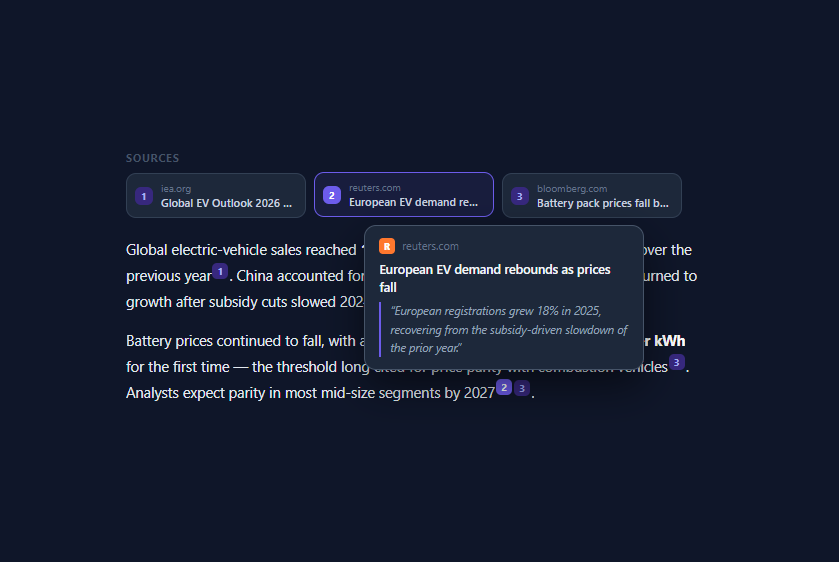
Retrieval-augmented generation (RAG) products live or die on trust, and trust comes from citations. Perplexity built a company on this interface; ChatGPT Search, Gemini, and every enterprise RAG tool followed with the same three-part anatomy this snippet implements: a row of source chips above the answer, superscript numbered markers inline in the text, and a hover preview card showing the source's title, domain, and the exact supporting quote. All of it is vanilla HTML, CSS, and JavaScript, structured so a real RAG backend can populate it directly.
Citation markers as real buttons, not spans
Each inline marker is a <button class="cite" data-src="N"> — a real button, so it is keyboard-focusable and screen-reader announced, styled to look like a superscript chip: vertical-align: super, 16px height, indigo-tinted background, 10px bold numeral. The data-src attribute carries the index into the SOURCES array, which is the entire wiring contract: the same index links markers, chips, and preview content. Markers respond to mouseenter/mouseleave *and* focus/blur with identical handlers, so keyboard users get the same preview experience as mouse users — the accessibility detail most citation UIs omit.
The hover preview card with quote excerpt
Hovering a marker opens a floating card: a coloured favicon tile with the source's initial, the domain, the article title, and — the piece that actually builds trust — the *supporting quote*, rendered italic behind an indigo left border like a pull quote. Showing the exact retrieved passage lets users verify a claim in one second without leaving the page; products that link to sources without quoting them push the verification cost back onto the user. In a production RAG system this quote is precisely the retrieved chunk that was fed to the model for that claim, so the UI doubles as an honesty check on your retrieval pipeline.
Positioning and the hover-intent gap
The preview positions itself above the hovered marker: horizontally centred on the marker via getBoundingClientRect() math relative to the wrapper, clamped into the wrapper's bounds so it never overflows, and flipped below the marker when there is no room above. Two timing details make it feel native rather than jumpy. First, hiding is delayed 150ms through a setTimeout stored in hideTimer — and the preview itself cancels that timer on mouseenter — so users can move the pointer from marker to card across the gap without the card vanishing (the classic hover-intent bridge). Second, show cancels any pending hide, so sweeping across several markers cross-fades content instead of flickering.
Two-way highlight linking
The subtle interaction that makes this UI feel considered: hovering citation ② lights up source chip 2, and hovering a chip lights every marker that cites it. One function, setActive(i, on), toggles an .active class across both collections filtered by data-src, giving users an instant visual answer to both "where does this claim come from?" and "which claims rest on this source?" — the second question being exactly what you ask when you distrust a source. Chips themselves show the numbered badge, domain, and an ellipsis-truncated title in a 180px max-width card.
The demo content — EV sales statistics with three sources — shows the realistic case of multiple claims citing the same source and one sentence citing two sources back-to-back. To integrate with a real system, your backend returns answer text with citation indices (as OpenAI and Anthropic tool-based RAG flows do), you render markers from those indices, and you fill SOURCES from the retrieval metadata: URL, title, and the retrieved chunk as the quote.
Build with AI
Build, Understand, Optimize, and Extend It With AI
The fastest way to make this yours is to hand an AI assistant both this snippet and a sample of your actual RAG output, then ask it to write the glue. Paste the code into Claude along with one real API response — Anthropic citation blocks, OpenAI file-search annotations, or your own [1]-style bracket format — and ask it to generate the transform that renders your answer text with markers and fills SOURCES from your retrieval metadata, keeping the quote field as the raw retrieved chunk so the preview stays honest evidence rather than paraphrase. Then stress the edges: ask what happens with twelve sources and a claim citing five of them, and have it implement the overflow chip row and marker grouping. Ask for the touch-device branch that turns hover previews into a bottom-sheet flow. And if you want to understand the code rather than just use it, ask it to explain why the hide timer exists and then delete it in a copy — watching the preview become unreachable teaches hover-intent better than any article.
Prompt to recreate it
Copy this into your AI assistant of choice to build the effect from scratch, or as a jumping-off point for your own variant:
Build a Perplexity-style cited AI answer in plain HTML, CSS, and JavaScript: inline numbered citation markers, a source chip row, and hover preview cards with supporting quotes — no frameworks.

Requirements:
- Define a sources array of at least three entries with domain, title, a short supporting quote, and a brand colour plus initial for a favicon tile; render a chip row above the answer from this array, each chip showing a numbered badge, the domain, and an ellipsis-truncated title.
- The answer paragraphs contain inline citation markers as real superscript-styled <button> elements carrying a data index into the sources array — including at least one source cited from multiple places and one sentence citing two sources back-to-back.
- Hovering or keyboard-focusing a marker opens a floating preview card showing the favicon tile, domain, title, and the quote styled as an italic pull quote behind an accent left border; the card positions itself centred above the marker using getBoundingClientRect math, clamps horizontally inside the container, and flips below the marker when there is no room above.
- Implement a hover-intent bridge: hiding is delayed ~150ms via a timer that both the marker and the preview card cancel on mouseenter, so the pointer can travel across the gap into the card without it vanishing, and sweeping across markers cross-fades content instead of flickering.
- Two-way highlight linking through one function: hovering a marker adds an active class to its source chip, and hovering a chip highlights every marker citing it — both driven by the shared data index.
- Mirror all mouse handlers with focus and blur so keyboard users get identical preview behaviour, and make marker click scroll smoothly to the corresponding chip (commenting where a real app would open the source URL instead).
- Style it as a dark reading surface with generous line-height, and comment where a RAG backend would supply the answer HTML with bracket-style citations and the retrieval metadata that fills the sources array.
Want to tighten it up first? Run this prompt through the AI Prompt Studio to score it across 8 quality dimensions, catch anti-patterns, and tune the wording for Claude, ChatGPT, or Gemini before you paste it in.
Source Code
<div class="cite-wrap">
  <!-- Source chips row -->
  <div class="sources-row" id="sources-row">
    <span class="sources-label">Sources</span>
    <div class="source-chips" id="source-chips"></div>
  </div>

  <!-- Answer with inline citations -->
  <div class="answer" id="answer">
    <p>Global electric-vehicle sales reached <strong>17.3 million units in 2025</strong>, a 24% increase over the previous year<button class="cite" data-src="0">1</button>. China accounted for roughly 60% of deliveries, while Europe returned to growth after subsidy cuts slowed 2024 demand<button class="cite" data-src="1">2</button>.</p>
    <p>Battery prices continued to fall, with average pack costs dropping below <strong>$100 per kWh</strong> for the first time — the threshold long cited for price parity with combustion vehicles<button class="cite" data-src="2">3</button>. Analysts expect parity in most mid-size segments by 2027<button class="cite" data-src="1">2</button><button class="cite" data-src="2">3</button>.</p>
  </div>

  <!-- Hover preview card -->
  <div class="preview" id="preview" role="tooltip">
    <div class="preview-head">
      <span class="preview-favicon" id="preview-favicon"></span>
      <span class="preview-domain" id="preview-domain"></span>
    </div>
    <p class="preview-title" id="preview-title"></p>
    <p class="preview-quote" id="preview-quote"></p>
  </div>
</div>
* { box-sizing: border-box; margin: 0; padding: 0; }
body { font-family: system-ui, sans-serif; background: #0f172a; min-height: 100vh; display: flex; align-items: center; justify-content: center; padding: 24px; }
.cite-wrap { width: 100%; max-width: 580px; position: relative; }
/* — Sources row — */
.sources-row { margin-bottom: 18px; }
.sources-label {
display: block; font-size: 10.5px; font-weight: 700;
letter-spacing: 0.1em; text-transform: uppercase;
color: #475569; margin-bottom: 8px;
}
.source-chips { display: flex; gap: 8px; flex-wrap: wrap; }
.chip {
display: flex; align-items: center; gap: 8px;
background: #1e293b; border: 1px solid #334155;
border-radius: 10px; padding: 7px 12px 7px 8px;
cursor: pointer; max-width: 180px;
transition: border-color 0.15s, background 0.15s, transform 0.15s;
}
.chip:hover { border-color: #475569; }
.chip.active {
border-color: #6366f1; background: rgba(99,102,241,0.1);
transform: translateY(-1px);
}
.chip-num {
width: 18px; height: 18px; border-radius: 6px; flex-shrink: 0;
background: #312e81; color: #a5b4fc;
font-size: 10px; font-weight: 700;
display: flex; align-items: center; justify-content: center;
}
.chip.active .chip-num { background: #6366f1; color: #fff; }
.chip-text { min-width: 0; }
.chip-domain { display: block; font-size: 10px; color: #64748b; }
.chip-title {
display: block; font-size: 11px; font-weight: 600; color: #cbd5e1;
white-space: nowrap; overflow: hidden; text-overflow: ellipsis;
}
/* — Answer — */
.answer { font-size: 14.5px; color: #e2e8f0; line-height: 1.8; }
.answer p + p { margin-top: 12px; }
.answer strong { color: #fff; }
/* Inline citation markers */
.cite {
display: inline-flex; align-items: center; justify-content: center;
min-width: 16px; height: 16px; padding: 0 4px;
margin: 0 1px; vertical-align: super;
background: #312e81; color: #a5b4fc;
border: none; border-radius: 5px;
font-size: 10px; font-weight: 700; font-family: inherit;
cursor: pointer; line-height: 1;
transition: background 0.15s, color 0.15s, transform 0.15s;
}
.cite:hover, .cite.active {
background: #6366f1; color: #fff;
transform: translateY(-1px);
}
/* — Hover preview card — */
.preview {
position: absolute; width: 280px;
background: #1e293b; border: 1px solid #475569;
border-radius: 12px; padding: 12px 14px;
box-shadow: 0 16px 40px rgba(0,0,0,0.5);
opacity: 0; transform: translateY(4px) scale(0.98);
pointer-events: none;
transition: opacity 0.16s, transform 0.16s;
z-index: 20;
}
.preview.show { opacity: 1; transform: none; }
.preview-head { display: flex; align-items: center; gap: 7px; margin-bottom: 6px; }
.preview-favicon {
width: 16px; height: 16px; border-radius: 4px; flex-shrink: 0;
display: flex; align-items: center; justify-content: center;
font-size: 9px; font-weight: 800; color: #fff;
}
.preview-domain { font-size: 11px; color: #64748b; }
.preview-title { font-size: 12.5px; font-weight: 600; color: #f1f5f9; line-height: 1.45; margin-bottom: 6px; }
.preview-quote {
font-size: 11.5px; color: #94a3b8; line-height: 1.6;
border-left: 2px solid #6366f1; padding-left: 9px;
font-style: italic;
}const SOURCES = [
{
domain: 'iea.org', color: '#0ea5e9', initial: 'I',
title: 'Global EV Outlook 2026 \u2014 Trends in electric car markets',
quote: 'Electric car sales exceeded 17 million in 2025, with year-on-year growth of almost one quarter.',
},
{
domain: 'reuters.com', color: '#f97316', initial: 'R',
title: 'European EV demand rebounds as prices fall',
quote: 'European registrations grew 18% in 2025, recovering from the subsidy-driven slowdown of the prior year.',
},
{
domain: 'bloomberg.com', color: '#a855f7', initial: 'B',
title: 'Battery pack prices fall below $100/kWh milestone',
quote: 'Average lithium-ion pack prices dropped to $97 per kilowatt-hour, crossing the parity threshold for the first time.',
},
];
const chipsEl = document.getElementById('source-chips');
const preview = document.getElementById('preview');
const wrap = document.querySelector('.cite-wrap');
let hideTimer = null;
/* Render source chips */
chipsEl.innerHTML = SOURCES.map((s, i) =>
'<div class="chip" data-src="' + i + '">' +
'<span class="chip-num">' + (i + 1) + '</span>' +
'<span class="chip-text">' +
'<span class="chip-domain">' + s.domain + '</span>' +
'<span class="chip-title">' + s.title + '</span>' +
'</span>' +
'</div>'
).join('');
function fillPreview(i) {
const s = SOURCES[i];
const fav = document.getElementById('preview-favicon');
fav.style.background = s.color;
fav.textContent = s.initial;
document.getElementById('preview-domain').textContent = s.domain;
document.getElementById('preview-title').textContent = s.title;
document.getElementById('preview-quote').textContent = '\u201C' + s.quote + '\u201D';
}
function showPreview(anchor, i) {
clearTimeout(hideTimer);
fillPreview(i);
// position above the marker, clamped to the wrapper
const a = anchor.getBoundingClientRect();
const w = wrap.getBoundingClientRect();
preview.classList.add('show');
const pw = preview.offsetWidth, ph = preview.offsetHeight;
let left = a.left - w.left + a.width / 2 - pw / 2;
left = Math.max(0, Math.min(left, w.width - pw));
let top = a.top - w.top - ph - 10;
if (top < -w.top) top = a.bottom - w.top + 10; // flip below if clipped
preview.style.left = left + 'px';
preview.style.top = top + 'px';
}
function scheduleHide() {
hideTimer = setTimeout(() => preview.classList.remove('show'), 150);
}
/* Highlight linkage: hovering a citation lights its chip, and vice versa */
function setActive(i, on) {
document.querySelectorAll('.chip').forEach(c =>
c.classList.toggle('active', on && +c.dataset.src === i));
document.querySelectorAll('.cite').forEach(c =>
c.classList.toggle('active', on && +c.dataset.src === i));
}
document.querySelectorAll('.cite').forEach(el => {
const i = +el.dataset.src;
el.addEventListener('mouseenter', () => { setActive(i, true); showPreview(el, i); });
el.addEventListener('mouseleave', () => { setActive(i, false); scheduleHide(); });
el.addEventListener('focus', () => { setActive(i, true); showPreview(el, i); });
el.addEventListener('blur', () => { setActive(i, false); scheduleHide(); });
el.addEventListener('click', () => {
// in a real app: open the source URL
document.querySelector('.chip[data-src="' + i + '"]')
.scrollIntoView({ behavior: 'smooth', block: 'nearest' });
});
});
document.querySelectorAll('.chip').forEach(el => {
const i = +el.dataset.src;
el.addEventListener('mouseenter', () => setActive(i, true));
el.addEventListener('mouseleave', () => setActive(i, false));
});
/* keep preview open while hovered */
preview.addEventListener('mouseenter', () => clearTimeout(hideTimer));
preview.addEventListener('mouseleave', scheduleHide);Step by step
How to Use
- 1Explore the citation interactionsHover any superscript number in the answer: a preview card opens above it with the source's domain, title, and supporting quote, while the matching chip in the Sources row lights up. Move the pointer onto the card itself — it stays open thanks to the 150ms hover-intent delay. Hover a source chip to light every marker citing it. Tab through the markers to confirm the keyboard gets the same previews, and click a marker to flash-scroll to its chip.
- 2Feed it real RAG dataPopulate SOURCES from your retrieval results: domain from the URL, title from the document metadata, quote from the retrieved chunk text, plus a brand color and initial for the favicon tile. Render the answer HTML with markers wherever your model emitted a citation: text.replace(/\[(\d+)\]/g, (_, n) => '<button class="cite" data-src="' + (n-1) + '">' + n + '</button>') converts the common [1] [2] bracket format the APIs return.
- 3Make markers open the sourceThe demo click handler scrolls to the chip; in production, add url to each source object and open it: window.open(SOURCES[i].url, "_blank", "noopener"). Keep the hover preview as the first-line verification and the click as the deep dive — that two-tier pattern (quote on hover, full page on click) is what Perplexity users expect. Also make each chip an <a> so right-click → open works.
- 4Use real faviconsReplace the coloured-initial tile with the site's actual favicon: <img src="https://www.google.com/s2/favicons?domain=iea.org&sz=32" width="16" height="16">. Keep the coloured initial as the onerror fallback — favicon services fail often enough that Perplexity itself renders lettered tiles when they do. Store the color/initial pair per source exactly as this demo does.
- 5Handle many sourcesWith 8+ sources, show the first four chips and a "+5 more" chip that expands the row (or opens a side panel listing all sources with their quotes). Keep inline markers for every source regardless — readers meet citations in the text first. For mobile, hover does not exist: make the marker click open the preview card as a bottom sheet instead, reusing the fill logic with the Bottom Sheet pattern.
- 6Export and composeClick JSX for React — render markers with a components map over your parsed answer, hold activeSource in state, and position the preview with a ref + getBoundingClientRect in a layout effect. This slots directly under the AI Streaming Response (stream first, attach citations when generation completes, as Perplexity does), inside the AI Chat Interface, or alongside the AI Agent Steps trace for research agents.
Real-world uses
Common Use Cases
Got questions?
Frequently Asked Questions
The standard flow: your retriever returns top-k chunks with metadata (document title, URL, chunk text); you pass them to the model as numbered context blocks with an instruction to cite claims using bracketed indices ("...cite sources as [1], [2] matching the context blocks"); the model's answer then contains [n] markers you convert to <button class="cite" data-src="n-1"> with the regex replace shown in the how-to-use steps. The SOURCES array is populated from the same retrieval metadata — crucially, the quote field should be the retrieved chunk itself (or the sentence within it that the retriever scored highest), not a model-generated summary, because the whole point of the preview is showing evidence the model did not write. Anthropic's citations feature and OpenAI's file-search annotations both return structured citation spans that map onto this UI even more directly: each annotation gives you the character range in the answer and the source id.
Because the card floats 10px above the marker, the pointer must cross empty space to reach it — and the instant the pointer leaves the marker, a naive implementation hides the card, making its content permanently unreachable (you could never select text in the quote or click a link in the card). The fix is the hover-intent bridge: mouseleave starts a 150ms setTimeout before hiding, and both the marker and the card cancel that timer on mouseenter. The result is that any pointer path from marker to card keeps the card open, while genuinely leaving the area still dismisses it promptly. 100–200ms is the sweet spot; longer feels sticky, shorter still races fast pointer movements. An alternative is a transparent ::after bridge element spanning the gap, but the timer approach also survives diagonal paths that briefly exit both elements.
Convert the hover interaction into an explicit tap flow: first tap on a marker shows the preview (and sets the active highlight), second tap on the same marker — or a tap on the card's title — opens the source URL. Implement it by branching on matchMedia("(hover: none)").matches: in touch mode, the click handler calls showPreview instead of navigating, a document-level tap outside dismisses, and you should render the card as a fixed bottom sheet rather than an anchored tooltip, because anchored cards near the top of a phone screen get covered by the user's hand. Keep the sources row always visible on mobile — chips are large enough tap targets (44px height with padding) to serve as the primary citation surface when hovering is unavailable.
Tailwind: markers are inline-flex h-4 min-w-4 px-1 align-super rounded-md bg-indigo-950 text-indigo-300 text-[10px] font-bold hover:bg-indigo-500 hover:text-white transition; chips are flex items-center gap-2 bg-slate-800 border border-slate-700 rounded-xl px-3 py-1.5 max-w-44 with a data-[active]:border-indigo-500 data-[active]:bg-indigo-500/10 variant; the preview is absolute w-72 bg-slate-800 border border-slate-600 rounded-xl p-3.5 shadow-2xl transition data-[open]:opacity-100 — positioning still needs the JS rect math regardless of styling framework. In Vue, drive activeSource with a ref and bind :class on markers and chips from it, using a single template for the preview filled from SOURCES[activeSource]. In Angular, the same with signals, and put the rect-measuring positioning in an afterRender hook; in both, the two-way highlight collapses into pure declarative class bindings, which is genuinely simpler than the vanilla version's manual class toggling.