You Might Also Like
Learn Coding Visually
Learn to code with interactive, live-preview playgrounds — HTML, CSS, JavaScript, React & more.
 HTML Playground42 lessons · Click-based · Live preview
 CSS PlaygroundLearn CSS with a live editor
 JavaScript Playground60 lessons · DOM · Async · Canvas
 React PlaygroundLearn React with a live code editor
 GSAP PlaygroundLearn GSAP animation interactively
 SVG Playground44 lessons · shapes · paths · animation
 SCSS Playground45 lessons · Sass modules · tokens
 Tailwind PlaygroundLearn Tailwind CSS with a live editor
 Bootstrap 5 Playground50 lessons · live preview
Live Vote Bar Race — Free FLIP-Animated Ranking Snippet
Live Vote Bar Race · Charts · Plain HTML, CSS & JS · Live preview
What's included
Features
About this UI Snippet
Live Vote Bar Race — Animated Ranking Bars That Reorder Smoothly With the FLIP Technique
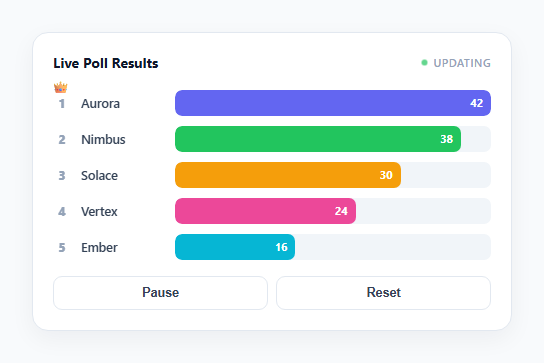
The "bar chart race" format — a set of labeled horizontal bars that grow, shrink, and swap vertical positions as their underlying numbers change over time — has become one of the most recognizable data-visualization formats on social media, used constantly for election results, sports standings, and trending topics. This snippet builds a live, interactive version: five candidates with simulated vote counts that update on a timer, bars that resize smoothly, rows that physically glide past each other when their rank changes, and a small crown animation whenever a new leader takes first place.
Why naive re-sorting causes a visual "pop"
The obvious way to reorder a list of DOM rows by rank is to sort the underlying data and re-insert the elements in the new order — container.appendChild(row) for each row in rank order. The problem is that the browser has no concept of "this row used to be third and is now first" once you do that; it simply computes a new layout and paints it. The result is every reordered row instantly jumping to its new position with zero visible motion — a jarring pop that makes it hard to follow which item moved where, exactly the failure mode a bar-chart race must avoid to be legible.
FLIP: First, Last, Invert, Play
The fix is the FLIP technique. First: before touching the DOM order, reorderWithFlip() records every row's current top position with getBoundingClientRect(). Last: the rows are then actually re-inserted into the container in their new sorted order — a real DOM mutation, causing an instant (invisible, un-animated) jump to the new layout. Invert: for each row, the delta between its old top and its new top is computed, and that delta is applied as a transform: translateY(...) — which visually cancels the jump out, making the row *appear* to still be sitting in its old position even though it has already moved in the DOM. Play: a CSS transition is enabled and the transform is reset to translateY(0), so the browser animates from the inverted (old-looking) position to the true (new) position — which the eye reads as the row smoothly gliding to its new rank, exactly the effect a bar race needs.
The forced-reflow step is not optional
Between setting the inverted transform and clearing it, the code calls row.getBoundingClientRect() again purely to force the browser to compute layout synchronously. Without this, both style writes can get batched into a single paint and the transition has no starting frame to animate from — the row would just silently snap to its final position. This one-line detail is the most common way a from-scratch FLIP implementation silently stops animating.
Why bar width still uses a plain CSS transition, not FLIP
Only the *reordering* (vertical position) needs FLIP, because a width change on a single element does not have the "the browser threw away my old position" problem that reordering has — a straightforward transition: width 0.5s on .vbr-fill already animates smoothly between two known widths on the same element. FLIP specifically solves the reordering problem, not general-purpose resizing, so this snippet uses the right tool for each of its two moving parts rather than over-engineering the whole thing through FLIP.
Deriving the crown from the same sorted data, not a separate check
The trophy/crown only appears on the current ranked[0] and is shown or hidden via a plain classList.toggle('show', c.id === leader.id) recomputed every tick — it never has its own independent state. A small pop animation (a scale-and-lift transform, hand-triggered rather than declared as a @keyframes loop) only fires when leader.id !== lastLeaderId, so the celebratory bounce plays exactly once per actual leadership change, not on every tick where the same candidate happens to still be winning.
Simulated data on a timer, structured for a real feed
tickVotes() randomly nudges each candidate's vote count and is called from a plain setInterval; in a production version you would replace the random nudge with data pulled from a WebSocket or polling endpoint and call the same reorderWithFlip() + updateBars() pair whenever new numbers arrive — the animation layer is fully decoupled from where the numbers come from.
Build with AI
Build, Understand, Optimize, and Extend It With AI
Paste this snippet's JS into an AI assistant like Claude and ask it to trace exactly what reorderWithFlip() does between the First measurement and the Play transition — walking through why the DOM is reordered before the inverted transform is applied (not after) will make FLIP click in a way the acronym alone doesn't. Good extensions to ask for: animating the crown traveling smoothly from the old leader's row to the new leader's row instead of just popping on the new one, adding a subtle color pulse on any bar that just changed rank, or generalizing reorderWithFlip() into a standalone function that could reorder any list of elements, not just this specific bar race.
Prompt to recreate it
Copy this into your AI assistant of choice to build the effect from scratch, or as a jumping-off point for your own variant:
Build a "bar chart race" style live ranking widget in plain HTML, CSS, and JavaScript where ranked horizontal bars reorder smoothly instead of jump-cutting, no libraries.

Requirements:
- A vertical list of labeled horizontal bars, each showing a name, a fill proportional to its current value relative to the maximum, and the numeric value itself.
- Simulate periodic data updates on a setInterval that randomly adjusts each item's value.
- When values change and cause the rank order to shift, reorder the underlying DOM rows using the FLIP technique: before reordering, measure every row's current position with getBoundingClientRect (First); re-insert the rows into the container in the new sorted order, causing an instant unanimated layout jump (Last); for each row, compute the delta between its old and new position and apply it as an inverted CSS transform so it visually appears unmoved (Invert); force a synchronous layout read; then enable a CSS transition and reset the transform to identity so the row animates smoothly from its old-looking position to its true new position (Play).
- Animate each bar's width and displayed number with a normal CSS transition separately from the FLIP reorder logic, since resizing a single element does not need the FLIP technique.
- Show a small trophy or crown indicator on whichever item currently has the highest value, derived fresh from the sorted data on every update, and play a brief pop/bounce animation on it only at the exact moment the leader changes, not on every update.
- Include Pause/Resume controls that stop and restart the update interval without losing the current data, and a Reset control that restores the original starting values and rebuilds the list.
- Explain in code comments why naive DOM re-sorting without FLIP causes a jarring instant pop instead of a smooth animated reorder.
Want to tighten it up first? Run this prompt through the AI Prompt Studio to score it across 8 quality dimensions, catch anti-patterns, and tune the wording for Claude, ChatGPT, or Gemini before you paste it in.
Step by step
How to Use
- 1Watch the bars update automaticallyEvery 1.5 seconds each candidate's vote count shifts slightly, and the corresponding bar width and number animate smoothly to the new value.
- 2Watch rows swap places when rank changesWhen a candidate's votes overtake the row above it, both rows visibly glide past each other into their new vertical order rather than jump-cutting — that's the FLIP reorder in action.
- 3Watch for the crownA small crown icon appears above whichever row currently has the most votes, and it plays a quick pop animation the moment leadership changes from one candidate to another.
- 4Click PauseThe update timer stops and the bars freeze at their current values; the button label switches to "Resume".
- 5Click ResumeUpdates continue from wherever the vote counts currently stand, on the same 1.5-second interval.
- 6Click ResetAll candidates return to their original starting vote counts and rank order, rebuilding the rows from scratch.
Real-world uses
Common Use Cases
Got questions?
Frequently Asked Questions
When you remove and re-insert DOM elements in a new order, the browser computes and paints the new layout with no awareness that an element used to be somewhere else — from its perspective, it is just laying out elements at their current positions. There is nothing to animate from, so every reordered row instantly appears at its new position in a single frame, which reads as a jarring pop rather than motion.
After the DOM has already been reordered (so every row is sitting at its true new position), Invert computes how far each row moved (new position minus old position) and applies the *opposite* of that as a CSS transform. Because a transform does not affect layout, the row is still occupying its new DOM position for layout purposes, but visually it is offset back to where it used to be. Play then transitions that transform back to zero, which the browser can animate smoothly since it is only animating a transform, not layout.
Browsers batch style writes and only recompute layout/paint when something forces them to, such as reading a layout property like getBoundingClientRect(). Without that forced read in between, both the "apply inverted transform" write and the "clear it back to zero" write can be coalesced into a single paint, meaning the browser never actually renders the inverted (old-looking) frame — the row would just silently snap to its destination with no visible glide.
Yes, with care around where FLIP measurements happen relative to re-renders. In React, measure row positions with refs before updating the sorted state, let React re-render the new order, then in a useLayoutEffect (which runs before paint) apply the inverted transform and immediately trigger the Play transition — useLayoutEffect matters here because a regular useEffect can run after the browser has already painted the un-animated new positions. Clear the setInterval driving simulated updates inside the effect's cleanup function. In Vue, do the same measurement-before/apply-after pattern around nextTick and clear the interval in onUnmounted; in Angular, use ngOnDestroy to clear it.
Replace the random nudge inside tickVotes() with however you receive real data — a WebSocket message handler, a polling fetch() on an interval, or a server-sent event listener — as long as it ends by updating the candidates array with the new vote counts and then calling the same reorderWithFlip() followed by updateBars(false). The animation logic has no dependency on where the numbers came from, only that candidates reflects the latest values before those two functions run.