You Might Also Like
Learn Coding Visually
Learn to code with interactive, live-preview playgrounds — HTML, CSS, JavaScript, React & more.
 HTML Playground42 lessons · Click-based · Live preview
 CSS PlaygroundLearn CSS with a live editor
 JavaScript Playground60 lessons · DOM · Async · Canvas
 React PlaygroundLearn React with a live code editor
 GSAP PlaygroundLearn GSAP animation interactively
 SVG Playground44 lessons · shapes · paths · animation
 SCSS Playground45 lessons · Sass modules · tokens
 Tailwind PlaygroundLearn Tailwind CSS with a live editor
 Bootstrap 5 Playground50 lessons · live preview
Web Crypto Hash Demo — Free SHA-256/384/512 Live Text Hasher
Web Crypto Hash Demo · Forms · Plain HTML, CSS & JS · Live preview
What's included
Features
About this UI Snippet
Web Crypto Hash Demo — Real SHA-2 Digests Computed On Your Device
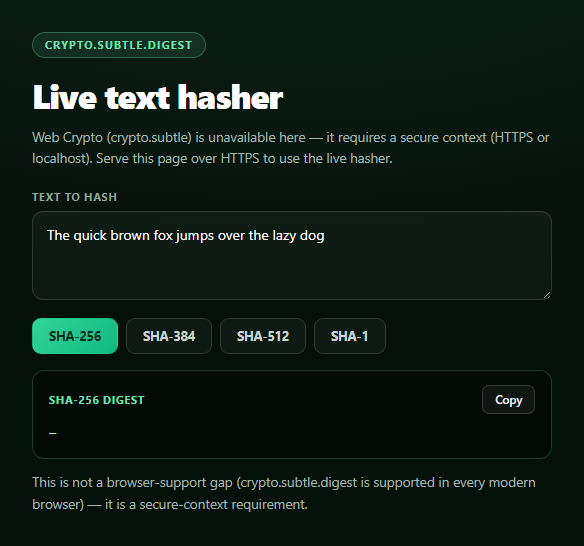
This snippet is a genuine cryptographic hash tool, not a lookup table or a fake spinner: every keystroke runs the typed text through the browser's native crypto.subtle.digest(), and the hex string on screen is the actual digest — verifiable against any other SHA-256 implementation.
The real call: crypto.subtle.digest()
Text first goes through new TextEncoder().encode(text), which turns the string into a UTF-8 Uint8Array — hashing always operates on bytes, not JavaScript's UTF-16 string representation. That byte array is passed to window.crypto.subtle.digest(algorithm, data), an async method that returns a promise resolving to an ArrayBuffer containing the raw digest bytes (32 bytes for SHA-256, 48 for SHA-384, 64 for SHA-512, 20 for SHA-1).
Correct ArrayBuffer-to-hex conversion
The result is a raw ArrayBuffer, not a readable string, so bufferToHex() wraps it in a Uint8Array view, maps each byte through byte.toString(16).padStart(2, '0') to get a zero-padded two-character hex pair, and joins with no separator. This is the textbook-correct pattern for the job — the padStart matters because a byte like 5 (0x05) would otherwise render as a single hex digit 5 instead of 05, silently shortening and corrupting the digest string. You can verify the output against any known test vector: hashing "The quick brown fox jumps over the lazy dog" (this demo's default text) with SHA-256 must produce d7a8fbb307d7809469ca9abcb0082e4f8d5651e46d3cdb762d02d0bf37c9e592.
Debounced, not throttled
Every keystroke calls scheduleHash(), which clears any pending timer and sets a new 150ms one before actually hashing — so a fast typist only triggers one digest computation after they pause, not one per character. digest() is cheap for short strings, but debouncing keeps the UI from recomputing on every single keypress of a long paste.
The one real caveat: secure contexts only
Unlike the flaky, permission-gated APIs elsewhere in this library, crypto.subtle is broadly supported in every modern browser — but it is only exposed in a *secure context*: an HTTPS origin, or localhost during development. On a plain http:// page, window.crypto.subtle is simply undefined. The code checks for that explicitly and disables the inputs with a message naming the actual requirement, rather than letting the first digest() call throw a confusing TypeError. Pair this with a password generator for a broader "client-side crypto toolkit" page, or a password strength meter.
Build with AI
Build, Understand, Optimize, and Extend It With AI
Paste this snippet's HTML, CSS, and JS into an AI coding assistant like Claude and ask it to walk through exactly why TextEncoder is needed before hashing (rather than passing the raw JavaScript string) and why the ArrayBuffer-to-hex conversion requires padStart(2, '0') on each byte specifically. It's also a good way to sanity-check correctness — ask it to trace the default sample text through SHA-256 by hand or verify the expected digest against a known test vector, and to explain precisely why crypto.subtle exists only in secure contexts and what that means for local development versus production hosting. For extensions, ask it to add HMAC support via crypto.subtle.importKey and sign, add a file-upload mode that hashes a File's bytes instead of typed text, or add a visual "avalanche effect" demo showing how much the output changes for a one-character input change. Treat the code less like a finished artifact and more like a starting point for a conversation.
Prompt to recreate it
Copy this into your AI assistant of choice to build the effect from scratch, or as a jumping-off point for your own variant:
Build a "Web Crypto hash demo" in plain HTML, CSS, and JavaScript using the real browser crypto.subtle.digest() API — no hashing libraries.

Requirements:
- A textarea for input text and a row of buttons to select the hash algorithm (SHA-256, SHA-384, SHA-512, SHA-1), with the currently selected algorithm visually highlighted.
- On input (debounced by roughly 150ms so it doesn't recompute on every single keystroke) and on algorithm change, encode the current text with new TextEncoder().encode(text) and pass the resulting bytes to await window.crypto.subtle.digest(algorithmName, data), which returns a Promise<ArrayBuffer> containing the raw digest.
- CRITICAL: convert the resulting ArrayBuffer to a lowercase hex string using the textbook-correct pattern -- wrap it in a Uint8Array, map each byte through byte.toString(16).padStart(2, '0') to get a zero-padded two-character hex pair, and join the array with no separator. Get this exactly right; padStart is required or single-digit hex bytes will corrupt the output. Verify your implementation would produce d7a8fbb307d7809469ca9abcb0082e4f8d5651e46d3cdb762d02d0bf37c9e592 when SHA-256-hashing the text "The quick brown fox jumps over the lazy dog".
- Display the resulting hex digest in a monospace, word-broken output block labeled with the active algorithm, plus a "Copy" button using navigator.clipboard.writeText with a brief confirmation state.
- Handle the rare but real unsupported case: crypto.subtle is only available in a secure context (HTTPS or localhost), so check for its existence (window.crypto && window.crypto.subtle && window.crypto.subtle.digest) before wiring up hashing. If unavailable, disable the inputs and show a status message explaining specifically that a secure context is required -- do not let an unguarded digest() call throw an unhandled error.
Want to tighten it up first? Run this prompt through the AI Prompt Studio to score it across 8 quality dimensions, catch anti-patterns, and tune the wording for Claude, ChatGPT, or Gemini before you paste it in.
Step by step
How to Use
- 1Paste HTML, CSS, and JSThe default text hashes immediately with SHA-256.
- 2Type or paste your own textThe digest recomputes live, debounced by 150ms.
- 3Switch algorithmsChoose SHA-256, SHA-384, SHA-512, or SHA-1.
- 4Copy the digestClick Copy to grab the current hex string.
- 5Verify itCompare the output against any standard SHA implementation.
- 6Served over http://?Inputs disable with an explanation — serve over HTTPS instead.
Real-world uses
Common Use Cases
Got questions?
Frequently Asked Questions
It's a real digest. The typed text is UTF-8 encoded with TextEncoder and passed to the browser's native window.crypto.subtle.digest(algorithm, data), which returns the actual cryptographic hash as an ArrayBuffer. You can verify it: hashing the default sample text "The quick brown fox jumps over the lazy dog" with SHA-256 produces d7a8fbb307d7809469ca9abcb0082e4f8d5651e46d3cdb762d02d0bf37c9e592, matching any standard SHA-256 implementation.
digest() returns a raw ArrayBuffer, so the code wraps it in a Uint8Array, maps each byte through byte.toString(16).padStart(2, '0'), and joins the results with no separator. The padStart(2, '0') is essential -- without it, a byte value like 5 (hex 0x05) would render as a single character "5" instead of "05", silently truncating and corrupting the digest.
crypto.subtle is only exposed in a secure context: an HTTPS origin or localhost during local development. On a plain http:// page (not localhost), window.crypto.subtle is undefined even in an up-to-date browser, since the Web Crypto API is deliberately restricted to secure contexts. The code checks for this and disables the inputs with an explanation rather than letting the first digest() call throw.
digest() is genuinely cheap for short strings, but hashing on every single keypress during a fast paste or fast typing would still mean many redundant computations whose results are immediately discarded. A 150ms debounce (clearing and resetting a timer on each input event) collapses that into one digest call after the user actually pauses, which is smoother without adding noticeable lag.
Keep the input text and selected algorithm in component state, and in an effect (or watcher) debounce a call to window.crypto.subtle.digest(algorithm, new TextEncoder().encode(text)), converting the resulting ArrayBuffer to hex with the same byte-mapping loop. Because digest() is a promise, guard against a stale response landing after a newer one by tracking a request id or using an AbortController-style flag.