You Might Also Like
Learn Coding Visually
Learn to code with interactive, live-preview playgrounds — HTML, CSS, JavaScript, React & more.
 HTML Playground42 lessons · Click-based · Live preview
 CSS PlaygroundLearn CSS with a live editor
 JavaScript Playground60 lessons · DOM · Async · Canvas
 React PlaygroundLearn React with a live code editor
 GSAP PlaygroundLearn GSAP animation interactively
 SVG Playground44 lessons · shapes · paths · animation
 SCSS Playground45 lessons · Sass modules · tokens
 Tailwind PlaygroundLearn Tailwind CSS with a live editor
 Bootstrap 5 Playground50 lessons · live preview
Citation Style Formatter — Free APA & MLA Generator HTML CSS JS
Citation Style Formatter · Forms · Plain HTML, CSS & JS · Live preview
What's included
Features
About this UI Snippet
Citation Style Formatter — Real APA and MLA Punctuation Rules, Not Approximations
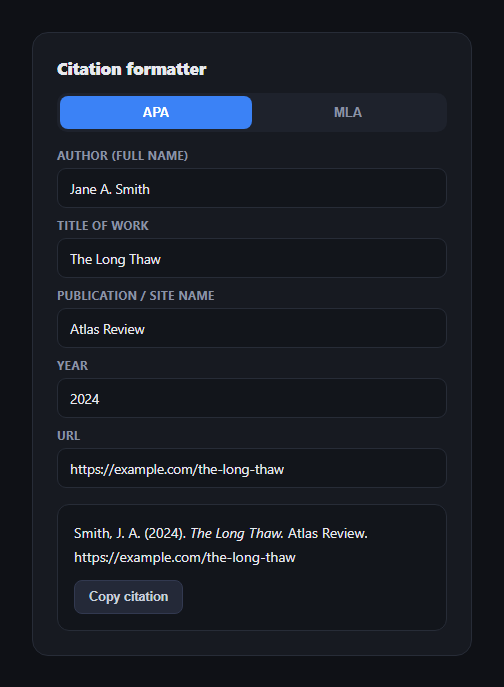
Most "citation generator" demos get the easy 80% right and fumble the punctuation that actually matters — where italics go, whether a period sits inside or outside quotation marks, whether the URL keeps its protocol. This snippet builds a genuinely accurate APA and MLA formatter from five structured fields (author, title, publication, year, URL), in plain HTML, CSS, and vanilla JavaScript, with italics represented via CSS font-style since the output is plain text.
APA: the work's title is italicized, not the site
For an online work, APA style (7th edition) italicizes the *title of the work itself* and leaves the publication/site name in plain text: Smith, J. A. (2024). The Long Thaw. Atlas Review. https://…. The author is reduced to last name plus initials — authorApa() splits the full name, pops the last token as the surname, and reduces every remaining token to a capitalized initial. The year sits in parentheses immediately after the author, and the URL is included in full with its protocol, no trailing period.
MLA: the title gets quotes, the publication gets italics — the opposite pairing
MLA style (9th edition) treats the source title as a *part of* its container: it goes in quotation marks, while the container — the publication or site name — is what gets italicized: Smith, Jane A. "The Long Thaw." Atlas Review, 2024, example.com/the-long-thaw. The author keeps full first and middle names rather than reducing to initials (authorMla()), and per current MLA guidance, the URL's http:// or https:// prefix is stripped before it's included — a genuinely easy-to-miss detail this formatter gets right automatically.
Terminal punctuation that respects existing punctuation
A title that already ends in a question mark or exclamation point shouldn't get a second, redundant period after it — withTerminal() checks the last character before deciding whether to append one, in both styles. This is a small rule that a naive "always add a period" implementation gets wrong.
One state, two renderers, no re-typing
The five input fields feed a single v object on every keystroke, and buildApa() / buildMla() are pure functions from that object to a citation string — switching styles re-runs the same field values through the other formatter, so nothing needs re-entering when you compare styles side by side.
Copy button with a real fallback
The copy button uses the modern navigator.clipboard API when available and falls back to a hidden-textarea-plus-execCommand approach otherwise, so it works in older or restricted embedding contexts too.
Customizing it
Add support for multiple authors (APA joins additional authors with &; MLA lists only the first author followed by "et al." for three or more), or extend the field set for journal volume/issue numbers. Pair it with code block for a technical writing toolkit, or a table of contents for a long-form article layout.
Build with AI
Build, Understand, Optimize, and Extend It With AI
Rather than double-checking punctuation rules by hand, paste this snippet's HTML, CSS, and JS into an AI coding assistant like Claude and ask it to verify that the APA output correctly italicizes the work title while MLA correctly quotes it and italicizes the publication instead, and to check that withTerminal() genuinely avoids double punctuation on titles ending in question marks or exclamation points. The same assistant is useful for extending accuracy further — ask it to add correct handling for two-author and three-plus-author (et al.) cases in both styles, add Chicago or Harvard style as a third formatter following the same buildXxx(v) pattern, or handle a missing field (like no URL for a print source) by omitting it cleanly rather than leaving a stray space. Treat the code less like a finished artifact and more like a starting point for a conversation, and always double-check generated citations against your institution's current style guide before submitting real academic work.
Prompt to recreate it
Copy this into your AI assistant of choice to build the effect from scratch, or as a jumping-off point for your own variant:
Build a "citation style formatter" in plain HTML, CSS, and JavaScript with no library, that converts structured input fields into properly punctuated APA and MLA reference strings.

Requirements:
- Five input fields: author (a single full name like "Jane A. Smith"), title of work, publication or site name, year, and URL, plus a toggle to switch between APA and MLA output, all driving a live-updating citation preview on every keystroke.
- An APA formatter that follows real APA style conventions for an online work: author reduced to last name plus capitalized initials for any first/middle names, the year in parentheses immediately after the author, the title of the work italicized (use CSS font-style for the italics since output is plain text), the publication/site name in plain (non-italic) text, and the full URL including its protocol with no trailing period.
- An MLA formatter that follows real MLA style conventions: author kept as last name plus full first and middle names (not reduced to initials), the title of the source wrapped in quotation marks (not italicized), the publication/site name italicized (the inverse of the APA treatment), the year placed after the publication rather than right after the author, and the URL included with its leading http:// or https:// protocol stripped off per current MLA guidance, ending in a period.
- A helper that decides whether to append a terminal period to the title (or author string): if the text already ends in a period, question mark, or exclamation point, no additional period should be added, in either style.
- A copy-to-clipboard button that copies the plain-text version of the citation (no HTML tags, with proper quote characters) using the modern Clipboard API, with a working fallback (a temporary offscreen textarea plus the older copy command) for environments where that API is unavailable.
- All user-entered field values must be HTML-escaped before being inserted into the rendered citation, so special characters in a title or author name cannot break the markup.
Want to tighten it up first? Run this prompt through the AI Prompt Studio to score it across 8 quality dimensions, catch anti-patterns, and tune the wording for Claude, ChatGPT, or Gemini before you paste it in.
Step by step
How to Use
- 1Paste HTML, CSS, and JSA formatter loads with example fields already filled in, showing an APA citation.
- 2Edit the fieldsAuthor, title, publication, year, and URL — the citation updates on every keystroke.
- 3Switch to MLAWatch the punctuation invert: the title moves into quotes and the publication becomes italicized.
- 4Click "Copy citation"The plain-text citation (no HTML markup) is copied to your clipboard.
- 5Try edge casesA single-word author name or a title ending in "?" both format correctly without extra punctuation.
- 6Extend for your needsAdd multi-author support or journal-specific fields like volume and issue.
Real-world uses
Common Use Cases
Got questions?
Frequently Asked Questions
In APA, the title of the work is italicized and the publication/site name is plain text, with the author reduced to last name plus initials and the year in parentheses right after the author. In MLA, that pairing inverts: the title goes in quotation marks and the publication is italicized instead, the author keeps full first and middle names, and the year moves later in the citation, after the publication.
MLA style specifically instructs writers to omit the leading http:// or https:// from a URL in a Works Cited entry, so this formatter strips it automatically for MLA output via stripProtocol(). APA style keeps the URL exactly as entered, protocol included, since APA references are meant to be directly clickable/functional as given.
withTerminal() inspects the last character of the title (or author string) before deciding whether to append a period — if the text already ends in a period, question mark, or exclamation point, nothing extra is added. Without this check, a title like "What Is Justice?" would incorrectly render as "What Is Justice?." with a redundant trailing period.
APA joins two authors with an ampersand (Smith, J. A., & Lee, K.) and switches to "et al." after 20 authors; MLA lists only the first author in "Last, First" form followed by ", et al." once there are three or more authors, but keeps both names spelled out in full for exactly two. You would extend the author field to accept multiple names (or add repeatable fields) and branch authorApa()/authorMla() on the count.
Hold the five field values in component state and recompute the citation with a memoized/computed value keyed to those fields and the selected style — buildApa() and buildMla() are already pure functions of a plain data object, so they port unchanged into any framework; only the input bindings and the copy button's DOM access change.