You Might Also Like
Learn Coding Visually
Learn to code with interactive, live-preview playgrounds — HTML, CSS, JavaScript, React & more.
 HTML Playground42 lessons · Click-based · Live preview
 CSS PlaygroundLearn CSS with a live editor
 JavaScript Playground60 lessons · DOM · Async · Canvas
 React PlaygroundLearn React with a live code editor
 GSAP PlaygroundLearn GSAP animation interactively
 SVG Playground44 lessons · shapes · paths · animation
 SCSS Playground45 lessons · Sass modules · tokens
 Tailwind PlaygroundLearn Tailwind CSS with a live editor
 Bootstrap 5 Playground50 lessons · live preview
GDPR Data Request Form — Free Privacy Rights Request Widget
GDPR Data Request Form · Forms · Plain HTML, CSS & JS · Live preview
What's included
Features
About this UI Snippet
GDPR Data Request Form — Access, Delete, Correct, or Export Your Data
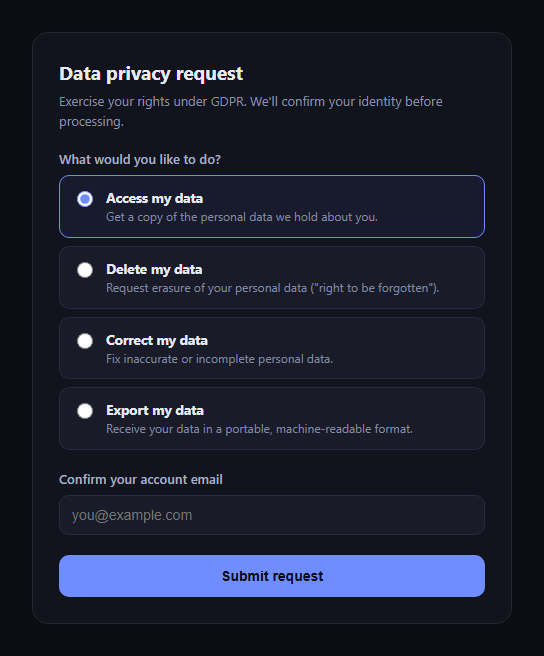
The GDPR data request form is the interface a privacy or account-settings page provides for a person to exercise their data subject rights under GDPR — access, erasure, rectification, and portability — without emailing support and hoping someone reads it. This snippet builds a self-contained version in plain HTML, CSS, and JavaScript.
Four request types, one radio group
A fieldset/legend-grouped set of radio buttons covers the four common request types: Access, Delete, Correct, and Export my data. Each option carries a short description of what it means in plain language, not just legal shorthand, so the visitor picks the right one with confidence.
Identity confirmation before anything happens
An email field asks the requester to confirm the address tied to their account. This snippet validates it's a plausible email format client-side and blocks submission with an inline error otherwise — a real (if basic) organization needs a stronger identity check before actually acting on a request, but the form demonstrates where that gate belongs in the flow.
The correct GDPR timeline — no invented numbers
The confirmation view states the response window as *"within one month (30 days)... may be extended by up to two further months for complex requests."* This is deliberately GDPR's actual statutory deadline (Article 12(3)) — a one-month base period, extendable by two further months when the request is complex — and the copy is written to match that exactly rather than a plausible-sounding but wrong number like "5 business days" or "90 days."
A confirmation that restates the request
Once submitted, the confirmation view echoes back the selected request type and the confirmed email in a sentence, so the requester has a receipt of exactly what they asked for — useful evidence if they need to follow up.
Restart without reload
A "Submit another request" button resets the form and swaps the views back, letting one page handle multiple sequential requests (e.g., an internal tool processing several people's requests) without reloading.
Customizing it
Wire the submit handler to your real request-intake API or ticketing system, add a free-text details field for correction requests, or add a stronger identity-verification step (e.g. a follow-up email link) before the request is actually logged. Pair it with gdpr-consent-manager or cookie preferences.
Build with AI
Build, Understand, Optimize, and Extend It With AI
Paste this snippet's HTML, CSS, and JS into an AI coding assistant like Claude and ask it to explain how the four request types map to GDPR's actual data subject rights (access, erasure, rectification, portability), and to double-check that the response-time copy correctly reflects GDPR's real one-month deadline (extendable by two further months for complex requests) rather than a plausible-sounding but wrong figure. It can help you add a genuine identity-verification step (like an email confirmation link) before a request is actually processed, wire the submission to a real ticketing or privacy-request-tracking backend, or add a conditional detail field that only appears for the "Correct my data" option.
Prompt to recreate it
Copy this into your AI assistant of choice to build the effect from scratch, or as a jumping-off point for your own variant:
Build a "GDPR data request form" in plain HTML, CSS, and JavaScript (no dependencies).

Requirements:
- A fieldset/legend-grouped radio button group with four options representing core GDPR data subject rights: access my data, delete my data (erasure), correct my data (rectification), and export my data (portability) — each option should have a short plain-language description of what it means, not just a legal term.
- An identity-confirmation email field that is required and validated client-side for a plausible email format before the form can be submitted; show an inline error and keep focus on the field if validation fails.
- On successful submission, hide the form and show a confirmation view in the same card (no page navigation) that restates exactly which request type was submitted and for which email address.
- The confirmation view MUST state the response-time expectation accurately per GDPR: respond within one month (30 days) of receiving the request, which may be extended by up to two further months for complex or numerous requests. Do not invent a different number of days — use GDPR's real statutory timeline (Article 12(3)).
- A "submit another request" action that resets the form and returns to the form view without a page reload.
- Keep the whole thing accessible: a proper fieldset/legend for the radio group, a label tied to the email input, and a clearly announced/visible error state.
Want to tighten it up first? Run this prompt through the AI Prompt Studio to score it across 8 quality dimensions, catch anti-patterns, and tune the wording for Claude, ChatGPT, or Gemini before you paste it in.
Step by step
How to Use
- 1Paste HTML, CSS, and JSThe request form renders with Access preselected.
- 2Choose a request typeAccess, Delete, Correct, or Export.
- 3Confirm your emailRequired and format-validated before submit.
- 4Submit the requestErrors show inline if the email is invalid.
- 5View the confirmationSee the restated request and the GDPR timeline.
- 6Wire to a real backendReplace the demo submit with your intake API.
Real-world uses
Common Use Cases
Got questions?
Frequently Asked Questions
Because that's GDPR's actual statutory deadline. Article 12(3) requires organizations to respond to data subject requests without undue delay and within one month (roughly 30 days) of receipt, extendable by up to two further months for complex or numerous requests. This snippet states that real figure deliberately rather than an invented, faster-sounding number.
No — it performs basic email format validation only, which is not sufficient identity verification for a production privacy tool. A real implementation needs a stronger check (e.g. requiring the requester to click a confirmation link sent to the account email, or matching against authenticated session data) before actually acting on the request.
They map to core GDPR data subject rights: the right of access (Article 15), the right to erasure/"to be forgotten" (Article 17), the right to rectification (Article 16), and the right to data portability (Article 20). The form's copy summarizes each in plain language rather than citing article numbers to the end user.
In the submit handler, after validation passes, send the selected request type and confirmed email to your backend (ticketing system, CRM, or dedicated privacy-request tool) instead of just rendering the confirmation view locally, and use the real ticket/reference number in the confirmation copy.
Yes — add another radio option following the same pattern (a value, a bold label, and a description), or add fields like a free-text "what would you like corrected" box that only appears when the Correct option is selected, toggled via a change listener on the radio group.