You Might Also Like
Learn Coding Visually
Learn to code with interactive, live-preview playgrounds — HTML, CSS, JavaScript, React & more.
 HTML Playground42 lessons · Click-based · Live preview
 CSS PlaygroundLearn CSS with a live editor
 JavaScript Playground60 lessons · DOM · Async · Canvas
 React PlaygroundLearn React with a live code editor
 GSAP PlaygroundLearn GSAP animation interactively
 SVG Playground44 lessons · shapes · paths · animation
 SCSS Playground45 lessons · Sass modules · tokens
 Tailwind PlaygroundLearn Tailwind CSS with a live editor
 Bootstrap 5 Playground50 lessons · live preview
Terms Acceptance Checkbox — Free Scroll-to-Enable Consent Pattern
Terms Acceptance Checkbox Pattern · Forms · Plain HTML, CSS & JS · Live preview
What's included
Features
About this UI Snippet
Terms Acceptance Checkbox — Real Scroll Detection, Not a Fake Timer
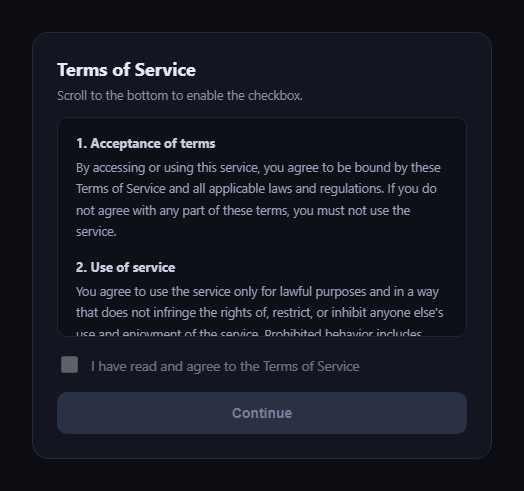
The terms acceptance checkbox pattern is the "you must actually read this" gate used before signup, checkout, or any binding agreement: a scrollable terms box, a checkbox that starts disabled, and a Continue button that stays disabled until both the scroll and the checkbox conditions are satisfied. This snippet implements the scroll detection for real — reading the box's actual scroll position — rather than faking it with a timer that just waits N seconds regardless of whether anyone scrolled.
Real scroll-position math, not a timer
The core check is el.scrollTop + el.clientHeight >= el.scrollHeight - SCROLL_TOLERANCE_PX. scrollTop is how far the content has scrolled, clientHeight is the visible viewport height, and scrollHeight is the full content height — when their sum reaches the total height (within a small pixel tolerance for sub-pixel rounding across browsers), the user has genuinely reached the bottom. A setTimeout-based fake would let someone tab away and come back "read"; this only fires from a real scroll event.
A one-way unlock
Once hasScrolledToEnd flips to true, the listener short-circuits (if (hasScrolledToEnd) return) — scrolling back up doesn't re-lock the checkbox. This matches how these gates are meant to work: you've proven you reached the end at least once, and don't need to re-prove it by staying there.
Short-content edge case handled
If the terms box is short enough that its content never needs scrolling — scrollHeight already equals clientHeight — the same isScrolledToBottom check runs once on load and unlocks the checkbox immediately, so a legitimately-short agreement doesn't trap the user in an impossible-to-satisfy state.
Two independent conditions gate Continue
The Continue button only enables when *both* hasScrolledToEnd is true *and* the checkbox is checked — either alone isn't enough. updateContinueState() runs on every checkbox change and re-evaluates both flags, so unchecking the box after scrolling correctly re-disables Continue.
Clear, changing hint text
The hint above the box starts as an instruction ("Scroll to the bottom to enable the checkbox") and updates to confirmation copy once unlocked, giving a visible, non-color-dependent signal of state alongside the checkbox's own disabled/enabled styling.
Customizing it
Swap the tolerance value for stricter/looser detection, add a scroll-progress indicator, or require an additional delay-after-unlock for extra-sensitive agreements. Pair it with a checkout form or gdpr-consent-manager.
Build with AI
Build, Understand, Optimize, and Extend It With AI
Paste this snippet's HTML, CSS, and JS into an AI coding assistant like Claude and ask it to explain exactly why the scroll check uses el.scrollTop + el.clientHeight >= el.scrollHeight - tolerance instead of a simpler heuristic, and why a timer-based "read time" approach would be a weaker (and easily gamed) proxy for actually reading the content. It can help you add a visual scroll-progress bar tied to the same scroll event, handle the short-content edge case differently (e.g. requiring an explicit "I've read the short version" button instead of auto-unlocking), or extend the gate to a multi-document flow where several scrollable sections must each be completed before the final checkbox unlocks.
Prompt to recreate it
Copy this into your AI assistant of choice to build the effect from scratch, or as a jumping-off point for your own variant:
Build a "terms acceptance checkbox" gate in plain HTML, CSS, and JavaScript (no dependencies, no timers).

Requirements:
- A scrollable box (fixed height, overflow-y: auto) containing several paragraphs of terms-of-service-style text, long enough to require scrolling in a normal viewport.
- A checkbox that starts disabled, and only becomes enabled once the user has scrolled the box to (at or very near) its actual bottom — detected via a real scroll event listener that computes el.scrollTop + el.clientHeight against el.scrollHeight with a small pixel tolerance for cross-browser rounding. Do NOT use a setTimeout or any time-based delay as a substitute for real scroll detection.
- Once unlocked, scrolling back up must NOT re-disable the checkbox — the unlock should be one-way after the user has proven they reached the bottom once.
- Handle the edge case where the content is short enough to not require scrolling at all (scrollHeight equals clientHeight on load) by unlocking the checkbox immediately in that case, rather than leaving the user stuck.
- A "Continue" button that stays disabled until BOTH the scroll-to-bottom condition has been met AND the checkbox is checked; unchecking the checkbox after scrolling should re-disable Continue.
- Visible, non-color-only feedback for the locked vs. unlocked state (e.g. changing hint text and a disabled/enabled visual style), not just a disabled attribute with no explanation.
Want to tighten it up first? Run this prompt through the AI Prompt Studio to score it across 8 quality dimensions, catch anti-patterns, and tune the wording for Claude, ChatGPT, or Gemini before you paste it in.
Step by step
How to Use
- 1Paste HTML, CSS, and JSThe terms box renders with the checkbox disabled.
- 2Scroll the terms boxThe scroll event fires on every scroll.
- 3Reach the bottomscrollTop + clientHeight >= scrollHeight unlocks it.
- 4Check the boxNow enabled; the hint text confirms it.
- 5Click ContinueEnabled only once both conditions are true.
Real-world uses
Common Use Cases
Got questions?
Frequently Asked Questions
A timer only proves time passed, not that the user scrolled or looked at the content — someone could switch tabs and come back once the timer expires. This pattern instead checks the box's real scroll position via scrollTop + clientHeight >= scrollHeight, so the checkbox only unlocks after an actual scroll event reaches the bottom.
SCROLL_TOLERANCE_PX (4px here) accounts for the fact that scrollHeight, clientHeight, and scrollTop can differ by a pixel or two across browsers and zoom levels due to sub-pixel rounding. Without it, some browsers might never report scrollTop + clientHeight as exactly equal to scrollHeight even when the user is visibly at the bottom.
No — once hasScrolledToEnd becomes true, the scroll listener returns early on every subsequent scroll event and never re-locks it. The pattern only requires proving you reached the bottom once, not staying there.
The same isScrolledToBottom check runs once immediately after setup. If the content already fits without scrolling, the check passes right away and the checkbox unlocks on load instead of leaving the user stuck unable to scroll to satisfy a condition that isn't physically possible.
Yes — add another input and include its condition in updateContinueState() alongside hasScrolledToEnd and checkbox.checked, so Continue only enables when all three conditions are satisfied.