You Might Also Like
Learn Coding Visually
Learn to code with interactive, live-preview playgrounds — HTML, CSS, JavaScript, React & more.
 HTML Playground42 lessons · Click-based · Live preview
 CSS PlaygroundLearn CSS with a live editor
 JavaScript Playground60 lessons · DOM · Async · Canvas
 React PlaygroundLearn React with a live code editor
 GSAP PlaygroundLearn GSAP animation interactively
 SVG Playground44 lessons · shapes · paths · animation
 SCSS Playground45 lessons · Sass modules · tokens
 Tailwind PlaygroundLearn Tailwind CSS with a live editor
 Bootstrap 5 Playground50 lessons · live preview
Insurance Quote Calculator — Free Live Premium Estimator Widget
Insurance Quote Calculator · Forms · Plain HTML, CSS & JS · Live preview
What's included
Features
About this UI Snippet
Insurance Quote Calculator — A Premium Estimator That Shows Its Work
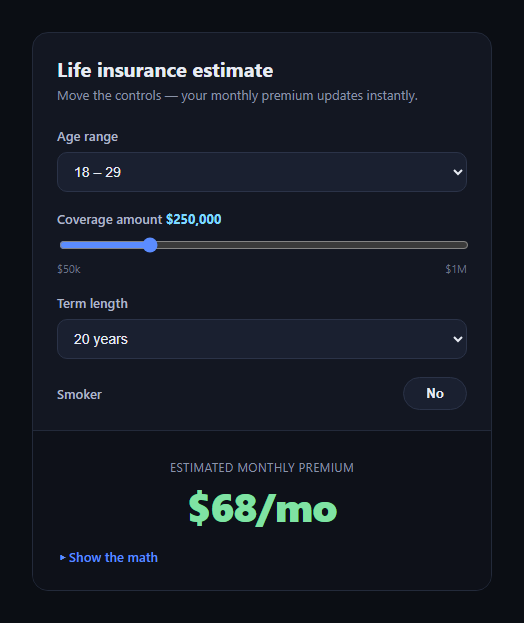
The insurance quote calculator is the widget on a carrier or comparison site that turns age, coverage amount, and term length into an estimated monthly premium — instantly, as the visitor adjusts controls, instead of forcing a form submission and a wait. This snippet builds one in plain HTML, CSS, and JavaScript with no dependencies, and deliberately exposes the formula instead of hiding it behind a black box.
Inputs that map to real risk factors
The widget collects four inputs: an age-range select, a coverage-amount range slider ($50k to $1M in $25k steps), a term-length select (10/20/30 years), and a smoker toggle. Each one maps to a numeric multiplier — ageFactor, termFactor, SMOKER_FACTOR — rather than a hidden lookup table, so the relationship between an input and the price is traceable.
A formula you can read
The premium is computed as (coverage / 1000) * baseRatePer1k * ageFactor * termFactor * smokerFactor. That's the entire pricing model, and it runs synchronously on every input event — moving the slider recalculates the premium on every tick, with no debounce needed since the arithmetic is trivial.
Show the math, not just the number
A <details> panel labeled "Show the math" renders every intermediate value: coverage converted to $1,000 units, the base rate, and each factor applied in turn, ending in a totals row. This is the core idea of the snippet — insurance pricing tools are notorious for feeling like black boxes, and rendering the arithmetic builds trust and doubles as a teaching tool for how term life pricing actually works (age and smoking status dominate; coverage scales linearly).
Native controls, no library
The age and term pickers are native <select> elements and the coverage input is a native <input type="range"> styled with accent-color — so keyboard, screen reader, and touch support come for free, and there's no dependency to load.
Instant feedback loop
Every control fires recalc() on input/change, which updates both the headline premium and the math panel in one pass, so the two never fall out of sync.
Customizing it
Swap in real actuarial rate factors, add a health-conditions field, or change the coverage step and range. Pair it with a checkout form to collect the applicant's details, or a comparison table to show multiple coverage tiers side by side.
Build with AI
Build, Understand, Optimize, and Extend It With AI
Paste this snippet's HTML, CSS, and JS into an AI coding assistant like Claude and ask it to explain how the multiplier-based formula in recalc() keeps the pricing "show your work" — with age, term, and smoker status each contributing a traceable factor rather than a hidden lookup table. It can also help you replace the illustrative constants with real rate tables, or wire the coverage slider to fetch factors from an API instead of hardcoded multipliers. Ask it to add more inputs (a health-conditions field, a location-based factor) while keeping the math panel accurate, or to add input validation and accessible labeling for a production quote flow.
Prompt to recreate it
Copy this into your AI assistant of choice to build the effect from scratch, or as a jumping-off point for your own variant:
Build an "insurance quote calculator" widget in plain HTML, CSS, and JavaScript (no dependencies, no CDN).

Requirements:
- Inputs: an age-range <select>, a coverage-amount <input type="range"> (e.g. $50,000 to $1,000,000 in $25,000 steps) with the current value shown as formatted currency next to its label, a term-length <select> (e.g. 10/20/30 years), and a smoker on/off toggle button using aria-pressed.
- A pricing formula expressed as clearly named numeric constants and factors (e.g. a base rate per $1,000 of coverage, and a multiplier for each of age range, term length, and smoker status) — do not hide the pricing logic in an opaque function or external call.
- The estimated monthly premium recalculates and re-renders immediately on every input/change event from any control, with no submit button and no debounce needed since the math is cheap.
- A collapsible "Show the math" panel (a <details> element is fine) that lists every intermediate value used to reach the final premium — the base units, the base premium, and each factor applied — updating in sync with the headline number every time it changes.
- Format all dollar amounts with toLocaleString or equivalent so they read as proper currency.
- Keep the whole thing dependency-free and accessible: native form controls, visible focus states, and labels tied to their inputs.
Want to tighten it up first? Run this prompt through the AI Prompt Studio to score it across 8 quality dimensions, catch anti-patterns, and tune the wording for Claude, ChatGPT, or Gemini before you paste it in.
Step by step
How to Use
- 1Paste HTML, CSS, and JSThe quote card renders with default selections.
- 2Adjust age, coverage, or termThe premium recalculates immediately.
- 3Toggle smoker statusThe multiplier changes and updates the price.
- 4Open "Show the math"See every factor applied, in order.
- 5Tune the constantsEdit BASE_RATE_PER_1K or the factor values.
Real-world uses
Common Use Cases
Got questions?
Frequently Asked Questions
No — the factors (base rate, age, term, smoker multipliers) are illustrative constants meant to demonstrate the pattern of a transparent, live-recalculating quote widget. Replace them with your own underwriting data or an API call before using it for real quotes.
Insurance calculators are often perceived as black boxes. The "show the math" panel renders every factor applied to reach the final number, which builds trust with the visitor and can double as an educational tool showing how age and smoking status dominate term life pricing.
Yes. The range input fires an "input" event on every tick, and recalc() runs synchronously — the arithmetic is trivial, so no debounce or throttling is needed even on rapid drags.
Add a new control, give it a numeric factor value the same way ageFactor and termFactor work, multiply it into the formula in recalc(), and add a corresponding row to the math breakdown template so it stays transparent.
Yes. Move the four inputs and the premium/math markup into your component, keep the constants and recalc() logic in a function triggered by state changes (or a computed/derived value), and re-render the breakdown rows from the same intermediate values.