You Might Also Like
Learn Coding Visually
Learn to code with interactive, live-preview playgrounds — HTML, CSS, JavaScript, React & more.
 HTML Playground42 lessons · Click-based · Live preview
 CSS PlaygroundLearn CSS with a live editor
 JavaScript Playground60 lessons · DOM · Async · Canvas
 React PlaygroundLearn React with a live code editor
 GSAP PlaygroundLearn GSAP animation interactively
 SVG Playground44 lessons · shapes · paths · animation
 SCSS Playground45 lessons · Sass modules · tokens
 Tailwind PlaygroundLearn Tailwind CSS with a live editor
 Bootstrap 5 Playground50 lessons · live preview
Resume Upload Dropzone — Free Drag & Drop File Upload UI
Resume Upload Dropzone · Forms · Plain HTML, CSS & JS · Live preview
What's included
Features
About this UI Snippet
Resume Upload Dropzone — Drag, Validate, Upload, Confirm
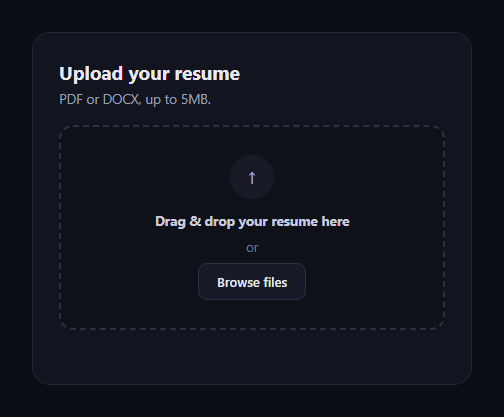
The resume upload dropzone is the file-upload pattern behind every job application: drag a file in (or click to browse), see it validated, watch it upload, and get confirmation it was received. This snippet builds the full state machine in plain HTML, CSS, and JavaScript using real HTML5 drag events.
Genuine drag-and-drop, not a decorative border
The zone listens for dragenter/dragover to add a highlighted rud-dragover state, and dragleave/dragend to remove it — checking zone.contains(e.relatedTarget) on dragleave so the highlight doesn't flicker as the pointer moves between child elements inside the zone. The drop handler reads e.dataTransfer.files[0], the actual File object the browser handed over from the OS-level drag, not a name typed into a text field.
Click-to-browse as a real fallback
A hidden native <input type="file"> is triggered by the visible "Browse files" button, and its change event runs through the exact same handleFile function as a drop — so both paths validate and upload identically, with no duplicated logic.
Validation before anything uploads
handleFile checks the file extension against an allow-list and the size against a 5MB cap before calling startUpload. Failing either shows an inline error and the zone stays in its idle state — nothing is "uploaded" and then rejected after the fact.
A progress bar with real state transitions
startUpload swaps the idle view for a progress view showing the filename and formatted size, then increments a simulated percentage on an interval until it reaches 100, at which point it swaps again to a done view with a checkmark and the confirmed filename — three distinct visual states, not just a spinner.
Remove and restart
The done state's "Remove & upload another" button resets the file input's value (necessary, since browsers won't fire change again for the same file otherwise) and returns to idle, so the whole flow can repeat.
Customizing it
Swap the simulated progress interval for real XMLHttpRequest/fetch upload-progress events, add a file preview thumbnail, or extend validation to check the file's actual MIME type. Pair it with an avatar upload for profile photos, or a file dropzone for general-purpose uploads.
Build with AI
Build, Understand, Optimize, and Extend It With AI
File upload zones have a few non-obvious correctness details, so it's worth pasting this snippet's HTML, CSS, and JS into an AI coding assistant like Claude and asking it to explain why dragleave needs the e.relatedTarget/contains check to avoid flicker when the dropzone has child elements, and how e.dataTransfer.files differs from the file input's own .files property despite both ending up in the same handleFile function. The same assistant can help you take this to production — ask it to swap the simulated setInterval progress bar for real upload progress using XMLHttpRequest's upload.onprogress event, add drag-and-drop support for multiple files with a per-file progress row, or validate the file's actual content type via its magic bytes rather than trusting the extension alone (since a renamed file can have any extension).
Prompt to recreate it
Copy this into your AI assistant of choice to build the effect from scratch, or as a jumping-off point for your own variant:
Build a "resume upload dropzone" in plain HTML, CSS, and JavaScript — no frameworks, no dependencies.

Requirements:
- A dropzone that responds to real HTML5 drag events: dragenter and dragover add a highlighted visual state and call preventDefault; dragleave and dragend remove it, with dragleave specifically checking e.relatedTarget against the zone (via .contains) so the highlight doesn't flicker when the pointer moves across child elements inside the zone rather than truly leaving it.
- A drop handler that calls preventDefault and reads the dropped file from e.dataTransfer.files[0] (a real File object).
- A hidden native file input triggered by a visible "Browse files" button, whose change event routes through the exact same file-handling function as the drop handler — no duplicated validation logic between the two paths.
- Validation of both file extension (allow only pdf/doc/docx) and file size (reject anything over 5MB) before any upload begins; a failure shows an inline error message and leaves the zone in its idle state.
- A simulated upload: on a valid file, swap to a progress view showing the filename and a human-readable formatted size (B/KB/MB), animate a progress bar from 0% to 100% using a timer with randomized increments, then swap to a done/confirmation view showing a checkmark and the filename.
- A "remove and upload another" action in the done state that resets the file input's value (so selecting the same filename again still fires a change event) and returns to the idle view.
- Keep it in a dark theme, and make sure the JavaScript only references classnames/ids that exist in the HTML you write.
Want to tighten it up first? Run this prompt through the AI Prompt Studio to score it across 8 quality dimensions, catch anti-patterns, and tune the wording for Claude, ChatGPT, or Gemini before you paste it in.
Step by step
How to Use
- 1Paste the HTML, CSS, and JSAn idle dropzone with a browse button renders.
- 2Drag a file over the zoneIt highlights with a solid accent border.
- 3Drop the file (or click Browse)Both paths validate type and size identically.
- 4Try an oversized or wrong-type fileAn inline error appears and nothing uploads.
- 5Drop a valid resumeA progress bar animates from 0% to 100%.
- 6See the confirmationA checkmark and filename confirm the upload; remove to retry.
Real-world uses
Common Use Cases
Got questions?
Frequently Asked Questions
It's real HTML5 drag-and-drop. The zone listens for the actual dragenter, dragover, dragleave, and drop events the browser fires during an OS-level file drag, and the drop handler reads e.dataTransfer.files[0] to get the genuine File object the user dragged in — not a value typed or selected some other way. The click-to-browse path exists alongside it as an accessible fallback, using the same validation function.
Because the dropzone contains child elements (icon, text, button), moving the pointer from the zone onto one of its own children also fires dragleave on the outer zone — without the relatedTarget check, the highlight would flicker on and off as the pointer crosses internal element boundaries. Checking zone.contains(e.relatedTarget) confirms the pointer actually left the zone entirely before clearing the highlight.
handleFile extracts the file extension from file.name and checks it against an allow-list (pdf, doc, docx), and separately checks file.size against a 5MB byte threshold. Either failure sets an inline error message and returns immediately, before startUpload is ever called — so an invalid file never enters the upload/progress state at all.
Replace the setInterval loop in startUpload with an XMLHttpRequest (which supports upload.onprogress with loaded/total byte counts) or a fetch call using a ReadableStream reader, and set the bar's width and percentage label from the real progress event instead of random increments. The state-swapping logic (idle to progress to done) stays the same either way.
Bind the same dragenter/dragover/dragleave/drop handlers to a container ref using your framework's event syntax, store upload state (idle/uploading/done, filename, progress percent, error) in component state, and conditionally render the three views from that state instead of toggling hidden attributes directly. The file validation function is plain JavaScript and needs no changes.