You Might Also Like
Learn Coding Visually
Learn to code with interactive, live-preview playgrounds — HTML, CSS, JavaScript, React & more.
 HTML Playground42 lessons · Click-based · Live preview
 CSS PlaygroundLearn CSS with a live editor
 JavaScript Playground60 lessons · DOM · Async · Canvas
 React PlaygroundLearn React with a live code editor
 GSAP PlaygroundLearn GSAP animation interactively
 SVG Playground44 lessons · shapes · paths · animation
 SCSS Playground45 lessons · Sass modules · tokens
 Tailwind PlaygroundLearn Tailwind CSS with a live editor
 Bootstrap 5 Playground50 lessons · live preview
Return Label Generator — Free Product Return Flow Widget
Return Label Generator · Forms · Plain HTML, CSS & JS · Live preview
What's included
Features
About this UI Snippet
Return Label Generator — A Two-Step Return Request Flow
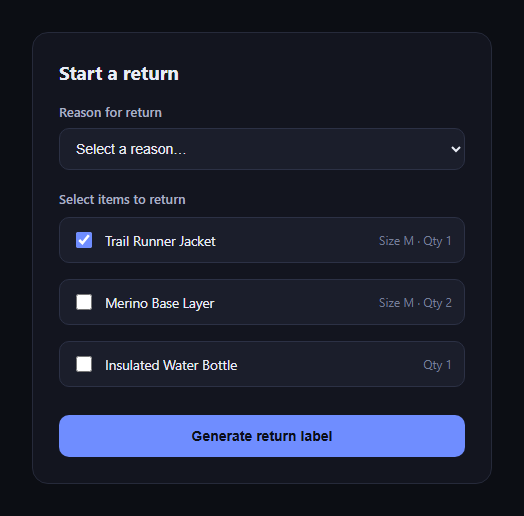
The return label generator is the flow e-commerce order pages use to let a customer pick a reason, select which items to send back, and get a shippable label — condensed to two states in one card instead of a multi-page wizard. This snippet builds it in plain HTML, CSS, and JavaScript.
Two states, one card
The widget has exactly two views: the form (#rlForm) and the confirmation (#rlConfirm). Submitting swaps their hidden attributes rather than routing to a new page, so the whole interaction stays in place — useful inside a modal or an order-details panel.
Reason plus itemized selection
A required <select> captures the reason for return, and a checkbox list — styled so the whole row is clickable, not just the tiny native checkbox — lets the customer choose exactly which items from the order to include, each showing its size/quantity metadata.
Validation before generating anything
The submit handler checks both that a reason is selected and that at least one item checkbox is checked before proceeding; if either is missing, an inline error message appears and no label is generated — a real (if simple) validation gate rather than a flow that always succeeds.
A mock tracking number, clearly a placeholder
generateTrackingNumber() builds a UPS-style code (1Z + nine random digits + US) purely for demo purposes. It's random on every submission, making clear in the code (and to anyone reading it) that this needs to be replaced with a real call to your shipping-label API.
Confirmation with real next steps
Once generated, the confirmation view shows a checkmark, the tracking number in large tabular numerals, and a numbered list of what happens next — print or show the QR code, pack the items, and the drop-off/refund timeline — so the customer knows what to do without hunting for a follow-up email.
Restart without a reload
A "Start another return" button calls form.reset() and flips the visibility back, so the demo (or a real multi-return flow) can be exercised repeatedly without a page refresh.
Customizing it
Wire the submit handler to a real shipping API, pull the item list from the actual order data, or add a shipping-method choice (drop-off vs. pickup). Pair it with order tracking timeline or checkbox tree for nested item selection.
Build with AI
Build, Understand, Optimize, and Extend It With AI
Paste this snippet's HTML, CSS, and JS into an AI coding assistant like Claude and ask it to explain how the two-state hidden-attribute toggle between the form and confirmation views works, and why the mock tracking number generator is written the way it is (clearly random, clearly a placeholder). It can help you replace the mock generator with a real shipping-label API call, add a shipping-method choice or a returns-window countdown, or restructure the item list to support grouped/nested selection for orders with many line items using something like a checkbox tree.
Prompt to recreate it
Copy this into your AI assistant of choice to build the effect from scratch, or as a jumping-off point for your own variant:
Build a "return label generator" flow in plain HTML, CSS, and JavaScript (no dependencies).

Requirements:
- A form with a required reason-for-return <select> (a handful of common return reasons) and a checkbox list of order items, each item showing its name plus metadata like size and quantity, styled so the entire row (not just the small checkbox) is clickable.
- Client-side validation on submit: block progression and show an inline error message unless a reason is selected AND at least one item checkbox is checked.
- On successful validation, hide the form and reveal a confirmation view in the same card (no page navigation) showing a success indicator, a generated mock tracking number (clearly a placeholder, e.g. randomly generated on each submission), and a short numbered list of concrete next steps (e.g. print/show the label, pack the items, drop-off and refund timing).
- A "Start another return" button on the confirmation view that resets the form fields and switches back to the form view, so the flow can be run again without reloading the page.
- Keep the whole thing accessible: proper label associations, a required attribute on the select, and the error message should be announced or at least clearly visible when it appears.
Want to tighten it up first? Run this prompt through the AI Prompt Studio to score it across 8 quality dimensions, catch anti-patterns, and tune the wording for Claude, ChatGPT, or Gemini before you paste it in.
Step by step
How to Use
- 1Paste HTML, CSS, and JSThe return form renders with sample order items.
- 2Pick a reasonThe select is required before submitting.
- 3Check the items to returnAt least one item must be selected.
- 4Click "Generate return label"Validation runs; errors show inline if incomplete.
- 5View the confirmationA mock tracking number and next steps appear.
- 6Click "Start another return"The form resets to try again.
Real-world uses
Common Use Cases
Got questions?
Frequently Asked Questions
No — generateTrackingNumber() produces a randomly formatted, UPS-style placeholder purely to demonstrate the confirmation state. Replace it with the tracking number your real shipping-label API returns before using this in production.
The submit handler checks that the reason select has a non-empty value and that at least one item checkbox is checked. If either check fails, an inline error message is shown and the confirmation view never appears.
Replace the static <li> markup with items rendered from your order data (name, size, quantity as the meta text), keeping the same input[name="rlItem"] pattern so the existing validation and submit logic keep working unchanged.
In the submit handler, after validation passes, call your API with the selected reason and item list, await the response, and use its returned tracking number and label URL in place of generateTrackingNumber() before showing the confirmation view.
Yes — add a third field to the form (e.g. a radio group for drop-off vs. pickup), include it in the validation check alongside reason and items, and pass its value along when you call your shipping API.