You Might Also Like
Learn Coding Visually
Learn to code with interactive, live-preview playgrounds — HTML, CSS, JavaScript, React & more.
 HTML Playground42 lessons · Click-based · Live preview
 CSS PlaygroundLearn CSS with a live editor
 JavaScript Playground60 lessons · DOM · Async · Canvas
 React PlaygroundLearn React with a live code editor
 GSAP PlaygroundLearn GSAP animation interactively
 SVG Playground44 lessons · shapes · paths · animation
 SCSS Playground45 lessons · Sass modules · tokens
 Tailwind PlaygroundLearn Tailwind CSS with a live editor
 Bootstrap 5 Playground50 lessons · live preview
Product Bundle Builder — Free Build-Your-Own-Bundle UI (HTML/CSS/JS)
Product Bundle Builder · Cards · Plain HTML, CSS & JS · Live preview
What's included
Features
About this UI Snippet
Product Bundle Builder — A Discount That Grows as the Cart Does
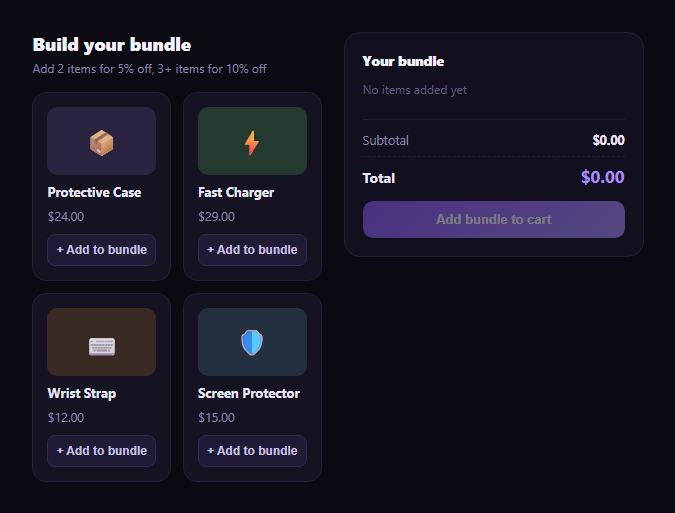
"Build your own bundle" is a proven e-commerce upsell: let a shopper pick their own combination of add-ons and reward them with a bigger discount the more they add. This snippet builds that interaction in plain HTML, CSS, and vanilla JavaScript — a grid of addable product cards, a running summary sidebar, and a discount rate that automatically steps up as the bundle grows.
One selection array, two views
Selected product ids live in a single selected array. renderProducts() and renderSummary() both read from it — the former to mark which product cards show "Added" instead of "Add to bundle," the latter to build the summary list, subtotal, discount, and total. Adding or removing an item (from either the product grid or the summary's own remove button) mutates that one array and re-renders both views, so the grid and the summary can never fall out of sync.
A discount that scales with commitment
discountRateFor(count) is a tiny, explicit function: 0% for zero or one item, 5% for exactly two, and 10% for three or more. Because it's a pure function of the selected count, the discount badge and dollar amount always match the actual rule, and changing the thresholds or rates later is a one-line edit rather than a hunt through scattered conditionals.
Discount shown as real savings, not just a lower number
The summary shows a full subtotal (the sum of every selected item's price), then a distinct discount line with both the percentage and the dollar amount it represents, and finally the total. For two items — say a $24 case and a $29 charger — the subtotal is $53.00, the 5% discount is $2.65, and the total is $50.35. For three items adding a $12 strap, the subtotal becomes $65.00, the 10% discount is $6.50, and the total is $58.50 — visibly showing the shopper that the *third* item didn't just add its own price, it also improved the discount rate on everything.
Where it fits
Pair it with a product card grid for the base catalog, a product quick view for item detail, or a coupon card / promo-code-input for stacking a manual code on top of the bundle discount.
Customizing it
Swap in your real product catalog and images, adjust the discount tiers and thresholds, add a maximum bundle size, or add per-category exclusivity (e.g. only one item from a "color" group) if your bundles need that constraint.
Build with AI
Build, Understand, Optimize, and Extend It With AI
You don't have to work out the tiered-discount logic by hand. Paste this snippet's HTML, CSS, and JS into an AI coding assistant like Claude and ask it to explain exactly how discountRateFor(count) turns the number of selected items into a discount percentage, and how that single function keeps the product grid's "Added" badges and the summary panel's discount line from ever disagreeing, since both derive from the same selected array. The same assistant can help you extend the tiers — ask it to add a fourth tier (e.g. 15% off at 5+ items), cap the maximum discount, or add a mutually-exclusive product group (like only one color variant per bundle). It's also useful for hardening the checkout step: ask how you'd replace the alert() placeholder with a real POST to a cart API, including error handling if an item goes out of stock between selection and checkout. Treat the code less like a finished artifact and more like a starting point for a conversation.
Prompt to recreate it
Copy this into your AI assistant of choice to build the effect from scratch, or as a jumping-off point for your own variant:
Build a "build your own bundle" product selector in plain HTML, CSS, and JavaScript with no framework or library.

Requirements:
- Render a grid of at least 4 selectable product cards, each with a name, a price, and an "Add to bundle" button that toggles to a visibly different "Added" state when clicked again.
- Maintain exactly one array of selected product ids as the single source of truth — both the product grid's added/not-added state and a separate running summary panel must derive from this one array, never maintain separate state.
- The summary panel must list each selected item with its name and price, plus its own remove button, and must show a subtotal (sum of selected item prices).
- Implement a tiered bundle discount as a pure function of the selected item count: 0% for 0-1 items, 5% for exactly 2 items, and 10% for 3 or more items. Show the discount as a separate line item with both its percentage and its dollar amount, only when the discount is greater than zero, followed by a final total (subtotal minus discount).
- Selecting or deselecting an item from either the product grid or the summary panel's remove button must update the shared selected array and re-render both the grid and the summary so they never fall out of sync.
- Disable the final "add bundle to cart" button when no items are selected, and re-enable it once at least one item is selected.
- Double-check that the discount and total math is arithmetically correct for at least one worked multi-item example.
Want to tighten it up first? Run this prompt through the AI Prompt Studio to score it across 8 quality dimensions, catch anti-patterns, and tune the wording for Claude, ChatGPT, or Gemini before you paste it in.
Step by step
How to Use
- 1Paste HTML, CSS, and JSA 4-product grid renders with an empty bundle summary.
- 2Add a productClick "+ Add to bundle"; it appears in the summary at full price.
- 3Add a second productThe summary shows a 5% discount line automatically.
- 4Add a third productThe discount jumps to 10% — recalculated on every add.
- 5Remove an itemUse the × in the summary or toggle the product card; the discount tier adjusts down.
- 6Wire up checkoutReplace the alert() in the checkout button with your real add-to-cart flow.
Real-world uses
Common Use Cases
Got questions?
Frequently Asked Questions
discountRateFor(count) is a small pure function: 0 or 1 selected items get no discount, exactly 2 items get 5% off the subtotal, and 3 or more items get 10% off. It only depends on how many items are currently selected, so the discount badge and dollar amount are always in sync with the actual bundle contents.
With a $24 case, $29 charger, and $12 strap selected, the subtotal is 24 + 29 + 12 = $65.00. At the 3-item tier the discount rate is 10%, so the discount is 65.00 × 0.10 = $6.50, and the total is 65.00 − 6.50 = $58.50.
Both views read from the same selected array of product ids — there's no separate "cart" state. Any click that adds or removes an item (from the grid's Add button or the summary's × button) mutates that one array and immediately re-renders both renderProducts() and renderSummary(), so they can never disagree.
renderSummary() recomputes discountRateFor() from the new, smaller selected count on every change, so removing an item immediately recalculates and can show a lower discount tier (or hide the discount line entirely if only one item remains) — it's always freshly derived, never cached from a prior state.
Move the selected array into component state (useState/ref) and derive the subtotal, discount rate, discount amount, and total with useMemo or a computed property whenever it changes. The PRODUCTS catalog and discountRateFor() function port over unchanged as plain data and a pure function.