You Might Also Like
Learn Coding Visually
Learn to code with interactive, live-preview playgrounds — HTML, CSS, JavaScript, React & more.
 HTML Playground42 lessons · Click-based · Live preview
 CSS PlaygroundLearn CSS with a live editor
 JavaScript Playground60 lessons · DOM · Async · Canvas
 React PlaygroundLearn React with a live code editor
 GSAP PlaygroundLearn GSAP animation interactively
 SVG Playground44 lessons · shapes · paths · animation
 SCSS Playground45 lessons · Sass modules · tokens
 Tailwind PlaygroundLearn Tailwind CSS with a live editor
 Bootstrap 5 Playground50 lessons · live preview
Coupon Card — Free HTML CSS JS Snippet
Coupon Card · Cards · Plain HTML, CSS & JS · Live preview
What's included
Features
About this UI Snippet
Coupon Card — Ticket-Style Discount Coupon with Punch Holes, Copy Code, and Expiry Countdown
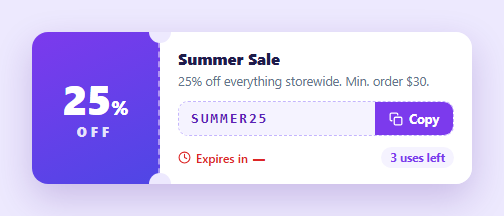
The perforated ticket is the universal visual shorthand for a discount — a coloured stub carrying the offer, a dashed tear line with punched holes, and a code the user can grab. This component builds the complete e-commerce coupon in HTML, CSS, and vanilla JavaScript: the ticket illusion in pure CSS, a copy-to-clipboard button with success feedback and a legacy fallback, a live HH:MM:SS expiry countdown, and a greyed-out expired state the card enters automatically when time runs out.
The punch-hole illusion
The ticket effect needs two things: a perforation and the two semicircular notches where a real coupon would be torn. The perforation is simply a border-right: 2px dashed on the stub. The notches are the card's own ::before and ::after pseudo-elements — 22px circles filled with the *page background colour*, absolutely positioned half-in half-out at the top and bottom of the divider line (top: -11px / bottom: -11px, centred on the stub edge with translateX(-50%)). Because they match the backdrop, they read as holes cut through the card. The one constraint of this classic technique: the circles must track the page background, so on a patterned backdrop you would switch to mask-image: radial-gradient() cut-outs instead — the trade-off is noted so you can pick per context.
Copy-to-clipboard done properly
The copy button calls navigator.clipboard.writeText() — the modern async API — inside a try/catch that falls back to the hidden-textarea document.execCommand('copy') trick for non-secure contexts (plain HTTP, some embedded webviews) where the Clipboard API is unavailable. On success the button swaps its copy icon for a checkmark, turns green, and relabels to "Copied!", reverting after 1.6 seconds. The two icons are both in the markup with CSS toggling their display off the .copied class, so no SVG is created at runtime — the same pattern as the standalone copy button.
The live countdown
A setInterval computes the remaining milliseconds against a fixed expiresAt timestamp each second — recomputing from Date.now() rather than decrementing a counter, so the timer cannot drift and survives tab throttling correctly. Hours, minutes, and seconds are derived with integer division and modulo, zero-padded with padStart, and rendered with tabular-nums so digits do not jiggle as they change. Storing an absolute expiry (as your backend would supply) rather than a duration is what makes the countdown honest across reloads.
The expired state
When the countdown hits zero the interval stops, the label reads "expired", and one class on the root repaints the whole card: the stub gradient desaturates to grey, the code gets struck through, the copy button greys out (and its handler exits early), and the urgency timer loses its red. Encoding expiry as a single class keeps the state change atomic — nothing can end up half-expired.
Urgency signals
The card carries the two proven scarcity cues: the red countdown ("Expires in 04:12:45") and a "3 uses left" pill — the same psychology as the stock urgency bar and trial countdown. Both are static-markup easy to feed from your promotions API.
Customisation
Change the stub gradient and percentage, set expiresAt from your API's ISO timestamp (new Date(iso).getTime()), and wire the copy handler to also apply the code straight to the cart — pair it with the promo code input at checkout. The stub, holes, and dashed line are all sized off the single 128px flex-basis, so widening the stub moves everything consistently.
Build with AI
Build, Understand, Optimize, and Extend It With AI
You don't have to work out the pseudo-element trick yourself to see why the "punch holes" disappear if the background ever changes. Paste this snippet's HTML, CSS, and JS into an AI coding assistant like Claude and ask it to explain exactly why the before and after circles are filled with the page's own background color rather than being cut out of the card, and why the countdown recomputes from an absolute expiresAt timestamp every tick instead of just decrementing a counter. The same assistant can help optimize it — for instance asking whether the setInterval-driven countdown could drift under heavy main-thread load and whether requestAnimationFrame or a Web Worker timer would be more reliable for a long-running promotional countdown. It's also useful for extending the card: ask it to swap the fixed-background punch holes for a mask-image approach that works over photos or gradients, wire the copy handler to also apply the coupon directly to a cart via an API call, or drive expiresAt and usesLeft from real promotion data instead of hardcoded values. Treat the code less like a finished artifact and more like a starting point for a conversation.
Prompt to recreate it
Copy this into your AI assistant of choice to build the effect from scratch, or as a jumping-off point for your own variant:
Build a ticket-style discount coupon card in plain HTML, CSS, and JavaScript — no clipboard library, no countdown library.

Requirements:
- A two-part card: a colored stub on one side showing a large percentage-off number, and a white body on the other showing an offer title, description, a monospace discount code, a copy button, a live countdown, and a "uses left" indicator.
- The illusion of a torn perforated ticket must be created purely in CSS: a dashed border between the stub and the body, plus two circular pseudo-elements (top and bottom) positioned half on and half off that same edge, filled with the exact page background color so they read as punched-out holes.
- The copy button must attempt the modern async clipboard write API first, and only if that throws (wrapped in try/catch) fall back to creating a temporary hidden textarea, selecting its text, and using the older synchronous copy command, removing the textarea afterward either way.
- On a successful copy, swap the button to a distinct success state (different icon, different color, changed label) and automatically revert it back to its normal state after roughly a second and a half.
- Implement the countdown by storing one fixed future timestamp representing expiry, then every second recomputing the remaining milliseconds as that fixed timestamp minus the current time (never by decrementing a running counter), formatting the result as zero-padded hours, minutes, and seconds.
- When the recomputed remaining time reaches zero or below, stop the interval, change the displayed time to an "expired" label, and add a single class to the whole card that simultaneously desaturates the stub's color, strikes through the discount code, and disables the copy button (including making its click handler a no-op while that class is present).
Want to tighten it up first? Run this prompt through the AI Prompt Studio to score it across 8 quality dimensions, catch anti-patterns, and tune the wording for Claude, ChatGPT, or Gemini before you paste it in.
Step by step
How to Use
- 1Paste the HTML, CSS, and JSA purple ticket renders — a 25% OFF stub with a dashed perforation and punch holes, the SUMMER25 code, a copy button, and a red live countdown.
- 2Copy the codeClick Copy — the code lands on the clipboard, the button turns green with a checkmark and "Copied!", then reverts after 1.6 seconds.
- 3Watch the countdownThe timer ticks down in HH:MM:SS with tabular digits, recomputed from the absolute expiry each second so it never drifts.
- 4See the expired stateSet expiresAt to a few seconds ahead — at zero the stub greys out, the code strikes through, and the copy button disables.
- 5Feed real promo dataSet the code text, offer copy, uses-left pill, and expiresAt (new Date(iso).getTime()) from your promotions API.
- 6Style to your brandSwap the stub gradient and accent purples; the holes track the page background colour, so update those two circles if your backdrop changes.
Real-world uses
Common Use Cases
Got questions?
Frequently Asked Questions
The card's ::before and ::after are 22px circles absolutely positioned at the top and bottom of the stub's right edge, pulled half outside the card with top/bottom: -11px and filled with the page's background colour (#ede9fe). Against that backdrop they are indistinguishable from holes. The limitation is inherent: they must match the backdrop, so over a photo or gradient you would use mask-image radial-gradient cut-outs on the card instead, which genuinely removes pixels.
navigator.clipboard is only available in secure contexts (HTTPS or localhost) and can be blocked by permissions policy in iframes. The catch branch creates a temporary offscreen textarea, selects it, and calls document.execCommand('copy') — deprecated but still the reliable fallback where the async API is missing. Wrapping the modern call in try/catch means users on plain HTTP embeds still get a working copy button.
A counter that subtracts one each tick drifts: browsers throttle setInterval in background tabs, so after a minute away your "60 seconds" might have ticked only a dozen times. Recomputing expiresAt - Date.now() every tick is self-correcting — however irregularly ticks fire, the displayed remainder is always true. It also means the expiry can come straight from your backend as an ISO date and stay consistent across reloads.
In the copy handler, after writeText succeeds, also dispatch your cart action — e.g. fetch('/api/cart/apply-coupon', { method: 'POST', body: JSON.stringify({ code: code.textContent }) }) or set a query param and navigate. Many stores do both: copy for later plus a toast offering "Apply now". Keep the button's green success state either way so the user gets immediate confirmation.
Make the coupon a component taking code, title, expiresAt, and usesLeft as props. The countdown becomes an effect: useEffect / onMounted / ngOnInit starts the interval, updates a remaining-time state each tick, and the cleanup clears it on unmount — deriving an expired boolean from remaining <= 0 drives the class binding. The copied flag is a piece of state reset by a timeout. All the ticket CSS — pseudo-element holes, dashed perforation, expired styles — ports unchanged.