Source Code
<div class="rf-card" id="rfCard">
  <div class="rf-glow"></div>
  <div class="rf-gift">🎁</div>
  <h2 class="rf-title">Give $10, get $10</h2>
  <p class="rf-sub">Invite friends — you both get $10 in credit when they sign up.</p>

  <div class="rf-link">
    <span class="rf-url" id="rfUrl">fwdtools.com/?ref=ALEX42</span>
    <button class="rf-copy" id="rfCopy" onclick="copyLink()">Copy</button>
  </div>

  <div class="rf-progress">
    <div class="rf-avatars" id="rfAvatars"></div>
    <div class="rf-track"><div class="rf-fill" id="rfFill"></div></div>
    <div class="rf-status"><span id="rfStatus">3 of 5 friends joined</span><span class="rf-reward" id="rfReward">$50 bonus at 5</span></div>
  </div>

  <button class="rf-invite" id="rfInvite" onclick="sendInvite()">Send an invite</button>
</div>*{box-sizing:border-box;margin:0;padding:0}
body{font-family:system-ui,-apple-system,sans-serif;background:#0f172a;min-height:100vh;display:flex;align-items:center;justify-content:center;padding:24px}
.rf-card{position:relative;background:linear-gradient(165deg,#1e293b,#0f172a);border:1px solid #334155;border-radius:20px;padding:28px 24px;width:100%;max-width:340px;text-align:center;overflow:hidden;box-shadow:0 20px 50px rgba(0,0,0,.4)}
.rf-glow{position:absolute;top:-70px;left:50%;transform:translateX(-50%);width:200px;height:200px;border-radius:50%;background:radial-gradient(circle,rgba(99,102,241,.35),transparent 70%);pointer-events:none}
.rf-gift{font-size:44px;position:relative}
.rf-title{font-size:20px;font-weight:800;color:#fff;margin-top:6px;position:relative}
.rf-sub{font-size:13px;color:#94a3b8;margin:6px 0 20px;line-height:1.5;position:relative}
.rf-link{display:flex;align-items:center;gap:8px;background:rgba(148,163,184,.1);border:1px dashed rgba(148,163,184,.3);border-radius:12px;padding:6px 6px 6px 14px;margin-bottom:22px;position:relative}
.rf-url{flex:1;min-width:0;font-size:13px;font-weight:700;color:#e2e8f0;text-align:left;font-family:ui-monospace,monospace;white-space:nowrap;overflow:hidden;text-overflow:ellipsis}
.rf-copy{background:#6366f1;color:#fff;border:none;border-radius:9px;padding:8px 14px;font-size:12px;font-weight:800;cursor:pointer;font-family:inherit;transition:background .15s;white-space:nowrap}
.rf-copy:hover{background:#4f46e5}
.rf-copy.done{background:#10b981}
.rf-progress{margin-bottom:22px;position:relative}
.rf-avatars{display:flex;justify-content:center;gap:6px;margin-bottom:12px}
.rf-av{width:30px;height:30px;border-radius:50%;display:flex;align-items:center;justify-content:center;font-size:13px;font-weight:800;color:#fff;border:2px solid #1e293b}
.rf-av.filled{background:linear-gradient(135deg,#6366f1,#8b5cf6)}
.rf-av.empty{background:rgba(148,163,184,.15);color:#475569;border-style:dashed;border-color:rgba(148,163,184,.3)}
.rf-av.pop{animation:rf-pop .3s cubic-bezier(.2,1.6,.4,1)}
@keyframes rf-pop{from{transform:scale(0)}to{transform:scale(1)}}
.rf-track{height:7px;background:rgba(148,163,184,.18);border-radius:999px;overflow:hidden}
.rf-fill{height:100%;background:linear-gradient(90deg,#6366f1,#8b5cf6);border-radius:999px;transform:scaleX(0);transform-origin:left;transition:transform .55s cubic-bezier(.4,0,.2,1)}
.rf-status{display:flex;justify-content:space-between;font-size:12px;margin-top:9px}
.rf-status #rfStatus{color:#cbd5e1;font-weight:600}
.rf-reward{color:#a5b4fc;font-weight:700}
.rf-card.complete .rf-fill{background:linear-gradient(90deg,#22c55e,#16a34a)}
.rf-card.complete .rf-reward{color:#4ade80}
.rf-invite{width:100%;padding:13px;background:#fff;color:#1e293b;border:none;border-radius:13px;font-size:15px;font-weight:800;cursor:pointer;font-family:inherit;transition:transform .1s,background .15s}
.rf-invite:hover:not(:disabled){background:#f1f5f9}
.rf-invite:active:not(:disabled){transform:scale(.98)}
.rf-invite:disabled{background:rgba(148,163,184,.2);color:#94a3b8;cursor:default}var GOAL = 5;
var invited = 3;
var copyTimer;
function renderAvatars() {
var box = document.getElementById('rfAvatars');
var html = '';
for (var i = 0; i < GOAL; i++) {
if (i < invited) html += '<span class="rf-av filled">' + String.fromCharCode(65 + i) + '</span>';
else html += '<span class="rf-av empty">+</span>';
}
box.innerHTML = html;
}
function render() {
document.getElementById('rfFill').style.transform = 'scaleX(' + Math.min(1, invited / GOAL) + ')';
var status = document.getElementById('rfStatus');
var card = document.getElementById('rfCard');
if (invited >= GOAL) {
status.textContent = 'All 5 friends joined!';
document.getElementById('rfReward').textContent = '$50 unlocked 🎉';
card.classList.add('complete');
var btn = document.getElementById('rfInvite');
btn.disabled = true; btn.textContent = 'Reward unlocked ✓';
} else {
status.textContent = invited + ' of ' + GOAL + ' friends joined';
}
}
function sendInvite() {
if (invited >= GOAL) return;
invited++;
renderAvatars();
var avs = document.querySelectorAll('.rf-av');
var justFilled = avs[invited - 1];
if (justFilled) { justFilled.classList.add('pop'); }
render();
}
function copyLink() {
var url = document.getElementById('rfUrl').textContent;
var btn = document.getElementById('rfCopy');
var done = function () {
btn.textContent = 'Copied ✓'; btn.classList.add('done');
clearTimeout(copyTimer);
copyTimer = setTimeout(function () { btn.textContent = 'Copy'; btn.classList.remove('done'); }, 1600);
};
if (navigator.clipboard && navigator.clipboard.writeText) {
navigator.clipboard.writeText('https://' + url).then(done).catch(done);
} else { done(); }
}
renderAvatars();
render();Learn Coding Visually
Learn to code with interactive, live-preview playgrounds — HTML, CSS, JavaScript, React & more.
 HTML Playground42 lessons · Click-based · Live preview
 CSS PlaygroundLearn CSS with a live editor
 JavaScript Playground60 lessons · DOM · Async · Canvas
 React PlaygroundLearn React with a live code editor
 GSAP PlaygroundLearn GSAP animation interactively
 SVG Playground44 lessons · shapes · paths · animation
 SCSS Playground45 lessons · Sass modules · tokens
 Tailwind PlaygroundLearn Tailwind CSS with a live editor
 Bootstrap 5 Playground50 lessons · live preview
Referral Card — Invite & Earn HTML CSS JS Snippet
Referral Card · Cards · Plain HTML, CSS & JS · Live preview
What's included
Features
copyLink uses navigator.clipboard.writeText (with an https:// prefix) and confirms "Copied ✓" for 1.6s — frictionless sharing.scaleX from a left origin with a transform transition — smooth and export-safe across frameworks.cubic-bezier scale pop, rewarding the action.invited and GOAL drive render/renderAvatars, so seeding real data is a couple of assignments.About this UI Snippet
Referral Card — Copyable Link, Avatar Milestone Progress & Reward Unlock
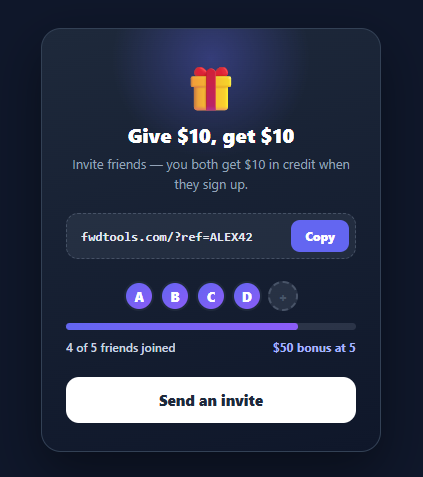
Referral programmes are among the most cost-effective growth channels, and the referral card is where users grab their link and watch their rewards build. A good one does three things: makes the referral link trivially copyable, shows clear progress toward a reward milestone, and celebrates when the reward unlocks. This snippet implements all three in plain HTML, CSS, and vanilla JavaScript: a copy-with-feedback referral link, an avatar progress row, an animated progress bar toward a goal, and a reward-unlocked state.
Frictionless link copy
The referral URL sits in a dashed "ticket" field with a Copy button. copyLink uses the modern navigator.clipboard.writeText API (prefixing https:// so the copied link is complete) and confirms with "Copied ✓" in green for 1.6 seconds before resetting. Removing every bit of friction from grabbing the link directly affects how many people share — so the copy interaction is the most important part of the card.
Avatar milestone progress
Progress toward the reward is shown two ways. A row of avatar slots — filled gradient circles for friends who joined, dashed "+" placeholders for the remaining — gives a tangible, human sense of "3 of 5". Below it, a progress bar fills proportionally. The bar uses transform: scaleX from a left origin with a transition: transform, so it animates smoothly and, being a transform, exports cleanly to utility frameworks (which animate transforms but not raw width).
Reward goal and unlock
The status line shows "3 of 5 friends joined" and the reward chip teases "$50 bonus at 5". The demo "Send an invite" button increments the count: each invite fills the next avatar with a spring pop, advances the bar, and updates the status. On reaching the goal, render switches the card to a complete state — the bar turns green, the chip becomes "$50 unlocked 🎉", and the button locks to "Reward unlocked ✓". That payoff moment is what makes the mechanic rewarding.
Driven by simple state
Everything derives from two values, invited and GOAL, through render and renderAvatars, so wiring it to real data is just seeding invited from your backend and replacing the demo button with the actual share/send flow. The card's premium dark styling with a radial glow gives the reward the elevated feel referral programmes rely on.
Pair this with a social share bar for sharing the link across networks, a loyalty points widget for the rewards balance, or a copy button pattern elsewhere.
Build with AI
Build, Understand, Optimize, and Extend It With AI
You do not need to work through the state model here on your own. Paste this snippet's HTML, CSS, and JS into an AI coding assistant like Claude and ask it to explain exactly why the progress bar animates with a scaleX transform from a left transform-origin instead of animating the width property directly, and why that specific choice matters when this snippet gets converted into a Tailwind export. The same assistant can help optimize it — ask whether renderAvatars() rebuilding the entire avatar row's innerHTML on every single invite is necessary versus updating just the one newly-filled avatar element directly. It's also useful for extending the card: ask it to add a countdown showing days left in the referral promotion, wire sendInvite to the real Web Share API on mobile with a clipboard fallback on desktop, or support a multi-tier reward structure where the chip text and unlock state change at several milestones instead of just one. Treat the code less like a finished artifact and more like a starting point for a conversation.
Prompt to recreate it
Copy this into your AI assistant of choice to build the effect from scratch, or as a jumping-off point for your own variant:
Build a referral/invite progress card in plain HTML, CSS, and JavaScript with no library.

Requirements:
- Show a copyable referral link inside a dashed "ticket" field with a Copy button that uses the navigator.clipboard.writeText API, falling back gracefully if that API is unavailable, and shows a temporary "Copied" confirmation state on the button for about 1.5 seconds before reverting.
- Render a row of avatar placeholder circles equal to a fixed goal count: circles up to the current invited count must show a filled gradient style, and the remaining circles must show an empty dashed placeholder style.
- Render a progress bar whose fill element is animated using a CSS transform of scaleX (with transform-origin set to the left edge) rather than animating the width property directly, scaled to invited count divided by goal count.
- Every time a new invite is registered, the newly-filled avatar circle must play a distinct spring/pop scale-in animation (going from scale 0 to scale 1 with an overshooting easing curve) so the moment of progress feels rewarded, not just silently updated.
- When the invited count reaches the goal, switch the whole card into a distinct "complete" visual state: the progress bar and reward text change color to a success color, the reward chip text changes to an unlocked message, and the invite button becomes disabled with different label text.
- Drive the entire UI from exactly two state values (the current invited count and the fixed goal count) through render functions, so seeding real backend data requires only assigning those two values before the first render.
Want to tighten it up first? Run this prompt through the AI Prompt Studio to score it across 8 quality dimensions, catch anti-patterns, and tune the wording for Claude, ChatGPT, or Gemini before you paste it in.
Step by step
How to Use
- 1Paste HTML, CSS, and JSA "Give $10, get $10" referral card appears with a copyable link, an avatar row (3 filled, 2 empty), a progress bar, and an invite button.
- 2Copy the linkClick Copy — the referral URL is copied to the clipboard and the button confirms "Copied ✓" in green.
- 3Send an inviteClick "Send an invite" — the next avatar fills with a spring pop, the bar advances, and the status updates to "4 of 5".
- 4Reach the goalInvite the fifth friend — the bar turns green, the chip reads "$50 unlocked 🎉", and the button locks to "Reward unlocked ✓".
- 5Read the milestoneThe reward chip always shows the next milestone so users know what they are working toward.
- 6Wire real dataSeed
invitedfrom your backend and replace the demo button with your real share/send flow; the card recomputes.
Real-world uses
Common Use Cases
Got questions?
Frequently Asked Questions
Generate a unique code per user server-side (tie it to their account) and render it into the URL. Track signups by reading the ?ref= param on registration and crediting the referrer. Seed invited from the count of successful referrals, and award the reward server-side when the goal is reached — never trust the client for the actual payout.
On mobile, use the Web Share API: a "Share" button that calls navigator.share({ title, url }) opens the OS share sheet (Messages, WhatsApp, email). Fall back to the copy button and a social share bar of intent links on desktop. Sharing directly converts better than copy-then-paste.
transform: scaleX runs on the compositor for smoothness and, importantly for this site's exports, Tailwind's transition utility animates transforms but not raw width — so a width-based bar would snap in the React + Tailwind build. Scaling from a left origin gives the same visual fill while staying export-safe.
Make the copy and invite controls real <button>s (they are) so they are keyboard-operable, and announce the copy success and progress changes via an aria-live="polite" region. Give the progress bar role="progressbar" with aria-valuenow/aria-valuemax, and ensure the reward state is conveyed in text, not colour alone.
In React, hold invited (and the link) in useState, derive the bar scale and avatars from it, and manage the "Copied" flag with a setTimeout. In Vue, use refs and a computed for progress with v-for avatars. In Angular, track state on the component and bind [style.transform]. The scaleX bar and pop keyframe port unchanged.