Learn Coding Visually
Learn to code with interactive, live-preview playgrounds — HTML, CSS, JavaScript, React & more.
 HTML Playground42 lessons · Click-based · Live preview
 CSS PlaygroundLearn CSS with a live editor
 JavaScript Playground60 lessons · DOM · Async · Canvas
 React PlaygroundLearn React with a live code editor
 GSAP PlaygroundLearn GSAP animation interactively
 SVG Playground44 lessons · shapes · paths · animation
 SCSS Playground45 lessons · Sass modules · tokens
 Tailwind PlaygroundLearn Tailwind CSS with a live editor
 Bootstrap 5 Playground50 lessons · live preview
Video Testimonial Card — Free HTML CSS JS Snippet
Video Testimonial Card · Cards · Plain HTML, CSS & JS · Live preview
What's included
Features
About this UI Snippet
Video Testimonial Card — Poster, Lazy Load-on-Play and Quote Overlay
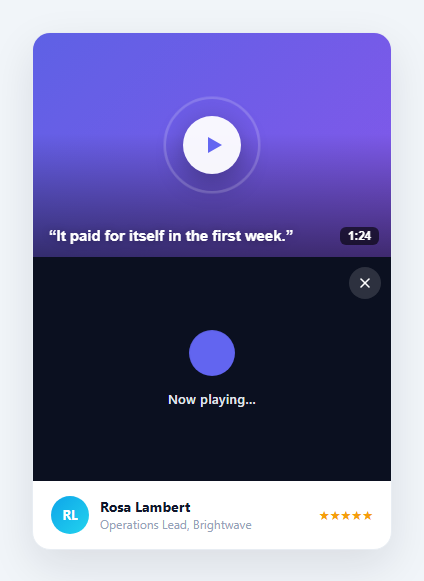
Video testimonials convert better than text — seeing a real customer say it is more persuasive than reading it — but embedding a video player on a marketing page is heavy: the player iframe loads hundreds of kilobytes whether or not anyone presses play. This component gives you the best of both: a lightweight poster card with a thumbnail, a pulsing play button, a duration badge, and a pull-quote overlay, that only swaps in the actual player when the visitor clicks play. It is built in HTML, CSS, and vanilla JavaScript, and the load-on-demand pattern is the key performance idea.
The poster, not the player, loads first
By default the card shows only a poster: a gradient (or image) thumbnail, a dark gradient shade for text legibility, a circular play button, a "1:24" duration badge, and the customer's strongest quote overlaid at the bottom. None of this loads any video. The real player markup lives in a sibling element that starts with the hidden attribute, so it contributes nothing until needed. Clicking the poster reveals the player and hides the poster; in production this is exactly where you would inject the real <iframe> or <video> so the heavy resource only downloads on demand — turning a multi-hundred-KB embed into a near-zero-cost card for the majority of visitors who never press play.
The pulsing play button
The play button is a white circle with an indigo triangle, centred over the poster. A ::before pseudo-element draws an expanding ring around it with the vtcRing keyframe — scaling from 1 to 1.5 while fading out, on a 2.4-second loop — the gentle "tap me" pulse you see on video cards across the web. On hover the whole button scales up slightly and the thumbnail behind it zooms with a transform: scale(1.05), giving the card a tactile, alive feel without any JavaScript.
Quote overlay and legibility
The customer quote sits over the bottom-left of the poster in bold white with a text-shadow, and a linear-gradient shade darkens the lower portion of the thumbnail so the text stays readable over any image. This means the card communicates the testimonial's punchline even before anyone plays the video — a visitor who only skims still gets the message. The duration badge in the opposite corner sets expectations about the time commitment.
Load-on-play and stop-on-close
Clicking play calls openPlayer(), which hides the poster, shows the player, and moves focus to the close button. Closing (via the X or the Escape key) calls closePlayer(), which hides the player, restores the poster, and returns focus to it. The comments mark the two production hooks: inject the real video element in openPlayer so it loads only when requested, and remove it in closePlayer — removing the node is the simplest reliable way to stop playback and free the resource, because a paused-but-present YouTube/Vimeo iframe can keep buffering and tracking. Escape-to-close and focus management make the player usable by keyboard.
The author meta row
Below the media, a meta row shows a gradient initials avatar, the customer's name and role (the role truncates with ellipsis so the row never wraps), and a five-star rating. This grounds the testimonial with a credible, attributable source — the same trust signals a written testimonial card uses, paired here with the higher-impact video.
Customisation
Replace the gradient .vtc-thumb with a real poster image, set the quote, duration, avatar, name, role, and star count, and in openPlayer() inject your provider's embed (a YouTube/Vimeo <iframe> with autoplay=1, or a self-hosted <video autoplay>). Swap the #6366f1 accent for your brand. The card is fully responsive with a 16/10 aspect-ratio media area that scales to its container.
Build with AI
Build, Understand, Optimize, and Extend It With AI
Instead of tracing the show/hide logic by hand, paste this snippet's HTML, CSS, and JS into an AI coding assistant like Claude and ask it to explain exactly why openPlayer() moves focus to the close button and closePlayer() moves it back to the poster, and why that focus-shuttling matters for someone navigating with a keyboard rather than a mouse. It's also worth asking about the pulsing ring animation — have it explain how the ::before pseudo-element's expanding-and-fading keyframe differs mechanically from just scaling the play button itself, and why layering a separate ring avoids distorting the icon inside it. For extending it, have it wire openPlayer to actually inject a real YouTube or self-hosted video element (rather than the placeholder "Now playing" state) with autoplay, add a way to swap between several testimonials without leaving the card, or add a subtle progress ring around the play button that fills as a testimonial has been watched by other visitors. Treat the code less like a finished artifact and more like a starting point for a conversation.
Prompt to recreate it
Copy this into your AI assistant of choice to build the effect from scratch, or as a jumping-off point for your own variant:
Build a video testimonial card in plain HTML, CSS, and vanilla JavaScript with no libraries, where the actual video player is never present in the DOM until the visitor explicitly presses play.

Requirements:
- A poster button showing a thumbnail background, a darkening gradient overlay for text legibility, a centered circular play icon, a duration badge in one corner, and a bold pull-quote from the testimonial overlaid across the bottom.
- The play icon must have a continuously looping expanding ring animation drawn from a separate pseudo-element (not the icon itself scaling), using a keyframe that grows a bordered circle outward while fading its opacity to zero, repeating indefinitely.
- On hover over the poster, the thumbnail must zoom in slightly via a transform scale, and the play button must grow slightly larger, both through CSS transitions with no JavaScript.
- A separate player container, hidden by default, that becomes visible only after the poster is clicked; the poster itself must be hidden at that same moment (not simply covered up).
- Clicking play must move keyboard focus into the now-visible player area (specifically onto its close control), and closing the player (via its close button or the Escape key) must hide the player, re-show the poster, and return keyboard focus to the poster button.
- Below the video area, a persistent author row showing a gradient initials avatar, the customer's name, their role/company (truncated with an ellipsis if too long to fit on one line), and a star rating.
- Structure the open/close functions so that in a real implementation, the actual video embed would be injected into the player container only when it becomes visible, and removed from the DOM again when it's closed, so playback genuinely stops rather than merely being hidden.
Want to tighten it up first? Run this prompt through the AI Prompt Studio to score it across 8 quality dimensions, catch anti-patterns, and tune the wording for Claude, ChatGPT, or Gemini before you paste it in.
Step by step
How to Use
- 1Paste the HTML, CSS, and JSA testimonial card renders with a video poster, a pulsing play button, a duration badge, an overlaid quote, and an author row.
- 2Hover the posterThe thumbnail zooms slightly and the play button scales up; an expanding ring pulses around the button continuously.
- 3Click playThe poster is replaced by the player area (where the real video would load on demand) and focus moves to the close button.
- 4Close the playerClick the X or press Escape; the poster returns and focus moves back to it.
- 5Add your real videoIn openPlayer(), inject your YouTube/Vimeo <iframe> or <video> so it loads only on play; remove it in closePlayer() to stop playback.
- 6Set the contentReplace the poster image, quote, duration, avatar, name, role, stars, and accent colour with your testimonial.
Real-world uses
Common Use Cases
Got questions?
Frequently Asked Questions
In openPlayer(), set the player's innerHTML to an iframe with autoplay, e.g. player.innerHTML = '<iframe src="https://www.youtube.com/embed/ID?autoplay=1" allow="autoplay" ...></iframe>' plus your close button. Building the iframe only on click is the whole point — it keeps the page light. In closePlayer(), clear that innerHTML (or remove the iframe) so the video stops and frees bandwidth.
A YouTube or Vimeo iframe that is merely hidden or paused can keep buffering, playing audio, or sending tracking pixels in the background. The most reliable cross-provider way to truly stop it is to remove the iframe from the DOM. That is why closePlayer() restores the poster and you clear the player markup there — it guarantees playback ends and the resource is released.
Replace the .vtc-thumb gradient background with background-image: url('poster.jpg') and background-size: cover, or use an <img> with object-fit: cover inside the poster button. Keep the .vtc-shade gradient overlay so the quote text stays readable over a busy image. Use your video's own thumbnail for the most relevant poster.
The poster is a real <button> with an aria-label, so it is focusable and announced as "Play testimonial video." On open, focus moves to the close button; on close (via the X or Escape), focus returns to the poster. The star rating has an aria-label describing the score. When you inject a real player, ensure the iframe has a descriptive title attribute for screen readers.
Hold a playing boolean in state; render the poster when false and the player (with the real embed) when true. The play button sets playing true, the close button and an Escape key handler set it false. Manage focus with refs in an effect that runs when playing changes. Conditionally rendering the player means the embed mounts on play and unmounts on close automatically — the framework gives you the load-on-play and stop-on-close behaviour for free.