Source Code
<div class="psc" id="psc">
  <div class="psc-badge">
    <svg viewBox="0 0 64 64" aria-hidden="true">
      <circle class="psc-circle" cx="32" cy="32" r="28"/>
      <polyline class="psc-tick" points="20 33 28.5 41.5 45 24"/>
    </svg>
  </div>
  <h3 class="psc-title">Payment successful</h3>
  <p class="psc-sub">Your receipt was sent to <b>ava@lumen.io</b></p>

  <div class="psc-amount" id="pscAmount">$0.00</div>

  <dl class="psc-rows">
    <div><dt>Reference</dt><dd class="psc-mono">PAY-8F3K2Q</dd></div>
    <div><dt>Date</dt><dd>Jul 3, 2026 · 14:32</dd></div>
    <div><dt>Payment method</dt><dd><span class="psc-cardchip">VISA</span> •••• 4242</dd></div>
    <div><dt>Merchant</dt><dd>Lumen Store</dd></div>
  </dl>

  <div class="psc-actions">
    <button class="psc-btn psc-ghost" type="button">
      <svg viewBox="0 0 24 24" aria-hidden="true"><path d="M21 15v4a2 2 0 0 1-2 2H5a2 2 0 0 1-2-2v-4"/><polyline points="7 10 12 15 17 10"/><line x1="12" y1="15" x2="12" y2="3"/></svg>
      Receipt
    </button>
    <button class="psc-btn psc-primary" id="pscDone" type="button">Done</button>
  </div>
  <button class="psc-replay" id="pscReplay" type="button">Replay animation</button>
</div>
* { box-sizing: border-box; margin: 0; padding: 0; }
body { font-family: system-ui, -apple-system, sans-serif; background: #0f172a; min-height: 100vh; display: flex; align-items: center; justify-content: center; padding: 24px; }
.psc {
width: min(360px, 100%); background: #fff; border-radius: 20px;
padding: 28px 26px 18px; text-align: center;
box-shadow: 0 24px 60px rgba(2, 6, 23, 0.5);
animation: pscPop 0.45s cubic-bezier(0.34, 1.56, 0.64, 1) both;
}
@keyframes pscPop { from { opacity: 0; transform: scale(0.92) translateY(14px); } to { opacity: 1; transform: none; } }
.psc-badge { width: 76px; height: 76px; margin: 0 auto 14px; }
.psc-badge svg { width: 100%; height: 100%; }
/* Circle draws first, then the tick — stroke-dashoffset animation */
.psc-circle {
fill: none; stroke: #10b981; stroke-width: 4; stroke-linecap: round;
stroke-dasharray: 176; stroke-dashoffset: 176;
transform: rotate(-90deg); transform-origin: center;
animation: pscDraw 0.6s ease-out 0.15s forwards;
}
.psc-tick {
fill: none; stroke: #10b981; stroke-width: 5; stroke-linecap: round; stroke-linejoin: round;
stroke-dasharray: 36; stroke-dashoffset: 36;
animation: pscDraw 0.35s ease-out 0.7s forwards;
}
@keyframes pscDraw { to { stroke-dashoffset: 0; } }
.psc-title { font-size: 19px; font-weight: 800; color: #0f172a; }
.psc-sub { font-size: 12.5px; color: #64748b; margin-top: 4px; }
.psc-sub b { color: #334155; }
.psc-amount {
font-size: 34px; font-weight: 900; letter-spacing: -1px; color: #0f172a;
margin: 16px 0 14px; font-variant-numeric: tabular-nums;
}
.psc-rows { border-top: 1px dashed #e2e8f0; padding-top: 6px; margin-bottom: 16px; }
.psc-rows > div { display: flex; justify-content: space-between; align-items: center; gap: 10px; padding: 7px 0; }
.psc-rows dt { font-size: 12.5px; color: #94a3b8; }
.psc-rows dd { font-size: 12.5px; font-weight: 600; color: #334155; }
.psc-mono { font-family: ui-monospace, 'SF Mono', Menlo, monospace; letter-spacing: 0.04em; }
.psc-cardchip {
display: inline-block; padding: 1px 5px; margin-right: 3px;
background: #1e3a8a; color: #fff; font-size: 9px; font-weight: 800; font-style: italic;
border-radius: 3px; vertical-align: 1px;
}
.psc-actions { display: flex; gap: 9px; }
.psc-btn {
flex: 1; display: inline-flex; align-items: center; justify-content: center; gap: 7px;
padding: 11px 0; border-radius: 11px; cursor: pointer;
font-family: inherit; font-size: 13.5px; font-weight: 700; transition: all 0.2s;
}
.psc-btn svg { width: 14px; height: 14px; fill: none; stroke: currentColor; stroke-width: 2.2; stroke-linecap: round; stroke-linejoin: round; }
.psc-ghost { background: #fff; border: 1.5px solid #e2e8f0; color: #475569; }
.psc-ghost:hover { border-color: #cbd5e1; }
.psc-primary { background: #10b981; border: 1.5px solid #10b981; color: #fff; }
.psc-primary:hover { background: #059669; }
.psc-replay { margin-top: 12px; border: none; background: none; cursor: pointer; font-family: inherit; font-size: 11.5px; font-weight: 600; color: #94a3b8; }
.psc-replay:hover { color: #64748b; }
@media (prefers-reduced-motion: reduce) {
.psc, .psc-circle, .psc-tick { animation-duration: 0.01s; animation-delay: 0s; }
}const AMOUNT = 148.5;
const amountEl = document.getElementById('pscAmount');
const fmt = new Intl.NumberFormat('en-US', { style: 'currency', currency: 'USD' });
// Count the amount up in sync with the check drawing (ease-out cubic)
function countUp() {
const dur = 900, start = performance.now();
function frame(now) {
const t = Math.min((now - start) / dur, 1);
const eased = 1 - Math.pow(1 - t, 3);
amountEl.textContent = fmt.format(AMOUNT * eased);
if (t < 1) requestAnimationFrame(frame);
}
requestAnimationFrame(frame);
}
// Replay restarts the CSS draw animations by re-triggering them
document.getElementById('pscReplay').addEventListener('click', () => {
const card = document.getElementById('psc');
card.style.animation = 'none';
card.querySelectorAll('.psc-circle, .psc-tick').forEach(el => { el.style.animation = 'none'; });
// Force a reflow so removing the animation styles re-runs them
void card.offsetWidth;
card.style.animation = '';
card.querySelectorAll('.psc-circle, .psc-tick').forEach(el => { el.style.animation = ''; });
countUp();
});
document.getElementById('pscDone').addEventListener('click', function () {
this.textContent = 'Redirecting…';
setTimeout(() => { this.textContent = 'Done'; }, 1200);
});
countUp();Learn Coding Visually
Learn to code with interactive, live-preview playgrounds — HTML, CSS, JavaScript, React & more.
 HTML Playground42 lessons · Click-based · Live preview
 CSS PlaygroundLearn CSS with a live editor
 JavaScript Playground60 lessons · DOM · Async · Canvas
 React PlaygroundLearn React with a live code editor
 GSAP PlaygroundLearn GSAP animation interactively
 SVG Playground44 lessons · shapes · paths · animation
 SCSS Playground45 lessons · Sass modules · tokens
 Tailwind PlaygroundLearn Tailwind CSS with a live editor
 Bootstrap 5 Playground50 lessons · live preview
Payment Success Card — Free HTML CSS JS Snippet
Payment Success Card · Cards · Plain HTML, CSS & JS · Live preview
What's included
Features
About this UI Snippet
Payment Success Card — Animated Checkmark Confirmation with Receipt Summary
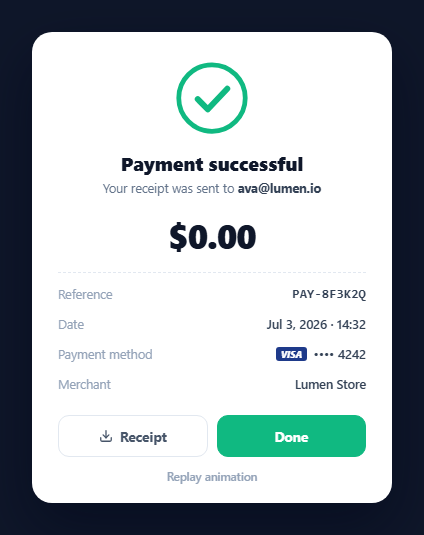
The payment success screen is the emotional peak of a checkout — the user just handed over money and needs unambiguous, satisfying confirmation. Stripe, PayPal, and every payment sheet converge on the same choreography: a checkmark that draws itself, the amount counting up, and a compact receipt beneath. This component implements that full moment in HTML, CSS, and vanilla JavaScript: an SVG circle-and-tick drawn with stroke-dashoffset, a spring-eased card entrance, an ease-out amount counter, a dashed-divider receipt, and a replay control that demonstrates how to restart CSS animations correctly.
Drawing the checkmark with stroke-dashoffset
The badge is a plain SVG — a <circle> and a <polyline> tick — animated with the line-drawing technique. Each shape's stroke-dasharray is set to its own path length (176 for the 28-radius circle, since 2πr ≈ 176; 36 for the tick), and stroke-dashoffset starts at that same value, hiding the stroke entirely. One keyframe animates the offset to 0, "unspooling" the dash along the path. The circle starts at 0.15s and draws over 0.6s from the twelve-o'clock position (a -90deg rotation, since SVG circles start at three o'clock); the tick waits until 0.7s so it snaps in just as the circle completes — the two animation-delays are what make it feel choreographed rather than simultaneous.
The count-up amount
The paid amount animates from $0.00 to the real figure in 900ms using requestAnimationFrame with an ease-out cubic (1 - (1-t)³), so it races through the small numbers and settles gently into the final one — the standard count up treatment. Formatting goes through Intl.NumberFormat on every frame, so separators and decimals are always correct, and tabular-nums stops the card layout jiggling as digit widths change. The counter's 900ms roughly matches the circle-plus-tick timeline, landing both payoffs together.
Restarting CSS animations: the reflow trick
CSS animations run once and will not restart just because you re-apply the same class. The replay button shows the canonical fix: set animation: none inline on the animated elements, force a synchronous reflow by reading offsetWidth (the void expression makes the read's intent explicit), then clear the inline override so the stylesheet animation re-attaches from frame zero. This three-step is worth stealing for any "play it again" control — toast re-entries, form-error shakes, celebration effects.
The receipt block
Details render as a semantic <dl> of label/value rows — reference (in monospace so the ID reads as a code), timestamp, payment method with a VISA chip and masked •••• 4242 digits, and merchant — separated from the amount by a dashed border that quotes physical receipt perforation. Real integrations map these straight off the payment-intent response; the masked-card pattern matches what processors return (brand + last4), so no full numbers ever touch the UI.
Entrance, actions, and reduced motion
The card itself pops in with a scale-and-rise keyframe on an overshooting cubic-bezier(0.34, 1.56, 0.64, 1), the same spring feel as a payment sheet presenting. Two actions close the loop — a ghost Receipt button (wire to your PDF endpoint) and a green Done that demos a redirecting state. A prefers-reduced-motion block collapses every animation to near-instant, so vestibular-sensitive users get the final state immediately without losing the confirmation.
Customisation
Set AMOUNT, currency locale, and the receipt fields from your payment response; swap the green for your brand's success colour (circle, tick, and primary button share it). For extra celebration layer a confetti celebration card burst behind the badge, and pair the flow with the checkout form that precedes it.
Build with AI
Build, Understand, Optimize, and Extend It With AI
You don't have to work out the stroke-dashoffset math or the animation-restart trick yourself. Paste this snippet's HTML, CSS, and JS into an AI coding assistant like Claude and ask it to explain exactly why the circle's stroke-dasharray is set to roughly 176 (its circumference) and how the -90deg rotation changes where the drawing appears to start, or why the replay button needs to read offsetWidth between clearing and restoring the animation style. The same assistant can help optimize it, for example checking whether the count-up's requestAnimationFrame loop and the CSS keyframe durations stay in sync if someone changes AMOUNT to a much larger number, or whether Intl.NumberFormat should be instantiated once instead of implicitly reused each frame. It's also useful for extending the effect: ask it to layer a confetti burst behind the badge, add a downloadable PDF receipt link, or support multiple currencies with per-locale formatting. Treat the code less like a finished artifact and more like a starting point for a conversation.
Prompt to recreate it
Copy this into your AI assistant of choice to build the effect from scratch, or as a jumping-off point for your own variant:
Build an animated payment success confirmation card in plain HTML, CSS, and vanilla JavaScript using SVG stroke-drawing and requestAnimationFrame — no animation libraries.

Requirements:
- An SVG badge containing a circle and a checkmark polyline. Give each shape a stroke-dasharray equal to its own approximate path length and a matching stroke-dashoffset of that same value so the stroke starts completely hidden, then animate stroke-dashoffset to 0 via CSS keyframes so each shape appears to draw itself. Rotate the circle -90 degrees so the draw visibly starts at the top rather than SVG's default three o'clock position, and stagger the checkmark's animation-delay so it starts only once the circle's draw has finished.
- A large amount display that counts up from zero to a target dollar value over roughly 900ms using requestAnimationFrame with an ease-out cubic easing curve, formatting the number through Intl.NumberFormat on every frame, and using font-variant-numeric: tabular-nums so the digit widths don't cause the layout to jitter as the number changes.
- The whole card must play an entrance animation (a scale-and-rise keyframe with an overshooting cubic-bezier) when it first appears.
- A "Replay animation" button that correctly restarts every one of these already-completed CSS animations: set animation: none inline on the card and the two SVG shapes, force a synchronous reflow by reading an element's offsetWidth, then clear the inline animation override so the stylesheet keyframes reattach and play again from the start — and re-trigger the JavaScript count-up at the same time.
- Below the amount, render a semantic list of receipt details (reference code, timestamp, masked payment method showing only a card brand and last 4 digits, merchant name) separated from the amount by a visual divider.
- Respect prefers-reduced-motion by collapsing all animation durations to near-zero so the final state appears immediately for users who have that preference set.
Want to tighten it up first? Run this prompt through the AI Prompt Studio to score it across 8 quality dimensions, catch anti-patterns, and tune the wording for Claude, ChatGPT, or Gemini before you paste it in.
Step by step
How to Use
- 1Paste the HTML, CSS, and JSThe card springs in on a dark backdrop — the green circle draws itself, the tick snaps in as it completes, and the amount counts up to $148.50.
- 2Read the receiptBelow the dashed divider sit the reference code, date, VISA •••• 4242 payment method, and merchant — the fields a payment-intent response provides.
- 3Replay the animationClick "Replay animation" — the reflow trick restarts the CSS draw animations from zero and re-runs the count-up.
- 4Try the actionsReceipt is ready to wire to your PDF endpoint; Done shows a brief "Redirecting…" state standing in for navigation.
- 5Feed real payment dataSet AMOUNT, the Intl locale/currency, and the receipt rows from your processor's response — brand and last4 map straight onto the method row.
- 6Check reduced motionWith prefers-reduced-motion set, all animations collapse to near-instant and the final state shows immediately.
Real-world uses
Common Use Cases
Got questions?
Frequently Asked Questions
Both shapes use the SVG line-drawing technique: stroke-dasharray is set to the path's total length (the circle's circumference 2π×28 ≈ 176; the tick measured at ~36), and stroke-dashoffset starts equal to it, so the visible dash is pushed entirely off the path. Animating the offset to 0 slides the stroke along the path as if drawn by hand. The circle is also rotated -90° so drawing starts at the top instead of SVG's default three-o'clock position.
A CSS animation that has finished will not re-run when you re-apply the same animation value — the browser sees no change. The fix is to set animation: none inline, force the style to actually take effect by reading a layout property (void card.offsetWidth triggers a synchronous reflow), then remove the inline override. The stylesheet animation re-attaches as if new and plays from frame zero. Without the read in the middle, browsers batch the two style writes and nothing restarts.
Loosely, by matching durations rather than coupling code: the circle finishes at 0.75s and the tick at ~1.05s, while the counter runs 900ms with ease-out cubic — so the amount settles within the same beat the tick lands. The counter recomputes progress from performance.now() each frame, so it stays accurate even if frames drop. If you change one duration, nudge the other to keep the payoffs together.
Map your processor's confirmation object: the amount and currency feed AMOUNT and the Intl.NumberFormat options; the payment intent or transaction ID becomes the reference; card.brand and card.last4 fill the method row (never store or render full card numbers); and the created timestamp formats into the date row. The receipt button typically links to a hosted receipt URL, which providers return alongside the confirmation.
Render it conditionally when payment status becomes succeeded — mounting fresh means the CSS entrance and draw animations play automatically, and the replay reflow trick becomes unnecessary (remount with a changing key instead). Run the count-up in useEffect / onMounted / ngAfterViewInit, cancelling the requestAnimationFrame in cleanup. Amount, reference, and card details arrive as props; the stroke-draw keyframes and reduced-motion query port unchanged.