
Learn Coding Visually
Learn to code with interactive, live-preview playgrounds — HTML, CSS, JavaScript, React & more.
 HTML Playground42 lessons · Click-based · Live preview
 CSS PlaygroundLearn CSS with a live editor
 JavaScript Playground60 lessons · DOM · Async · Canvas
 React PlaygroundLearn React with a live code editor
 GSAP PlaygroundLearn GSAP animation interactively
 SVG Playground44 lessons · shapes · paths · animation
 SCSS Playground45 lessons · Sass modules · tokens
 Tailwind PlaygroundLearn Tailwind CSS with a live editor
 Bootstrap 5 Playground50 lessons · live preview
Stock Urgency Bar — Low Stock HTML CSS JS Snippet
Stock Urgency Bar · Cards · Plain HTML, CSS & JS · Live preview
What's included
Features
requestAnimationFrame triggers the first render so the bar grows from zero on mount, drawing attention to how much stock is gone.sold and TOTAL through a single render function — accurate, honest, and trivial to wire to real inventory..warn, ≤40 left) → red (.crit, ≤15 left), communicating urgency faster than reading a number.ping keyframe scales and fades on a loop — a live-presence indicator with no JavaScript animation cost.setInterval nudges the concurrent-viewer number randomly for a live feel; swap it for a real websocket count in production.About this UI Snippet
Stock Urgency Bar — Animated Sold Progress, Colour Escalation, Low-Stock Warning & Live Viewer Pulse
Scarcity is one of the most powerful and well-documented levers in conversion psychology: shoppers move faster when they can see that an item is running low or selling quickly. The honest version of this — showing real sold counts, real remaining stock, and real concurrent interest — reassures buyers and reduces hesitation without resorting to fake timers. This snippet implements a complete, ethical stock-urgency widget in plain HTML, CSS, and vanilla JavaScript: an animated sold-versus-total progress bar, colour that escalates as stock drops, a low-stock warning, a live "people viewing" pulse, and a graceful sold-out state.
Animated sold progress bar
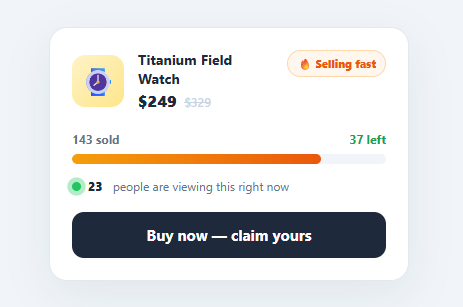
The bar fills from zero on load. On the first frame, requestAnimationFrame calls render(true), which sets the .su-fill width to sold / total as a percentage; a cubic-bezier transition animates the growth. That load-time animation draws the eye straight to how much of the stock is already gone — far more persuasive than a static bar. The bar head shows "142 sold" on the left and "38 left" on the right, so both framings (momentum and scarcity) are visible at once.
Colour escalation
As remaining stock falls, the fill changes colour by class: green by default, amber (.warn) at 40 or fewer remaining, and red (.crit) at 15 or fewer. The "left" label turns red and the flame badge switches from "🔥 Selling fast" to "⚡ Almost gone". This graduated escalation communicates increasing urgency through colour, which is processed faster than reading a number.
Live viewer pulse
A small green dot with a pure-CSS ping animation (a pseudo-element scales and fades on a loop) sits beside a "17 people are viewing this right now" line. A setInterval nudges that number up or down by a small random amount every couple of seconds, giving a live, breathing feel. In production you would replace the random drift with a real concurrent-viewer count from your analytics or a websocket — the rendering stays identical.
Honest, data-driven state
Everything derives from two numbers, sold and TOTAL, through one render function. The "Buy now" button calls buyOne, which increments sold and re-renders with animation — so the bar visibly advances and can tip the widget into warning, critical, and finally sold-out states, where the button disables and reads "Sold out". Because the entire UI is a function of real inventory numbers, there is nothing fabricated: swap in live stock and the urgency reflects reality.
Pair this widget with a product card, a variant selector so size-level stock drives the bar, a countdown timer for time-limited deals, or an add to cart button.
Build with AI
Build, Understand, Optimize, and Extend It With AI
You don't have to reverse-engineer the render function's escalation thresholds by hand. Paste this snippet's HTML, CSS, and JS into an AI coding assistant like Claude and ask it to explain exactly how render toggles the warn and crit classes based on the remaining-stock thresholds, and why the load animation temporarily sets transition to none before forcing a reflow via fill.offsetWidth. The same assistant can help optimize it — for instance whether the viewer-count setInterval should pause when the tab is backgrounded via the Page Visibility API, or whether render's repeated getElementById calls should be cached instead of re-queried on every buyOne click. It's also useful for extending the widget: ask it to wire sold and TOTAL to a real inventory API, add an aria-live region so screen readers announce the escalating urgency state, or support per-variant stock levels driven by a size selector. Treat the code less like a finished artifact and more like a starting point for a conversation.
Prompt to recreate it
Copy this into your AI assistant of choice to build the effect from scratch, or as a jumping-off point for your own variant:
Build a "stock urgency bar" widget in plain HTML, CSS, and JavaScript, driven entirely by two numbers — no fake countdown, no hardcoded percentages.

Requirements:
- A single render function that computes the remaining stock and fill percentage purely from two variables, a total count and a sold count, and is the only place that ever writes to the DOM for this widget.
- A progress track whose fill bar animates its width with a CSS transition on load: on the very first render, temporarily disable the transition, set the width, force a synchronous reflow by reading the element's offsetWidth, then re-enable the transition so subsequent width changes animate smoothly.
- The fill bar's color must escalate through three states purely via class toggling based on the remaining-stock count: a default green gradient, an amber "warn" gradient once remaining stock drops at or below one threshold, and a red "critical" gradient once it drops at or below a lower threshold — with the badge text and the "N left" label changing wording and color in sync with the same thresholds.
- A live "people viewing this" counter that starts at a base number and is nudged up or down by a small random amount every couple of seconds via setInterval, clamped so it never drops below a realistic minimum.
- A buy button that increments the sold count by one, triggers a full re-render with the width transition enabled, and once sold reaches the total, disables itself and changes its label to indicate the item is sold out, with the fill bar capping visually at 100%.
Want to tighten it up first? Run this prompt through the AI Prompt Studio to score it across 8 quality dimensions, catch anti-patterns, and tune the wording for Claude, ChatGPT, or Gemini before you paste it in.
Source Code
<div class="su-card">
<div class="su-top">
<div class="su-img">⌚</div>
<div>
<div class="su-name">Titanium Field Watch</div>
<div class="su-price">$249 <span class="su-was">$329</span></div>
</div>
<div class="su-flame" id="suFlame">🔥 Selling fast</div>
</div>
<div class="su-bar-head">
<span id="suSold">142 sold</span>
<span class="su-left" id="suLeft">38 left</span>
</div>
<div class="su-track">
<div class="su-fill" id="suFill"></div>
</div>
<div class="su-foot">
<span class="su-pulse"></span>
<span id="suViewers">17</span> people are viewing this right now
</div>
<button class="su-buy" onclick="buyOne()">Buy now — claim yours</button>
</div>*{box-sizing:border-box;margin:0;padding:0}
body{font-family:system-ui,-apple-system,sans-serif;background:#f1f5f9;min-height:100vh;display:flex;align-items:center;justify-content:center;padding:24px}
.su-card{background:#fff;border:1px solid #e2e8f0;border-radius:18px;padding:22px;width:100%;max-width:360px;box-shadow:0 14px 44px rgba(15,23,42,.07)}
.su-top{display:flex;align-items:center;gap:14px;margin-bottom:20px}
.su-img{width:52px;height:52px;border-radius:13px;background:linear-gradient(135deg,#fef3c7,#fde68a);display:flex;align-items:center;justify-content:center;font-size:28px;flex-shrink:0}
.su-name{font-size:14px;font-weight:700;color:#1e293b}
.su-price{font-size:16px;font-weight:800;color:#1e293b;margin-top:2px}
.su-was{font-size:12px;font-weight:600;color:#cbd5e1;text-decoration:line-through;margin-left:3px}
.su-flame{margin-left:auto;font-size:11px;font-weight:800;color:#ea580c;background:#fff7ed;border:1px solid #fed7aa;border-radius:999px;padding:5px 9px;white-space:nowrap;align-self:flex-start}
.su-bar-head{display:flex;justify-content:space-between;font-size:12px;font-weight:700;color:#64748b;margin-bottom:7px}
.su-left{color:#16a34a;transition:color .3s}
.su-left.low{color:#dc2626}
.su-track{height:10px;background:#f1f5f9;border-radius:999px;overflow:hidden}
.su-fill{height:100%;width:0;border-radius:999px;background:linear-gradient(90deg,#22c55e,#16a34a);transition:width .9s cubic-bezier(.4,0,.2,1),background .4s}
.su-fill.warn{background:linear-gradient(90deg,#f59e0b,#ea580c)}
.su-fill.crit{background:linear-gradient(90deg,#f97316,#dc2626)}
.su-foot{display:flex;align-items:center;gap:7px;font-size:12px;color:#64748b;margin:14px 0 18px}
.su-foot span#suViewers{font-weight:800;color:#1e293b}
.su-pulse{width:9px;height:9px;border-radius:50%;background:#22c55e;position:relative;flex-shrink:0}
.su-pulse::after{content:'';position:absolute;inset:0;border-radius:50%;background:#22c55e;animation:su-ping 1.6s ease-out infinite}
@keyframes su-ping{0%{transform:scale(1);opacity:.7}100%{transform:scale(3);opacity:0}}
.su-buy{width:100%;padding:13px;background:#1e293b;color:#fff;border:none;border-radius:12px;font-size:15px;font-weight:700;cursor:pointer;font-family:inherit;transition:background .15s,transform .1s}
.su-buy:hover{background:#0f172a}
.su-buy:active{transform:scale(.99)}
.su-buy:disabled{background:#cbd5e1;cursor:not-allowed}var TOTAL = 180;
var sold = 142;
function render(animate) {
var left = TOTAL - sold;
var pct = Math.min(100, (sold / TOTAL) * 100);
var fill = document.getElementById('suFill');
if (!animate) fill.style.transition = 'none';
fill.style.width = pct + '%';
if (!animate) { void fill.offsetWidth; fill.style.transition = ''; }
fill.classList.toggle('warn', left <= 40 && left > 15);
fill.classList.toggle('crit', left <= 15);
document.getElementById('suSold').textContent = sold + ' sold';
var leftEl = document.getElementById('suLeft');
leftEl.textContent = left > 0 ? left + ' left' : 'Sold out';
leftEl.classList.toggle('low', left <= 15);
document.getElementById('suFlame').textContent = left <= 15 ? '⚡ Almost gone' : '🔥 Selling fast';
var btn = document.querySelector('.su-buy');
if (left <= 0) { btn.disabled = true; btn.textContent = 'Sold out'; }
}
function buyOne() {
if (sold >= TOTAL) return;
sold++;
render(true);
}
// Animate the bar in from zero on load, then drift viewers for a live feel.
requestAnimationFrame(function () { render(true); });
setInterval(function () {
var v = document.getElementById('suViewers');
var n = Math.max(6, +v.textContent + (Math.random() < 0.5 ? -1 : 1) * (1 + Math.floor(Math.random() * 3)));
v.textContent = n;
}, 2200);Step by step
How to Use
- 1Paste HTML, CSS, and JSA product card appears and the green progress bar animates from empty to "142 sold / 38 left" with a pulsing live-viewer line below.
- 2Watch the live viewersThe "people viewing" number drifts up and down every couple of seconds beside a pulsing green dot, giving a sense of live demand.
- 3Buy to advance stockClick "Buy now — claim yours" — the sold count rises, the bar grows, and the remaining count drops.
- 4Trigger the warning stateKeep buying until 40 or fewer remain — the bar turns amber to signal stock is getting low.
- 5Trigger the critical stateDrop to 15 or fewer — the bar turns red, the "left" label goes red, and the badge switches to "⚡ Almost gone".
- 6Reach sold outBuy until none remain — the label reads "Sold out" and the button disables, demonstrating the graceful end state.
Real-world uses
Common Use Cases
Got questions?
Frequently Asked Questions
Set TOTAL and sold from your product data on load and call render(true). For live updates, push new sold counts over a websocket or poll an endpoint and re-render — the colour escalation, labels, and sold-out state all follow automatically from the numbers.
It is, as long as the numbers are real. This widget is built to reflect actual sold counts, actual remaining stock, and (when wired up) actual concurrent viewers — not fabricated timers or fake "only 1 left" claims. Honest scarcity reassures buyers; fake scarcity erodes trust and, in many jurisdictions, breaches consumer-protection rules.
Replace the random setInterval drift with a value from your real-time layer: increment a counter on a websocket "viewer joined" event and decrement on "left", or read a presence count from a service. Keep the pulsing dot and the update cadence so the number still feels live.
Add role="progressbar" with aria-valuemin, aria-valuemax, and a live aria-valuenow to the track, and put the low-stock and sold-out messages in an aria-live="polite" region. Never rely on the colour change alone — the "N left" text already conveys the state, which is what screen-reader users will hear.
In React, hold sold and viewer count in useState, derive the percentage and colour class with useMemo, and animate width via the style prop. In Vue, use refs and a computed percentage with :class for escalation. In Angular, track state on the component and bind [style.width] and [class.warn]/[class.crit]. The pulse and gradient CSS port unchanged.