More Forms Snippets
Product Variant Selector — HTML CSS JS Snippet
Product Variant Selector · Forms · Plain HTML, CSS & JS · Live preview
What's included
Features
data-color, data-grad, and data-price; selectColor reads them to retint the image, rename the colour, and update the price in one call.background transitions between gradient strings, so switching colours feels like the product itself is changing.data-price, so the displayed price updates with the variant — no separate price logic needed.disabled attribute (not just CSS), so they cannot be focused or selected; sold-out colours flash a badge instead.disabled reading "Select a size" and only unlocks once selectSize records a choice — preventing invalid, sizeless cart adds.STOCK map drives honest copy: amber "Only N left" under a threshold, green "In stock" above it, with a matching badge flash.box-shadow ring with a white gap so the active colour reads clearly without resizing the chip.addToBag echoes the exact colour and size and turns the button green, closing the loop on what was added.About this UI Snippet
Product Variant Selector — Colour Swatches, Size Pills, Sold-Out States & Stock-Aware Add to Bag
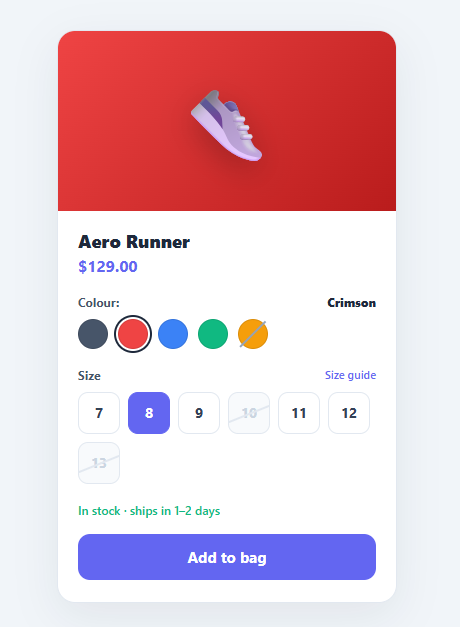
Almost every physical product comes in variants — sizes, colours, materials — and the variant selector is where shoppers translate "I want this" into "I want this specific one". Done badly, it lets people add out-of-stock combinations, hides the price impact of a premium colour, or enables checkout before a size is chosen. Done well, it guides the shopper to a valid, in-stock selection and is honest about scarcity. This snippet implements the complete pattern in plain HTML, CSS, and vanilla JavaScript: colour swatches that retint the product image and update price, size pills with sold-out states, live stock messaging, and an add-to-bag button that stays disabled until a size is selected.
Colour swatches with live retint and price
Each swatch is a button carrying its data on attributes: data-color, data-grad (a gradient string), and data-price. selectColor moves the .active ring, updates the colour name label, swaps the product image's background to the new gradient with a CSS transition, and sets the price — because some colours (like Cobalt) cost more. The active state uses a layered box-shadow to draw a ring with a white gap, the standard way to show a selected swatch without altering its size.
Sold-out variants are visibly blocked
A swatch marked .oos gets a diagonal slash via a pseudo-element and a not-allowed cursor; clicking it flashes a "Sold out" badge instead of selecting it. Sold-out sizes use the native disabled attribute plus an .oos style with a strike-through line, so they cannot be focused, clicked, or chosen — the browser enforces it, not just CSS.
Size pills gate the call to action
The add-to-bag button starts disabled and reads "Select a size". selectSize moves the active pill, records selectedSize, and only then enables the button and changes its label to "Add to bag". This gate is the single most important conversion-safety mechanism in the component: it makes it impossible to add an item without a size, which prevents the most common cause of fulfilment errors and refunds.
Honest, stock-aware messaging
A STOCK map holds remaining units per size. When a size is selected, selectSize reads the count: three or fewer shows an amber "Only N left in size X — order soon!" message and flashes a "Low stock" badge; more than three shows a green "In stock · ships in 1–2 days". This scarcity signalling is a well-documented conversion lever, but here it is driven by real numbers rather than fabricated urgency.
Add-to-bag confirmation
addToBag confirms the exact variant ("✓ Added — Cobalt / 11") and turns the button green, closing the loop so the shopper knows precisely what entered their cart.
Pair this selector with an order summary, a product card grid, an add to cart button micro-interaction, or a quantity stepper.
Step by step
How to Use
- 1Paste HTML, CSS, and JSA product card shows a slate sneaker, a $129 price, five colour swatches (one sold out), a size row (two sizes struck out), and a disabled "Select a size" button.
- 2Pick a colourClick Cobalt — the product image retints with a smooth transition, the colour name updates, and the price changes to $139 since that colour costs more.
- 3Try a sold-out colourClick the struck-through Amber swatch — instead of selecting, a "Sold out" badge flashes on the image.
- 4Choose a sizeClick size 9 — it highlights, a low-stock amber message warns "Only 2 left", and the add button unlocks and reads "Add to bag".
- 5Notice blocked sizesSizes 10 and 13 are struck through and disabled — the browser will not let you select them at all.
- 6Add to bagClick "Add to bag" — it turns green and confirms the exact variant, e.g. "✓ Added — Cobalt / 9".
Real-world uses
Common Use Cases
data-price pattern handles "256GB +\$100" upsells cleanly.Got questions?
Frequently Asked Questions
Render the swatch and size buttons from your product data, setting data-grad, data-price, and disabled per variant, and replace the STOCK object with live inventory from your API. selectSize already reads from that map, so accurate stock messaging follows automatically once the numbers are real.
Keep a matrix of availability keyed by color + size. In selectColor, after switching colour, loop the size pills and toggle disabled based on the matrix for the new colour. This prevents selecting a size that exists for one colour but not the chosen one — a common edge case in apparel.
Place a small − / + stepper above the add-to-bag button and track quantity in a variable. Multiply it into the cart payload in addToBag, and optionally clamp the max to the remaining STOCK count for the selected size so users cannot order more than exist.
Sizes and swatches are real <button> elements, so they are keyboard-focusable and respect disabled. Add aria-pressed to reflect the selected state, group each set with role="radiogroup" and an accessible label, and announce stock changes via an aria-live="polite" region so screen-reader users hear "Only 2 left".
In React, hold selectedColor and selectedSize in useState, derive the image gradient, price, and button disabled from them, and render stock copy from a lookup. In Vue, use refs with :class and :disabled bindings. In Angular, track selection on the component and bind [class.active]/[disabled]. The swatch and pill CSS port unchanged.
Product Variant Selector — Export as HTML, React, Vue, Angular & Tailwind
<!DOCTYPE html>
<html lang="en">
<head>
<meta charset="UTF-8" />
<meta name="viewport" content="width=device-width, initial-scale=1.0" />
<title>Product Variant Selector</title>
<style>
*{box-sizing:border-box;margin:0;padding:0}
body{font-family:system-ui,-apple-system,sans-serif;background:#f1f5f9;min-height:100vh;display:flex;align-items:center;justify-content:center;padding:24px}
.pv-card{background:#fff;border:1px solid #e2e8f0;border-radius:18px;overflow:hidden;width:100%;max-width:340px;box-shadow:0 14px 44px rgba(15,23,42,.07)}
.pv-image{position:relative;height:180px;display:flex;align-items:center;justify-content:center;transition:background .35s}
.pv-emoji{font-size:72px;filter:drop-shadow(0 10px 16px rgba(0,0,0,.25))}
.pv-badge{position:absolute;top:12px;left:12px;font-size:10px;font-weight:800;letter-spacing:.04em;text-transform:uppercase;padding:4px 9px;border-radius:999px;background:rgba(255,255,255,.9);color:#b45309;opacity:0;transform:translateY(-4px);transition:opacity .2s,transform .2s}
.pv-badge.show{opacity:1;transform:translateY(0)}
.pv-body{padding:18px 20px 22px}
.pv-name{font-size:18px;font-weight:800;color:#1e293b}
.pv-price{font-size:16px;font-weight:700;color:#6366f1;margin-top:2px;margin-bottom:18px}
.pv-group{margin-bottom:18px}
.pv-glabel{font-size:12px;font-weight:700;color:#475569;margin-bottom:9px;display:flex;justify-content:space-between;align-items:center}
.pv-glabel strong{color:#1e293b}
.pv-guide{font-size:11px;color:#6366f1;cursor:pointer;font-weight:600}
.pv-swatches{display:flex;gap:10px}
.pv-swatch{width:30px;height:30px;border-radius:50%;background:var(--c);border:1px solid rgba(0,0,0,.1);cursor:pointer;position:relative;transition:transform .12s}
.pv-swatch:hover{transform:scale(1.1)}
.pv-swatch.active{box-shadow:0 0 0 2px #fff,0 0 0 4px #1e293b}
.pv-swatch.oos{cursor:not-allowed}
.pv-swatch.oos::after{content:'';position:absolute;left:50%;top:50%;width:130%;height:2px;background:#94a3b8;transform:translate(-50%,-50%) rotate(-45deg)}
.pv-sizes{display:flex;flex-wrap:wrap;gap:8px}
.pv-size{min-width:42px;height:42px;padding:0 6px;border:1.5px solid #e2e8f0;background:#fff;border-radius:10px;font-size:14px;font-weight:700;color:#334155;cursor:pointer;font-family:inherit;transition:all .14s}
.pv-size:hover:not(.oos){border-color:#94a3b8}
.pv-size.active{border-color:#6366f1;background:#6366f1;color:#fff}
.pv-size.oos{color:#cbd5e1;cursor:not-allowed;background:#f8fafc;position:relative;overflow:hidden}
.pv-size.oos::after{content:'';position:absolute;left:-10%;top:50%;width:120%;height:1.5px;background:#e2e8f0;transform:rotate(-22deg)}
.pv-stock{font-size:12px;font-weight:600;color:#94a3b8;margin-bottom:16px;min-height:16px;transition:color .15s}
.pv-stock.low{color:#f59e0b}
.pv-stock.in{color:#10b981}
.pv-add{width:100%;padding:13px;background:#6366f1;color:#fff;border:none;border-radius:12px;font-size:15px;font-weight:700;cursor:pointer;font-family:inherit;transition:background .15s,transform .1s}
.pv-add:hover:not(:disabled){background:#4f46e5}
.pv-add:active:not(:disabled){transform:scale(.99)}
.pv-add:disabled{background:#e2e8f0;color:#94a3b8;cursor:not-allowed}
.pv-add.added{background:#10b981!important}
</style>
</head>
<body>
<div class="pv-card">
<div class="pv-image" id="pvImage" style="background:linear-gradient(135deg,#475569,#1e293b)">
<span class="pv-emoji">👟</span>
<span class="pv-badge" id="pvBadge"></span>
</div>
<div class="pv-body">
<div class="pv-name">Aero Runner</div>
<div class="pv-price" id="pvPrice">$129.00</div>
<div class="pv-group">
<div class="pv-glabel">Colour: <strong id="pvColorName">Slate</strong></div>
<div class="pv-swatches">
<button class="pv-swatch active" style="--c:#475569" data-color="Slate" data-grad="135deg,#475569,#1e293b" data-price="$129.00" onclick="selectColor(this)" aria-label="Slate"></button>
<button class="pv-swatch" style="--c:#ef4444" data-color="Crimson" data-grad="135deg,#ef4444,#b91c1c" data-price="$129.00" onclick="selectColor(this)" aria-label="Crimson"></button>
<button class="pv-swatch" style="--c:#3b82f6" data-color="Cobalt" data-grad="135deg,#3b82f6,#1d4ed8" data-price="$139.00" onclick="selectColor(this)" aria-label="Cobalt"></button>
<button class="pv-swatch" style="--c:#10b981" data-color="Mint" data-grad="135deg,#10b981,#047857" data-price="$129.00" onclick="selectColor(this)" aria-label="Mint"></button>
<button class="pv-swatch oos" style="--c:#f59e0b" data-color="Amber" data-grad="135deg,#f59e0b,#b45309" data-price="$129.00" data-oos="1" onclick="selectColor(this)" aria-label="Amber (sold out)"></button>
</div>
</div>
<div class="pv-group">
<div class="pv-glabel">Size <span class="pv-guide">Size guide</span></div>
<div class="pv-sizes">
<button class="pv-size" onclick="selectSize(this)">7</button>
<button class="pv-size" onclick="selectSize(this)">8</button>
<button class="pv-size" onclick="selectSize(this)">9</button>
<button class="pv-size oos" disabled>10</button>
<button class="pv-size" onclick="selectSize(this)">11</button>
<button class="pv-size" onclick="selectSize(this)">12</button>
<button class="pv-size oos" disabled>13</button>
</div>
</div>
<div class="pv-stock" id="pvStock">Select a size to see availability.</div>
<button class="pv-add" id="pvAdd" onclick="addToBag()" disabled>Select a size</button>
</div>
</div>
<script>
var STOCK = { '7': 12, '8': 5, '9': 2, '11': 8, '12': 3 };
var selectedColor = 'Slate';
var selectedSize = null;
function selectColor(btn) {
if (btn.dataset.oos) {
flashBadge('Sold out');
return;
}
document.querySelectorAll('.pv-swatch').forEach(function (s) { s.classList.remove('active'); });
btn.classList.add('active');
selectedColor = btn.dataset.color;
document.getElementById('pvColorName').textContent = selectedColor;
document.getElementById('pvImage').style.background = 'linear-gradient(' + btn.dataset.grad + ')';
document.getElementById('pvPrice').textContent = btn.dataset.price;
}
function selectSize(btn) {
document.querySelectorAll('.pv-size').forEach(function (s) { s.classList.remove('active'); });
btn.classList.add('active');
selectedSize = btn.textContent.trim();
var left = STOCK[selectedSize] || 0;
var stock = document.getElementById('pvStock');
if (left <= 3) {
stock.textContent = 'Only ' + left + ' left in size ' + selectedSize + ' — order soon!';
stock.className = 'pv-stock low';
flashBadge('Low stock');
} else {
stock.textContent = 'In stock · ships in 1–2 days';
stock.className = 'pv-stock in';
}
var add = document.getElementById('pvAdd');
add.disabled = false;
add.textContent = 'Add to bag';
add.classList.remove('added');
}
function flashBadge(text) {
var badge = document.getElementById('pvBadge');
badge.textContent = text;
badge.classList.add('show');
}
function addToBag() {
if (!selectedSize) return;
var add = document.getElementById('pvAdd');
add.textContent = '✓ Added — ' + selectedColor + ' / ' + selectedSize;
add.classList.add('added');
}
</script>
</body>
</html><!DOCTYPE html>
<html lang="en">
<head>
<meta charset="UTF-8" />
<meta name="viewport" content="width=device-width, initial-scale=1.0" />
<title>Product Variant Selector</title>
<!-- Tailwind CSS v3+ — arbitrary value classes (e.g. bg-[#0f172a]) are valid -->
<script src="https://cdn.tailwindcss.com"></script>
<style>
* {
box-sizing:border-box;margin:0;padding:0
}
body {
font-family:system-ui,-apple-system,sans-serif;background:#f1f5f9;min-height:100vh;display:flex;align-items:center;justify-content:center;padding:24px
}
.pv-badge.show {
opacity:1;transform:translateY(0)
}
.pv-glabel strong {
color:#1e293b
}
.pv-swatch.active {
box-shadow:0 0 0 2px #fff,0 0 0 4px #1e293b
}
.pv-swatch.oos {
cursor:not-allowed
}
.pv-swatch.oos::after {
content:'';position:absolute;left:50%;top:50%;width:130%;height:2px;background:#94a3b8;transform:translate(-50%,-50%) rotate(-45deg)
}
.pv-size:hover:not(.oos) {
border-color:#94a3b8
}
.pv-size.active {
border-color:#6366f1;background:#6366f1;color:#fff
}
.pv-size.oos {
color:#cbd5e1;cursor:not-allowed;background:#f8fafc;position:relative;overflow:hidden
}
.pv-size.oos::after {
content:'';position:absolute;left:-10%;top:50%;width:120%;height:1.5px;background:#e2e8f0;transform:rotate(-22deg)
}
.pv-stock {
font-size:12px;font-weight:600;color:#94a3b8;margin-bottom:16px;min-height:16px;transition:color .15s
}
.pv-stock.low {
color:#f59e0b
}
.pv-stock.in {
color:#10b981
}
.pv-add:hover:not(:disabled) {
background:#4f46e5
}
.pv-add:active:not(:disabled) {
transform:scale(.99)
}
.pv-add:disabled {
background:#e2e8f0;color:#94a3b8;cursor:not-allowed
}
.pv-add.added {
background:#10b981!important
}
</style>
</head>
<body>
<div class="bg-[#fff] border border-[#e2e8f0] rounded-[18px] overflow-hidden w-full max-w-[340px] shadow-[0_14px_44px_rgba(15,23,42,.07)]">
<div class="relative h-[180px] flex items-center justify-center [transition:background_.35s]" id="pvImage" style="background:linear-gradient(135deg,#475569,#1e293b)">
<span class="text-7xl [filter:drop-shadow(0_10px_16px_rgba(0,0,0,.25))]">👟</span>
<span class="pv-badge absolute top-3 left-3 text-xs font-extrabold tracking-[.04em] uppercase py-1 px-[9px] rounded-[999px] bg-[rgba(255,255,255,.9)] text-[#b45309] opacity-0 [transform:translateY(-4px)] [transition:opacity_.2s,transform_.2s]" id="pvBadge"></span>
</div>
<div class="pt-[18px] px-5 pb-[22px]">
<div class="text-lg font-extrabold text-[#1e293b]">Aero Runner</div>
<div class="text-base font-bold text-[#6366f1] mt-0.5 mb-[18px]" id="pvPrice">$129.00</div>
<div class="mb-[18px]">
<div class="pv-glabel text-xs font-bold text-[#475569] mb-[9px] flex justify-between items-center">Colour: <strong id="pvColorName">Slate</strong></div>
<div class="flex gap-2.5">
<button class="pv-swatch w-[30px] h-[30px] rounded-full [background:var(--c)] border border-[rgba(0,0,0,.1)] cursor-pointer relative [transition:transform_.12s] hover:[transform:scale(1.1)] active" style="--c:#475569" data-color="Slate" data-grad="135deg,#475569,#1e293b" data-price="$129.00" onclick="selectColor(this)" aria-label="Slate"></button>
<button class="pv-swatch w-[30px] h-[30px] rounded-full [background:var(--c)] border border-[rgba(0,0,0,.1)] cursor-pointer relative [transition:transform_.12s] hover:[transform:scale(1.1)]" style="--c:#ef4444" data-color="Crimson" data-grad="135deg,#ef4444,#b91c1c" data-price="$129.00" onclick="selectColor(this)" aria-label="Crimson"></button>
<button class="pv-swatch w-[30px] h-[30px] rounded-full [background:var(--c)] border border-[rgba(0,0,0,.1)] cursor-pointer relative [transition:transform_.12s] hover:[transform:scale(1.1)]" style="--c:#3b82f6" data-color="Cobalt" data-grad="135deg,#3b82f6,#1d4ed8" data-price="$139.00" onclick="selectColor(this)" aria-label="Cobalt"></button>
<button class="pv-swatch w-[30px] h-[30px] rounded-full [background:var(--c)] border border-[rgba(0,0,0,.1)] cursor-pointer relative [transition:transform_.12s] hover:[transform:scale(1.1)]" style="--c:#10b981" data-color="Mint" data-grad="135deg,#10b981,#047857" data-price="$129.00" onclick="selectColor(this)" aria-label="Mint"></button>
<button class="pv-swatch w-[30px] h-[30px] rounded-full [background:var(--c)] border border-[rgba(0,0,0,.1)] cursor-pointer relative [transition:transform_.12s] hover:[transform:scale(1.1)] oos" style="--c:#f59e0b" data-color="Amber" data-grad="135deg,#f59e0b,#b45309" data-price="$129.00" data-oos="1" onclick="selectColor(this)" aria-label="Amber (sold out)"></button>
</div>
</div>
<div class="mb-[18px]">
<div class="pv-glabel text-xs font-bold text-[#475569] mb-[9px] flex justify-between items-center">Size <span class="text-[11px] text-[#6366f1] cursor-pointer font-semibold">Size guide</span></div>
<div class="flex flex-wrap gap-2">
<button class="pv-size min-w-[42px] h-[42px] py-0 px-1.5 border bg-[#fff] rounded-[10px] text-sm font-bold text-[#334155] cursor-pointer font-[inherit] [transition:all_.14s]" onclick="selectSize(this)">7</button>
<button class="pv-size min-w-[42px] h-[42px] py-0 px-1.5 border bg-[#fff] rounded-[10px] text-sm font-bold text-[#334155] cursor-pointer font-[inherit] [transition:all_.14s]" onclick="selectSize(this)">8</button>
<button class="pv-size min-w-[42px] h-[42px] py-0 px-1.5 border bg-[#fff] rounded-[10px] text-sm font-bold text-[#334155] cursor-pointer font-[inherit] [transition:all_.14s]" onclick="selectSize(this)">9</button>
<button class="pv-size min-w-[42px] h-[42px] py-0 px-1.5 border bg-[#fff] rounded-[10px] text-sm font-bold text-[#334155] cursor-pointer font-[inherit] [transition:all_.14s] oos" disabled>10</button>
<button class="pv-size min-w-[42px] h-[42px] py-0 px-1.5 border bg-[#fff] rounded-[10px] text-sm font-bold text-[#334155] cursor-pointer font-[inherit] [transition:all_.14s]" onclick="selectSize(this)">11</button>
<button class="pv-size min-w-[42px] h-[42px] py-0 px-1.5 border bg-[#fff] rounded-[10px] text-sm font-bold text-[#334155] cursor-pointer font-[inherit] [transition:all_.14s]" onclick="selectSize(this)">12</button>
<button class="pv-size min-w-[42px] h-[42px] py-0 px-1.5 border bg-[#fff] rounded-[10px] text-sm font-bold text-[#334155] cursor-pointer font-[inherit] [transition:all_.14s] oos" disabled>13</button>
</div>
</div>
<div class="pv-stock" id="pvStock">Select a size to see availability.</div>
<button class="pv-add w-full p-[13px] bg-[#6366f1] text-[#fff] border-0 rounded-xl text-[15px] font-bold cursor-pointer font-[inherit] [transition:background_.15s,transform_.1s]" id="pvAdd" onclick="addToBag()" disabled>Select a size</button>
</div>
</div>
<script>
var STOCK = { '7': 12, '8': 5, '9': 2, '11': 8, '12': 3 };
var selectedColor = 'Slate';
var selectedSize = null;
function selectColor(btn) {
if (btn.dataset.oos) {
flashBadge('Sold out');
return;
}
document.querySelectorAll('.pv-swatch').forEach(function (s) { s.classList.remove('active'); });
btn.classList.add('active');
selectedColor = btn.dataset.color;
document.getElementById('pvColorName').textContent = selectedColor;
document.getElementById('pvImage').style.background = 'linear-gradient(' + btn.dataset.grad + ')';
document.getElementById('pvPrice').textContent = btn.dataset.price;
}
function selectSize(btn) {
document.querySelectorAll('.pv-size').forEach(function (s) { s.classList.remove('active'); });
btn.classList.add('active');
selectedSize = btn.textContent.trim();
var left = STOCK[selectedSize] || 0;
var stock = document.getElementById('pvStock');
if (left <= 3) {
stock.textContent = 'Only ' + left + ' left in size ' + selectedSize + ' — order soon!';
stock.className = 'pv-stock low';
flashBadge('Low stock');
} else {
stock.textContent = 'In stock · ships in 1–2 days';
stock.className = 'pv-stock in';
}
var add = document.getElementById('pvAdd');
add.disabled = false;
add.textContent = 'Add to bag';
add.classList.remove('added');
}
function flashBadge(text) {
var badge = document.getElementById('pvBadge');
badge.textContent = text;
badge.classList.add('show');
}
function addToBag() {
if (!selectedSize) return;
var add = document.getElementById('pvAdd');
add.textContent = '✓ Added — ' + selectedColor + ' / ' + selectedSize;
add.classList.add('added');
}
</script>
</body>
</html>import React, { useEffect } from 'react';
// CSS — optionally move to ProductVariantSelector.module.css
const css = `
*{box-sizing:border-box;margin:0;padding:0}
body{font-family:system-ui,-apple-system,sans-serif;background:#f1f5f9;min-height:100vh;display:flex;align-items:center;justify-content:center;padding:24px}
.pv-card{background:#fff;border:1px solid #e2e8f0;border-radius:18px;overflow:hidden;width:100%;max-width:340px;box-shadow:0 14px 44px rgba(15,23,42,.07)}
.pv-image{position:relative;height:180px;display:flex;align-items:center;justify-content:center;transition:background .35s}
.pv-emoji{font-size:72px;filter:drop-shadow(0 10px 16px rgba(0,0,0,.25))}
.pv-badge{position:absolute;top:12px;left:12px;font-size:10px;font-weight:800;letter-spacing:.04em;text-transform:uppercase;padding:4px 9px;border-radius:999px;background:rgba(255,255,255,.9);color:#b45309;opacity:0;transform:translateY(-4px);transition:opacity .2s,transform .2s}
.pv-badge.show{opacity:1;transform:translateY(0)}
.pv-body{padding:18px 20px 22px}
.pv-name{font-size:18px;font-weight:800;color:#1e293b}
.pv-price{font-size:16px;font-weight:700;color:#6366f1;margin-top:2px;margin-bottom:18px}
.pv-group{margin-bottom:18px}
.pv-glabel{font-size:12px;font-weight:700;color:#475569;margin-bottom:9px;display:flex;justify-content:space-between;align-items:center}
.pv-glabel strong{color:#1e293b}
.pv-guide{font-size:11px;color:#6366f1;cursor:pointer;font-weight:600}
.pv-swatches{display:flex;gap:10px}
.pv-swatch{width:30px;height:30px;border-radius:50%;background:var(--c);border:1px solid rgba(0,0,0,.1);cursor:pointer;position:relative;transition:transform .12s}
.pv-swatch:hover{transform:scale(1.1)}
.pv-swatch.active{box-shadow:0 0 0 2px #fff,0 0 0 4px #1e293b}
.pv-swatch.oos{cursor:not-allowed}
.pv-swatch.oos::after{content:'';position:absolute;left:50%;top:50%;width:130%;height:2px;background:#94a3b8;transform:translate(-50%,-50%) rotate(-45deg)}
.pv-sizes{display:flex;flex-wrap:wrap;gap:8px}
.pv-size{min-width:42px;height:42px;padding:0 6px;border:1.5px solid #e2e8f0;background:#fff;border-radius:10px;font-size:14px;font-weight:700;color:#334155;cursor:pointer;font-family:inherit;transition:all .14s}
.pv-size:hover:not(.oos){border-color:#94a3b8}
.pv-size.active{border-color:#6366f1;background:#6366f1;color:#fff}
.pv-size.oos{color:#cbd5e1;cursor:not-allowed;background:#f8fafc;position:relative;overflow:hidden}
.pv-size.oos::after{content:'';position:absolute;left:-10%;top:50%;width:120%;height:1.5px;background:#e2e8f0;transform:rotate(-22deg)}
.pv-stock{font-size:12px;font-weight:600;color:#94a3b8;margin-bottom:16px;min-height:16px;transition:color .15s}
.pv-stock.low{color:#f59e0b}
.pv-stock.in{color:#10b981}
.pv-add{width:100%;padding:13px;background:#6366f1;color:#fff;border:none;border-radius:12px;font-size:15px;font-weight:700;cursor:pointer;font-family:inherit;transition:background .15s,transform .1s}
.pv-add:hover:not(:disabled){background:#4f46e5}
.pv-add:active:not(:disabled){transform:scale(.99)}
.pv-add:disabled{background:#e2e8f0;color:#94a3b8;cursor:not-allowed}
.pv-add.added{background:#10b981!important}
`;
export default function ProductVariantSelector() {
// Auto-generated escape hatch: the original snippet's vanilla JS runs once
// after mount and queries the rendered DOM. For idiomatic React, lift this
// into state + handlers.
useEffect(() => {
const _listeners = [];
const _originalAddEventListener = EventTarget.prototype.addEventListener;
EventTarget.prototype.addEventListener = function(type, listener, options) {
_listeners.push({ target: this, type, listener, options });
return _originalAddEventListener.call(this, type, listener, options);
};
var STOCK = { '7': 12, '8': 5, '9': 2, '11': 8, '12': 3 };
var selectedColor = 'Slate';
var selectedSize = null;
function selectColor(btn) {
if (btn.dataset.oos) {
flashBadge('Sold out');
return;
}
document.querySelectorAll('.pv-swatch').forEach(function (s) { s.classList.remove('active'); });
btn.classList.add('active');
selectedColor = btn.dataset.color;
document.getElementById('pvColorName').textContent = selectedColor;
document.getElementById('pvImage').style.background = 'linear-gradient(' + btn.dataset.grad + ')';
document.getElementById('pvPrice').textContent = btn.dataset.price;
}
function selectSize(btn) {
document.querySelectorAll('.pv-size').forEach(function (s) { s.classList.remove('active'); });
btn.classList.add('active');
selectedSize = btn.textContent.trim();
var left = STOCK[selectedSize] || 0;
var stock = document.getElementById('pvStock');
if (left <= 3) {
stock.textContent = 'Only ' + left + ' left in size ' + selectedSize + ' — order soon!';
stock.className = 'pv-stock low';
flashBadge('Low stock');
} else {
stock.textContent = 'In stock · ships in 1–2 days';
stock.className = 'pv-stock in';
}
var add = document.getElementById('pvAdd');
add.disabled = false;
add.textContent = 'Add to bag';
add.classList.remove('added');
}
function flashBadge(text) {
var badge = document.getElementById('pvBadge');
badge.textContent = text;
badge.classList.add('show');
}
function addToBag() {
if (!selectedSize) return;
var add = document.getElementById('pvAdd');
add.textContent = '✓ Added — ' + selectedColor + ' / ' + selectedSize;
add.classList.add('added');
}
// Cleanup: restore addEventListener and remove all listeners
return () => {
EventTarget.prototype.addEventListener = _originalAddEventListener;
for (const { target, type, listener, options } of _listeners) {
target.removeEventListener(type, listener, options);
}
};
// Expose handlers used by inline JSX events to the global scope
if (typeof selectColor === 'function') window.selectColor = selectColor;
if (typeof selectSize === 'function') window.selectSize = selectSize;
if (typeof addToBag === 'function') window.addToBag = addToBag;
}, []);
return (
<>
<style>{css}</style>
<div className="pv-card">
<div className="pv-image" id="pvImage" style={{ background: 'linear-gradient(135deg,#475569,#1e293b)' }}>
<span className="pv-emoji">👟</span>
<span className="pv-badge" id="pvBadge"></span>
</div>
<div className="pv-body">
<div className="pv-name">Aero Runner</div>
<div className="pv-price" id="pvPrice">$129.00</div>
<div className="pv-group">
<div className="pv-glabel">Colour: <strong id="pvColorName">Slate</strong></div>
<div className="pv-swatches">
<button className="pv-swatch active" style={{ '--c': '#475569' }} data-color="Slate" data-grad="135deg,#475569,#1e293b" data-price="$129.00" onClick={(event) => { selectColor(event.currentTarget) }} aria-label="Slate"></button>
<button className="pv-swatch" style={{ '--c': '#ef4444' }} data-color="Crimson" data-grad="135deg,#ef4444,#b91c1c" data-price="$129.00" onClick={(event) => { selectColor(event.currentTarget) }} aria-label="Crimson"></button>
<button className="pv-swatch" style={{ '--c': '#3b82f6' }} data-color="Cobalt" data-grad="135deg,#3b82f6,#1d4ed8" data-price="$139.00" onClick={(event) => { selectColor(event.currentTarget) }} aria-label="Cobalt"></button>
<button className="pv-swatch" style={{ '--c': '#10b981' }} data-color="Mint" data-grad="135deg,#10b981,#047857" data-price="$129.00" onClick={(event) => { selectColor(event.currentTarget) }} aria-label="Mint"></button>
<button className="pv-swatch oos" style={{ '--c': '#f59e0b' }} data-color="Amber" data-grad="135deg,#f59e0b,#b45309" data-price="$129.00" data-oos="1" onClick={(event) => { selectColor(event.currentTarget) }} aria-label="Amber (sold out)"></button>
</div>
</div>
<div className="pv-group">
<div className="pv-glabel">Size <span className="pv-guide">Size guide</span></div>
<div className="pv-sizes">
<button className="pv-size" onClick={(event) => { selectSize(event.currentTarget) }}>7</button>
<button className="pv-size" onClick={(event) => { selectSize(event.currentTarget) }}>8</button>
<button className="pv-size" onClick={(event) => { selectSize(event.currentTarget) }}>9</button>
<button className="pv-size oos" defaultDisabled>10</button>
<button className="pv-size" onClick={(event) => { selectSize(event.currentTarget) }}>11</button>
<button className="pv-size" onClick={(event) => { selectSize(event.currentTarget) }}>12</button>
<button className="pv-size oos" defaultDisabled>13</button>
</div>
</div>
<div className="pv-stock" id="pvStock">Select a size to see availability.</div>
<button className="pv-add" id="pvAdd" onClick={(event) => { addToBag() }} defaultDisabled>Select a size</button>
</div>
</div>
</>
);
}import React, { useEffect } from 'react';
// Requires Tailwind CSS v3+ — https://tailwindcss.com/docs/installation
// Arbitrary value classes (e.g. bg-[#0f172a]) are valid Tailwind v3+
export default function ProductVariantSelector() {
// Auto-generated escape hatch: the original snippet's vanilla JS runs once
// after mount and queries the rendered DOM. For idiomatic React, lift this
// into state + handlers.
useEffect(() => {
const _listeners = [];
const _originalAddEventListener = EventTarget.prototype.addEventListener;
EventTarget.prototype.addEventListener = function(type, listener, options) {
_listeners.push({ target: this, type, listener, options });
return _originalAddEventListener.call(this, type, listener, options);
};
var STOCK = { '7': 12, '8': 5, '9': 2, '11': 8, '12': 3 };
var selectedColor = 'Slate';
var selectedSize = null;
function selectColor(btn) {
if (btn.dataset.oos) {
flashBadge('Sold out');
return;
}
document.querySelectorAll('.pv-swatch').forEach(function (s) { s.classList.remove('active'); });
btn.classList.add('active');
selectedColor = btn.dataset.color;
document.getElementById('pvColorName').textContent = selectedColor;
document.getElementById('pvImage').style.background = 'linear-gradient(' + btn.dataset.grad + ')';
document.getElementById('pvPrice').textContent = btn.dataset.price;
}
function selectSize(btn) {
document.querySelectorAll('.pv-size').forEach(function (s) { s.classList.remove('active'); });
btn.classList.add('active');
selectedSize = btn.textContent.trim();
var left = STOCK[selectedSize] || 0;
var stock = document.getElementById('pvStock');
if (left <= 3) {
stock.textContent = 'Only ' + left + ' left in size ' + selectedSize + ' — order soon!';
stock.className = 'pv-stock low';
flashBadge('Low stock');
} else {
stock.textContent = 'In stock · ships in 1–2 days';
stock.className = 'pv-stock in';
}
var add = document.getElementById('pvAdd');
add.disabled = false;
add.textContent = 'Add to bag';
add.classList.remove('added');
}
function flashBadge(text) {
var badge = document.getElementById('pvBadge');
badge.textContent = text;
badge.classList.add('show');
}
function addToBag() {
if (!selectedSize) return;
var add = document.getElementById('pvAdd');
add.textContent = '✓ Added — ' + selectedColor + ' / ' + selectedSize;
add.classList.add('added');
}
// Cleanup: restore addEventListener and remove all listeners
return () => {
EventTarget.prototype.addEventListener = _originalAddEventListener;
for (const { target, type, listener, options } of _listeners) {
target.removeEventListener(type, listener, options);
}
};
// Expose handlers used by inline JSX events to the global scope
if (typeof selectColor === 'function') window.selectColor = selectColor;
if (typeof selectSize === 'function') window.selectSize = selectSize;
if (typeof addToBag === 'function') window.addToBag = addToBag;
}, []);
return (
<>
<style>{`
* {
box-sizing:border-box;margin:0;padding:0
}
body {
font-family:system-ui,-apple-system,sans-serif;background:#f1f5f9;min-height:100vh;display:flex;align-items:center;justify-content:center;padding:24px
}
.pv-badge.show {
opacity:1;transform:translateY(0)
}
.pv-glabel strong {
color:#1e293b
}
.pv-swatch.active {
box-shadow:0 0 0 2px #fff,0 0 0 4px #1e293b
}
.pv-swatch.oos {
cursor:not-allowed
}
.pv-swatch.oos::after {
content:'';position:absolute;left:50%;top:50%;width:130%;height:2px;background:#94a3b8;transform:translate(-50%,-50%) rotate(-45deg)
}
.pv-size:hover:not(.oos) {
border-color:#94a3b8
}
.pv-size.active {
border-color:#6366f1;background:#6366f1;color:#fff
}
.pv-size.oos {
color:#cbd5e1;cursor:not-allowed;background:#f8fafc;position:relative;overflow:hidden
}
.pv-size.oos::after {
content:'';position:absolute;left:-10%;top:50%;width:120%;height:1.5px;background:#e2e8f0;transform:rotate(-22deg)
}
.pv-stock {
font-size:12px;font-weight:600;color:#94a3b8;margin-bottom:16px;min-height:16px;transition:color .15s
}
.pv-stock.low {
color:#f59e0b
}
.pv-stock.in {
color:#10b981
}
.pv-add:hover:not(:disabled) {
background:#4f46e5
}
.pv-add:active:not(:disabled) {
transform:scale(.99)
}
.pv-add:disabled {
background:#e2e8f0;color:#94a3b8;cursor:not-allowed
}
.pv-add.added {
background:#10b981!important
}
`}</style>
<div className="bg-[#fff] border border-[#e2e8f0] rounded-[18px] overflow-hidden w-full max-w-[340px] shadow-[0_14px_44px_rgba(15,23,42,.07)]">
<div className="relative h-[180px] flex items-center justify-center [transition:background_.35s]" id="pvImage" style={{ background: 'linear-gradient(135deg,#475569,#1e293b)' }}>
<span className="text-7xl [filter:drop-shadow(0_10px_16px_rgba(0,0,0,.25))]">👟</span>
<span className="pv-badge absolute top-3 left-3 text-xs font-extrabold tracking-[.04em] uppercase py-1 px-[9px] rounded-[999px] bg-[rgba(255,255,255,.9)] text-[#b45309] opacity-0 [transform:translateY(-4px)] [transition:opacity_.2s,transform_.2s]" id="pvBadge"></span>
</div>
<div className="pt-[18px] px-5 pb-[22px]">
<div className="text-lg font-extrabold text-[#1e293b]">Aero Runner</div>
<div className="text-base font-bold text-[#6366f1] mt-0.5 mb-[18px]" id="pvPrice">$129.00</div>
<div className="mb-[18px]">
<div className="pv-glabel text-xs font-bold text-[#475569] mb-[9px] flex justify-between items-center">Colour: <strong id="pvColorName">Slate</strong></div>
<div className="flex gap-2.5">
<button className="pv-swatch w-[30px] h-[30px] rounded-full [background:var(--c)] border border-[rgba(0,0,0,.1)] cursor-pointer relative [transition:transform_.12s] hover:[transform:scale(1.1)] active" style={{ '--c': '#475569' }} data-color="Slate" data-grad="135deg,#475569,#1e293b" data-price="$129.00" onClick={(event) => { selectColor(event.currentTarget) }} aria-label="Slate"></button>
<button className="pv-swatch w-[30px] h-[30px] rounded-full [background:var(--c)] border border-[rgba(0,0,0,.1)] cursor-pointer relative [transition:transform_.12s] hover:[transform:scale(1.1)]" style={{ '--c': '#ef4444' }} data-color="Crimson" data-grad="135deg,#ef4444,#b91c1c" data-price="$129.00" onClick={(event) => { selectColor(event.currentTarget) }} aria-label="Crimson"></button>
<button className="pv-swatch w-[30px] h-[30px] rounded-full [background:var(--c)] border border-[rgba(0,0,0,.1)] cursor-pointer relative [transition:transform_.12s] hover:[transform:scale(1.1)]" style={{ '--c': '#3b82f6' }} data-color="Cobalt" data-grad="135deg,#3b82f6,#1d4ed8" data-price="$139.00" onClick={(event) => { selectColor(event.currentTarget) }} aria-label="Cobalt"></button>
<button className="pv-swatch w-[30px] h-[30px] rounded-full [background:var(--c)] border border-[rgba(0,0,0,.1)] cursor-pointer relative [transition:transform_.12s] hover:[transform:scale(1.1)]" style={{ '--c': '#10b981' }} data-color="Mint" data-grad="135deg,#10b981,#047857" data-price="$129.00" onClick={(event) => { selectColor(event.currentTarget) }} aria-label="Mint"></button>
<button className="pv-swatch w-[30px] h-[30px] rounded-full [background:var(--c)] border border-[rgba(0,0,0,.1)] cursor-pointer relative [transition:transform_.12s] hover:[transform:scale(1.1)] oos" style={{ '--c': '#f59e0b' }} data-color="Amber" data-grad="135deg,#f59e0b,#b45309" data-price="$129.00" data-oos="1" onClick={(event) => { selectColor(event.currentTarget) }} aria-label="Amber (sold out)"></button>
</div>
</div>
<div className="mb-[18px]">
<div className="pv-glabel text-xs font-bold text-[#475569] mb-[9px] flex justify-between items-center">Size <span className="text-[11px] text-[#6366f1] cursor-pointer font-semibold">Size guide</span></div>
<div className="flex flex-wrap gap-2">
<button className="pv-size min-w-[42px] h-[42px] py-0 px-1.5 border bg-[#fff] rounded-[10px] text-sm font-bold text-[#334155] cursor-pointer font-[inherit] [transition:all_.14s]" onClick={(event) => { selectSize(event.currentTarget) }}>7</button>
<button className="pv-size min-w-[42px] h-[42px] py-0 px-1.5 border bg-[#fff] rounded-[10px] text-sm font-bold text-[#334155] cursor-pointer font-[inherit] [transition:all_.14s]" onClick={(event) => { selectSize(event.currentTarget) }}>8</button>
<button className="pv-size min-w-[42px] h-[42px] py-0 px-1.5 border bg-[#fff] rounded-[10px] text-sm font-bold text-[#334155] cursor-pointer font-[inherit] [transition:all_.14s]" onClick={(event) => { selectSize(event.currentTarget) }}>9</button>
<button className="pv-size min-w-[42px] h-[42px] py-0 px-1.5 border bg-[#fff] rounded-[10px] text-sm font-bold text-[#334155] cursor-pointer font-[inherit] [transition:all_.14s] oos" defaultDisabled>10</button>
<button className="pv-size min-w-[42px] h-[42px] py-0 px-1.5 border bg-[#fff] rounded-[10px] text-sm font-bold text-[#334155] cursor-pointer font-[inherit] [transition:all_.14s]" onClick={(event) => { selectSize(event.currentTarget) }}>11</button>
<button className="pv-size min-w-[42px] h-[42px] py-0 px-1.5 border bg-[#fff] rounded-[10px] text-sm font-bold text-[#334155] cursor-pointer font-[inherit] [transition:all_.14s]" onClick={(event) => { selectSize(event.currentTarget) }}>12</button>
<button className="pv-size min-w-[42px] h-[42px] py-0 px-1.5 border bg-[#fff] rounded-[10px] text-sm font-bold text-[#334155] cursor-pointer font-[inherit] [transition:all_.14s] oos" defaultDisabled>13</button>
</div>
</div>
<div className="pv-stock" id="pvStock">Select a size to see availability.</div>
<button className="pv-add w-full p-[13px] bg-[#6366f1] text-[#fff] border-0 rounded-xl text-[15px] font-bold cursor-pointer font-[inherit] [transition:background_.15s,transform_.1s]" id="pvAdd" onClick={(event) => { addToBag() }} defaultDisabled>Select a size</button>
</div>
</div>
</>
);
}<template>
<div class="pv-card">
<div class="pv-image" id="pvImage" style="background:linear-gradient(135deg,#475569,#1e293b)">
<span class="pv-emoji">👟</span>
<span class="pv-badge" id="pvBadge"></span>
</div>
<div class="pv-body">
<div class="pv-name">Aero Runner</div>
<div class="pv-price" id="pvPrice">$129.00</div>
<div class="pv-group">
<div class="pv-glabel">Colour: <strong id="pvColorName">Slate</strong></div>
<div class="pv-swatches">
<button class="pv-swatch active" style="--c:#475569" data-color="Slate" data-grad="135deg,#475569,#1e293b" data-price="$129.00" @click="selectColor($event.currentTarget)" aria-label="Slate"></button>
<button class="pv-swatch" style="--c:#ef4444" data-color="Crimson" data-grad="135deg,#ef4444,#b91c1c" data-price="$129.00" @click="selectColor($event.currentTarget)" aria-label="Crimson"></button>
<button class="pv-swatch" style="--c:#3b82f6" data-color="Cobalt" data-grad="135deg,#3b82f6,#1d4ed8" data-price="$139.00" @click="selectColor($event.currentTarget)" aria-label="Cobalt"></button>
<button class="pv-swatch" style="--c:#10b981" data-color="Mint" data-grad="135deg,#10b981,#047857" data-price="$129.00" @click="selectColor($event.currentTarget)" aria-label="Mint"></button>
<button class="pv-swatch oos" style="--c:#f59e0b" data-color="Amber" data-grad="135deg,#f59e0b,#b45309" data-price="$129.00" data-oos="1" @click="selectColor($event.currentTarget)" aria-label="Amber (sold out)"></button>
</div>
</div>
<div class="pv-group">
<div class="pv-glabel">Size <span class="pv-guide">Size guide</span></div>
<div class="pv-sizes">
<button class="pv-size" @click="selectSize($event.currentTarget)">7</button>
<button class="pv-size" @click="selectSize($event.currentTarget)">8</button>
<button class="pv-size" @click="selectSize($event.currentTarget)">9</button>
<button class="pv-size oos" disabled>10</button>
<button class="pv-size" @click="selectSize($event.currentTarget)">11</button>
<button class="pv-size" @click="selectSize($event.currentTarget)">12</button>
<button class="pv-size oos" disabled>13</button>
</div>
</div>
<div class="pv-stock" id="pvStock">Select a size to see availability.</div>
<button class="pv-add" id="pvAdd" @click="addToBag()" disabled>Select a size</button>
</div>
</div>
</template>
<script setup>
import { onMounted } from 'vue';
var STOCK = { '7': 12, '8': 5, '9': 2, '11': 8, '12': 3 };
var selectedColor = 'Slate';
var selectedSize = null;
function selectColor(btn) {
if (btn.dataset.oos) {
flashBadge('Sold out');
return;
}
document.querySelectorAll('.pv-swatch').forEach(function (s) { s.classList.remove('active'); });
btn.classList.add('active');
selectedColor = btn.dataset.color;
document.getElementById('pvColorName').textContent = selectedColor;
document.getElementById('pvImage').style.background = 'linear-gradient(' + btn.dataset.grad + ')';
document.getElementById('pvPrice').textContent = btn.dataset.price;
}
function selectSize(btn) {
document.querySelectorAll('.pv-size').forEach(function (s) { s.classList.remove('active'); });
btn.classList.add('active');
selectedSize = btn.textContent.trim();
var left = STOCK[selectedSize] || 0;
var stock = document.getElementById('pvStock');
if (left <= 3) {
stock.textContent = 'Only ' + left + ' left in size ' + selectedSize + ' — order soon!';
stock.className = 'pv-stock low';
flashBadge('Low stock');
} else {
stock.textContent = 'In stock · ships in 1–2 days';
stock.className = 'pv-stock in';
}
var add = document.getElementById('pvAdd');
add.disabled = false;
add.textContent = 'Add to bag';
add.classList.remove('added');
}
function flashBadge(text) {
var badge = document.getElementById('pvBadge');
badge.textContent = text;
badge.classList.add('show');
}
function addToBag() {
if (!selectedSize) return;
var add = document.getElementById('pvAdd');
add.textContent = '✓ Added — ' + selectedColor + ' / ' + selectedSize;
add.classList.add('added');
}
</script>
<style scoped>
*{box-sizing:border-box;margin:0;padding:0}
body{font-family:system-ui,-apple-system,sans-serif;background:#f1f5f9;min-height:100vh;display:flex;align-items:center;justify-content:center;padding:24px}
.pv-card{background:#fff;border:1px solid #e2e8f0;border-radius:18px;overflow:hidden;width:100%;max-width:340px;box-shadow:0 14px 44px rgba(15,23,42,.07)}
.pv-image{position:relative;height:180px;display:flex;align-items:center;justify-content:center;transition:background .35s}
.pv-emoji{font-size:72px;filter:drop-shadow(0 10px 16px rgba(0,0,0,.25))}
.pv-badge{position:absolute;top:12px;left:12px;font-size:10px;font-weight:800;letter-spacing:.04em;text-transform:uppercase;padding:4px 9px;border-radius:999px;background:rgba(255,255,255,.9);color:#b45309;opacity:0;transform:translateY(-4px);transition:opacity .2s,transform .2s}
.pv-badge.show{opacity:1;transform:translateY(0)}
.pv-body{padding:18px 20px 22px}
.pv-name{font-size:18px;font-weight:800;color:#1e293b}
.pv-price{font-size:16px;font-weight:700;color:#6366f1;margin-top:2px;margin-bottom:18px}
.pv-group{margin-bottom:18px}
.pv-glabel{font-size:12px;font-weight:700;color:#475569;margin-bottom:9px;display:flex;justify-content:space-between;align-items:center}
.pv-glabel strong{color:#1e293b}
.pv-guide{font-size:11px;color:#6366f1;cursor:pointer;font-weight:600}
.pv-swatches{display:flex;gap:10px}
.pv-swatch{width:30px;height:30px;border-radius:50%;background:var(--c);border:1px solid rgba(0,0,0,.1);cursor:pointer;position:relative;transition:transform .12s}
.pv-swatch:hover{transform:scale(1.1)}
.pv-swatch.active{box-shadow:0 0 0 2px #fff,0 0 0 4px #1e293b}
.pv-swatch.oos{cursor:not-allowed}
.pv-swatch.oos::after{content:'';position:absolute;left:50%;top:50%;width:130%;height:2px;background:#94a3b8;transform:translate(-50%,-50%) rotate(-45deg)}
.pv-sizes{display:flex;flex-wrap:wrap;gap:8px}
.pv-size{min-width:42px;height:42px;padding:0 6px;border:1.5px solid #e2e8f0;background:#fff;border-radius:10px;font-size:14px;font-weight:700;color:#334155;cursor:pointer;font-family:inherit;transition:all .14s}
.pv-size:hover:not(.oos){border-color:#94a3b8}
.pv-size.active{border-color:#6366f1;background:#6366f1;color:#fff}
.pv-size.oos{color:#cbd5e1;cursor:not-allowed;background:#f8fafc;position:relative;overflow:hidden}
.pv-size.oos::after{content:'';position:absolute;left:-10%;top:50%;width:120%;height:1.5px;background:#e2e8f0;transform:rotate(-22deg)}
.pv-stock{font-size:12px;font-weight:600;color:#94a3b8;margin-bottom:16px;min-height:16px;transition:color .15s}
.pv-stock.low{color:#f59e0b}
.pv-stock.in{color:#10b981}
.pv-add{width:100%;padding:13px;background:#6366f1;color:#fff;border:none;border-radius:12px;font-size:15px;font-weight:700;cursor:pointer;font-family:inherit;transition:background .15s,transform .1s}
.pv-add:hover:not(:disabled){background:#4f46e5}
.pv-add:active:not(:disabled){transform:scale(.99)}
.pv-add:disabled{background:#e2e8f0;color:#94a3b8;cursor:not-allowed}
.pv-add.added{background:#10b981!important}
</style>// @ts-nocheck
// Note: vanilla JS DOM manipulation is preserved as-is inside ngAfterViewInit().
// For idiomatic Angular, replace document.getElementById() with @ViewChild() refs
// and move state into component properties with two-way binding.
import { Component, AfterViewInit, ViewEncapsulation } from '@angular/core';
import { CommonModule } from '@angular/common';
@Component({
selector: 'app-product-variant-selector',
standalone: true,
imports: [CommonModule],
encapsulation: ViewEncapsulation.None,
template: `
<div class="pv-card">
<div class="pv-image" id="pvImage" style="background:linear-gradient(135deg,#475569,#1e293b)">
<span class="pv-emoji">👟</span>
<span class="pv-badge" id="pvBadge"></span>
</div>
<div class="pv-body">
<div class="pv-name">Aero Runner</div>
<div class="pv-price" id="pvPrice">$129.00</div>
<div class="pv-group">
<div class="pv-glabel">Colour: <strong id="pvColorName">Slate</strong></div>
<div class="pv-swatches">
<button class="pv-swatch active" style="--c:#475569" data-color="Slate" data-grad="135deg,#475569,#1e293b" data-price="$129.00" (click)="selectColor($event.currentTarget)" aria-label="Slate"></button>
<button class="pv-swatch" style="--c:#ef4444" data-color="Crimson" data-grad="135deg,#ef4444,#b91c1c" data-price="$129.00" (click)="selectColor($event.currentTarget)" aria-label="Crimson"></button>
<button class="pv-swatch" style="--c:#3b82f6" data-color="Cobalt" data-grad="135deg,#3b82f6,#1d4ed8" data-price="$139.00" (click)="selectColor($event.currentTarget)" aria-label="Cobalt"></button>
<button class="pv-swatch" style="--c:#10b981" data-color="Mint" data-grad="135deg,#10b981,#047857" data-price="$129.00" (click)="selectColor($event.currentTarget)" aria-label="Mint"></button>
<button class="pv-swatch oos" style="--c:#f59e0b" data-color="Amber" data-grad="135deg,#f59e0b,#b45309" data-price="$129.00" data-oos="1" (click)="selectColor($event.currentTarget)" aria-label="Amber (sold out)"></button>
</div>
</div>
<div class="pv-group">
<div class="pv-glabel">Size <span class="pv-guide">Size guide</span></div>
<div class="pv-sizes">
<button class="pv-size" (click)="selectSize($event.currentTarget)">7</button>
<button class="pv-size" (click)="selectSize($event.currentTarget)">8</button>
<button class="pv-size" (click)="selectSize($event.currentTarget)">9</button>
<button class="pv-size oos" disabled>10</button>
<button class="pv-size" (click)="selectSize($event.currentTarget)">11</button>
<button class="pv-size" (click)="selectSize($event.currentTarget)">12</button>
<button class="pv-size oos" disabled>13</button>
</div>
</div>
<div class="pv-stock" id="pvStock">Select a size to see availability.</div>
<button class="pv-add" id="pvAdd" (click)="addToBag()" disabled>Select a size</button>
</div>
</div>
`,
styles: [`
*{box-sizing:border-box;margin:0;padding:0}
body{font-family:system-ui,-apple-system,sans-serif;background:#f1f5f9;min-height:100vh;display:flex;align-items:center;justify-content:center;padding:24px}
.pv-card{background:#fff;border:1px solid #e2e8f0;border-radius:18px;overflow:hidden;width:100%;max-width:340px;box-shadow:0 14px 44px rgba(15,23,42,.07)}
.pv-image{position:relative;height:180px;display:flex;align-items:center;justify-content:center;transition:background .35s}
.pv-emoji{font-size:72px;filter:drop-shadow(0 10px 16px rgba(0,0,0,.25))}
.pv-badge{position:absolute;top:12px;left:12px;font-size:10px;font-weight:800;letter-spacing:.04em;text-transform:uppercase;padding:4px 9px;border-radius:999px;background:rgba(255,255,255,.9);color:#b45309;opacity:0;transform:translateY(-4px);transition:opacity .2s,transform .2s}
.pv-badge.show{opacity:1;transform:translateY(0)}
.pv-body{padding:18px 20px 22px}
.pv-name{font-size:18px;font-weight:800;color:#1e293b}
.pv-price{font-size:16px;font-weight:700;color:#6366f1;margin-top:2px;margin-bottom:18px}
.pv-group{margin-bottom:18px}
.pv-glabel{font-size:12px;font-weight:700;color:#475569;margin-bottom:9px;display:flex;justify-content:space-between;align-items:center}
.pv-glabel strong{color:#1e293b}
.pv-guide{font-size:11px;color:#6366f1;cursor:pointer;font-weight:600}
.pv-swatches{display:flex;gap:10px}
.pv-swatch{width:30px;height:30px;border-radius:50%;background:var(--c);border:1px solid rgba(0,0,0,.1);cursor:pointer;position:relative;transition:transform .12s}
.pv-swatch:hover{transform:scale(1.1)}
.pv-swatch.active{box-shadow:0 0 0 2px #fff,0 0 0 4px #1e293b}
.pv-swatch.oos{cursor:not-allowed}
.pv-swatch.oos::after{content:'';position:absolute;left:50%;top:50%;width:130%;height:2px;background:#94a3b8;transform:translate(-50%,-50%) rotate(-45deg)}
.pv-sizes{display:flex;flex-wrap:wrap;gap:8px}
.pv-size{min-width:42px;height:42px;padding:0 6px;border:1.5px solid #e2e8f0;background:#fff;border-radius:10px;font-size:14px;font-weight:700;color:#334155;cursor:pointer;font-family:inherit;transition:all .14s}
.pv-size:hover:not(.oos){border-color:#94a3b8}
.pv-size.active{border-color:#6366f1;background:#6366f1;color:#fff}
.pv-size.oos{color:#cbd5e1;cursor:not-allowed;background:#f8fafc;position:relative;overflow:hidden}
.pv-size.oos::after{content:'';position:absolute;left:-10%;top:50%;width:120%;height:1.5px;background:#e2e8f0;transform:rotate(-22deg)}
.pv-stock{font-size:12px;font-weight:600;color:#94a3b8;margin-bottom:16px;min-height:16px;transition:color .15s}
.pv-stock.low{color:#f59e0b}
.pv-stock.in{color:#10b981}
.pv-add{width:100%;padding:13px;background:#6366f1;color:#fff;border:none;border-radius:12px;font-size:15px;font-weight:700;cursor:pointer;font-family:inherit;transition:background .15s,transform .1s}
.pv-add:hover:not(:disabled){background:#4f46e5}
.pv-add:active:not(:disabled){transform:scale(.99)}
.pv-add:disabled{background:#e2e8f0;color:#94a3b8;cursor:not-allowed}
.pv-add.added{background:#10b981!important}
`]
})
export class ProductVariantSelectorComponent implements AfterViewInit {
ngAfterViewInit(): void {
var STOCK = { '7': 12, '8': 5, '9': 2, '11': 8, '12': 3 };
var selectedColor = 'Slate';
var selectedSize = null;
function selectColor(btn) {
if (btn.dataset.oos) {
flashBadge('Sold out');
return;
}
document.querySelectorAll('.pv-swatch').forEach(function (s) { s.classList.remove('active'); });
btn.classList.add('active');
selectedColor = btn.dataset.color;
document.getElementById('pvColorName').textContent = selectedColor;
document.getElementById('pvImage').style.background = 'linear-gradient(' + btn.dataset.grad + ')';
document.getElementById('pvPrice').textContent = btn.dataset.price;
}
function selectSize(btn) {
document.querySelectorAll('.pv-size').forEach(function (s) { s.classList.remove('active'); });
btn.classList.add('active');
selectedSize = btn.textContent.trim();
var left = STOCK[selectedSize] || 0;
var stock = document.getElementById('pvStock');
if (left <= 3) {
stock.textContent = 'Only ' + left + ' left in size ' + selectedSize + ' — order soon!';
stock.className = 'pv-stock low';
flashBadge('Low stock');
} else {
stock.textContent = 'In stock · ships in 1–2 days';
stock.className = 'pv-stock in';
}
var add = document.getElementById('pvAdd');
add.disabled = false;
add.textContent = 'Add to bag';
add.classList.remove('added');
}
function flashBadge(text) {
var badge = document.getElementById('pvBadge');
badge.textContent = text;
badge.classList.add('show');
}
function addToBag() {
if (!selectedSize) return;
var add = document.getElementById('pvAdd');
add.textContent = '✓ Added — ' + selectedColor + ' / ' + selectedSize;
add.classList.add('added');
}
// Bind inline-handler functions to the component so the template can call them
Object.assign(this, { selectColor, selectSize, flashBadge, addToBag });
}
}