You Might Also Like
Learn Coding Visually
Learn to code with interactive, live-preview playgrounds — HTML, CSS, JavaScript, React & more.
 HTML Playground42 lessons · Click-based · Live preview
 CSS PlaygroundLearn CSS with a live editor
 JavaScript Playground60 lessons · DOM · Async · Canvas
 React PlaygroundLearn React with a live code editor
 GSAP PlaygroundLearn GSAP animation interactively
 SVG Playground44 lessons · shapes · paths · animation
 SCSS Playground45 lessons · Sass modules · tokens
 Tailwind PlaygroundLearn Tailwind CSS with a live editor
 Bootstrap 5 Playground50 lessons · live preview
Live Currency Ticker — Scrolling Rates HTML CSS JS
Live Currency Ticker · Dashboards · Plain HTML, CSS & JS · Live preview
What's included
Features
About this UI Snippet
Live Currency Ticker — Seamless Marquee, Simulated Live Drift & Flash-on-Change
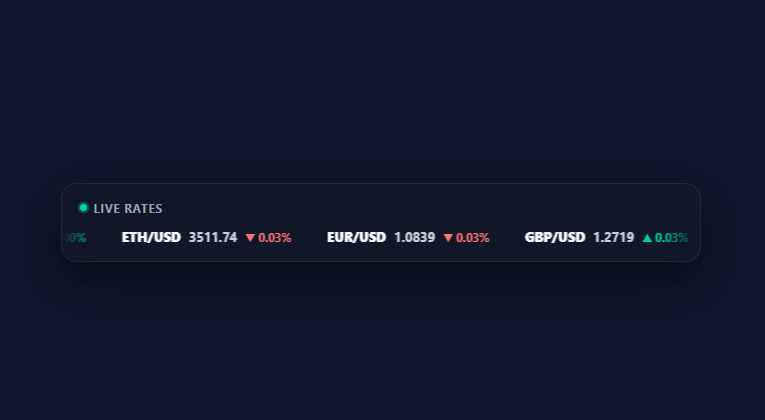
A scrolling rates ticker is the visual shorthand for "this data is live" — banks, exchanges, and finance dashboards all use one because a static price table doesn't communicate motion the way a marquee does. This snippet builds a seamless, infinitely scrolling ticker in plain HTML, CSS, and vanilla JavaScript, with simulated price drift and a flash animation on every change.
A seamless loop via duplicated content
buildItems() renders the pair list once into a string, then sets the track's innerHTML to that string *twice* concatenated. The marquee then only needs to scroll exactly half of the track's total scrollWidth before resetting the offset — because the second half is an identical copy, the reset is invisible to the eye. This is the standard trick for an infinite marquee without cloning DOM nodes on every frame.
requestAnimationFrame, not CSS animation
The scroll position is driven by requestAnimationFrame, decrementing an offset variable by a fixed speed each frame and applying it via transform: translateX(). Using JS instead of a CSS @keyframes marquee makes the loop point exact (tied to the real measured scrollWidth, not a guessed percentage) and makes pausing trivial: hovering the card sets SPEED to zero, and the next frame simply stops advancing — no animation-play-state juggling needed.
Simulated live price drift
Every 1.5 seconds, tickPrices() nudges each pair's price by a small random delta (roughly ±0.045% of its value) and recomputes the percent change against a fixed base price captured at load. This produces a realistic-looking tape without a real market-data feed — replace the random drift with your actual price source and the rendering stays identical.
Flash-on-change feedback
When a price updates, its color flashes green or red via a CSS @keyframes animation (lct-flash-up/lct-flash-down) that fades back to neutral gray, the same up/down-tick feedback real trading tickers use. The class is removed and immediately re-added with a forced reflow (void el.offsetWidth) so the flash retriggers even if the price moves in the same direction twice in a row — without the reflow, a repeated class add wouldn't restart the CSS animation.
Querying by duplicated id
Because the pair list is rendered twice for the seamless loop, both copies share the same element ids; tickPrices() updates *both* copies in one pass with document.querySelectorAll('[id="…"]'), since a duplicate id is invalid HTML but still queryable this way — a deliberate, documented trade-off for the marquee trick, not an accident. Keep this in mind if you extend the ticker: any new per-pair element should be queried the same way, by id across both copies, rather than assuming a single match.
Build with AI
Build, Understand, Optimize, and Extend It With AI
You do not have to work out the duplicated-id querying trick on your own. Paste this snippet's HTML, CSS, and JS into an AI coding assistant like Claude and ask it to explain exactly why tickPrices() uses document.querySelectorAll('[id="lctPrice' + i + '"]') instead of getElementById, and how that connects to the track being built from two concatenated copies of the same HTML string. The same assistant can help optimize it, for instance asking whether updating both duplicate DOM nodes on every 1.5-second tick could be replaced with CSS custom properties or a single source-of-truth render to cut DOM writes in half. It is also useful for extending the ticker: ask it to wire tickPrices to a real WebSocket feed, add a per-pair click handler that opens a detail chart, or support a vertical ticker layout for a sidebar widget. Treat the code less like a finished artifact and more like a starting point for a conversation.
Prompt to recreate it
Copy this into your AI assistant of choice to build the effect from scratch, or as a jumping-off point for your own variant:
Build a "live currency ticker" marquee in plain HTML, CSS, and JavaScript with no libraries, using requestAnimationFrame for the scroll (not a CSS keyframe animation).

Requirements:
- A horizontal track built from an array of currency/crypto pair objects, each with a pair name, a current price, and a fixed base price captured once at load for computing percent change.
- Render the full pair list into the track's innerHTML, then concatenate that same HTML string to itself so the track contains exactly two identical copies back to back, enabling a seamless loop.
- Drive the scroll with requestAnimationFrame: decrement a numeric offset each frame by a fixed pixel speed, apply it via transform: translateX(), and once the absolute offset reaches or exceeds half of the track's measured scrollWidth, add that half-width back to the offset so the reset is invisible.
- Every 1.5 seconds, nudge each pair's price by a small random percentage delta, recompute its percent change against the fixed base price, and update both duplicate copies of that pair's price and change elements in one pass (since both copies share the same element id, a single querySelectorAll by that id must update both).
- On each price update, remove and immediately re-add a flash CSS class (forcing a reflow in between) so a brief color flash animation retriggers every time, even if the price moves in the same direction on consecutive ticks.
- Hovering the ticker card must set the scroll speed to zero so the whole track visibly freezes, and moving the mouse away must resume the original speed.
- Apply a CSS mask-image gradient across the track's container so pairs fade in and out at the left and right edges instead of clipping abruptly.
Want to tighten it up first? Run this prompt through the AI Prompt Studio to score it across 8 quality dimensions, catch anti-patterns, and tune the wording for Claude, ChatGPT, or Gemini before you paste it in.
Step by step
How to Use
- 1Paste HTML, CSS, and JSA dark ticker bar appears with a "Live rates" pulsing dot and a row of currency/crypto pairs scrolling right to left.
- 2Watch prices updateEvery 1.5 seconds, each price nudges up or down slightly and flashes green or red, with the percent change updating beside it.
- 3Hover to pauseMoving your mouse over the ticker stops the scroll so you can read a specific rate; moving away resumes it.
- 4Watch the seamless loopThe ticker never visibly jumps or resets — the track scrolls through a duplicated copy of the list and wraps invisibly.
- 5Edit the pairsChange the PAIRS array's pair names and starting prices, then call buildItems() to rebuild the ticker with your data.
- 6Plug in real market dataReplace the random drift in tickPrices() with prices from a real feed (WebSocket or polling fetch), keeping the same DOM update calls.
Real-world uses
Common Use Cases
Got questions?
Frequently Asked Questions
Open a WebSocket (or poll a REST endpoint) for your provider, and on each price update find the matching pair in PAIRS by symbol, set its .price, and call the same DOM-update block tickPrices() uses (or call tickPrices() itself if your update cadence matches) — the marquee and flash logic don't need to change.
Edit the SPEED constant (px per frame) for speed — larger is faster. To scroll right-to-left instead of left-to-right, increment offset instead of decrementing it in the animate() function.
Duplicating the list is what makes the marquee loop seamless: the track only needs to scroll exactly half its total width before resetting, and because the second half is identical to the first, the reset is invisible. This means both copies share element ids, which tickPrices() updates together via a single querySelectorAll call.
Add a touchstart listener that sets SPEED to 0 and a touchend listener that restores it, mirroring the existing mouseenter/mouseleave handlers, since touch devices have no hover state.
In React, drive the offset with useRef and a requestAnimationFrame loop inside useEffect, storing prices in state updated on an interval; in Vue, use ref()/onMounted with the same rAF loop; in Angular, use ngZone.runOutsideAngular for the animation loop to avoid unnecessary change-detection cycles. The duplicate-content seamless-loop technique applies in every framework.