Learn Coding Visually
Learn to code with interactive, live-preview playgrounds — HTML, CSS, JavaScript, React & more.
 HTML Playground42 lessons · Click-based · Live preview
 CSS PlaygroundLearn CSS with a live editor
 JavaScript Playground60 lessons · DOM · Async · Canvas
 React PlaygroundLearn React with a live code editor
 GSAP PlaygroundLearn GSAP animation interactively
 SVG Playground44 lessons · shapes · paths · animation
 SCSS Playground45 lessons · Sass modules · tokens
 Tailwind PlaygroundLearn Tailwind CSS with a live editor
 Bootstrap 5 Playground50 lessons · live preview
Streak Tracker — Habit Streak HTML CSS JS Snippet
Streak Tracker · Dashboards · Plain HTML, CSS & JS · Live preview
What's included
Features
checked flag makes checkIn fire once, converting today to done and locking the button, like real streak apps.cubic-bezier scale+rotate keyframe on the flame via a forced-reflow restart — the reward moment.box-shadow keyframe — zero JS cost and perfectly steady.streak, best, total, and checked hold all state, so seeding from a backend is a few assignments.About this UI Snippet
Streak Tracker — Flame Counter, 7-Day Check-In Row & One-Tap Daily Check-In
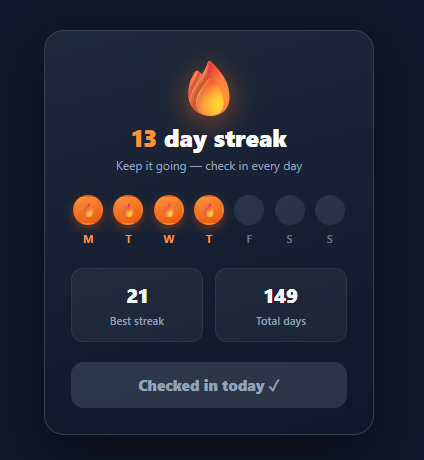
Streaks are one of the most powerful engagement mechanics in apps — Duolingo, Snapchat, and fitness trackers all use them because the fear of breaking a run keeps people coming back daily. A streak tracker shows the current run, a visual week of check-ins, and a single action to extend it. This snippet implements that in plain HTML, CSS, and vanilla JavaScript: an animated flame counter, a seven-day dot row with completed/today/upcoming states, best and total stats, and a check-in button that extends the streak with a satisfying flame pop.
The week row: three day states
The seven dots represent the current week. Completed days (.done) show a filled orange gradient with a tiny flame and a coloured label; today (.today) is an outlined dot with a continuous pulsing ring drawing attention to the action; upcoming days stay muted. This instantly communicates "you've done Mon–Wed, today is Thursday, here's the rest of the week" — the at-a-glance progress that makes streaks motivating.
One-tap check-in
checkIn is guarded so it only fires once: it converts today's dot from the pulsing today state to a completed done flame, increments the streak and total counters, updates the best streak if the new run exceeds it, and disables the button to "Checked in today ✓". A checked flag prevents double check-ins, mirroring how real streak apps lock the action until the next day.
Flame celebration
The moment you check in, the big flame plays a spring st-pop keyframe — scaling up with a slight rotation and settling back via a cubic-bezier overshoot. It is re-triggered with the remove-class / force-reflow / add-class pattern so it fires on every check-in. That little reward is the dopamine hit that reinforces the habit. The today dot's pulse is a pure-CSS box-shadow animation, so it costs nothing and never drifts.
Stats that frame the streak
Best streak and total days sit below the week, giving context — a personal record to beat and a sense of long-term commitment. The current streak is the hero number beside the flame, in the accent colour.
Everything is driven by a few variables (streak, best, total, checked), so wiring it to real data is just seeding those from your backend and persisting the check-in. In production you would also reset the streak to zero if a day was missed (compare last-check-in date to today). Pair this with a profile completion meter for onboarding, an activity heatmap for long-term history, or a stats card for other metrics.
Build with AI
Build, Understand, Optimize, and Extend It With AI
You don't have to work out the celebration-animation restart trick by hand. Paste this snippet's HTML, CSS, and JS into an AI coding assistant like Claude and ask it to explain exactly why checkIn removes the pop class, reads flame.offsetWidth, then re-adds it, and why the today dot's pulsing ring is implemented as a looping box-shadow keyframe instead of a JavaScript-driven animation. The same assistant can help optimize it — for instance whether the checked boolean guard is sufficient to prevent double check-ins across page reloads, or whether the best-streak comparison should be computed once from stored history rather than incrementally. It's also useful for extending the tracker: ask it to reset the streak to zero when a day is missed by comparing stored dates, expand the seven-dot week into a full 30-day activity grid, or add a milestone celebration (confetti, a badge) at streak values like 7, 30, or 100. Treat the code less like a finished artifact and more like a starting point for a conversation.
Prompt to recreate it
Copy this into your AI assistant of choice to build the effect from scratch, or as a jumping-off point for your own variant:
Build a gamified "daily streak tracker" card in plain HTML, CSS, and JavaScript using a guarded state variable and a CSS animation-restart trick — no animation library, no framework.

Requirements:
- A hero section showing a large flame emoji/icon and the current streak count in days, with the flame having a permanent drop-shadow glow.
- A row of exactly seven day indicators representing the current week, each supporting three distinct visual states via CSS classes only: a completed state (filled gradient circle with a small flame glyph and a colored day-letter label), a "today" state (an outlined circle with a continuously looping pulsing ring built from a box-shadow keyframe animation, not a JavaScript-driven loop), and a default muted upcoming state.
- Two stat tiles below the week row showing the best-ever streak and the total lifetime check-in count.
- A single check-in function, guarded by a boolean flag so it can only execute once per session/day, that: converts today's day indicator from the "today" pulsing state to the "completed" filled state, increments both the current streak and the total count, updates the best-streak stat only if the new streak value exceeds the previous best, and disables the check-in button while changing its label to confirm the action was recorded.
- On every successful check-in, replay a spring-style "pop" keyframe animation (scale up with a slight rotation, then settle back to normal) on the hero flame element, using the standard remove-class, force-reflow via reading offsetWidth, then re-add-class technique so the animation restarts reliably even if it was already played before.
- Keep all mutable numbers (current streak, best streak, total days, and the checked-today flag) in a small number of plain variables so wiring the widget to a real backend is a matter of seeding those variables and persisting the check-in date.
Want to tighten it up first? Run this prompt through the AI Prompt Studio to score it across 8 quality dimensions, catch anti-patterns, and tune the wording for Claude, ChatGPT, or Gemini before you paste it in.
Step by step
How to Use
- 1Paste HTML, CSS, and JSA streak card appears with a flame, "12 day streak", a week row (Mon–Wed completed, Thursday pulsing), best/total stats, and a check-in button.
- 2Read the weekCompleted days show filled flame dots, today pulses with an outlined ring, and upcoming days stay muted.
- 3Check inClick "Check in today" — today's dot fills with a flame, the streak ticks to 13, total updates, and the big flame pops.
- 4See the button lockThe button disables to "Checked in today ✓" so you cannot check in twice in one day.
- 5Watch best updateIf your new streak beats the record, the "Best streak" stat updates to match.
- 6Wire real dataSeed
streak,best, andtotalfrom your backend and persist the check-in date; reset the streak if a day is missed.
Real-world uses
Common Use Cases
Got questions?
Frequently Asked Questions
Store the streak, best, total, and the last check-in date (server-side or in localStorage). On load, compare today to the last check-in: if it is the next day, allow check-in; if more than one day has passed, reset the streak to 0 before rendering. Save the new values after each check-in. This date logic is what makes a streak real rather than a counter.
Render more dots (a 30-day grid) or switch to an activity heatmap for a calendar view. Keep the seven-day row as the focused "this week" widget and link to the fuller history — most apps show both: a compact current week and an expandable full calendar.
Always validate check-ins server-side against the user's stored timezone (or UTC day boundaries), not the client clock, since device time can be changed. The client UI is optimistic, but the authoritative streak count and the "already checked in today" rule must be enforced on the server.
Make the check-in a real <button> (it is) so it is keyboard-operable, and announce the new streak via an aria-live="polite" region after check-in. Give each day dot an aria-label ("Monday: completed", "Thursday: today") since the state is conveyed by colour and a flame glyph; ensure the disabled state is communicated, not just styled.
In React, hold streak, best, total, and checkedToday in useState, render the week from a days array, and trigger the flame pop by toggling a class/key on check-in. In Vue, use refs and :class bindings with a method. In Angular, track state on the component and bind [class.done]/[disabled]. The pop/pulse keyframes port unchanged.