You Might Also Like
Learn Coding Visually
Learn to code with interactive, live-preview playgrounds — HTML, CSS, JavaScript, React & more.
 HTML Playground42 lessons · Click-based · Live preview
 CSS PlaygroundLearn CSS with a live editor
 JavaScript Playground60 lessons · DOM · Async · Canvas
 React PlaygroundLearn React with a live code editor
 GSAP PlaygroundLearn GSAP animation interactively
 SVG Playground44 lessons · shapes · paths · animation
 SCSS Playground45 lessons · Sass modules · tokens
 Tailwind PlaygroundLearn Tailwind CSS with a live editor
 Bootstrap 5 Playground50 lessons · live preview
Cron Expression Builder — Free HTML CSS JS Snippet
Cron Expression Builder · Forms · Plain HTML, CSS & JS · Live preview
What's included
Features
About this UI Snippet
Cron Expression Builder — Field Expansion, Plain-English Descriptions & Real Next-Run Calculation
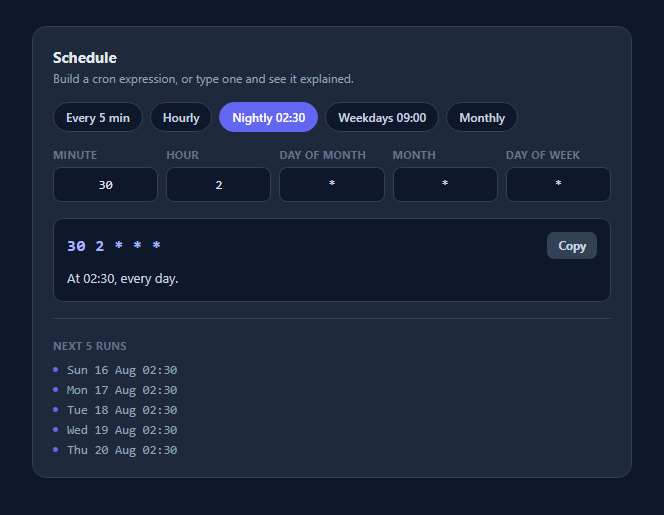
Cron syntax is five fields of terse punctuation that almost nobody reads confidently, and the cost of misreading one is a job that runs a thousand times more often than intended — or never. This snippet is a builder and an explainer in one: edit any field and the expression, a plain-English description, and the next five actual run times all update together, so the schedule is verified before it ships rather than after the pager goes off.
Expanding fields rather than pattern-matching them
Most cron helpers work by matching the expression against a table of known shapes and printing a canned sentence, which means anything slightly unusual falls through to "custom schedule". This one parses properly. expand() turns any field into the explicit list of values it matches, handling *, single numbers, a-b ranges, */n and a-b/n steps, and comma-separated combinations of all of those. Because everything downstream works from those value sets rather than from the original string, the description and the run-time preview handle expressions the author never anticipated.
Validation that names the field
expand() returns null for anything outside its field's legal range — minute 61, month 0, a reversed range, a zero step — and the caller marks that specific input red and reports which field is wrong by name. Cron's failure mode is normally silent acceptance followed by wrong behaviour, so catching 0-70 in the minute field at the moment of typing is most of this component's value.
The day-of-month / day-of-week OR rule
This is the part real implementations get wrong. When both the day-of-month and day-of-week fields are restricted, standard cron treats them as an OR, not an AND: 0 0 1 * 1 fires on the 1st of the month *and* on every Monday, not only on Mondays that fall on the 1st. The matcher checks whether each field is restricted and switches between OR and AND accordingly, and the description says "on day 1 or Monday" so the behaviour is visible rather than surprising.
Next runs computed, not guessed
The preview walks forward minute by minute from now, testing each candidate against the parsed sets, and collects the first five matches. That is a brute-force search rather than a clever date calculation, and at one iteration per minute it finds a daily schedule in well under a second. The loop is capped at roughly four years so an expression that can never fire — 30 February, say — terminates and reports "This expression never runs" instead of hanging the tab, which is the failure mode any minute-stepping scheduler needs to guard against.
Presets that stay in sync
The preset chips write all five fields at once, and after every edit the current expression is compared back against the preset list so the matching chip highlights itself. Typing the equivalent expression by hand lights the same chip, because the sync compares the generated string rather than tracking which button was last clicked.
Build with AI
Build, Understand, Optimize, and Extend It With AI
Paste this snippet into an AI assistant like Claude and ask it to add a timezone selector that computes the next run times in a chosen IANA zone rather than the browser's, since servers almost always run cron in UTC and a schedule that looks right locally is the most common way this kind of form misleads people. Other natural extensions: support named months and days (JAN-DEC, MON-SUN) and the @daily / @hourly shorthands, mapping them onto the same expansion step; add a reverse mode that accepts a pasted expression and splits it into the five fields; highlight the specific characters that failed to parse rather than marking the whole field; or add a frequency warning when an expression would fire more often than a threshold, which catches the */1 mistakes before they reach production.
Prompt to recreate it
Copy this into your AI assistant of choice to build the effect from scratch, or as a jumping-off point for your own variant:
Build a cron expression builder in plain HTML, CSS, and JavaScript — no frameworks or libraries.

Requirements:
- Five text inputs for minute, hour, day-of-month, month and day-of-week, plus a row of preset chips that fill all five fields at once.
- Write a real parser: an expand(part, min, max) function that returns the explicit sorted list of values a field matches, supporting *, single numbers, a-b ranges, */n steps, a-b/n stepped ranges, and comma-separated combinations. De-duplicate overlapping values. Return null for anything invalid — out of range, reversed range, zero or negative step.
- Derive EVERYTHING downstream from those expanded value sets rather than by pattern-matching the original string, so unusual but valid expressions are handled correctly.
- Validate per field: mark the offending input with an error style and report which field is invalid by name.
- Generate a plain-English description of the schedule that stays silent about fields covering their whole range, so it reads naturally instead of restating every field.
- Implement the standard cron day rule: when BOTH day-of-month and day-of-week are restricted, a run matches if EITHER matches (OR); otherwise both must match (AND). Make this visible in the description wording.
- Compute the next five run times by stepping forward minute by minute from now and testing each against the parsed sets. Cap the search at roughly four years of minutes so an impossible expression (like 30 February) reports "never runs" instead of hanging the page.
- Show the assembled expression in a monospace readout with a Clipboard API copy button and a confirmation state, and highlight whichever preset chip matches the current expression — comparing the generated string, so typing it by hand highlights it too.
- Style it as a dark settings card with uppercase field labels and a monospace list of upcoming run times.
Want to tighten it up first? Run this prompt through the AI Prompt Studio to score it across 8 quality dimensions, catch anti-patterns, and tune the wording for Claude, ChatGPT, or Gemini before you paste it in.
Step by step
How to Use
- 1Start from a preset or from scratchThe chips across the top write all five fields at once. The matching chip highlights whenever the current expression equals it, including when you type that expression by hand.
- 2Edit any of the five fieldsEach field accepts full cron syntax: * for every value, a single number, a-b ranges, */n steps, a-b/n stepped ranges, and comma-separated lists combining any of those.
- 3Read the plain-English descriptionThe sentence under the expression describes what the schedule actually does, staying quiet about fields set to the whole range so it reads naturally rather than restating every field.
- 4Check the next five run timesReal dates and times computed by walking forward from now and testing each minute, so you can confirm the schedule fires when you expect before deploying it.
- 5Watch for validation errorsAn out-of-range or malformed field turns red immediately and the description names which field is wrong — minute 61 or a reversed range is caught as you type rather than by your scheduler at 3am.
- 6Copy the finished expressionThe Copy button writes the assembled five-field string to the clipboard via the Clipboard API and confirms with a short success state.
Real-world uses
Common Use Cases
Got questions?
Frequently Asked Questions
That is standard cron behaviour, and it surprises almost everyone. When both fields are restricted, a job fires if EITHER matches — so 0 0 1 * 1 runs on the 1st of every month and on every Monday. The matcher checks whether each field is restricted and switches between OR and AND to match real cron, and the description says "or" so the behaviour is visible in the UI.
By walking forward from the current minute and testing each candidate minute against the parsed value sets, collecting the first five matches. It is brute force rather than a closed-form date calculation, which keeps the logic short and correct; a daily schedule resolves in a few hundred thousand cheap iterations, well under a second.
The search loop is capped at roughly four years of minutes. An expression that can never fire — 30 February, or 31 in a month field set to February — exhausts the cap and the UI reports "This expression never runs" rather than looping forever. Any minute-stepping scheduler needs this guard.
The standard five-field format with *, single values, a-b ranges, */n and a-b/n steps, and comma-separated lists of any combination. Non-standard extensions — @reboot, @daily, L for last day, W for weekday, # for nth weekday, and named months or days like JAN and MON — are not parsed; expand() would return null and flag the field.
Yes. The preview is built with the browser's Date object, so it reflects the local timezone of whoever is looking. Since servers usually run cron in UTC, a production version should let the user pick the target timezone and compute against that — otherwise a schedule that looks correct locally fires at a different hour in production.
Yes, and it fits component state well. Hold the five field strings in state, and derive the expression, validation, description and run list with a memoised function of those five values — they are all pure functions of the input, so useMemo in React or a computed property in Vue removes any need for manual update() calls.