
Learn Coding Visually
Learn to code with interactive, live-preview playgrounds — HTML, CSS, JavaScript, React & more.
 HTML Playground42 lessons · Click-based · Live preview
 CSS PlaygroundLearn CSS with a live editor
 JavaScript Playground60 lessons · DOM · Async · Canvas
 React PlaygroundLearn React with a live code editor
 GSAP PlaygroundLearn GSAP animation interactively
 SVG Playground44 lessons · shapes · paths · animation
 SCSS Playground45 lessons · Sass modules · tokens
 Tailwind PlaygroundLearn Tailwind CSS with a live editor
 Bootstrap 5 Playground50 lessons · live preview
Morse Code Translator & Player — Free JS Snippet
Morse Code Translator & Player · Forms · Plain HTML, CSS & JS · Live preview
What's included
Features
About this UI Snippet
Morse Code Translator & Player — Web Audio Oscillator Beeps, Timed Playback & Standard Timing Ratios
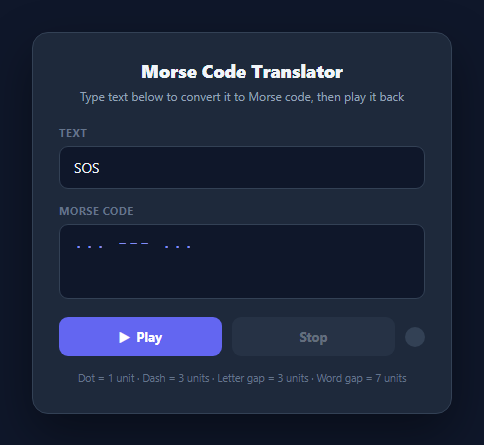
Morse code is defined entirely by timing ratios, not by any visual dot/dash shape, which makes an accurate player a genuinely interesting small scheduling problem: every dot, dash, and silence must land at the correct millisecond relative to a single base unit. This snippet builds a live text-to-Morse converter plus a real audible and visual playback engine using the Web Audio API's OscillatorNode, with all timing derived from the internationally standard Morse ratios rather than hardcoded per-symbol durations.
Standard Morse timing ratios, all derived from one constant
International Morse code defines five timing units relative to a single base "dot" duration: a dot is 1 unit, a dash is 3 units, the gap between dots/dashes *within* one character is 1 unit, the gap *between letters* is 3 units, and the gap *between words* is 7 units. This snippet encodes exactly these ratios in schedulePlayback() by deriving every duration from one UNIT_MS constant: DOT = UNIT_MS, DASH = UNIT_MS * 3, LETTER_GAP = UNIT_MS * 3, WORD_GAP = UNIT_MS * 7. Because every gap and tone length is a multiple of the same base unit, changing playback speed is a one-line change — adjusting UNIT_MS scales the entire rhythm proportionally, exactly as real Morse operators speed up or slow down their sending rate uniformly.
Converting text to Morse with a lookup table
textToMorse() uppercases the input, splits it into words on whitespace, and maps each character through the MORSE_MAP object — a flat dictionary of all 26 letters and 10 digits to their dot/dash strings (e.g. S: '...', O: '---'). Letters within a word are joined with a single space, and words are joined with / (space-slash-space), which doubles as both the human-readable separator shown in the textarea and the parsing signal schedulePlayback() later uses to know when to insert a full 7-unit word gap instead of a 3-unit letter gap.
Scheduling audio and visuals on one shared timeline
Rather than playing symbols one at a time with chained setTimeout callbacks (which drifts under JavaScript's imprecise timer scheduling), schedulePlayback() computes a single cumulative cursor position for every symbol up front and schedules all setTimeout calls against that pre-computed timeline in one pass. For each dot or dash, it schedules a flashOn() + beep(duration) pair at the symbol's start offset and a flashOff() call at its end offset, then advances cursor by the symbol's duration plus the 1-unit intra-character gap. When the loop encounters a space or slash character in the Morse string, it *upgrades* the trailing gap already added — subtracting the 1-unit intra-character gap already queued and adding the correct 3-unit letter gap or 7-unit word gap instead, so gaps are never double-counted.
Real audio via Web Audio API's OscillatorNode
The beep() function creates a fresh OscillatorNode and GainNode for every tone, connects the oscillator through the gain node to the audio context's destination, sets the oscillator to a 600Hz sine wave, and calls oscillator.start(now) immediately followed by oscillator.stop(now + durationMs / 1000) to schedule its own precise stop time using the audio context's high-resolution clock rather than a JavaScript timer. Creating a new oscillator per beep (rather than reusing one) is the standard Web Audio pattern, since an OscillatorNode is single-use — once stopped it cannot be restarted. The AudioContext itself is lazily created on first use via getAudioContext() to respect browsers' autoplay policies, which require audio contexts to be created or resumed from within a user gesture like a button click.
The synced glow pulse
Alongside every audio beep, flashOn()/flashOff() toggle an .on class on a small circular .pulse-indicator div, driven by the exact same setTimeout schedule as the corresponding tone — both are queued from the same pass through schedulePlayback(), so the glowing dot lights up and fades in lockstep with the beep, letting users both see and hear the dot/dash rhythm simultaneously, similar in spirit to how the Whack-a-Mole Game times its own visual pop against a countdown clock.
Build with AI
Build, Understand, Optimize, and Extend It With AI
Paste this snippet into an AI coding assistant like Claude and ask it to trace schedulePlayback() through a short example word, like "SOS", showing the exact millisecond offset at which every beep starts and stops and how the gap-upgrading logic avoids double-counting the intra-character gap when it becomes a letter or word gap instead. It's also worth asking the assistant to explain why the code creates a brand-new OscillatorNode for every single beep rather than reusing one, and why getAudioContext() is deliberately lazy rather than running at page load. Beyond understanding, use the assistant to extend the tool: ask for a playback-speed slider that adjusts UNIT_MS live, a reverse Morse-to-text decoder driven by spacebar tap timing, a downloadable WAV export of the generated tone sequence, or support for punctuation and prosigns (like the SOS distress signal as a single prosign) beyond the current letters and digits. Treat the current timing engine as a correct, reusable core to build new input/output modes around.
Prompt to recreate it
Copy this into your AI assistant of choice to build the effect from scratch, or as a jumping-off point for your own variant:
Build a two-way Morse code translator and audio/visual player in plain HTML, CSS, and JavaScript.

Requirements:
- A text input that live-converts typed text into Morse code (dots and dashes, letters separated by spaces, words separated by a distinct marker) and displays the result immediately as the user types, covering at minimum all 26 letters and 10 digits via a lookup table.
- A "Play" control that plays the currently displayed Morse code back using the real Web Audio API (an OscillatorNode-based tone), not an audio file, at approximately 600Hz.
- Implement correct standard Morse timing ratios relative to a single base time unit: a dot lasts 1 unit, a dash lasts 3 units, the gap between symbols within one letter is 1 unit, the gap between letters is 3 units, and the gap between words is 7 units — all five values must be derived from one adjustable base constant, not hardcoded independently.
- Alongside the audio, pulse a visual indicator element on screen in exact synchronization with each tone — it must light up for the duration of each dot or dash and go dark during every gap, matching the audio precisely rather than approximately.
- Provide a "Stop" control that immediately halts all pending audio and visual playback with no queued beeps or flashes firing afterward, even if stopped mid-word.
- Handle the browser's audio autoplay restrictions correctly by only creating or resuming the audio context in response to a genuine user interaction (such as clicking Play), not on page load.
- Gracefully skip or ignore characters that have no Morse mapping (such as punctuation not in your lookup table) without breaking the timing of the rest of the message.
Want to tighten it up first? Run this prompt through the AI Prompt Studio to score it across 8 quality dimensions, catch anti-patterns, and tune the wording for Claude, ChatGPT, or Gemini before you paste it in.
Source Code
<div class="translator-wrap">
<div class="header">
<h2>Morse Code Translator</h2>
<p class="subtitle">Type text below to convert it to Morse code, then play it back</p>
</div>
<div class="field">
<label for="text-input">Text</label>
<input type="text" id="text-input" placeholder="Type something..." autocomplete="off" maxlength="60" />
</div>
<div class="field">
<label for="morse-output">Morse Code</label>
<textarea id="morse-output" readonly rows="3" placeholder="Morse code appears here"></textarea>
</div>
<div class="controls">
<button class="btn-play" id="btn-play">
<span id="play-icon">▶</span> Play
</button>
<button class="btn-stop" id="btn-stop" disabled>Stop</button>
<div class="pulse-indicator" id="pulse-indicator" aria-hidden="true"></div>
</div>
<p class="key-hint">Dot = 1 unit · Dash = 3 units · Letter gap = 3 units · Word gap = 7 units</p>
</div>* { box-sizing: border-box; margin: 0; padding: 0; }
body { font-family: system-ui, sans-serif; background: #0f172a; min-height: 100vh; display: flex; align-items: center; justify-content: center; padding: 24px; }
.translator-wrap {
width: 100%; max-width: 420px;
background: #1e293b; border-radius: 16px;
padding: 26px; box-shadow: 0 20px 50px rgba(0,0,0,0.4);
border: 1px solid #334155;
}
.header { margin-bottom: 20px; text-align: center; }
.header h2 { font-size: 18px; font-weight: 800; color: #f1f5f9; }
.subtitle { font-size: 12px; color: #94a3b8; margin-top: 4px; line-height: 1.5; }
.field { margin-bottom: 14px; }
.field label {
display: block; font-size: 11px; font-weight: 700; letter-spacing: 0.04em;
text-transform: uppercase; color: #64748b; margin-bottom: 6px;
}
#text-input {
width: 100%; padding: 11px 14px; border-radius: 9px;
border: 1.5px solid #334155; background: #0f172a; color: #f1f5f9;
font-size: 14px; font-family: inherit;
}
#text-input:focus { outline: none; border-color: #6366f1; }
#morse-output {
width: 100%; padding: 11px 14px; border-radius: 9px;
border: 1.5px solid #334155; background: #0f172a; color: #818cf8;
font-size: 15px; font-family: 'Courier New', monospace;
letter-spacing: 2px; resize: none;
}
.controls { display: flex; align-items: center; gap: 10px; margin-top: 6px; }
.btn-play, .btn-stop {
flex: 1; padding: 11px; border-radius: 9px; border: none;
font-size: 13px; font-weight: 700; cursor: pointer;
font-family: inherit; transition: background 0.15s, opacity 0.15s;
display: flex; align-items: center; justify-content: center; gap: 6px;
}
.btn-play { background: #6366f1; color: #fff; }
.btn-play:hover:not(:disabled) { background: #4f46e5; }
.btn-play:disabled { opacity: 0.5; cursor: default; }
.btn-stop { background: #334155; color: #cbd5e1; }
.btn-stop:hover:not(:disabled) { background: #475569; }
.btn-stop:disabled { opacity: 0.4; cursor: default; }
.pulse-indicator {
width: 20px; height: 20px; border-radius: 50%;
background: #334155; flex-shrink: 0;
transition: background 0.05s, box-shadow 0.05s;
}
.pulse-indicator.on {
background: #6366f1;
box-shadow: 0 0 16px 4px rgba(99,102,241,0.8);
}
.key-hint { margin-top: 14px; font-size: 10.5px; color: #64748b; text-align: center; line-height: 1.6; }const MORSE_MAP = {
A: '.-', B: '-...', C: '-.-.', D: '-..', E: '.', F: '..-.',
G: '--.', H: '....', I: '..', J: '.---', K: '-.-', L: '.-..',
M: '--', N: '-.', O: '---', P: '.--.', Q: '--.-', R: '.-.',
S: '...', T: '-', U: '..-', V: '...-', W: '.--', X: '-..-',
Y: '-.--', Z: '--..',
0: '-----', 1: '.----', 2: '..---', 3: '...--', 4: '....-',
5: '.....', 6: '-....', 7: '--...', 8: '---..', 9: '----.',
};
const UNIT_MS = 90; // base timing unit, all Morse durations derive from this
const textInput = document.getElementById('text-input');
const morseOutput = document.getElementById('morse-output');
const btnPlay = document.getElementById('btn-play');
const btnStop = document.getElementById('btn-stop');
const pulseIndicator = document.getElementById('pulse-indicator');
let audioCtx = null;
let playbackTimeouts = [];
let isPlaying = false;
function textToMorse(text) {
return text
.toUpperCase()
.trim()
.split(/\s+/)
.filter(Boolean)
.map(word =>
word
.split('')
.map(ch => MORSE_MAP[ch] || '')
.filter(Boolean)
.join(' ')
)
.join(' / ');
}
function updateMorseOutput() {
morseOutput.value = textToMorse(textInput.value);
btnPlay.disabled = !morseOutput.value.trim();
}
function getAudioContext() {
if (!audioCtx) {
const AudioContextClass = window.AudioContext || window.webkitAudioContext;
audioCtx = new AudioContextClass();
}
return audioCtx;
}
function beep(durationMs) {
const ctx = getAudioContext();
const oscillator = ctx.createOscillator();
const gain = ctx.createGain();
oscillator.type = 'sine';
oscillator.frequency.value = 600;
gain.gain.value = 0.25;
oscillator.connect(gain);
gain.connect(ctx.destination);
const now = ctx.currentTime;
oscillator.start(now);
oscillator.stop(now + durationMs / 1000);
}
function flashOn() {
pulseIndicator.classList.add('on');
}
function flashOff() {
pulseIndicator.classList.remove('on');
}
// Builds a flat timeline of { at, duration, type } symbol events using
// standard Morse timing ratios, then schedules audio + visual pulses.
function schedulePlayback(morse) {
const DOT = UNIT_MS;
const DASH = UNIT_MS * 3;
const INTRA_CHAR_GAP = UNIT_MS; // gap between dots/dashes within one letter
const LETTER_GAP = UNIT_MS * 3; // gap between letters
const WORD_GAP = UNIT_MS * 7; // gap between words
let cursor = 0;
const timeouts = [];
const chars = morse.split('');
chars.forEach((symbol, i) => {
if (symbol === '.' || symbol === '-') {
const duration = symbol === '.' ? DOT : DASH;
const startAt = cursor;
timeouts.push(setTimeout(() => { flashOn(); beep(duration); }, startAt));
timeouts.push(setTimeout(flashOff, startAt + duration));
cursor += duration + INTRA_CHAR_GAP;
} else if (symbol === ' ') {
// Look ahead: a " / " sequence means a word gap; a lone space is a letter gap.
// Since we split per-character, detect the pattern via neighbors.
const prev = chars[i - 1];
const next = chars[i + 1];
if (prev === '/' || next === '/') {
// spacing around the slash is handled by the '/' branch itself
return;
}
cursor += LETTER_GAP - INTRA_CHAR_GAP; // upgrade the trailing intra-char gap to a full letter gap
} else if (symbol === '/') {
cursor += WORD_GAP - INTRA_CHAR_GAP; // upgrade to a full word gap
}
});
const totalDuration = cursor;
timeouts.push(setTimeout(stopPlayback, totalDuration + 50));
return timeouts;
}
function playMorse() {
const morse = morseOutput.value.trim();
if (!morse || isPlaying) return;
isPlaying = true;
btnPlay.disabled = true;
btnStop.disabled = false;
playbackTimeouts = schedulePlayback(morse);
}
function stopPlayback() {
playbackTimeouts.forEach(clearTimeout);
playbackTimeouts = [];
flashOff();
isPlaying = false;
btnStop.disabled = true;
btnPlay.disabled = !morseOutput.value.trim();
}
textInput.addEventListener('input', updateMorseOutput);
btnPlay.addEventListener('click', playMorse);
btnStop.addEventListener('click', stopPlayback);
textInput.value = 'SOS';
updateMorseOutput();Step by step
How to Use
- 1Type text to convertTyping in the #text-input field fires an input listener that calls updateMorseOutput() on every keystroke, live-converting your text through textToMorse() and MORSE_MAP into dots, dashes, and word separators shown in the read-only textarea.
- 2Play the Morse code backClick "Play" to call playMorse(), which hands the current Morse string to schedulePlayback(). This pre-computes a full timeline of beep and flash events using standard Morse timing ratios and schedules them all via setTimeout.
- 3Watch the synced pulse indicatorThe glowing circle next to the buttons toggles the .on class in exact sync with each audio beep — flashOn() and beep() are always scheduled at the same offset, and flashOff() fires exactly when the tone's duration ends.
- 4Stop playback earlyClick "Stop" to call stopPlayback(), which clears every pending setTimeout stored in the playbackTimeouts array, immediately turns off the pulse indicator, and re-enables the Play button — no lingering beeps will fire after stopping.
- 5Understand the timing ratiosAll durations derive from one UNIT_MS constant: dot = 1 unit, dash = 3 units, intra-letter gap = 1 unit, letter gap = 3 units, word gap = 7 units — exactly the international Morse code standard, shown in the hint text under the controls.
- 6Export and adjust speedClick HTML or JSX to export. Change UNIT_MS in the JS panel (lower = faster sending speed, higher = slower) to adjust playback speed uniformly across every dot, dash, and gap without touching the scheduling logic.
Real-world uses
Common Use Cases
Got questions?
Frequently Asked Questions
It follows the international standard: a dot is 1 time unit, a dash is 3 units, the silent gap between dots/dashes within the same letter is 1 unit, the gap between separate letters is 3 units, and the gap between words is 7 units. All five values are derived from a single UNIT_MS constant (DOT = UNIT_MS, DASH = UNIT_MS * 3, and so on), so the entire rhythm scales uniformly if you change that one constant.
No audio files are used. Every beep is synthesized live using the Web Audio API: beep() creates a new OscillatorNode set to a 600Hz sine wave, routes it through a GainNode for volume control, connects that to the AudioContext's destination, and calls oscillator.start()/oscillator.stop() with a precisely calculated duration. A fresh oscillator is created for every single beep because OscillatorNode instances are single-use — once stopped, the same node cannot be restarted.
Browsers enforce an autoplay policy that blocks audio from starting until the user has interacted with the page via a genuine user gesture, like a click. getAudioContext() lazily constructs the AudioContext only the first time playMorse() runs (which only happens from a button click), ensuring the context is created within a valid user-gesture call stack and avoiding the browser silently blocking playback.
Both the beep() call and the flashOn()/flashOff() class toggles are scheduled from the exact same setTimeout offsets computed in a single pass through schedulePlayback(). Rather than triggering the flash from an audio event, the code queues both the tone and the visual state change at identical millisecond offsets on the same pre-computed timeline, so they fire together deterministically regardless of how long the audio synthesis itself takes to set up.
stopPlayback() iterates over the playbackTimeouts array — which holds every setTimeout ID scheduled by the current playback — and calls clearTimeout() on each one, immediately canceling all future beeps and flashes. It also force-turns-off the pulse indicator, re-enables the Play button, and disables Stop, so no queued audio or visual event can fire after the click, even if playback was mid-word.